


Hello crypto warriors! 👋 Have you ever wanted to buy your favorite coin at your dream price, or sell it when the price soars high, without constantly staring at the charts? Well, there’s a smart way to do it: Limit Orders!
For those of you who are new to the crypto world (and this is 45% of Binance Square users!), understanding Limit Orders is a game-changer. It's not just about trading, but about trading smartly and in a controlled manner. Let's break it down thoroughly!
What Is a Limit Order? 🤔 Not Just a Regular Buy/Sell!
Imagine you want to buy a cup of coffee. If you go directly to the cashier and pay the listed price, that's like a Market Order. You buy or sell immediately at the current market price.
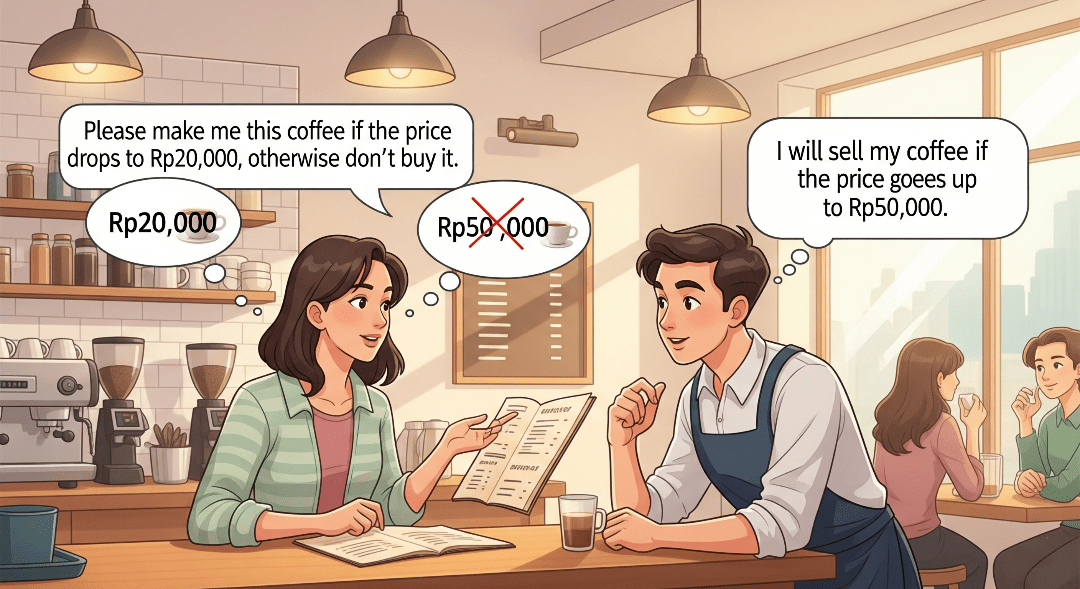
Well, a Limit Order is like telling the barista: 'Please make me this coffee if the price drops to Rp20,000, okay? If not, don’t buy it.' Or 'I will sell my coffee if the price rises to Rp50,000.'
In short:
You set the price (limit price) at which you want to buy or sell your crypto asset.
Your order will only be executed if the market price reaches the limit price you set (or better).
Why is this important? Because with Limit Orders, you have full control over your entry and exit prices, minimizing the risk of buying too high or selling too low.
Limit Order in Action: Buy Low, Sell High! 🎯
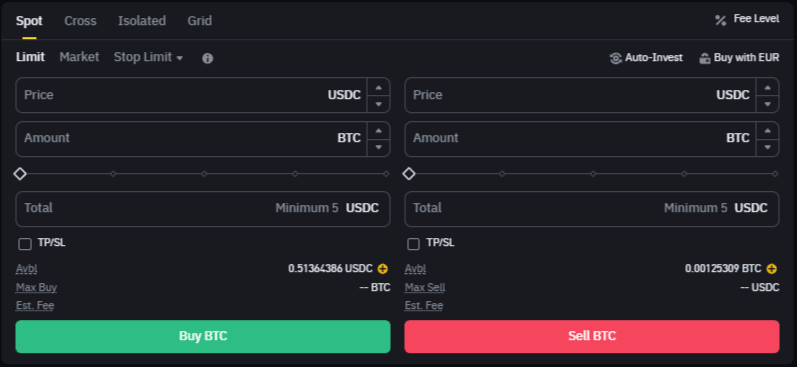
There are two main types of Limit Orders:
Buy Limit (Buy Limit Order) 📈
This is used when you want to buy crypto assets at a price lower than the current market price.
Example:
The current price of BTC is $65,000. You believe BTC will drop briefly to $63,000 before rising again.
➡️ You set a Buy Limit at $63,000.
If the price of BTC drops to $63,000 (or lower), your order will be filled automatically. If not, your order will remain 'hanging' until the price is reached or you cancel it.
When to Use Buy Limit?
When you want to 'catch' a price during a correction (price drop).
You have a specific entry price target.
You want to avoid buying at the peak price.
Sell Limit (Sell Limit Order) 📉
This is used when you want to sell crypto assets at a price higher than the current market price.
Example:
You have ETH that you bought at $3,000. The current price of ETH is $3,200, but you believe it can reach $3,500.
➡️ You set a Sell Limit at $3,500.
If the price of ETH rises to $3,500 (or higher), your order will be filled automatically. This allows you to secure profits without constantly watching the charts.
When to Use Sell Limit?
Locking in profits at your desired price target.
Selling assets during a price spike.
You don’t want to sell at a discount (too low).
Why Should Beginners Use Limit Orders? 🌟
Price Control: You won’t panic buying at high prices or selling at low prices when the market is volatile.
Cost Savings: Sometimes, Limit Orders have lower transaction fees compared to Market Orders because you act as a 'market maker.'
Risk Management: By setting your entry and exit prices, you can better plan your trading strategy. This helps you avoid emotional decisions.
Flexibility: You can set orders and let them run without having to stare at the screen.
Easy Steps to Place a Limit Order on Binance Square:
Open the Binance App: Make sure you are logged in.
Select Trading Pair: For example, you want to buy BNB with USDT. Look for the BNB/USDT pair in the Spot Trading section.
Choose 'Buy' or 'Sell': Depending on the action you want to take.
Choose 'Limit': Among the order type options (Market, Limit, Stop-Limit, etc.).
Enter Limit Price: Type the price you want.
Enter Amount: How much of the asset you want to buy/sell (e.g., 0.1 BNB or 100 USDT).
Confirm Order: Click the 'Buy BNB' or 'Sell BNB' button.
Your order will now appear in the 'Open Orders' section until it is executed or you cancel it.
Important Notes for Beginners: Always DYOR! 🚨
Although Limit Orders are a great tool, it’s important to remember:
There is no guarantee your order will be filled. If the price never reaches your limit price, the order will remain open.
The crypto market is very volatile. Always do your own research (DYOR - Do Your Own Research) and understand the risks involved. Never invest more than you can afford to lose.
What do you think? Are you ready to try Limit Orders for your crypto trading? Share your experiences or questions in the comments! 👇
#LimitOrderExplained #BinanceSquare #dyor #BinanceSquare


