
#withdrawcrypto
withdrawcrypto
1,248 ຄັ້ງທີ່ເບິ່ງ
7 ກຳລັງສົນທະນາ
ມາແຮງ
ຫຼ້າສຸດ

·
--
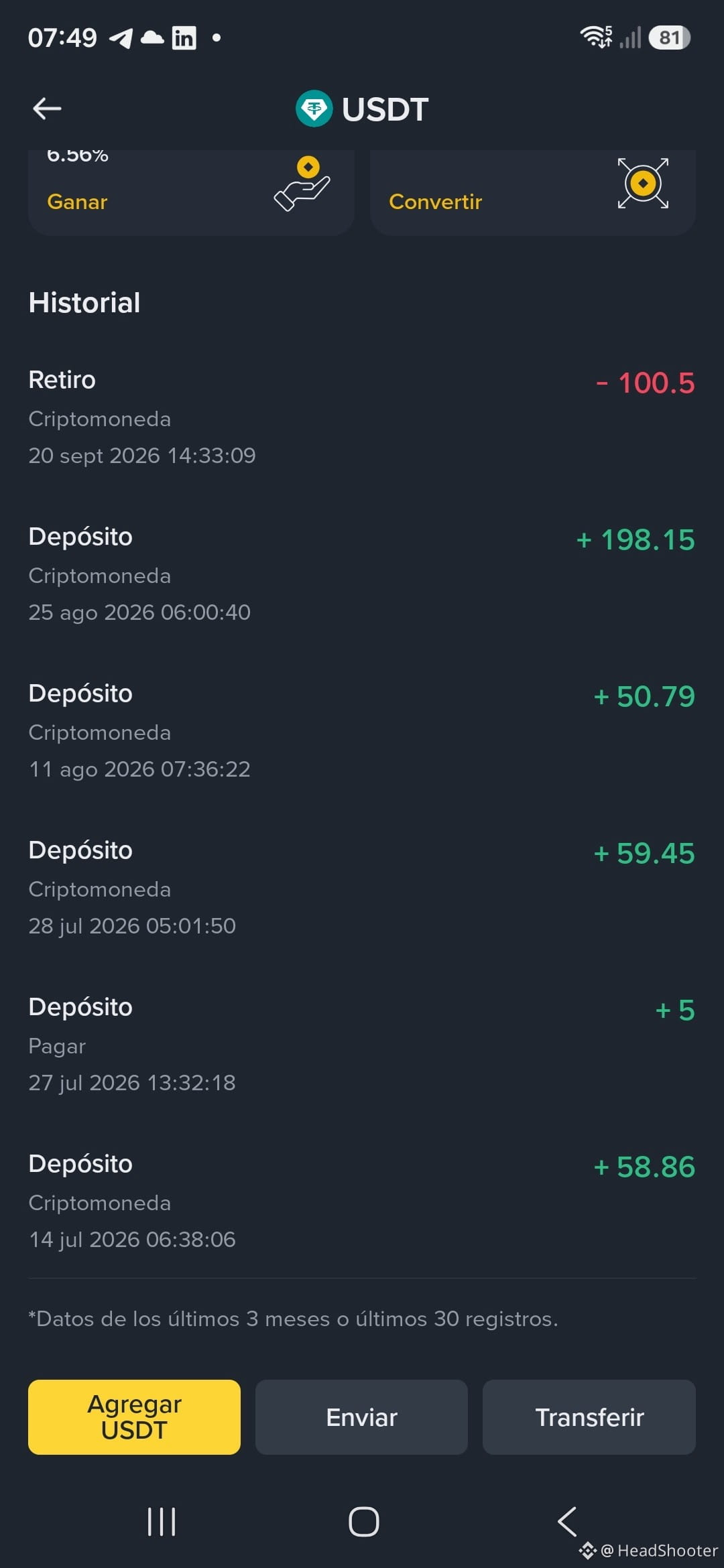
Retiré USDT100 para pagar algunos Gastos Corrientes, básicamente los envié a mi banco utilizando una App local como puente, Los junté con el saldo que ya tenía, pagué Alquiler, Comida, recargué la tarjeta del Metro y otras cosas.
Por primera vez siento que vale la pena el trabajo Online que me pagan usando esta platafotma. En la imagen te muestro los depósitos que he recibido de algunos clientes de mis servicios Freelance.
Siento el Poder de la Libertad Financiera. Deseo que estés muy bien hoy, y que también tengas mucho Éxito en tu vida.
#WithdrawCrypto $USDT
Me gustaría conocer tu experiencia, y si este también es tu caso.
Retiré USDT100 para pagar algunos Gastos Corrientes, básicamente los envié a mi banco utilizando una App local como puente, Los junté con el saldo que ya tenía, pagué Alquiler, Comida, recargué la tarjeta del Metro y otras cosas.
Por primera vez siento que vale la pena el trabajo Online que me pagan usando esta platafotma. En la imagen te muestro los depósitos que he recibido de algunos clientes de mis servicios Freelance.
Siento el Poder de la Libertad Financiera. Deseo que estés muy bien hoy, y que también tengas mucho Éxito en tu vida.
#WithdrawCrypto $USDT
Me gustaría conocer tu experiencia, y si este también es tu caso.
Por primera vez siento que vale la pena el trabajo Online que me pagan usando esta platafotma. En la imagen te muestro los depósitos que he recibido de algunos clientes de mis servicios Freelance.
Siento el Poder de la Libertad Financiera. Deseo que estés muy bien hoy, y que también tengas mucho Éxito en tu vida.
#WithdrawCrypto $USDT
Me gustaría conocer tu experiencia, y si este también es tu caso.
341

·
--
Hellow guys...I've been making my withdrawals and deposits using ETH and LTC cryptos since the first day as a Binance user.
How about you guys?
$ETH
{spot}(ETHUSDT)
$LTC
{spot}(LTCUSDT)
#deposits #WithdrawCrypto #WithdrawalTimes #WithdrawalTips
Hellow guys...I've been making my withdrawals and deposits using ETH and LTC cryptos since the first day as a Binance user.
How about you guys?
$ETH
$LTC
#deposits #WithdrawCrypto #WithdrawalTimes #WithdrawalTips
How about you guys?
$ETH
$LTC
#deposits #WithdrawCrypto #WithdrawalTimes #WithdrawalTips
9
3
687

How to Withdraw USDT from Binance to Your Bank Account
Withdrawing USDT (Tether) from Binance to your bank account is simple and secure. Here’s how you can do it:
🔹 Step 1: Log in to Binance
Open the Binance App or go to the Binance website.
Sign in with your verified account.
Make sure your account is KYC-verified to enable fiat withdrawals.
🔹 Step 2: Go to Wallet
Tap on Wallets → Select Funding or Spot Wallet.
Find USDT (Tether) in your list of assets.
Tap Withdraw.
🔹 Step 3: Select “Sell to Fiat” or “Withdraw to Bank”
There are two main ways to cash out USDT:
1. P2P (Peer-to-Peer) Trading – Sell USDT directly to verified buyers and receive money in your local bank account.
Choose P2P Trading under “Trade.”
Select Sell USDT.
Pick a buyer offering your preferred payment method (Bank Transfer, Easypaisa, Payoneer, etc., depending on your region).
Enter the amount and confirm.
Once the buyer transfers money to your account, confirm receipt and release USDT.
2. Direct Bank Withdrawal (if supported in your country)
Select Withdraw Fiat.
Choose Currency (e.g., USD, EUR, GBP, PKR, etc.).
Enter your bank details and the amount to withdraw.
Confirm the transaction → Funds are usually credited within minutes to 3 business days, depending on bank processing.
🔹 Step 4: Confirm & Complete
Double-check your details (bank account name must match your Binance account name).
Confirm withdrawal.
Wait for the transaction to complete — you’ll get a notification once the funds arrive.
✅ Tips for Smooth Withdrawal
Always enable 2FA for security.
Use only your own verified bank account.
Watch out for transaction fees (P2P may have better rates).
Check your country’s supported payment methods in Binance before withdrawing.
💡 With these steps, you can easily convert your USDT into cash and withdraw it to your bank account safely.
#Binance #USDT #CryptoToFiat #WithdrawCrypto
How to Withdraw USDT from Binance to Your Bank Account
Withdrawing USDT (Tether) from Binance to your bank account is simple and secure. Here’s how you can do it:
🔹 Step 1: Log in to Binance
Open the Binance App or go to the Binance website.
Sign in with your verified account.
Make sure your account is KYC-verified to enable fiat withdrawals.
🔹 Step 2: Go to Wallet
Tap on Wallets → Select Funding or Spot Wallet.
Find USDT (Tether) in your list of assets.
Tap Withdraw.
🔹 Step 3: Select “Sell to Fiat” or “Withdraw to Bank”
There are two main ways to cash out USDT:
1. P2P (Peer-to-Peer) Trading – Sell USDT directly to verified buyers and receive money in your local bank account.
Choose P2P Trading under “Trade.”
Select Sell USDT.
Pick a buyer offering your preferred payment method (Bank Transfer, Easypaisa, Payoneer, etc., depending on your region).
Enter the amount and confirm.
Once the buyer transfers money to your account, confirm receipt and release USDT.
2. Direct Bank Withdrawal (if supported in your country)
Select Withdraw Fiat.
Choose Currency (e.g., USD, EUR, GBP, PKR, etc.).
Enter your bank details and the amount to withdraw.
Confirm the transaction → Funds are usually credited within minutes to 3 business days, depending on bank processing.
🔹 Step 4: Confirm & Complete
Double-check your details (bank account name must match your Binance account name).
Confirm withdrawal.
Wait for the transaction to complete — you’ll get a notification once the funds arrive.
✅ Tips for Smooth Withdrawal
Always enable 2FA for security.
Use only your own verified bank account.
Watch out for transaction fees (P2P may have better rates).
Check your country’s supported payment methods in Binance before withdrawing.
💡 With these steps, you can easily convert your USDT into cash and withdraw it to your bank account safely.
#Binance #USDT #CryptoToFiat #WithdrawCrypto
Withdrawing USDT (Tether) from Binance to your bank account is simple and secure. Here’s how you can do it:
🔹 Step 1: Log in to Binance
Open the Binance App or go to the Binance website.
Sign in with your verified account.
Make sure your account is KYC-verified to enable fiat withdrawals.
🔹 Step 2: Go to Wallet
Tap on Wallets → Select Funding or Spot Wallet.
Find USDT (Tether) in your list of assets.
Tap Withdraw.
🔹 Step 3: Select “Sell to Fiat” or “Withdraw to Bank”
There are two main ways to cash out USDT:
1. P2P (Peer-to-Peer) Trading – Sell USDT directly to verified buyers and receive money in your local bank account.
Choose P2P Trading under “Trade.”
Select Sell USDT.
Pick a buyer offering your preferred payment method (Bank Transfer, Easypaisa, Payoneer, etc., depending on your region).
Enter the amount and confirm.
Once the buyer transfers money to your account, confirm receipt and release USDT.
2. Direct Bank Withdrawal (if supported in your country)
Select Withdraw Fiat.
Choose Currency (e.g., USD, EUR, GBP, PKR, etc.).
Enter your bank details and the amount to withdraw.
Confirm the transaction → Funds are usually credited within minutes to 3 business days, depending on bank processing.
🔹 Step 4: Confirm & Complete
Double-check your details (bank account name must match your Binance account name).
Confirm withdrawal.
Wait for the transaction to complete — you’ll get a notification once the funds arrive.
✅ Tips for Smooth Withdrawal
Always enable 2FA for security.
Use only your own verified bank account.
Watch out for transaction fees (P2P may have better rates).
Check your country’s supported payment methods in Binance before withdrawing.
💡 With these steps, you can easily convert your USDT into cash and withdraw it to your bank account safely.
#Binance #USDT #CryptoToFiat #WithdrawCrypto
3
1
4
6.1k

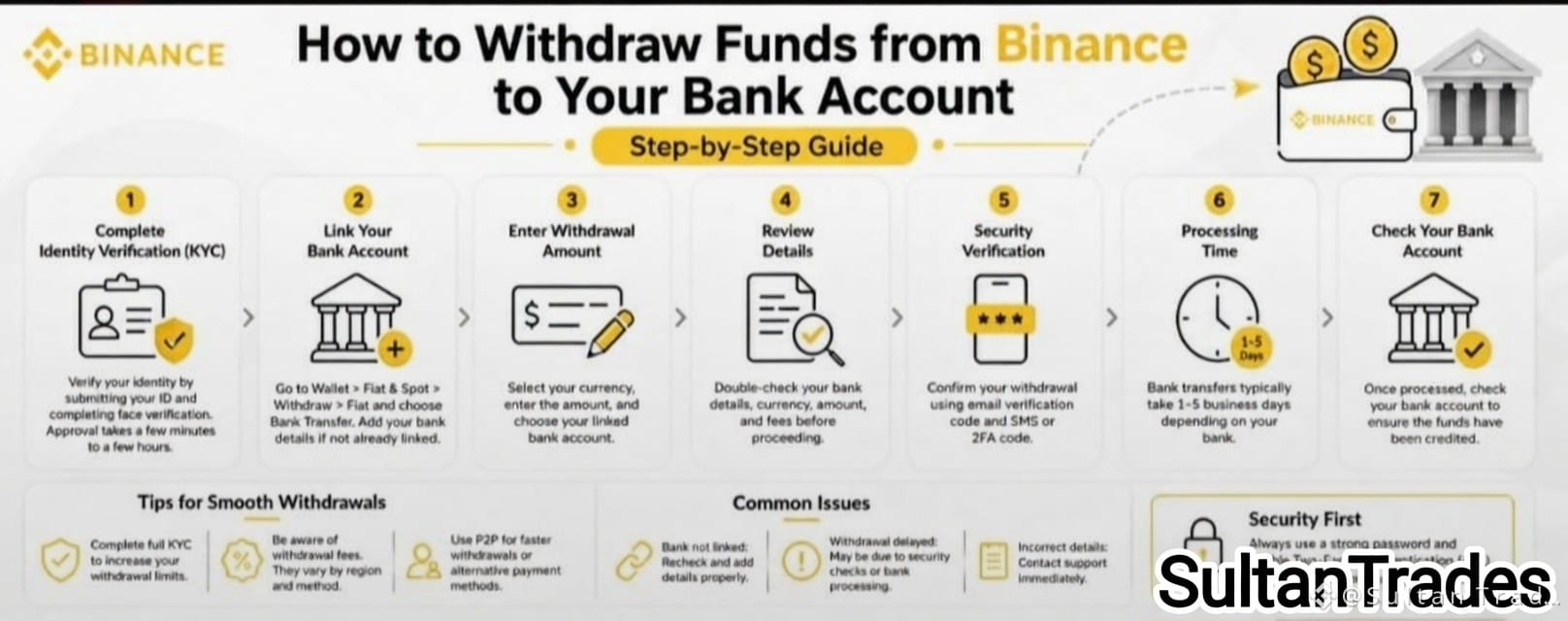
💰 Turning Crypto into Cash? Here’s How to Withdraw from Binance to Your Bank Account Safely
Withdrawing funds doesn’t have to be complicated. Just follow these 7 steps:
1️⃣ Complete KYC – Verify your ID & face scan
2️⃣ Link your bank account – Add account number, bank name, routing/IBAN
3️⃣ Enter amount – Check minimum withdrawal limits
4️⃣ Review details – Double-check bank info, currency, amount & fees
5️⃣ Security verification – Use email, SMS, or 2FA
6️⃣ Wait for processing – Usually 1–5 business days
7️⃣ Check your bank account – Confirm funds arrived
🔹 Pro tips:
· Full KYC = higher limits
· Watch for withdrawal fees
· Try P2P if bank transfers are slow
⚠️ Common issues?
· Bank not linked → Recheck details
· Delayed withdrawal → Securitychecks or bank processing
· Wrong info → Contact support immediately
Stay secure, double-check everything, and plan for processing time.
📌 Save this guide for your next withdrawal!
#Binance #CryptoGuide #WithdrawCrypto #CryptoTips
💰 Turning Crypto into Cash? Here’s How to Withdraw from Binance to Your Bank Account Safely
Withdrawing funds doesn’t have to be complicated. Just follow these 7 steps:
1️⃣ Complete KYC – Verify your ID & face scan
2️⃣ Link your bank account – Add account number, bank name, routing/IBAN
3️⃣ Enter amount – Check minimum withdrawal limits
4️⃣ Review details – Double-check bank info, currency, amount & fees
5️⃣ Security verification – Use email, SMS, or 2FA
6️⃣ Wait for processing – Usually 1–5 business days
7️⃣ Check your bank account – Confirm funds arrived
🔹 Pro tips:
· Full KYC = higher limits
· Watch for withdrawal fees
· Try P2P if bank transfers are slow
⚠️ Common issues?
· Bank not linked → Recheck details
· Delayed withdrawal → Securitychecks or bank processing
· Wrong info → Contact support immediately
Stay secure, double-check everything, and plan for processing time.
📌 Save this guide for your next withdrawal!
#Binance #CryptoGuide #WithdrawCrypto #CryptoTips
Withdrawing funds doesn’t have to be complicated. Just follow these 7 steps:
1️⃣ Complete KYC – Verify your ID & face scan
2️⃣ Link your bank account – Add account number, bank name, routing/IBAN
3️⃣ Enter amount – Check minimum withdrawal limits
4️⃣ Review details – Double-check bank info, currency, amount & fees
5️⃣ Security verification – Use email, SMS, or 2FA
6️⃣ Wait for processing – Usually 1–5 business days
7️⃣ Check your bank account – Confirm funds arrived
🔹 Pro tips:
· Full KYC = higher limits
· Watch for withdrawal fees
· Try P2P if bank transfers are slow
⚠️ Common issues?
· Bank not linked → Recheck details
· Delayed withdrawal → Securitychecks or bank processing
· Wrong info → Contact support immediately
Stay secure, double-check everything, and plan for processing time.
📌 Save this guide for your next withdrawal!
#Binance #CryptoGuide #WithdrawCrypto #CryptoTips
269
ເຂົ້າສູ່ລະບົບເພື່ອສຳຫຼວດເນື້ອຫາເພີ່ມເຕີມ
ເຂົ້າຮ່ວມກຸ່ມຜູ້ໃຊ້ຄຣິບໂຕທົ່ວໂລກໃນ Binance Square.
⚡️ ໄດ້ຮັບຂໍ້ມູນຫຼ້າສຸດ ແລະ ທີ່ມີປະໂຫຍດກ່ຽວກັບຄຣິບໂຕ.
💬 ໄດ້ຮັບຄວາມໄວ້ວາງໃຈຈາກຕະຫຼາດແລກປ່ຽນຄຣິບໂຕທີ່ໃຫຍ່ທີ່ສຸດໃນໂລກ.
👍 ຄົ້ນຫາຂໍ້ມູນເຊີງເລິກທີ່ແທ້ຈາກນັກສ້າງທີ່ໄດ້ຮັບການຢືນຢັນ.
ອີເມວ / ເບີໂທລະສັບ
ຫົວຂໍ້ທີ່ກໍາລັງນິຍົມ
1
#USMidterms-WhatAreMarketsExpecting?
96,832 ຄັ້ງທີ່ເບິ່ງ
801 ກຳລັງສົນທະນາ
2
#USOctoberNFP-AreRateCutsStillPossible
253,049 ຄັ້ງທີ່ເບິ່ງ
1,955 ກຳລັງສົນທະນາ
3
#AMDBeatsExpectations-AINarrativeContinues
23,704 ຄັ້ງທີ່ເບິ່ງ
314 ກຳລັງສົນທະນາ
4
#BinanceIncidentReport
256,017 ຄັ້ງທີ່ເບິ່ງ
1,391 ກຳລັງສົນທະນາ
5
#AnthropicIPOPricedDownasInvestorsEye$1.5T
16,984 ຄັ້ງທີ່ເບິ່ງ
107 ກຳລັງສົນທະນາ
6
#HongKongPassesCryptoAssetReportingFrameworkAmendment
0 ຄັ້ງທີ່ເບິ່ງ
1 ກຳລັງສົນທະນາ
7
#37thQuarterlyBNBBurnRemoves1.64MillionBNB
537 ຄັ້ງທີ່ເບິ່ງ
31 ກຳລັງສົນທະນາ
8
#BinanceReopensWithdrawalsForMoreAssets
365,949 ຄັ້ງທີ່ເບິ່ງ
2,376 ກຳລັງສົນທະນາ
9
#HongKongToLicenseVirtualAssetCustodyAndAdvisory
3,202 ຄັ້ງທີ່ເບິ່ງ
88 ກຳລັງສົນທະນາ
10
#BinanceHourlyDepositsExceedWithdrawals
155,526 ຄັ້ງທີ່ເບິ່ງ
1,163 ກຳລັງສົນທະນາ