
#ethwhalewatch
ethwhalewatch
9.9M views
36,505 ກຳລັງສົນທະນາ
ມາແຮງ
ຫຼ້າສຸດ


·
--
ເບິ່ງການແປ
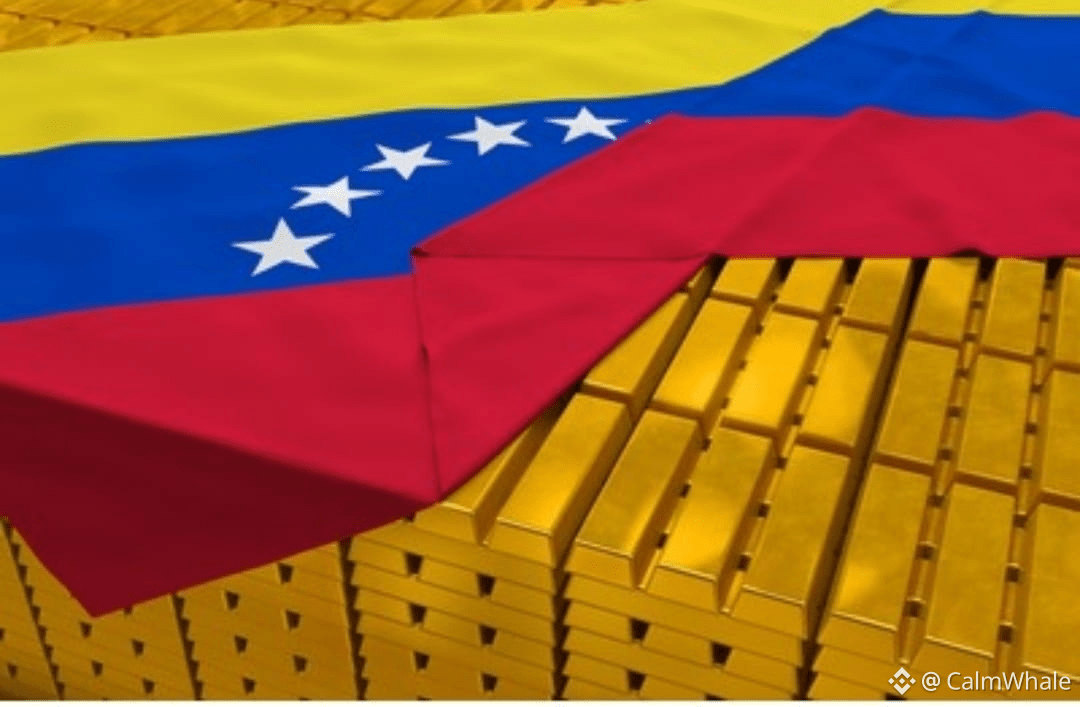
🇨🇴 Venezuela's sitting on 161 metric tons of gold reserves – that's the biggest stash in all of Latin America! 💰
At current prices, we're talking roughly $22B in value 🔥
$XAU $A2Z $RIVER
#BinanceHODLerBREV #ETHWhaleWatch #USJobsData #WriteToEarnUpgrade #GOLD
🇨🇴 Venezuela's sitting on 161 metric tons of gold reserves – that's the biggest stash in all of Latin America! 💰
At current prices, we're talking roughly $22B in value 🔥
$XAU $A2Z $RIVER
#BinanceHODLerBREV #ETHWhaleWatch #USJobsData #WriteToEarnUpgrade #GOLD
At current prices, we're talking roughly $22B in value 🔥
$XAU $A2Z $RIVER
#BinanceHODLerBREV #ETHWhaleWatch #USJobsData #WriteToEarnUpgrade #GOLD

8
16.5k

·
--
ສັນຍານກະທິງ
ເບິ່ງການແປ
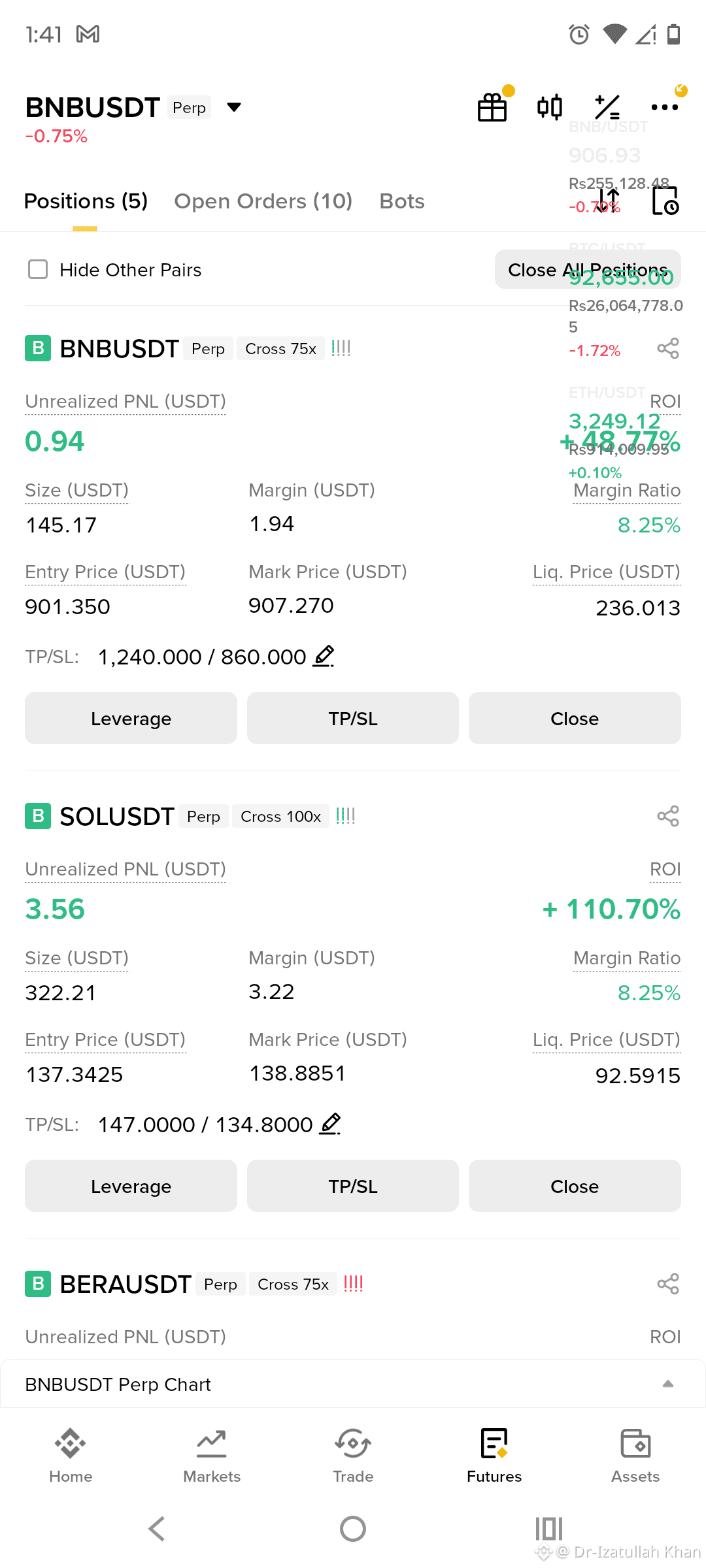
$BTC $ETH $BNB 🚨 Crypto Has Entered the Era of Institutional Control
The crypto market hasn’t just evolved — it has shifted power. With Bitcoin and Ethereum spot ETFs, crypto moved from a retail-driven market to a professionally controlled financial arena. While ETFs brought legitimacy and capital, they also changed how BTC & ETH trade.
#WriteToEarnUpgrade #ETHWhaleWatch #USJobsData #CPIWatch #BTCVSGOLD
🔍 Current BTC & ETH Market Tone
BTC is trading range-bound, respecting higher-timeframe liquidity with frequent fake breakouts and quick rejections.
ETH follows BTC’s structure but shows weaker momentum, often acting as liquidity confirmation.
Price reacts more to ETF flows, macro data, and risk sentiment than retail momentum.
Volatility still exists, but it’s engineered and selective, built to hunt liquidity.
👉 Timing now matters more than direction.
📉 Before vs After ETFs
Before ETFs:
Cleaner trends, emotional moves, and better breakout follow-through.
After ETFs:
Institutions trade liquidity, not indicators.
Stop hunts, fake breakouts, and rapid reversals dominate.
⚠️ Why Trading Feels Harder
Shorter, interrupted trends
Overtrading punished quickly
Precision > prediction
Risk management > conviction
🎯 Who Survives This Market
Trades less, but smarter
Respects higher-timeframe structure
Focuses on liquidity over indicators
Treats staying sidelined as a position
🧩 Final Thought
ETFs didn’t remove volatility — they controlled it.
Crypto didn’t die; it grew up.
This is not financial advice. Always manage risk and trade responsibly.
$BTC $ETH $BNB 🚨 Crypto Has Entered the Era of Institutional Control
The crypto market hasn’t just evolved — it has shifted power. With Bitcoin and Ethereum spot ETFs, crypto moved from a retail-driven market to a professionally controlled financial arena. While ETFs brought legitimacy and capital, they also changed how BTC & ETH trade.
#WriteToEarnUpgrade #ETHWhaleWatch #USJobsData #CPIWatch #BTCVSGOLD
🔍 Current BTC & ETH Market Tone
BTC is trading range-bound, respecting higher-timeframe liquidity with frequent fake breakouts and quick rejections.
ETH follows BTC’s structure but shows weaker momentum, often acting as liquidity confirmation.
Price reacts more to ETF flows, macro data, and risk sentiment than retail momentum.
Volatility still exists, but it’s engineered and selective, built to hunt liquidity.
👉 Timing now matters more than direction.
📉 Before vs After ETFs
Before ETFs:
Cleaner trends, emotional moves, and better breakout follow-through.
After ETFs:
Institutions trade liquidity, not indicators.
Stop hunts, fake breakouts, and rapid reversals dominate.
⚠️ Why Trading Feels Harder
Shorter, interrupted trends
Overtrading punished quickly
Precision > prediction
Risk management > conviction
🎯 Who Survives This Market
Trades less, but smarter
Respects higher-timeframe structure
Focuses on liquidity over indicators
Treats staying sidelined as a position
🧩 Final Thought
ETFs didn’t remove volatility — they controlled it.
Crypto didn’t die; it grew up.
This is not financial advice. Always manage risk and trade responsibly.
The crypto market hasn’t just evolved — it has shifted power. With Bitcoin and Ethereum spot ETFs, crypto moved from a retail-driven market to a professionally controlled financial arena. While ETFs brought legitimacy and capital, they also changed how BTC & ETH trade.
#WriteToEarnUpgrade #ETHWhaleWatch #USJobsData #CPIWatch #BTCVSGOLD
🔍 Current BTC & ETH Market Tone
BTC is trading range-bound, respecting higher-timeframe liquidity with frequent fake breakouts and quick rejections.
ETH follows BTC’s structure but shows weaker momentum, often acting as liquidity confirmation.
Price reacts more to ETF flows, macro data, and risk sentiment than retail momentum.
Volatility still exists, but it’s engineered and selective, built to hunt liquidity.
👉 Timing now matters more than direction.
📉 Before vs After ETFs
Before ETFs:
Cleaner trends, emotional moves, and better breakout follow-through.
After ETFs:
Institutions trade liquidity, not indicators.
Stop hunts, fake breakouts, and rapid reversals dominate.
⚠️ Why Trading Feels Harder
Shorter, interrupted trends
Overtrading punished quickly
Precision > prediction
Risk management > conviction
🎯 Who Survives This Market
Trades less, but smarter
Respects higher-timeframe structure
Focuses on liquidity over indicators
Treats staying sidelined as a position
🧩 Final Thought
ETFs didn’t remove volatility — they controlled it.
Crypto didn’t die; it grew up.
This is not financial advice. Always manage risk and trade responsibly.
1
100

·
--
ເບິ່ງການແປ
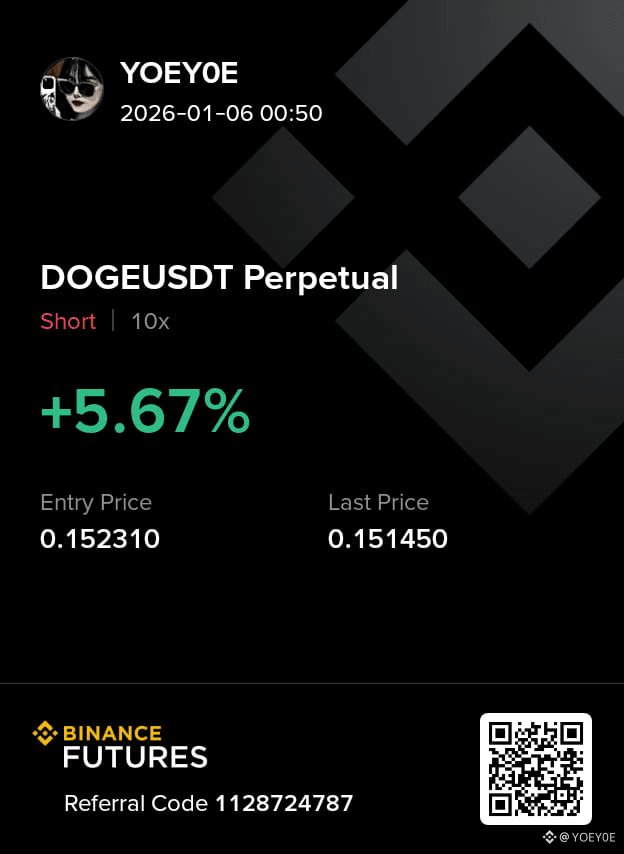
$DOGE take a short position on dog
1h chart time frame
trade on it for profit #BinanceHODLerBREV #CPIWatch #ETHWhaleWatch #USJobsData #WriteToEarnUpgrade
$XRP $BNB
$DOGE take a short position on dog
1h chart time frame
trade on it for profit #BinanceHODLerBREV #CPIWatch #ETHWhaleWatch #USJobsData #WriteToEarnUpgrade
$XRP $BNB
1h chart time frame
trade on it for profit #BinanceHODLerBREV #CPIWatch #ETHWhaleWatch #USJobsData #WriteToEarnUpgrade
$XRP $BNB
2
177

·
--
ສັນຍານກະທິງ
ເບິ່ງການແປ
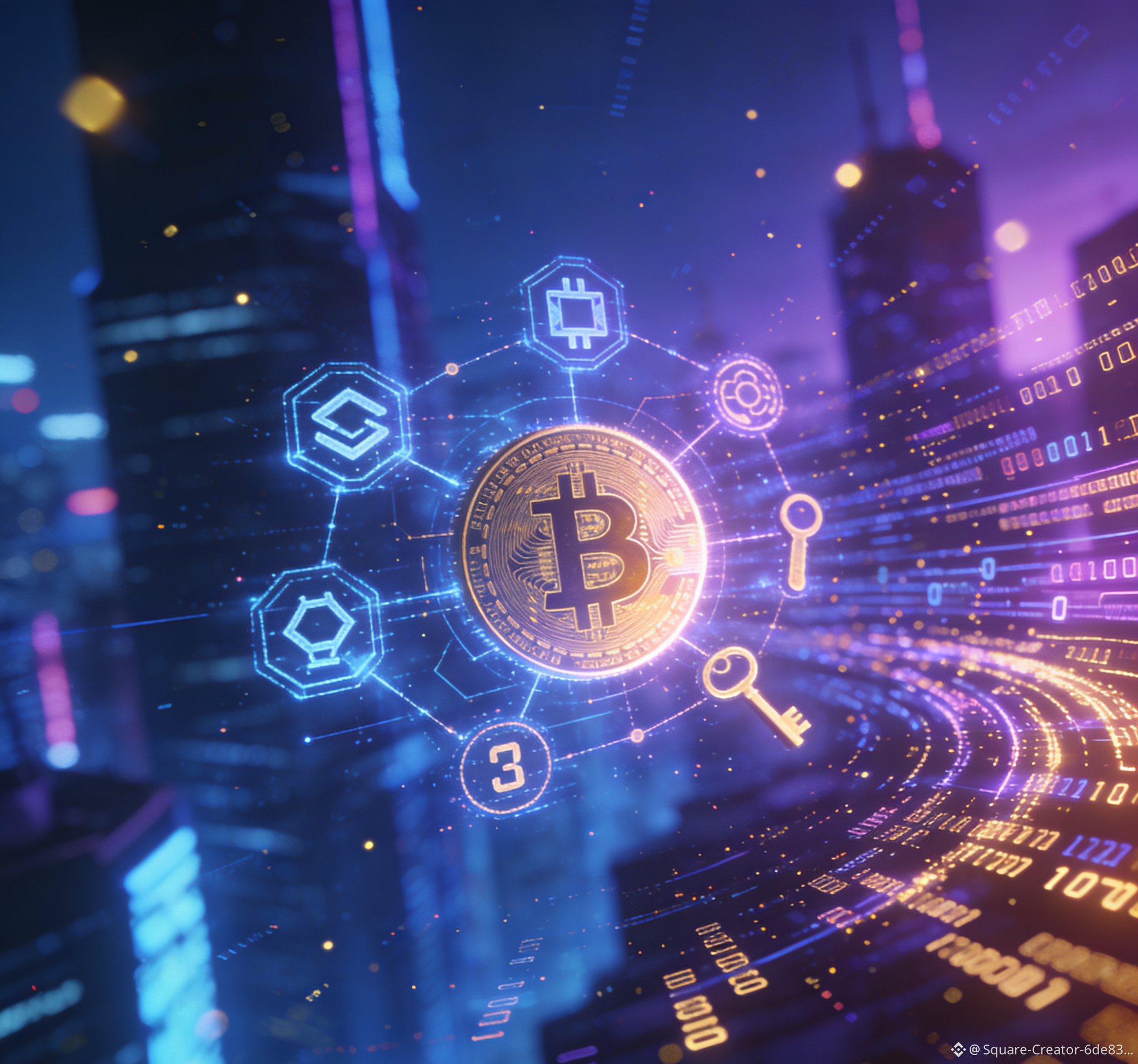
لقد مضى وقت طويل منذ آخر مرة… التحليل الحالي كما يلي BTC
التحكم في الأموال من قبل المؤسسات مؤخرًا: تدفقات مستمرة في ETF BTC، زيادة Tether بمقدار 800 مليون دولار من BTC، الدعم قصير الأمد لBTC عند 90,000 دولار، الهدف 95,000 دولار؛ استقرار ETH عند 3100 دولار، وارتفاع حجم الرهن يقدم فرصًا منخفضة التقلب + عالية اليقين.
اقتراحات العمليات القابلة للتنفيذ غدًا
1. دخول العملات الرئيسية/زيادة الحصة: إذا استقر BTC عند 91,000 دولار يمكن زيادة الحصة بحجم صغير، الهدف هو 95,000 دولار، وضع وقف الخسارة عند 90,000 دولار؛ إذا استقر ETH عند 3050 دولار يمكن وضع كمية خفيفة، وضع وقف الخسارة عند 3000 دولار، السيطرة على الحجم عند 20%-30% من إجمالي الحصة.
2. المشاركة في العملات الساخنة على المدى القصير: Solana و Stellar يمكن تخصيص 5% لكل منهما لتوقع أحداث إيجابية، PEPE و Dogecoin دخول وخروج سريع، تحقيق ربح بنسبة 10%-15% ووقف الربح فورًا، دون التعلق بالمعركة.
3. التحكم في المخاطر: عدم التعامل مع الرافعة المالية العالية (نسبة الرافعة ≤ 2)، إجمالي حجم العملات البديلة لا يتجاوز 10% من إجمالي الحصة، متابعة دقيقة لتدفقات أموال ETF في المساء، إذا حدث تدفق كبير للخارج، يجب تقليل الحصة بشكل حاسم.
$BTC #BTC
{future}(BTCUSDT)
$ETH #ETH
{future}(ETHUSDT)
$BNB #bnb #BinanceHODLerBREV #ETHWhaleWatch
{future}(BNBUSDT)
SOL XRP USDC USDT PEPE SHIB
BONK FLOKI DOGE BTTC ZEC ZEN
BOB AAVE AIA LTC
لقد مضى وقت طويل منذ آخر مرة… التحليل الحالي كما يلي BTC
التحكم في الأموال من قبل المؤسسات مؤخرًا: تدفقات مستمرة في ETF BTC، زيادة Tether بمقدار 800 مليون دولار من BTC، الدعم قصير الأمد لBTC عند 90,000 دولار، الهدف 95,000 دولار؛ استقرار ETH عند 3100 دولار، وارتفاع حجم الرهن يقدم فرصًا منخفضة التقلب + عالية اليقين.
اقتراحات العمليات القابلة للتنفيذ غدًا
1. دخول العملات الرئيسية/زيادة الحصة: إذا استقر BTC عند 91,000 دولار يمكن زيادة الحصة بحجم صغير، الهدف هو 95,000 دولار، وضع وقف الخسارة عند 90,000 دولار؛ إذا استقر ETH عند 3050 دولار يمكن وضع كمية خفيفة، وضع وقف الخسارة عند 3000 دولار، السيطرة على الحجم عند 20%-30% من إجمالي الحصة.
2. المشاركة في العملات الساخنة على المدى القصير: Solana و Stellar يمكن تخصيص 5% لكل منهما لتوقع أحداث إيجابية، PEPE و Dogecoin دخول وخروج سريع، تحقيق ربح بنسبة 10%-15% ووقف الربح فورًا، دون التعلق بالمعركة.
3. التحكم في المخاطر: عدم التعامل مع الرافعة المالية العالية (نسبة الرافعة ≤ 2)، إجمالي حجم العملات البديلة لا يتجاوز 10% من إجمالي الحصة، متابعة دقيقة لتدفقات أموال ETF في المساء، إذا حدث تدفق كبير للخارج، يجب تقليل الحصة بشكل حاسم.
$BTC #BTC
$ETH #ETH
$BNB #bnb #BinanceHODLerBREV #ETHWhaleWatch
SOL XRP USDC USDT PEPE SHIB
BONK FLOKI DOGE BTTC ZEC ZEN
BOB AAVE AIA LTC
التحكم في الأموال من قبل المؤسسات مؤخرًا: تدفقات مستمرة في ETF BTC، زيادة Tether بمقدار 800 مليون دولار من BTC، الدعم قصير الأمد لBTC عند 90,000 دولار، الهدف 95,000 دولار؛ استقرار ETH عند 3100 دولار، وارتفاع حجم الرهن يقدم فرصًا منخفضة التقلب + عالية اليقين.
اقتراحات العمليات القابلة للتنفيذ غدًا
1. دخول العملات الرئيسية/زيادة الحصة: إذا استقر BTC عند 91,000 دولار يمكن زيادة الحصة بحجم صغير، الهدف هو 95,000 دولار، وضع وقف الخسارة عند 90,000 دولار؛ إذا استقر ETH عند 3050 دولار يمكن وضع كمية خفيفة، وضع وقف الخسارة عند 3000 دولار، السيطرة على الحجم عند 20%-30% من إجمالي الحصة.
2. المشاركة في العملات الساخنة على المدى القصير: Solana و Stellar يمكن تخصيص 5% لكل منهما لتوقع أحداث إيجابية، PEPE و Dogecoin دخول وخروج سريع، تحقيق ربح بنسبة 10%-15% ووقف الربح فورًا، دون التعلق بالمعركة.
3. التحكم في المخاطر: عدم التعامل مع الرافعة المالية العالية (نسبة الرافعة ≤ 2)، إجمالي حجم العملات البديلة لا يتجاوز 10% من إجمالي الحصة، متابعة دقيقة لتدفقات أموال ETF في المساء، إذا حدث تدفق كبير للخارج، يجب تقليل الحصة بشكل حاسم.
$BTC #BTC
$ETH #ETH
$BNB #bnb #BinanceHODLerBREV #ETHWhaleWatch
SOL XRP USDC USDT PEPE SHIB
BONK FLOKI DOGE BTTC ZEC ZEN
BOB AAVE AIA LTC
2
100

·
--
ສັນຍານໝີ
ເບິ່ງການແປ
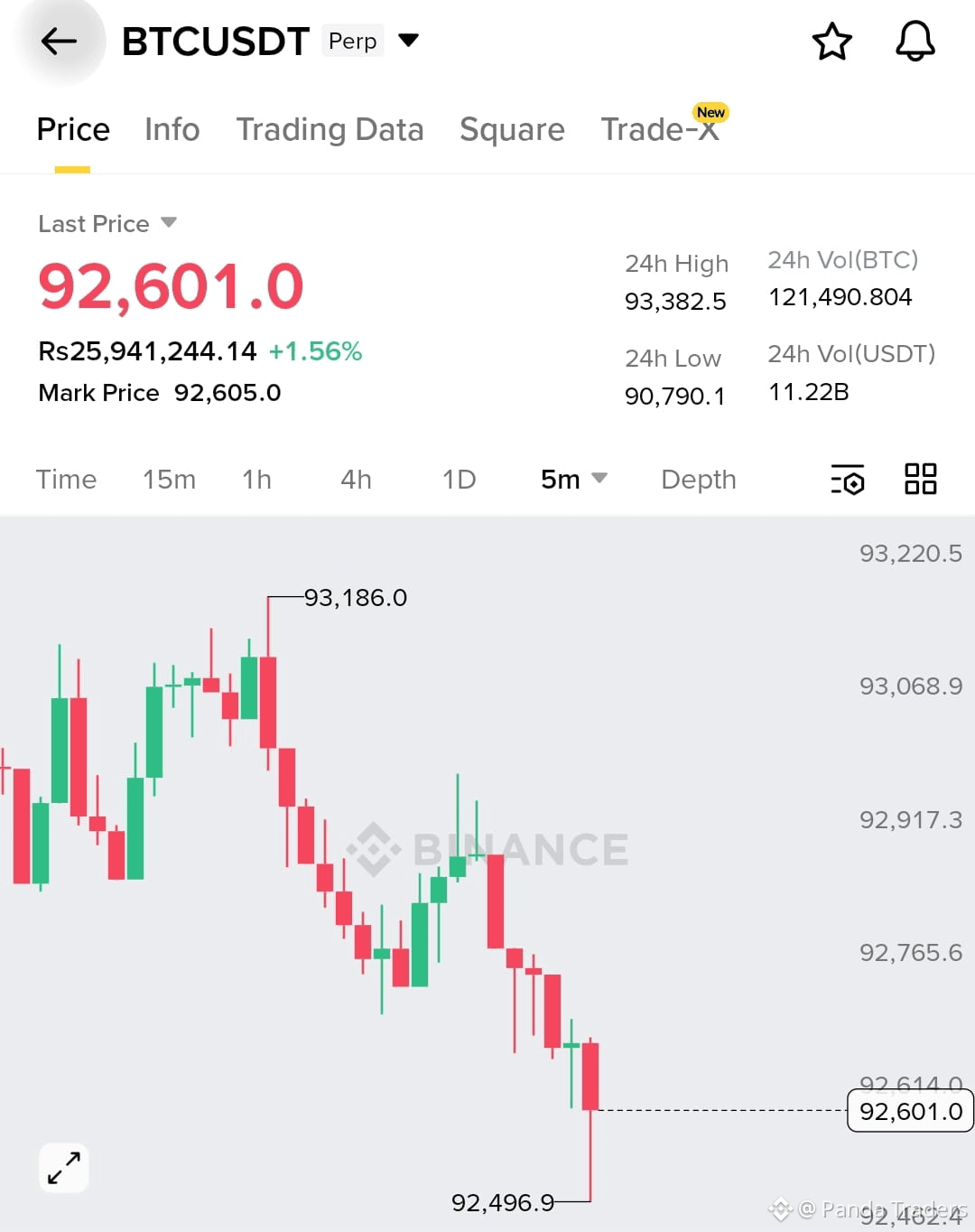
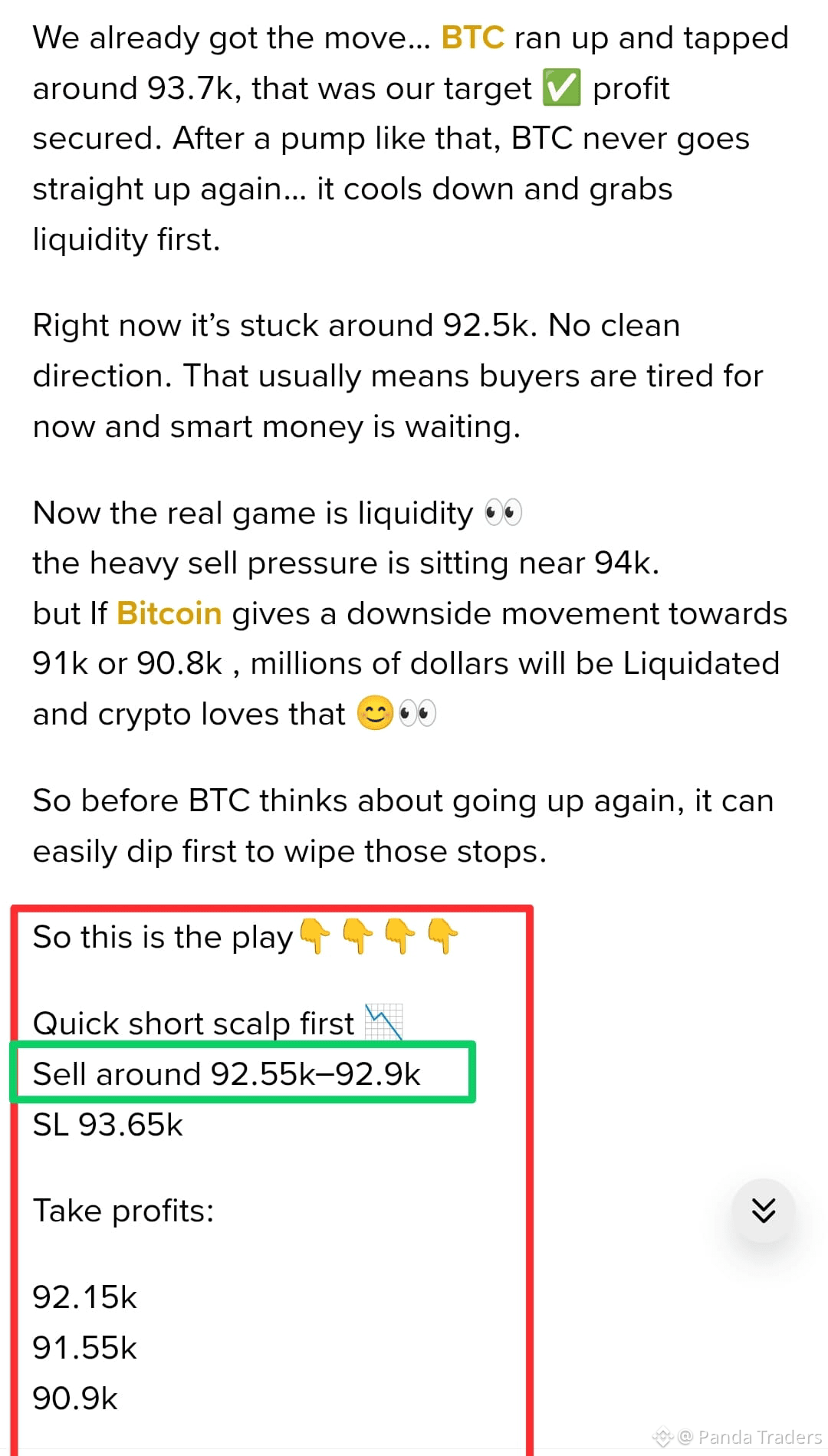
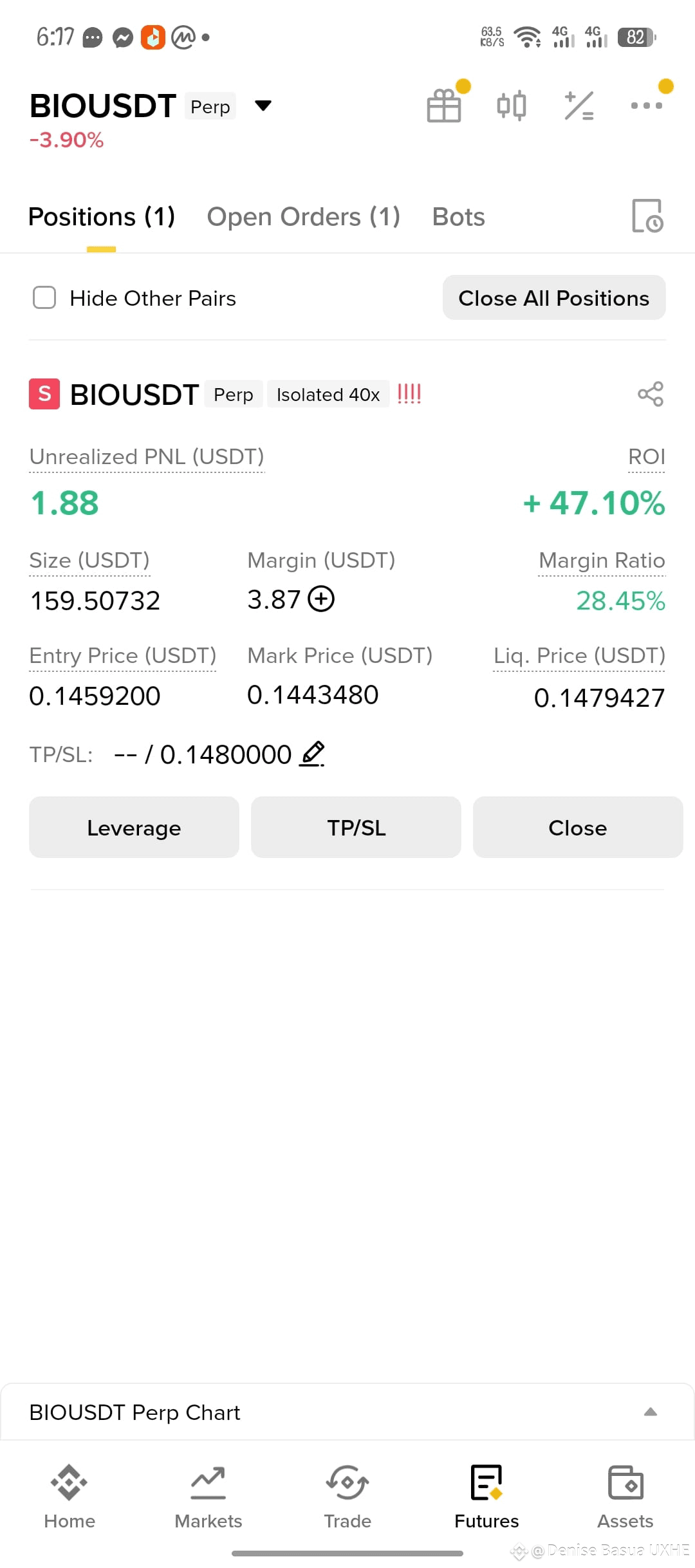
$BTC short back in profit
But don't forget to UPGRADE stop loss in profit because I already told you it's a pullback not trend a reversal
Congratulations 🐼
{future}(BTCUSDT)
#BinanceHODLerBREV #ETHWhaleWatch #WriteToEarnUpgrade #USJobsData #CPIWatch
$BTC short back in profit
But don't forget to UPGRADE stop loss in profit because I already told you it's a pullback not trend a reversal
Congratulations 🐼
#BinanceHODLerBREV #ETHWhaleWatch #WriteToEarnUpgrade #USJobsData #CPIWatch
But don't forget to UPGRADE stop loss in profit because I already told you it's a pullback not trend a reversal
Congratulations 🐼
#BinanceHODLerBREV #ETHWhaleWatch #WriteToEarnUpgrade #USJobsData #CPIWatch
23
7
43
25.6k

1
30

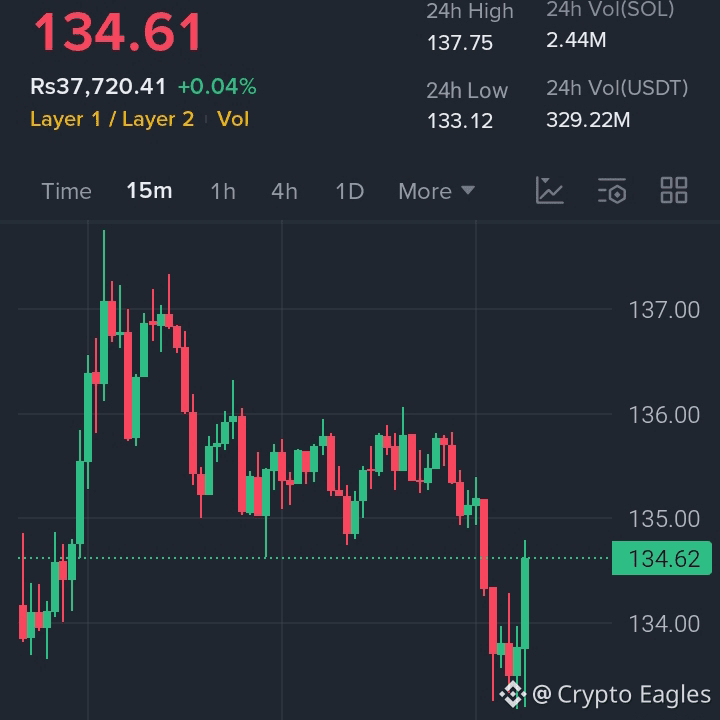
$SOL ສະໜັບສະຫນູນຄວາມປະຕິກິຣິຢາໃນເກມ....
ເຂດເຂົ້າ: 133.5 – 134.5
Bullish ເໜືອ: 135
TP1: 138
TP2: 142
TP3: 148
SL: 131.8
#币安HODLer空投BREV #ETHWhaleWatch #BinanceHODLerBREV
$SOL ສະໜັບສະຫນູນຄວາມປະຕິກິຣິຢາໃນເກມ....
ເຂດເຂົ້າ: 133.5 – 134.5
Bullish ເໜືອ: 135
TP1: 138
TP2: 142
TP3: 148
SL: 131.8
#币安HODLer空投BREV #ETHWhaleWatch #BinanceHODLerBREV
ເຂດເຂົ້າ: 133.5 – 134.5
Bullish ເໜືອ: 135
TP1: 138
TP2: 142
TP3: 148
SL: 131.8
#币安HODLer空投BREV #ETHWhaleWatch #BinanceHODLerBREV
2
2
20
9.3k

·
--
ຢືນຢັນແລ້ວ
ບົດຄວາມ
ເບິ່ງການແປ
Binance Official Login: Safe Sign-In For Web, App, Passkeys And 2FATo log in to Binance safely, open Binance.com or the Binance app from a trusted source, verify that you are using the correct platform for your region, enter the email address or phone number linked to your account, and complete the security verification configured for that account. Never enter login credentials on an unverified page.
✅ Binance Official Login: Quick Answer
For an existing Binance account:
Open Binance.com or the Binance app.Select Log In.Enter your registered email address or phone number.Complete the required authentication.Confirm that you are inside your own account before taking further action.
The current Binance.com login page supports email or phone login and also displays options to continue with Google, Apple, or Telegram.
If you do not already have an account, use the separate Create a Binance Account option rather than trying to log in.
🔒 How To Log In To Binance Safely
Use this simple rule:
Verify → Identify → Authenticate → Access
1. Verify The Platform
Before entering your email, password, passkey, or verification code:
Check That You Are On Binance.com Or The Correct Regional Binance Service.Avoid Login Links From Unsolicited Emails, Messages, Ads, Or Social-Media Accounts.Do Not Provide Account Information To Unverified Support Contacts.Use Binance Verify When You Need To Confirm Whether A Website, Email, Phone Number, Telegram Account, Or Social-Media Source Represents Binance.
Binance Verify is specifically designed to check these types of sources, and Binance warns users not to reveal account details to unofficial or unverified contacts.
2. Identify The Correct Account
Use the email address, phone number, or supported sign-in method linked to your existing Binance account.
Do not create another account simply because your normal login method is temporarily unavailable.
3. Authenticate
Complete the security verification requested for your account. Depending on your setup, this may involve a password, passkey, authenticator, email verification, SMS verification, or another configured security method.
4. Access Your Account
Only continue after confirming that you are inside the expected Binance account.
🚫 Stop immediately if a login or support page asks for a wallet seed phrase or private key as part of normal Binance account login.
Binance Login Methods
Email Or Phone
The main Binance.com login page currently begins with an Email/Phone number field.
Use the account identity you originally registered or later linked to your account.
Google, Apple Or Telegram
Binance also currently displays:
Continue With GoogleContinue With AppleContinue With Telegram
Use one of these only when it corresponds to the login method connected to your Binance account.
🔐 Passkey
If you have configured a passkey, Binance may request passkey verification during authentication.
Binance supports passkeys for account verification across compatible devices and allows passkeys to be created using options such as device biometrics, screen lock, PIN, security keys, or another supported device. Availability and exact behavior depend on your device and account configuration.
📱 Binance App Login
For mobile access, use the Binance app obtained through a trusted Binance or official app-store route.
Inside the app, select Sign Up / Log In, then use the credentials associated with your existing account. Binance's current account-recovery documentation confirms this app access path.
Avoid downloading modified apps or APK files from unknown websites simply because you cannot access your account.
A login problem should be fixed through account recovery—not by installing an unverified version of the app.
💻 Binance Website Login
For browser access:
Open Binance.com Directly.Select Log In.Enter Your Registered Email Or Phone Number.Complete The Requested Security Verification.Confirm Your Account Before Continuing.
➡️ [Access The Binance App Through An Official Source](https://www.binance.com/join?ref=167889865&utm_medium=web_share_link_facebook), verify the publisher, and enable two-factor authentication after registration.
📌 Bookmarking a verified Binance page can reduce the risk of repeatedly searching for the login page and accidentally opening a look-alike domain.
🚫 Can't Log In To Binance?
First identify what is actually failing.
Forgot Your Password
Use the Forgot password? recovery process rather than repeatedly guessing passwords.
Binance states that after a password reset, withdrawals, P2P selling, and payment services are disabled for 24 hours as a security measure.
Lost Access To 2FA
A 2FA problem is different from a forgotten password.
If you have lost access to a configured 2FA device, use Binance's security-verification reset process. Binance states that withdrawals, P2P selling, internal transfers, and payment services can be disabled for up to 48 hours following a 2FA reset.
Passkey Is Unavailable
If Binance requests a passkey that you cannot access, do not assume your password is wrong.
Binance's recovery flow provides a My Passkeys Are Not Available option in applicable situations, allowing the user to continue through other available security verification methods.
Wrong Binance Platform
Check whether your account belongs to Binance.com or a separate regional platform.
For example, Binance.US uses its own login system and its official support documentation directs Binance.US customers to the Binance.US login page.
Trying Binance.com credentials on the wrong service can therefore look like an account problem when the real issue is platform selection.
🌍 Binance.com vs Binance.US
Do not treat these login routes as interchangeable.
Use Binance.com when: Your account belongs to the Binance.com platform available for your jurisdiction.
Use Binance.US when: Your account was created specifically with Binance.US.
Availability and account access can vary by country or region, so verify the platform applicable to you rather than assuming one Binance service works everywhere. Binance.US, for example, maintains its own regional availability requirements.
⚠️ Binance Login Security Checks
Before every sensitive login:
✅ Check The Domain Or App Source.🔒 Use Your Existing Account Credentials.✅ Complete Only The Security Checks Associated With Your Account.🚫 Never Send Verification Codes To Someone Claiming To Be Support.🚫 Never Reveal Wallet Private Keys Or Seed Phrases To Fix An Exchange Login.🔒 Use Binance Verify If A Website Or Contact Seems Suspicious.✅ Use Binance Support For Account-Recovery Problems You Cannot Resolve Through The Normal Flow.
The important distinction is simple: an official recovery process verifies your access; it should not require you to bypass Binance security controls.
❓ FAQ
Can I Log In To Binance With A Passkey?
Yes, if passkeys have been configured for your Binance account and your device supports the required verification. Binance supports passkeys for many account-verification functions across compatible devices.
Why Can't I Log In Even With The Correct Password?
The issue may involve your passkey, 2FA method, email or phone access, account status, browser/app environment, or using the wrong Binance platform. Diagnose the failed security step before resetting unrelated credentials.
Is Binance Login The Same As Creating A Binance Account?
No. Login is for an existing account. Registration creates a new account. The Binance login interface keeps these actions separate by providing both Log In and Create a Binance Account options.
Final Takeaway
For a safe Binance login, verify the platform first, use the account identity already connected to your Binance account, complete the configured security verification, and use the appropriate recovery route when something fails.
Do not confuse a forgotten password with lost 2FA or passkey access, and do not create another account simply to work around a login problem.
Logging in only provides access to the platform; it is not a recommendation to buy or trade crypto. Cryptoassets involve substantial risk, and availability of Binance products and services can vary by jurisdiction.
✅ New To Binance? If you do not already have an account, you can [Create A Binance Account](https://www.binance.com/join?ref=167889865&utm_medium=web_share_link_facebook). Existing users should use Binance's login or account-recovery process instead.
Binance Official Login: Safe Sign-In For Web, App, Passkeys And 2FA
To log in to Binance safely, open Binance.com or the Binance app from a trusted source, verify that you are using the correct platform for your region, enter the email address or phone number linked to your account, and complete the security verification configured for that account. Never enter login credentials on an unverified page.
✅ Binance Official Login: Quick Answer
For an existing Binance account:
Open Binance.com or the Binance app.Select Log In.Enter your registered email address or phone number.Complete the required authentication.Confirm that you are inside your own account before taking further action.
The current Binance.com login page supports email or phone login and also displays options to continue with Google, Apple, or Telegram.
If you do not already have an account, use the separate Create a Binance Account option rather than trying to log in.
🔒 How To Log In To Binance Safely
Use this simple rule:
Verify → Identify → Authenticate → Access
1. Verify The Platform
Before entering your email, password, passkey, or verification code:
Check That You Are On Binance.com Or The Correct Regional Binance Service.Avoid Login Links From Unsolicited Emails, Messages, Ads, Or Social-Media Accounts.Do Not Provide Account Information To Unverified Support Contacts.Use Binance Verify When You Need To Confirm Whether A Website, Email, Phone Number, Telegram Account, Or Social-Media Source Represents Binance.
Binance Verify is specifically designed to check these types of sources, and Binance warns users not to reveal account details to unofficial or unverified contacts.
2. Identify The Correct Account
Use the email address, phone number, or supported sign-in method linked to your existing Binance account.
Do not create another account simply because your normal login method is temporarily unavailable.
3. Authenticate
Complete the security verification requested for your account. Depending on your setup, this may involve a password, passkey, authenticator, email verification, SMS verification, or another configured security method.
4. Access Your Account
Only continue after confirming that you are inside the expected Binance account.
🚫 Stop immediately if a login or support page asks for a wallet seed phrase or private key as part of normal Binance account login.
Binance Login Methods
Email Or Phone
The main Binance.com login page currently begins with an Email/Phone number field.
Use the account identity you originally registered or later linked to your account.
Google, Apple Or Telegram
Binance also currently displays:
Continue With GoogleContinue With AppleContinue With Telegram
Use one of these only when it corresponds to the login method connected to your Binance account.
🔐 Passkey
If you have configured a passkey, Binance may request passkey verification during authentication.
Binance supports passkeys for account verification across compatible devices and allows passkeys to be created using options such as device biometrics, screen lock, PIN, security keys, or another supported device. Availability and exact behavior depend on your device and account configuration.
📱 Binance App Login
For mobile access, use the Binance app obtained through a trusted Binance or official app-store route.
Inside the app, select Sign Up / Log In, then use the credentials associated with your existing account. Binance's current account-recovery documentation confirms this app access path.
Avoid downloading modified apps or APK files from unknown websites simply because you cannot access your account.
A login problem should be fixed through account recovery—not by installing an unverified version of the app.
💻 Binance Website Login
For browser access:
Open Binance.com Directly.Select Log In.Enter Your Registered Email Or Phone Number.Complete The Requested Security Verification.Confirm Your Account Before Continuing.
➡️ Access The Binance App Through An Official Source, verify the publisher, and enable two-factor authentication after registration.
📌 Bookmarking a verified Binance page can reduce the risk of repeatedly searching for the login page and accidentally opening a look-alike domain.
🚫 Can't Log In To Binance?
First identify what is actually failing.
Forgot Your Password
Use the Forgot password? recovery process rather than repeatedly guessing passwords.
Binance states that after a password reset, withdrawals, P2P selling, and payment services are disabled for 24 hours as a security measure.
Lost Access To 2FA
A 2FA problem is different from a forgotten password.
If you have lost access to a configured 2FA device, use Binance's security-verification reset process. Binance states that withdrawals, P2P selling, internal transfers, and payment services can be disabled for up to 48 hours following a 2FA reset.
Passkey Is Unavailable
If Binance requests a passkey that you cannot access, do not assume your password is wrong.
Binance's recovery flow provides a My Passkeys Are Not Available option in applicable situations, allowing the user to continue through other available security verification methods.
Wrong Binance Platform
Check whether your account belongs to Binance.com or a separate regional platform.
For example, Binance.US uses its own login system and its official support documentation directs Binance.US customers to the Binance.US login page.
Trying Binance.com credentials on the wrong service can therefore look like an account problem when the real issue is platform selection.
🌍 Binance.com vs Binance.US
Do not treat these login routes as interchangeable.
Use Binance.com when: Your account belongs to the Binance.com platform available for your jurisdiction.
Use Binance.US when: Your account was created specifically with Binance.US.
Availability and account access can vary by country or region, so verify the platform applicable to you rather than assuming one Binance service works everywhere. Binance.US, for example, maintains its own regional availability requirements.
⚠️ Binance Login Security Checks
Before every sensitive login:
✅ Check The Domain Or App Source.🔒 Use Your Existing Account Credentials.✅ Complete Only The Security Checks Associated With Your Account.🚫 Never Send Verification Codes To Someone Claiming To Be Support.🚫 Never Reveal Wallet Private Keys Or Seed Phrases To Fix An Exchange Login.🔒 Use Binance Verify If A Website Or Contact Seems Suspicious.✅ Use Binance Support For Account-Recovery Problems You Cannot Resolve Through The Normal Flow.
The important distinction is simple: an official recovery process verifies your access; it should not require you to bypass Binance security controls.
❓ FAQ
Can I Log In To Binance With A Passkey?
Yes, if passkeys have been configured for your Binance account and your device supports the required verification. Binance supports passkeys for many account-verification functions across compatible devices.
Why Can't I Log In Even With The Correct Password?
The issue may involve your passkey, 2FA method, email or phone access, account status, browser/app environment, or using the wrong Binance platform. Diagnose the failed security step before resetting unrelated credentials.
Is Binance Login The Same As Creating A Binance Account?
No. Login is for an existing account. Registration creates a new account. The Binance login interface keeps these actions separate by providing both Log In and Create a Binance Account options.
Final Takeaway
For a safe Binance login, verify the platform first, use the account identity already connected to your Binance account, complete the configured security verification, and use the appropriate recovery route when something fails.
Do not confuse a forgotten password with lost 2FA or passkey access, and do not create another account simply to work around a login problem.
Logging in only provides access to the platform; it is not a recommendation to buy or trade crypto. Cryptoassets involve substantial risk, and availability of Binance products and services can vary by jurisdiction.
✅ New To Binance? If you do not already have an account, you can Create A Binance Account. Existing users should use Binance's login or account-recovery process instead.
✅ Binance Official Login: Quick Answer
For an existing Binance account:
Open Binance.com or the Binance app.Select Log In.Enter your registered email address or phone number.Complete the required authentication.Confirm that you are inside your own account before taking further action.
The current Binance.com login page supports email or phone login and also displays options to continue with Google, Apple, or Telegram.
If you do not already have an account, use the separate Create a Binance Account option rather than trying to log in.
🔒 How To Log In To Binance Safely
Use this simple rule:
Verify → Identify → Authenticate → Access
1. Verify The Platform
Before entering your email, password, passkey, or verification code:
Check That You Are On Binance.com Or The Correct Regional Binance Service.Avoid Login Links From Unsolicited Emails, Messages, Ads, Or Social-Media Accounts.Do Not Provide Account Information To Unverified Support Contacts.Use Binance Verify When You Need To Confirm Whether A Website, Email, Phone Number, Telegram Account, Or Social-Media Source Represents Binance.
Binance Verify is specifically designed to check these types of sources, and Binance warns users not to reveal account details to unofficial or unverified contacts.
2. Identify The Correct Account
Use the email address, phone number, or supported sign-in method linked to your existing Binance account.
Do not create another account simply because your normal login method is temporarily unavailable.
3. Authenticate
Complete the security verification requested for your account. Depending on your setup, this may involve a password, passkey, authenticator, email verification, SMS verification, or another configured security method.
4. Access Your Account
Only continue after confirming that you are inside the expected Binance account.
🚫 Stop immediately if a login or support page asks for a wallet seed phrase or private key as part of normal Binance account login.
Binance Login Methods
Email Or Phone
The main Binance.com login page currently begins with an Email/Phone number field.
Use the account identity you originally registered or later linked to your account.
Google, Apple Or Telegram
Binance also currently displays:
Continue With GoogleContinue With AppleContinue With Telegram
Use one of these only when it corresponds to the login method connected to your Binance account.
🔐 Passkey
If you have configured a passkey, Binance may request passkey verification during authentication.
Binance supports passkeys for account verification across compatible devices and allows passkeys to be created using options such as device biometrics, screen lock, PIN, security keys, or another supported device. Availability and exact behavior depend on your device and account configuration.
📱 Binance App Login
For mobile access, use the Binance app obtained through a trusted Binance or official app-store route.
Inside the app, select Sign Up / Log In, then use the credentials associated with your existing account. Binance's current account-recovery documentation confirms this app access path.
Avoid downloading modified apps or APK files from unknown websites simply because you cannot access your account.
A login problem should be fixed through account recovery—not by installing an unverified version of the app.
💻 Binance Website Login
For browser access:
Open Binance.com Directly.Select Log In.Enter Your Registered Email Or Phone Number.Complete The Requested Security Verification.Confirm Your Account Before Continuing.
➡️ Access The Binance App Through An Official Source, verify the publisher, and enable two-factor authentication after registration.
📌 Bookmarking a verified Binance page can reduce the risk of repeatedly searching for the login page and accidentally opening a look-alike domain.
🚫 Can't Log In To Binance?
First identify what is actually failing.
Forgot Your Password
Use the Forgot password? recovery process rather than repeatedly guessing passwords.
Binance states that after a password reset, withdrawals, P2P selling, and payment services are disabled for 24 hours as a security measure.
Lost Access To 2FA
A 2FA problem is different from a forgotten password.
If you have lost access to a configured 2FA device, use Binance's security-verification reset process. Binance states that withdrawals, P2P selling, internal transfers, and payment services can be disabled for up to 48 hours following a 2FA reset.
Passkey Is Unavailable
If Binance requests a passkey that you cannot access, do not assume your password is wrong.
Binance's recovery flow provides a My Passkeys Are Not Available option in applicable situations, allowing the user to continue through other available security verification methods.
Wrong Binance Platform
Check whether your account belongs to Binance.com or a separate regional platform.
For example, Binance.US uses its own login system and its official support documentation directs Binance.US customers to the Binance.US login page.
Trying Binance.com credentials on the wrong service can therefore look like an account problem when the real issue is platform selection.
🌍 Binance.com vs Binance.US
Do not treat these login routes as interchangeable.
Use Binance.com when: Your account belongs to the Binance.com platform available for your jurisdiction.
Use Binance.US when: Your account was created specifically with Binance.US.
Availability and account access can vary by country or region, so verify the platform applicable to you rather than assuming one Binance service works everywhere. Binance.US, for example, maintains its own regional availability requirements.
⚠️ Binance Login Security Checks
Before every sensitive login:
✅ Check The Domain Or App Source.🔒 Use Your Existing Account Credentials.✅ Complete Only The Security Checks Associated With Your Account.🚫 Never Send Verification Codes To Someone Claiming To Be Support.🚫 Never Reveal Wallet Private Keys Or Seed Phrases To Fix An Exchange Login.🔒 Use Binance Verify If A Website Or Contact Seems Suspicious.✅ Use Binance Support For Account-Recovery Problems You Cannot Resolve Through The Normal Flow.
The important distinction is simple: an official recovery process verifies your access; it should not require you to bypass Binance security controls.
❓ FAQ
Can I Log In To Binance With A Passkey?
Yes, if passkeys have been configured for your Binance account and your device supports the required verification. Binance supports passkeys for many account-verification functions across compatible devices.
Why Can't I Log In Even With The Correct Password?
The issue may involve your passkey, 2FA method, email or phone access, account status, browser/app environment, or using the wrong Binance platform. Diagnose the failed security step before resetting unrelated credentials.
Is Binance Login The Same As Creating A Binance Account?
No. Login is for an existing account. Registration creates a new account. The Binance login interface keeps these actions separate by providing both Log In and Create a Binance Account options.
Final Takeaway
For a safe Binance login, verify the platform first, use the account identity already connected to your Binance account, complete the configured security verification, and use the appropriate recovery route when something fails.
Do not confuse a forgotten password with lost 2FA or passkey access, and do not create another account simply to work around a login problem.
Logging in only provides access to the platform; it is not a recommendation to buy or trade crypto. Cryptoassets involve substantial risk, and availability of Binance products and services can vary by jurisdiction.
✅ New To Binance? If you do not already have an account, you can Create A Binance Account. Existing users should use Binance's login or account-recovery process instead.
3
2.6k
ເບິ່ງການແປ
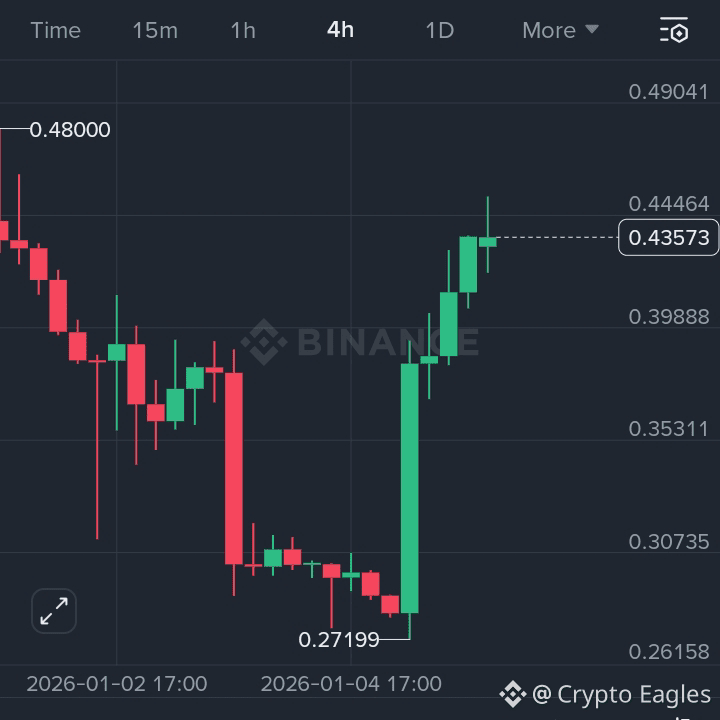
$CLO Reversal Strength After Capitulation
Entry Zone: 0.41 – 0.43
Bullish Above: 0.44
TP1: 0.48
TP2: 0.54
TP3: 0.62
SL: 0.36
#币安HODLer空投BREV #BinanceHODLerBREV #ETHWhaleWatch
{alpha}(560x81d3a238b02827f62b9f390f947d36d4a5bf89d2)
$CLO Reversal Strength After Capitulation
Entry Zone: 0.41 – 0.43
Bullish Above: 0.44
TP1: 0.48
TP2: 0.54
TP3: 0.62
SL: 0.36
#币安HODLer空投BREV #BinanceHODLerBREV #ETHWhaleWatch
Entry Zone: 0.41 – 0.43
Bullish Above: 0.44
TP1: 0.48
TP2: 0.54
TP3: 0.62
SL: 0.36
#币安HODLer空投BREV #BinanceHODLerBREV #ETHWhaleWatch
2
2
7
6.2k

·
--
ສັນຍານກະທິງ
ເບິ່ງການແປ
💬 Drop your current market move in the comments:
👉 $HIFI
👉 Buy the dip
👉 Take profits#BNBBreaksATH #MarketRebound #ETHWhaleWatch #BinanceHODLerHOLO #SECReviewsCryptoETFS
💬 Drop your current market move in the comments:
👉 $HIFI
👉 Buy the dip
👉 Take profits#BNBBreaksATH #MarketRebound #ETHWhaleWatch #BinanceHODLerHOLO #SECReviewsCryptoETFS
👉 $HIFI
👉 Buy the dip
👉 Take profits#BNBBreaksATH #MarketRebound #ETHWhaleWatch #BinanceHODLerHOLO #SECReviewsCryptoETFS
3
2
755


·
--
ສັນຍານໝີ
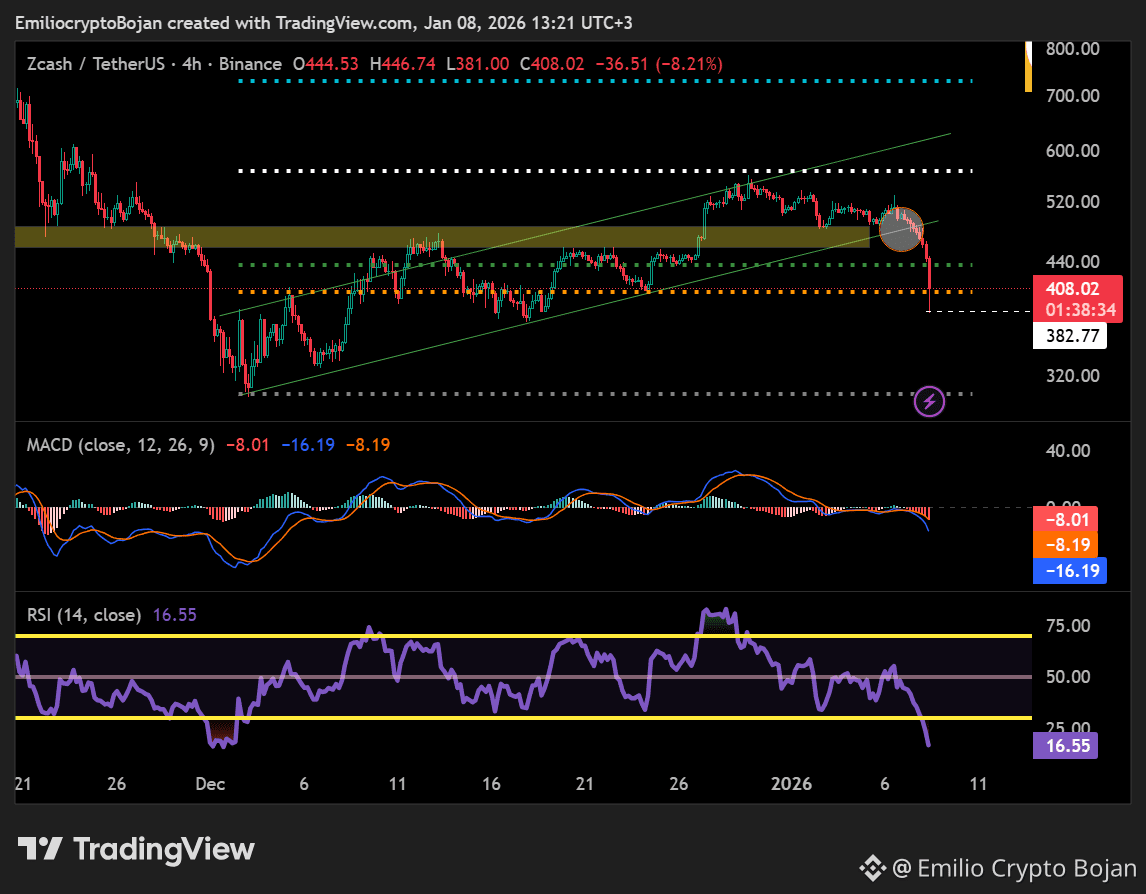
🚨 #Zcash ການລົ້ມ: ກຳລັງໄປຫາ $0? 🚨
Zcash ໄດ້ຫັກຕໍ່າລຸ່ມລະດັບ Fibonacci ທີ່ 61%, ຊີ້ບອກພະລັງລົງແຮງດ້ານບຽນ (bearish) ທີ່ນ່າກັງວົນ.
ເຫດຜົນ: ທີມງານທັງໝົດຂອງ Electric Coin Company (ECC) ໄດ້ລາອອກ ເນື່ອງຈາກຂໍ້ຂັດແຍ່ງດ້ານການປົກຄອງ (governance) ກັບກະດານ Bootstrap. ດ້ວຍການປ່ຽນແປງການນຳຄັ້ງນີ້, ສິ່ງຕ່າງໆບໍ່ໄດ້ດູດີສຳລັບ $ZEC .
Zcash ຈະຢູ່ສະເທຍທີ່ນີ້, ຫຼືການລົງຕໍ່ອີກຈະແນ່ນອນ?
#ZTCBinanceTGE #BinanceHODLerBREV #ETHWhaleWatch #USJobsData
🚨 #Zcash ການລົ້ມ: ກຳລັງໄປຫາ $0? 🚨
Zcash ໄດ້ຫັກຕໍ່າລຸ່ມລະດັບ Fibonacci ທີ່ 61%, ຊີ້ບອກພະລັງລົງແຮງດ້ານບຽນ (bearish) ທີ່ນ່າກັງວົນ.
ເຫດຜົນ: ທີມງານທັງໝົດຂອງ Electric Coin Company (ECC) ໄດ້ລາອອກ ເນື່ອງຈາກຂໍ້ຂັດແຍ່ງດ້ານການປົກຄອງ (governance) ກັບກະດານ Bootstrap. ດ້ວຍການປ່ຽນແປງການນຳຄັ້ງນີ້, ສິ່ງຕ່າງໆບໍ່ໄດ້ດູດີສຳລັບ $ZEC .
Zcash ຈະຢູ່ສະເທຍທີ່ນີ້, ຫຼືການລົງຕໍ່ອີກຈະແນ່ນອນ?
#ZTCBinanceTGE #BinanceHODLerBREV #ETHWhaleWatch #USJobsData
Zcash ໄດ້ຫັກຕໍ່າລຸ່ມລະດັບ Fibonacci ທີ່ 61%, ຊີ້ບອກພະລັງລົງແຮງດ້ານບຽນ (bearish) ທີ່ນ່າກັງວົນ.
ເຫດຜົນ: ທີມງານທັງໝົດຂອງ Electric Coin Company (ECC) ໄດ້ລາອອກ ເນື່ອງຈາກຂໍ້ຂັດແຍ່ງດ້ານການປົກຄອງ (governance) ກັບກະດານ Bootstrap. ດ້ວຍການປ່ຽນແປງການນຳຄັ້ງນີ້, ສິ່ງຕ່າງໆບໍ່ໄດ້ດູດີສຳລັບ $ZEC .
Zcash ຈະຢູ່ສະເທຍທີ່ນີ້, ຫຼືການລົງຕໍ່ອີກຈະແນ່ນອນ?
#ZTCBinanceTGE #BinanceHODLerBREV #ETHWhaleWatch #USJobsData
2
5.9k

·
--
ເບິ່ງການແປ
ကျွန်ုပ်၏ ပြန်ရငွေပမာဏများနှင့် ပိုင်ဆိုင်မှုစာရင်း ခွဲခြမ်းစိတ်ဖြာချက်ကို ကြည့်ပါ။ ရင်းနှီးမြှုပ်နှံခြင်းဆိုင်ရာ အကြံပြုချက်များကို သိရှိနိုင်စေရန် ဖော်လိုလုပ်ပါ#ETHWhaleWatch #BinanceHODLerZKC $SOL $BTC $BNB
ကျွန်ုပ်၏ ပြန်ရငွေပမာဏများနှင့် ပိုင်ဆိုင်မှုစာရင်း ခွဲခြမ်းစိတ်ဖြာချက်ကို ကြည့်ပါ။ ရင်းနှီးမြှုပ်နှံခြင်းဆိုင်ရာ အကြံပြုချက်များကို သိရှိနိုင်စေရန် ဖော်လိုလုပ်ပါ#ETHWhaleWatch #BinanceHODLerZKC $SOL $BTC $BNB

5
1.5k
ເບິ່ງການແປ
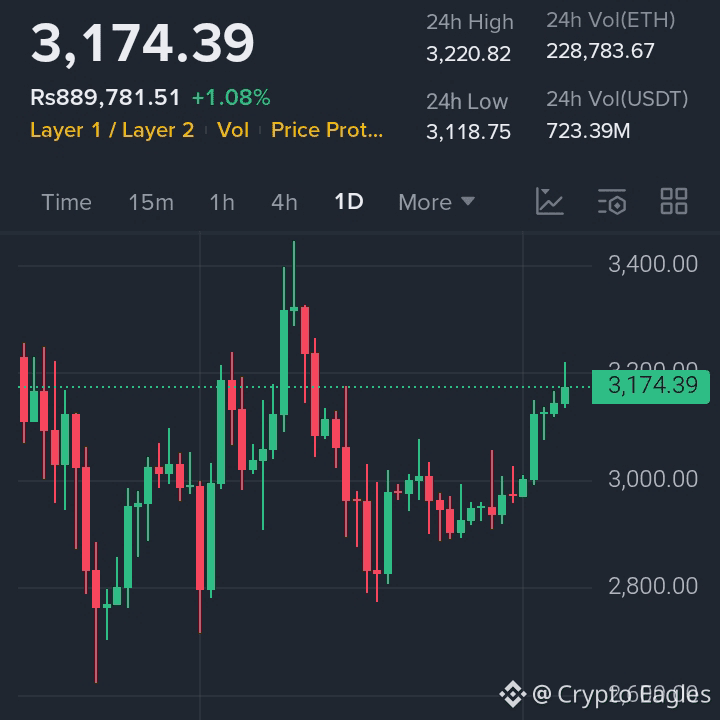
$ETH Recovery Momentum Building
Entry Zone: 3,080 – 3,140
Bullish Above: 3,180
TP1: 3,280
TP2: 3,380
TP3: 3,520
SL: 2,980
#币安HODLer空投BREV #BinanceHODLerBREV #ETHWhaleWatch
$ETH Recovery Momentum Building
Entry Zone: 3,080 – 3,140
Bullish Above: 3,180
TP1: 3,280
TP2: 3,380
TP3: 3,520
SL: 2,980
#币安HODLer空投BREV #BinanceHODLerBREV #ETHWhaleWatch
Entry Zone: 3,080 – 3,140
Bullish Above: 3,180
TP1: 3,280
TP2: 3,380
TP3: 3,520
SL: 2,980
#币安HODLer空投BREV #BinanceHODLerBREV #ETHWhaleWatch
6
4.2k

·
--
ເບິ່ງການແປ
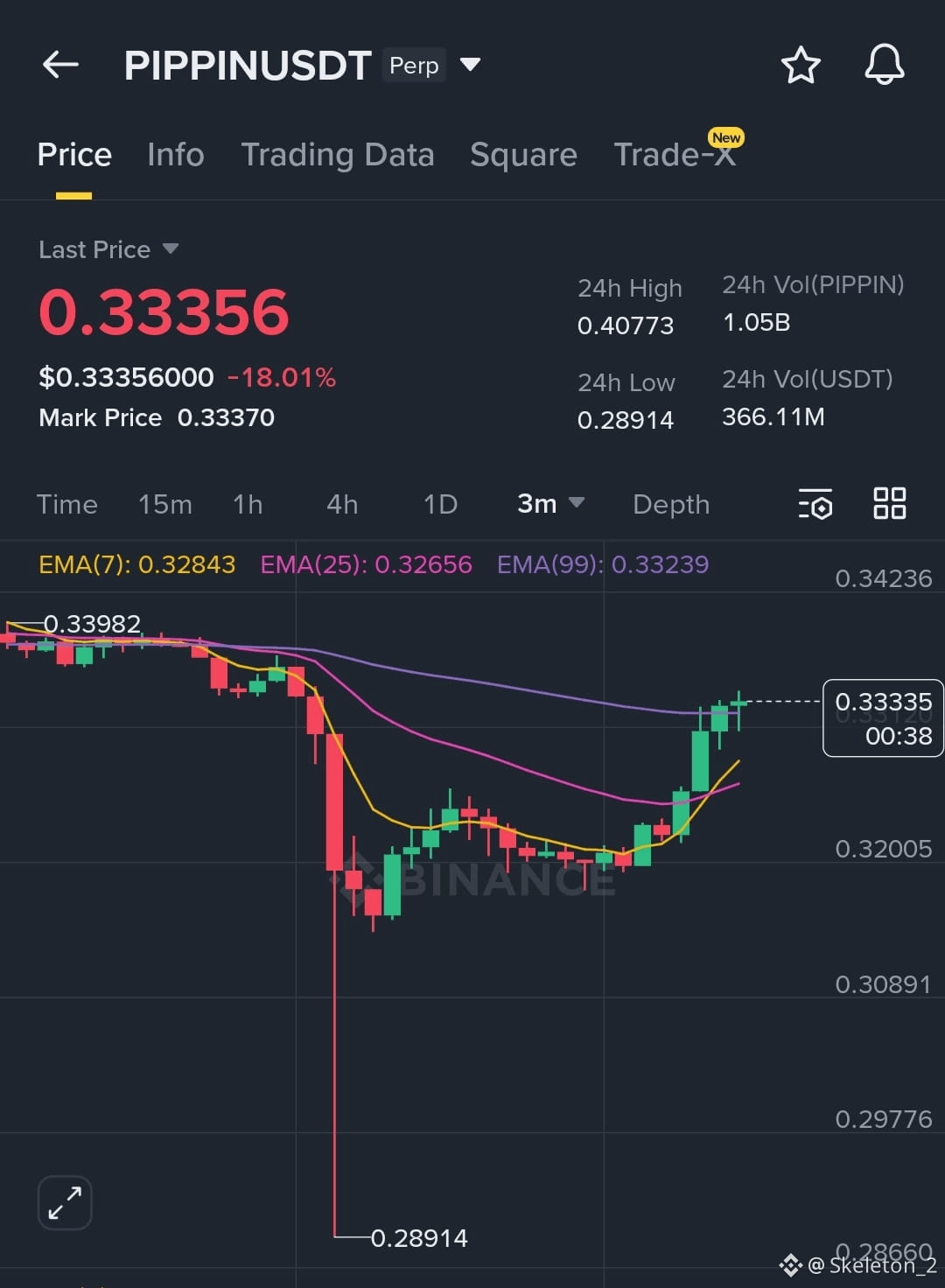
$PIPPIN There was a flush wick and an immediate recovery again, so pushing $PIPPIN down is actually very difficult.
Such a Mysterious Coin ever,,,, No analysis work here dude,,,, Such a Unpredictable One,,, 😅😅 Also a manipulation one,,,,
Now What's next? either Above 0.42$ neither we can see Another flash wick near 0.245 or 0.235$
Let's see How it react Next,,,, But for me I'm bullish from here,,,, No more bearish Continuation,,,,
#WriteToEarnUpgrade
#ETHWhaleWatch
#CPIWatch
#CPIWatch
$PIPPIN There was a flush wick and an immediate recovery again, so pushing $PIPPIN down is actually very difficult.
Such a Mysterious Coin ever,,,, No analysis work here dude,,,, Such a Unpredictable One,,, 😅😅 Also a manipulation one,,,,
Now What's next? either Above 0.42$ neither we can see Another flash wick near 0.245 or 0.235$
Let's see How it react Next,,,, But for me I'm bullish from here,,,, No more bearish Continuation,,,,
#WriteToEarnUpgrade
#ETHWhaleWatch
#CPIWatch
#CPIWatch
Such a Mysterious Coin ever,,,, No analysis work here dude,,,, Such a Unpredictable One,,, 😅😅 Also a manipulation one,,,,
Now What's next? either Above 0.42$ neither we can see Another flash wick near 0.245 or 0.235$
Let's see How it react Next,,,, But for me I'm bullish from here,,,, No more bearish Continuation,,,,
#WriteToEarnUpgrade
#ETHWhaleWatch
#CPIWatch
#CPIWatch
12
2
5
5.9k

·
--
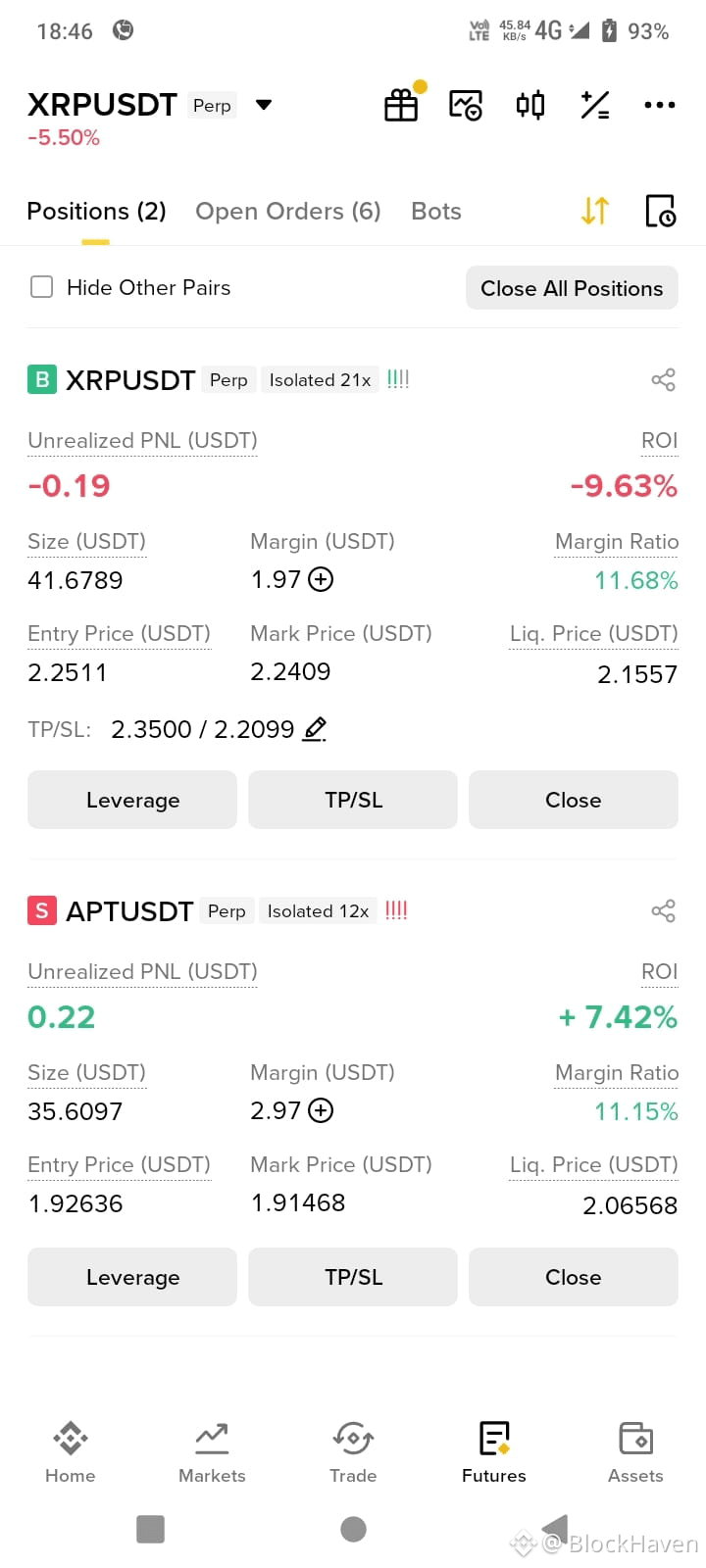
ຂ້ອຍໄດ້ວາງ $APT and $XRP ການຄ້າ ແລະການຄ້າທັງສອງກຳລັງແລ່ນຢູ່ຕອນນີ້' ພົບກັນ #ZTCBinanceTGE #ETHWhaleWatch
ຂ້ອຍໄດ້ວາງ $APT and $XRP ການຄ້າ ແລະການຄ້າທັງສອງກຳລັງແລ່ນຢູ່ຕອນນີ້' ພົບກັນ #ZTCBinanceTGE #ETHWhaleWatch
118

·
--

ບົດຄວາມ
Mae’r ETF Bitcoin a Ethereum yn chwalu recordiau: 2 000 biliwn o ddoleri mewn cyfaint cronnusCafodd ETFiau sbot Bitcoin eu cymeradwyo yn yr Unol Daleithiau ym mis Ionawr 2024. Ers hynny, bu llwyddiant mawr iddynt gyda buddsoddwyr. Ym mis Hydref 2025, dyma ETFiau ETH gael eu cymeradwyo gan y SEC. Gyda’i gilydd, mae’r cronfeydd hyn newydd gyrraedd record newydd, gyda chyfaint cronnus o fwy na 2 000 biliwn.
Mae’r ETF Bitcoin a Ethereum yn rhagori ar 2 000 biliwn o ddoleri mewn cyfaint
Yn ôl y data a rennir gan TheBlock, felly mae’r ETF BTC ac ETH wedi cofnodi cyfaint cronnus o 2 000 biliwn o ddoleri ers eu lansio. Ac ar ôl blwyddyn 2025 hynod gadarnhaol, mae 2026 yn ymddangos ei bod yn dechrau ar yr un sail.
Mae’r ETF Bitcoin a Ethereum yn chwalu recordiau: 2 000 biliwn o ddoleri mewn cyfaint cronnus
Cafodd ETFiau sbot Bitcoin eu cymeradwyo yn yr Unol Daleithiau ym mis Ionawr 2024. Ers hynny, bu llwyddiant mawr iddynt gyda buddsoddwyr. Ym mis Hydref 2025, dyma ETFiau ETH gael eu cymeradwyo gan y SEC. Gyda’i gilydd, mae’r cronfeydd hyn newydd gyrraedd record newydd, gyda chyfaint cronnus o fwy na 2 000 biliwn.
Mae’r ETF Bitcoin a Ethereum yn rhagori ar 2 000 biliwn o ddoleri mewn cyfaint
Yn ôl y data a rennir gan TheBlock, felly mae’r ETF BTC ac ETH wedi cofnodi cyfaint cronnus o 2 000 biliwn o ddoleri ers eu lansio. Ac ar ôl blwyddyn 2025 hynod gadarnhaol, mae 2026 yn ymddangos ei bod yn dechrau ar yr un sail.
Mae’r ETF Bitcoin a Ethereum yn rhagori ar 2 000 biliwn o ddoleri mewn cyfaint
Yn ôl y data a rennir gan TheBlock, felly mae’r ETF BTC ac ETH wedi cofnodi cyfaint cronnus o 2 000 biliwn o ddoleri ers eu lansio. Ac ar ôl blwyddyn 2025 hynod gadarnhaol, mae 2026 yn ymddangos ei bod yn dechrau ar yr un sail.
704
326
65
704

·
--
ສັນຍານກະທິງ
2
2
112
ເຂົ້າສູ່ລະບົບເພື່ອສຳຫຼວດເນື້ອຫາເພີ່ມເຕີມ
ເຂົ້າຮ່ວມກຸ່ມຜູ້ໃຊ້ຄຣິບໂຕທົ່ວໂລກໃນ Binance Square.
⚡️ ໄດ້ຮັບຂໍ້ມູນຫຼ້າສຸດ ແລະ ທີ່ມີປະໂຫຍດກ່ຽວກັບຄຣິບໂຕ.
💬 ໄດ້ຮັບຄວາມໄວ້ວາງໃຈຈາກຕະຫຼາດແລກປ່ຽນຄຣິບໂຕທີ່ໃຫຍ່ທີ່ສຸດໃນໂລກ.
👍 ຄົ້ນຫາຂໍ້ມູນເຊີງເລິກທີ່ແທ້ຈາກນັກສ້າງທີ່ໄດ້ຮັບການຢືນຢັນ.
ອີເມວ / ເບີໂທລະສັບ
ຫົວຂໍ້ທີ່ກໍາລັງນິຍົມ
1
#CardanoAddedToX402KitForADAPayments
1,630 views
144 ກຳລັງສົນທະນາ
2
#XRPRises8%
10,011 views
481 ກຳລັງສົນທະນາ
3
#AMDHits$1TrillionMarketCap
227 views
23 ກຳລັງສົນທະນາ
4
#BitcoinSpotETFs$999MNetInflow
650 views
39 ກຳລັງສົນທະນາ
5
#AppleGoogleSeekStablecoinTokenizedDepositTalent
6,549 views
360 ກຳລັງສົນທະນາ
6
#NvidiaToBuyAnother$1.5BSBEnergySharesPreIPO
1,284 views
32 ກຳລັງສົນທະນາ
7
#AgoraGetsPreliminaryOCCApprovalForTrustBank
3,937 views
178 ກຳລັງສົນທະນາ
8
#NEARRisesNearly80%InAWeek
74,036 views
1,332 ກຳລັງສົນທະນາ
9
#MultiversXPlansHardForkRecovery
58,222 views
1,006 ກຳລັງສົນທະນາ
10
#CircleLaunchesInstitutionalBTCBackedBorrowing
50,903 views
988 ກຳລັງສົນທະນາ