
#createrdata
createrdata
20 views
3 ກຳລັງສົນທະນາ
ມາແຮງ
ຫຼ້າສຸດ

·
--
ສັນຍານກະທິງ
ເບິ່ງການແປ
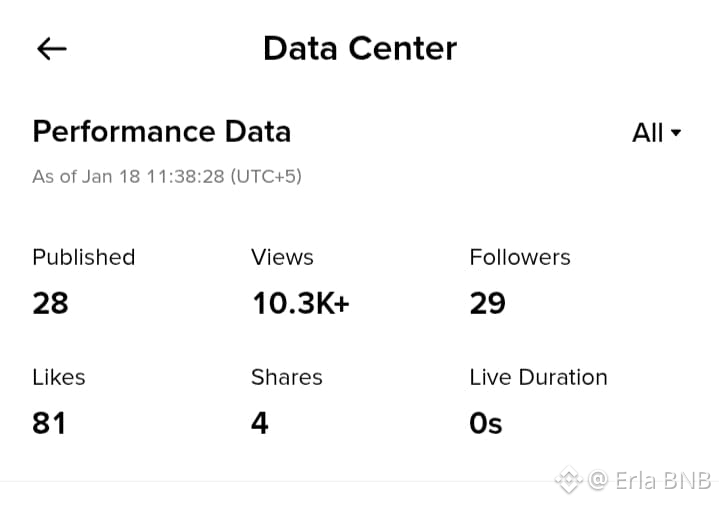
To view post-level analytics on Binance Square, such as views, likes, shares, and engagement for individual posts, navigate through your profile's Creator Center. This provides detailed breakdowns beyond overall stats. Use the app or web platform for the clearest access.
App Steps:
Open Binance Square in the app, tap your profile icon, and enter the Creator Center or Dashboard.Select Data Center or Analytics, then choose a specific post from your published list.View metrics like post views, likes, shares, comments, and live duration directly under that post; apply time filters if available.
Additional TipsPost-level data updates periodically; check frequently for trends.For deeper insights, export data if supported or review Creator Tools for advanced filters.
#Squredata #Binanceaqure #binanceSqurefamily #MarketRebound #createrdata
To view post-level analytics on Binance Square, such as views, likes, shares, and engagement for individual posts, navigate through your profile's Creator Center. This provides detailed breakdowns beyond overall stats. Use the app or web platform for the clearest access.
App Steps:
Open Binance Square in the app, tap your profile icon, and enter the Creator Center or Dashboard.Select Data Center or Analytics, then choose a specific post from your published list.View metrics like post views, likes, shares, comments, and live duration directly under that post; apply time filters if available.
Additional TipsPost-level data updates periodically; check frequently for trends.For deeper insights, export data if supported or review Creator Tools for advanced filters.
#Squredata #Binanceaqure #binanceSqurefamily #MarketRebound #createrdata
App Steps:
Open Binance Square in the app, tap your profile icon, and enter the Creator Center or Dashboard.Select Data Center or Analytics, then choose a specific post from your published list.View metrics like post views, likes, shares, comments, and live duration directly under that post; apply time filters if available.
Additional TipsPost-level data updates periodically; check frequently for trends.For deeper insights, export data if supported or review Creator Tools for advanced filters.
#Squredata #Binanceaqure #binanceSqurefamily #MarketRebound #createrdata
17
42
ເຂົ້າສູ່ລະບົບເພື່ອສຳຫຼວດເນື້ອຫາເພີ່ມເຕີມ
ເຂົ້າຮ່ວມກຸ່ມຜູ້ໃຊ້ຄຣິບໂຕທົ່ວໂລກໃນ Binance Square.
⚡️ ໄດ້ຮັບຂໍ້ມູນຫຼ້າສຸດ ແລະ ທີ່ມີປະໂຫຍດກ່ຽວກັບຄຣິບໂຕ.
💬 ໄດ້ຮັບຄວາມໄວ້ວາງໃຈຈາກຕະຫຼາດແລກປ່ຽນຄຣິບໂຕທີ່ໃຫຍ່ທີ່ສຸດໃນໂລກ.
👍 ຄົ້ນຫາຂໍ້ມູນເຊີງເລິກທີ່ແທ້ຈາກນັກສ້າງທີ່ໄດ້ຮັບການຢືນຢັນ.
ອີເມວ / ເບີໂທລະສັບ
ຫົວຂໍ້ທີ່ກໍາລັງນິຍົມ
1
#NEARSurges26%Past$3.45
4,208 views
56 ກຳລັງສົນທະນາ
2
#BOJHikesRatesTo31YearHigh
10,719 views
369 ກຳລັງສົນທະນາ
3
#ChainlinkPowersBottomlinePaymentPlatform
14,627 views
410 ກຳລັງສົນທະນາ
4
#DtcpayCompletes$25MSeriesA
197 views
15 ກຳລັງສົນທະນາ
5
#InjectiveLaunchesINJOnSolana
269 views
32 ກຳລັງສົນທະນາ
6
#StellarActivatesProtocol28At211TPS
23,225 views
533 ກຳລັງສົນທະນາ
7
#SECGrantsInnovationExemptionForTokenizedStocks
19,736 views
433 ກຳລັງສົນທະນາ
8
#XRPGains3%AsRippleAddsMPPSupport
17,284 views
335 ກຳລັງສົນທະນາ
9
#SPGlobalToAcquireOpenZeppelin
9,660 views
214 ກຳລັງສົນທະນາ
10
#WorldLaunchesSelfCustodyAppIn150Countries
5,442 views
119 ກຳລັງສົນທະນາ