


Getting rand out of Binance and into a South African bank account comes down to two routes. You can sell your crypto for ZAR on Binance and send it to your bank by EFT, or you can sell USDT on P2P to another user who sends rand straight to your account. Both end with money in your bank. They differ on speed, cost, who you deal with and what can go wrong. This guide puts the two side by side, then covers what to do when a cash-out stalls.
👉 Create a Binance account with code GETREWARD
Menus, limits and fees on Binance change, so the screen in your own account is the final word on what is available to you.
The two routes at a glance
Bank route: Sell crypto for ZAR inside Binance, then withdraw the rand with Bank Transfer (EFT). Binance handles the bank side through its partner Stitch, and you deal with nobody else.
P2P route: Put up an ad or take a buyer's ad to sell USDT for rand. Binance holds your USDT in escrow, the buyer sends rand from their bank to yours, and you release the coins once the money has landed.
Third option: Send crypto to a South African exchange and sell there. That is a crypto withdrawal from Binance, not a rand cash-out on Binance, so it only gets a short section near the end.
How the bank route works today
The bank route has two steps, and people often stall on the first one without realising it.
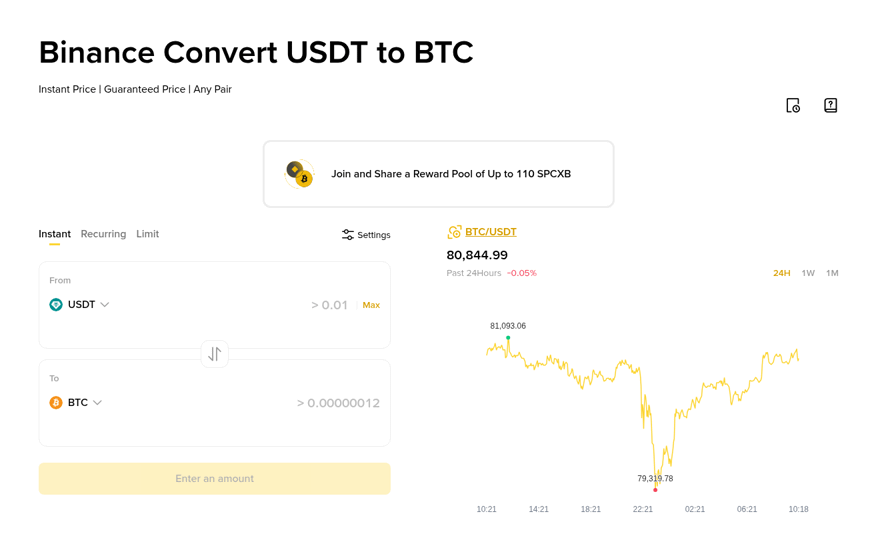
Step one, turn crypto into rand: A rand withdrawal needs a ZAR balance, so the coins have to be sold first. Convert is the quickest way. You pick the coin in the From box and ZAR in the To box, and the screen shows the exact rand amount before you confirm. If ZAR does not appear in the list for your account, sell into USDT first and look again, or check whether a ZAR pair is listed on Spot for your coin.
Step two, send the rand to your bank: Go to Wallet, then Overview, then Withdraw. Pick ZAR and choose Bank Transfer (EFT). The first time, Binance asks you to add bank details, and you can save up to five bank accounts. Enter the amount, read the fee line the form shows before you continue, confirm, and finish the two-factor check.
Three rules decide whether the money arrives:
Same name: The bank account has to be in the same name as your verified Binance account. A partner's or family member's account will be refused.
Banking hours: An order sent outside banking hours is processed on the next business day, so a Friday night request usually moves on Monday.
Verified account: If identity verification is not finished, the form stops you and asks you to complete it before the withdrawal can go ahead.
The Withdraw button sits on the wallet overview, next to Deposit and Transfer.

The sell step looks like the Convert screen below. The capture shows USDT to BTC. For a cash-out you would put your coin in the From box and ZAR in the To box.
How the P2P route works today
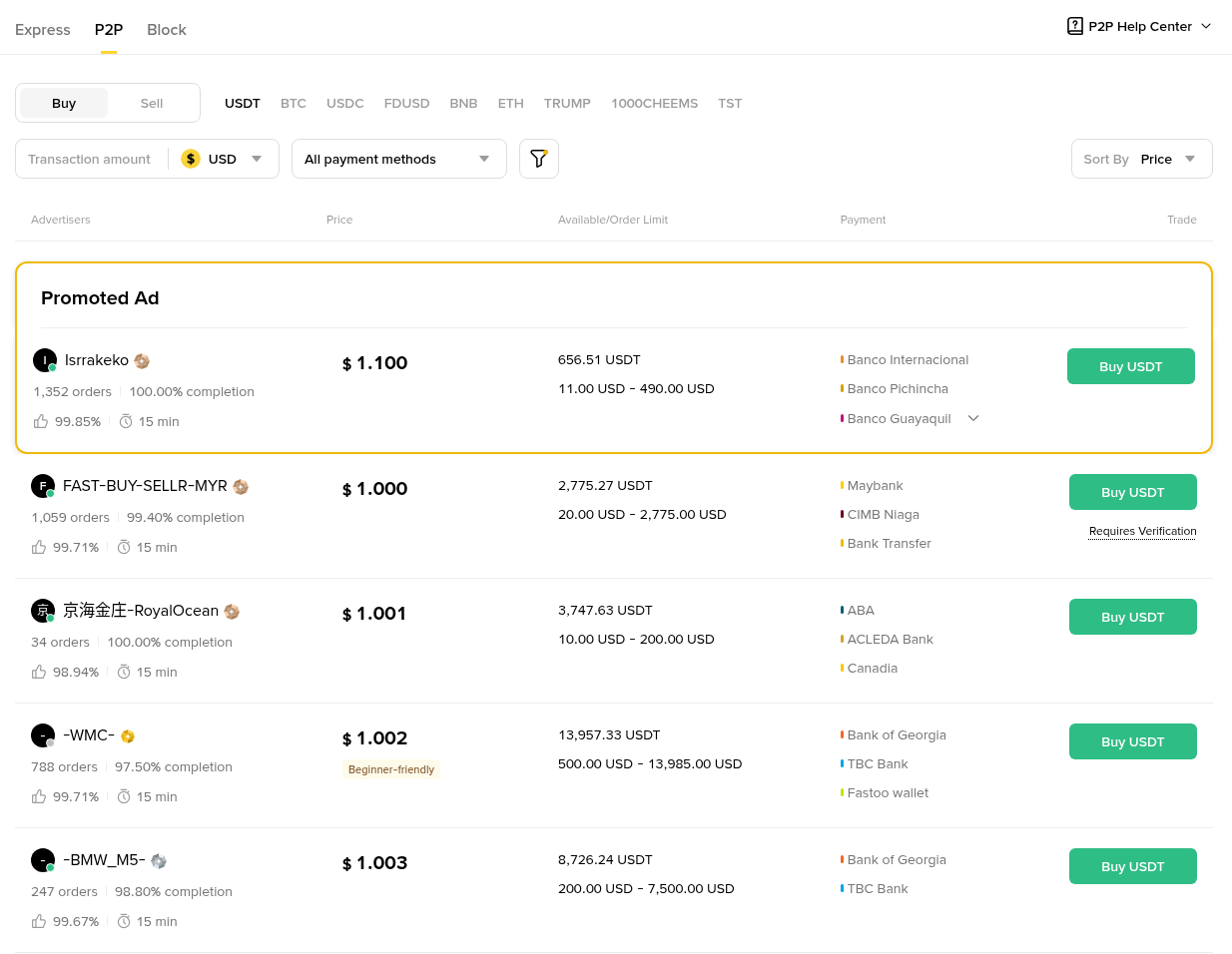
On P2P you are selling USDT to a person, not to Binance. Choose the Sell tab, set the currency to ZAR and pick USDT. Each ad shows the buyer's price, the amount they want, their order limits, the bank methods they accept and their track record. When you open an order, your USDT is locked in escrow. The buyer then sends rand to the bank account you listed, and you release the USDT once you can see the money in your own banking app.
A sale on P2P runs in five moves:
Pick the ad: Look at the completion rate and order count as well as the price. A buyer with a few hundred finished orders and a high completion rate is a safer counterparty than a brand new profile with a slightly higher rate.
Check the limits: The amount you want to sell has to sit inside the ad's minimum and maximum, or the order will not open.
Open the order and wait: The timer starts. The buyer has a set number of minutes to send the rand and mark the order as done.
Check your bank, not the chat: Log in to your bank app and confirm the full amount has arrived, from an account in the buyer's verified name. A screenshot, an SMS or a bank notification forwarded in the chat is not proof.
Release the USDT: Only now do you tap Release. Once released, Binance cannot pull the coins back for you.
Here is the P2P market layout. This capture is set to USD, but a ZAR page uses the same columns, with South African banks in the method column.
Bank route vs P2P route side by side
Here is how the two compare on the points that matter for a normal cash-out.
Who you deal with: On the bank route only Binance and its bank partner. On P2P a private buyer whose money has to clear into your account before you release.
Price: The bank route uses the Convert quote or the Spot price, plus any withdrawal fee shown on the form. On P2P the buyer sets the rate in the ad, and it can be above or below the Spot price depending on demand that day.
Speed: An EFT sent in banking hours usually lands the same or next business day. P2P can finish in minutes if the buyer moves quickly and the banks clear instantly, but it can also stall if the buyer is slow.
Weekends and holidays: The bank route waits for the next business day. P2P buyers trade at all hours, though bank clearing on their side can still be slow.
Fraud risk: Low on the bank route, since there is no stranger involved. On P2P the main risk is releasing USDT for money that never arrived or that gets reversed later.
Paper trail: The bank route leaves a clean line from Binance to your bank under one reference. A P2P sale lands as a transfer from a private person, which your bank may ask about.
Size: Large amounts usually go more smoothly by bank, because a single P2P buyer's limit may be lower than the amount you want to sell, and splitting a sale across many strangers means many separate risks.
A worked example helps. Say you hold 1,000 USDT and the rand price is around R18 per USDT. On the bank route, Convert shows you a quote close to R18,000 before you confirm, and the EFT form shows any fee before you send. On P2P a buyer's ad might offer R17.90 or R18.20 per USDT, so the same sale could bring R17,900 or R18,200. These numbers are an illustration of how to compare, not a quote. Put the two final rand figures next to each other before you choose.
Which route suits which situation
First cash-out ever: Use the bank route. It has the fewest moving parts and no stranger to judge.
A large amount: Use the bank route, or split P2P sales across buyers with long, clean track records.
Weekend and you need rand today: P2P can be faster, as long as you only release after the rand shows in your own bank app.
ZAR does not show for you in Withdraw: P2P may still be open, or you can move coins to a South African platform that lists the coin.
What to do if a cash out stalls
If ZAR is missing from the withdraw list: Confirm your account is verified and that South Africa is the country on your profile. Fiat options depend on the country and on what Binance supports at the moment, so look at the current fiat list in the app before assuming it is a fault.
If the EFT is still pending after two business days: Open View History in the withdrawal section and check the status. If it shows completed, ask your bank to trace the incoming transfer using the date and amount. If it still shows processing, contact Binance support from inside the account with the order details.
If the withdrawal is rejected: The usual reason is a name mismatch. The bank account must carry exactly the name on your Binance profile. Fix the saved bank details and send again.
If a P2P buyer marks the order as done but nothing arrived: Do not release. Wait for the bank to show the money, and if the timer runs out, open an appeal in the order so the Binance P2P team can review it. Keep every message inside the order chat.
If the rand came from a name that does not match the buyer: Do not release. Third-party transfers are a common setup for reversals. Appeal the order and ask for a refund to the original sender through the appeal process.
If your bank asks about the deposits: South African banks have to ask about the source of funds under FICA, and P2P rand coming in from several people is the kind of pattern that triggers questions. Have your Binance order history and statements ready. Our bank statement troubleshooting for P2P and deposits goes through what banks usually want to see and how to pull it from Binance.
Sending crypto to a local exchange instead
Some people withdraw USDT or BTC to a South African exchange and sell there. Since 30 April 2025, FIC Directive 9 applies the travel rule to crypto transfers in, out of and within South Africa. Crypto platforms have to collect and pass on the sender's and the recipient's names with the transfer, and that covers amounts under R5,000 too, with lighter checks below that line. In practice, expect Binance and the receiving platform to ask who owns the destination, and make sure the name on both accounts is yours. Check the network carefully before you send, because a transfer on the wrong network can be lost.
Rules to keep in mind in South Africa
The FSCA declared crypto assets a financial product under FAIS in October 2022, and crypto platforms that serve South Africans have to deal with that framework. Binance's own legal page says Futures and Options in South Africa are offered by Brickhouse Trading Ltd as a juristic representative of FiveWest OTC Desk (Pty) Ltd, FSP 51619. That arrangement is about derivatives. The wider rules for crypto platforms in South Africa are still being filled in, so read the terms in your account and decide how much you keep on any one platform.
On tax, moving rand from Binance to your bank is not itself a taxable event. The sale of crypto for rand, or a swap of one coin for another, is the disposal SARS looks at. Keep the trade date, the rand value and the fees for each sale. Our guide to South Africa SARS tax mistakes to avoid covers the records and deadlines in detail. This is not tax advice, and a registered tax practitioner can look at your own figures.
A quick routine for every cash out
Before selling: Check the rand figure in Convert or on Spot, and compare it with two or three P2P ads for the same amount.
Bank route: Same-name bank account saved, request sent in banking hours, fee line read, reference kept.
P2P route: Buyer with a long record, money confirmed in your own bank app, sender name matches, then release.
Afterwards: Save the order history and the bank entry together for SARS.
If you are opening an account for this, see the current Binance welcome bonus rules before you deposit, and check which tasks apply in South Africa.
👉 Code for the sign-up form: GETREWARD
This article is for information only and is not financial or tax advice. Crypto prices move, P2P rates are set by individual users, and Binance fees, limits and fiat options can change.
FAQ
Can I withdraw ZAR from Binance to Capitec or FNB?
Bank Transfer (EFT) sends rand to a South African bank account in your own name. Add the account in the withdraw form and check the fee line before you confirm.
How long does a ZAR withdrawal take?
An EFT sent in banking hours usually arrives within one to two business days. Requests outside banking hours start on the next business day.
Is P2P cheaper than the bank route?
Sometimes. It depends on the rate in the ad compared with the Convert quote plus the withdrawal fee. Compare the final rand amounts each time.
Is a rand withdrawal to my bank taxed?
The withdrawal itself is not the taxable event. The earlier sale of crypto for rand is the disposal you report to SARS.
Disclosure: the sign-up link at the top contains my own code, GETREWARD. The rand figures above are worked examples, not quotes or forecasts.