



Deploying a smart contract on Ethereum means uploading compiled code to the blockchain network via a signed transaction. Once the network confirms the transaction, the contract receives a unique address, becomes globally accessible, and executes exactly as written.
Because Ethereum transactions are permanent and code cannot simply be rewritten after deployment, learning the process safely on a test network is critical. This guide walks through writing, compiling, deploying, and verifying a smart contract using Remix IDE and the Sepolia testnet.
What You Need Before Starting
To follow this walkthrough without spending real money, prepare three things:
A Web3 Wallet: Install a browser extension wallet like MetaMask.
A Separate Test Account: Create a fresh account inside your wallet dedicated exclusively to development and testing. Never mix real funds with testing keys.
Testnet ETH: Ethereum uses test networks (testnets) that mirror mainnet conditions using free test tokens. You will need a small amount of Sepolia ETH from an online faucet.
Step 1: Write and Compile Your Smart Contract
The fastest way to deploy your first contract is through Remix IDE, an open-source, web-based development environment maintained by the Ethereum community.
1. Open Remix and Create a File
Navigate to remix.ethereum.org. In the left sidebar under the File Explorer, locate the contracts folder and create a new file named Storage.sol.
2. Add Your Solidity Code
Paste a simple, self-contained contract into the editor:
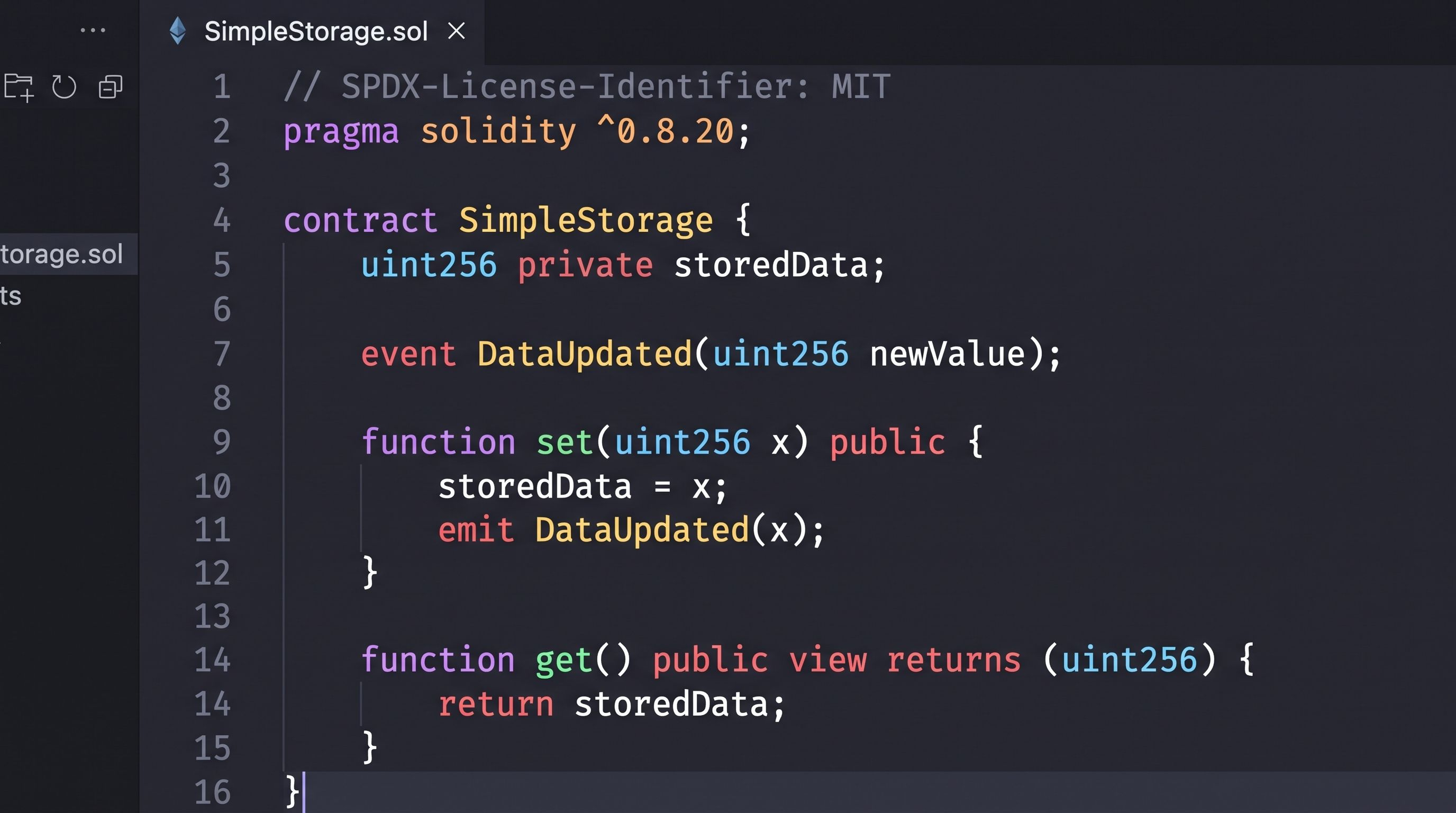
SPDX License Identifier: States the open-source license governing the code.
pragma solidity: Specifies the compiler version required.
get and set functions: Allow users to update and read the stored integer.
3. Compile the Code
Click the Solidity Compiler tab on the left sidebar (the icon resembling an Ethereum diamond with compiler braces).
Select a compiler version matching your pragma line (e.g., 0.8.20).
Click Compile Storage.sol.
A green checkmark will appear on the icon. The compiler translates human-readable Solidity into two outputs:
Bytecode: The raw hex instructions executed by the Ethereum Virtual Machine (EVM).
Application Binary Interface (ABI): A JSON file defining how external applications (like web front ends) talk to your contract.
Step 2: Set Up Your Test Environment
Mainnet transactions require real Ether ($ETH ), and gas fees can fluctuate significantly. Always test contracts on a public testnet before considering production deployment.
1. Switch MetaMask to the Sepolia Testnet
Open MetaMask and click the network selector in the top-left corner.
Enable the option to Show test networks.
Select Sepolia.
2. Acquire Sepolia Testnet ETH
Smart contract deployment requires gas, even on a testnet. To get free test tokens:
Use a public Sepolia faucet (such as the Google Cloud Web3 Faucet or the Alchemy Sepolia Faucet).
Enter your wallet public address and complete the request.
Verify that your Sepolia balance reflects the received test ETH before moving forward.
Step 3: Deploy the Contract Using Remix
Now that your contract is compiled and your wallet holds testnet funds, you can broadcast the deployment transaction.
1. Connect Remix to MetaMask
In Remix, click the Deploy & Run Transactions tab on the left sidebar.
Under the ENVIRONMENT dropdown, choose Injected Provider - MetaMask.
MetaMask will prompt you to connect. Select your testing account and approve the connection.
Verify that the network ID matches Sepolia and your account address displays your current testnet balance.
2. Broadcast the Deployment Transaction
Ensure SimpleStorage is selected in the CONTRACT dropdown.
Click the orange Deploy button.
MetaMask will open a transaction prompt showing:
Estimated gas fee (in testnet ETH).
Total transaction cost.
Click Confirm.
Within a few seconds, the transaction will confirm on the blockchain. The Remix console at the bottom will log a green checkmark, and your contract will appear under the Deployed Contracts section at the bottom of the sidebar.
Step 4: Interact with Your Deployed Contract
Expand your contract instance under Deployed Contracts in Remix:
Blue Buttons (get): Represent read-only (view) functions. Clicking get queries the current state stored on the blockchain without spending gas or sending a transaction.
Orange Buttons (set): Represent state-modifying functions. Enter a number (e.g., 42) into the field next to set and click the button. MetaMask will open, asking you to sign and pay a small gas fee to update the state.
Step 5: Verify the Contract on Etherscan
When you deploy a contract, the block explorer only displays raw, compiled bytecode. Users cannot see what the contract actually does unless you verify and publish the source code.
Copy the address of your newly deployed contract from Remix.
Visit sepolia.etherscan.io and paste the address into the search bar.
Click the Contract tab, then select Verify and Publish.
Configure the verification settings:
Compiler Type: Single file (or standard JSON input).
Compiler Version: The exact version used during compilation (e.g., v0.8.20).
Open Source License Type: MIT.
Click Continue, paste your exact SimpleStorage.sol code into the text box, and complete the submission.
Once verified, a green checkmark will appear next to the Contract tab. Anyone can now read the clean Solidity code, review the ABI, and call Read Contract and Write Contract functions directly through Etherscan.
Moving Beyond Remix: Production Tooling
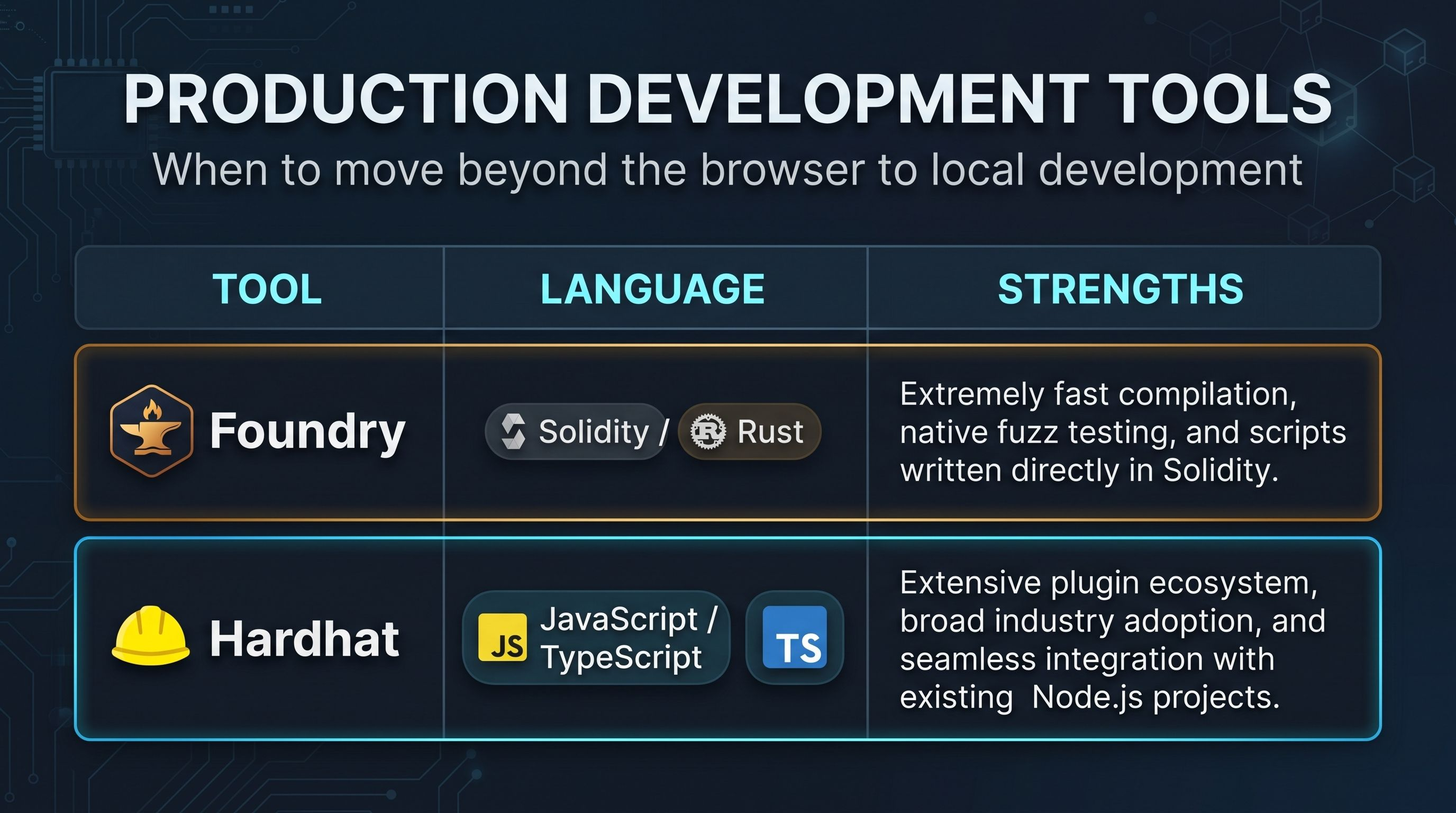
While Remix is ideal for quick prototypes and learning, production-grade applications are built using local command-line frameworks:
Handling Private Keys Securely
When transitioning to CLI tools:
Never hardcode private keys into scripts.
Store keys in .env files and add .env to your .gitignore before committing any code to public repositories.
For mainnet deployments, use hardware wallets (like a Ledger) or keystore password encryption rather than plain-text private keys.
Common Deployment Mistakes
Running Out of Gas: If a deployment fails with an Out of Gas error, check your contract's constructor logic for infinite loops or excessively large arrays.
Constructor Parameter Errors: If your contract requires arguments upon creation (such as an owner address or token name), failing to pass them properly will cause the deployment transaction to revert.
Losing Deployment Addresses: Always record the deployed address returned by the transaction receipt. If you close your browser before saving it, you will need to search your wallet address on a block explorer to find the contract again.
Frequently Asked Questions
How much does it cost to deploy on the Ethereum mainnet?
Mainnet costs depend on two variables: the size of your contract bytecode and prevailing network gas prices (measured in Gwei). A simple contract might cost between $10 and $40, while complex DeFi protocols can cost several hundred dollars during periods of high network congestion. Deployment to testnets is completely free.
Can I edit a smart contract after it is deployed?
No. Smart contracts are immutable by design. If you find a bug after deploying, you must deploy a new contract and migrate your users or data. Advanced projects use upgradeable proxy patterns (such as ERC-1967) to route calls to new logic contracts while preserving state, but the underlying bytecode itself cannot be altered.
Do I need to run a full Ethereum node to deploy?
No. Services provide remote procedure call (RPC) nodes that communicate with the network on your behalf. When you use Remix with MetaMask, MetaMask handles the RPC connection for you automatically.