Full details
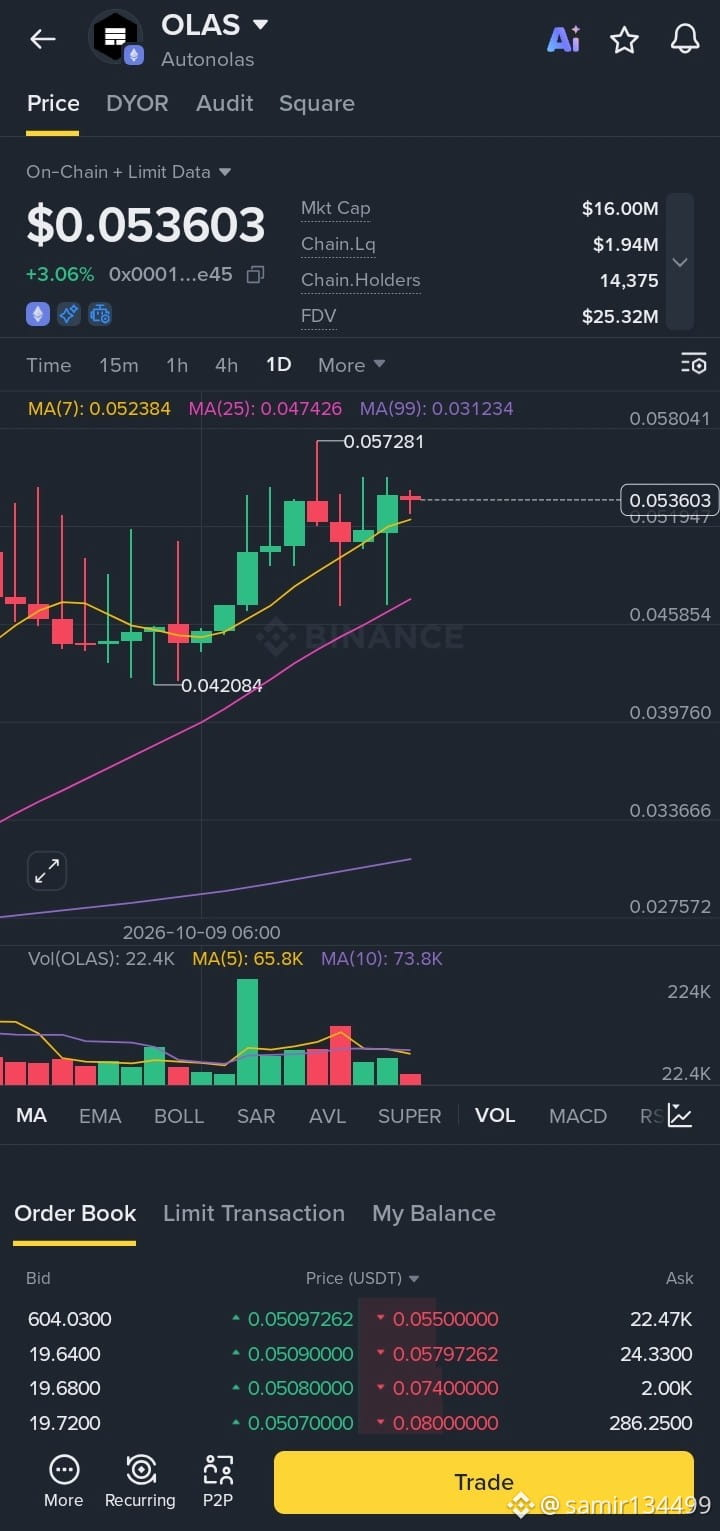
Here are the complete details captured from the trading interface in the image:
JPG
Asset & Overview
Token Name: OLAS / Autonolas
JPG
Contract Address Snippet: 0x0001...e45
JPG
Current Price: $0.053603 (+3.06%)
JPG
Key Metrics
MetricValueMarket Cap
$16.00M
JPG
Chain Liquidity
$1.94M
JPG
Chain Holders
14,375
JPG
FDV (Fully Diluted Valuation)
$25.32M
JPG
Technical Indicators & Price Points
Moving Averages (MA):
MA(7): 0.052384
JPG
MA(25): 0.047426
JPG
MA(99): 0.031234
JPG
Volume Moving Averages:
Vol (OLAS): 22.4K
JPG
MA(5): 65.8K
JPG
MA(10): 73.8K
JPG
Chart High / Low:
High: 0.057281
JPG
Low: 0.042084
JPG
Timeframe Selected: 1D (Daily)
JPG
Visible Date Marker: 2026-10-09 06:00
JPG
Order Book (Top Bids & Asks)
Bids (Buy Orders)
604.0300 @ $0.05097262
JPG
19.6400 @ $0.05090000
JPG
19.6800 @ $0.05080000
JPG
19.7200 @ $0.05070000
JPG
Asks (Sell Orders)
22.47K @ $0.05500000
JPG
24.3300 @ $0.05797262
JPG
2.00K @ $0.07400000
JPG
286.2500 @ $0.08000000
JPG
Shortcut
If you are looking for shortcuts related to the Binance or crypto trading app shown, here are the main interface shortcuts and navigation tools available:
App Interface Shortcuts
Trade: Click the yellow Trade button at the bottom right to execute buy or sell orders instantly.
JPG
Order Book Tabs: Use Order Book, Limit Transaction, or My Balance tabs below the chart to switch between active orders and account balances.
JPG
Indicator Bar: Tap MA, EMA, BOLL, SAR, AVL, SUPER, VOL, MACD, or RSI below the volume chart to toggle technical indicators on/off.
JPG
Timeframes: Switch quickly between 15m, 1h, 4h, 1D, or tap More for additional timeframes.
JPG
Quick Tools (Bottom Left):
More: Access advanced features and options.
JPG
Recurring: Set up automated DCA (Dollar-Cost Averaging) purchases.
JPG
P2P: Access Peer-to-Peer trading directly.
#OLASUSDT $BTC
Here are the complete details captured from the trading interface in the image:
JPG
Asset & Overview
Token Name: OLAS / Autonolas
JPG
Contract Address Snippet: 0x0001...e45
JPG
Current Price: $0.053603 (+3.06%)
JPG
Key Metrics
MetricValueMarket Cap
$16.00M
JPG
Chain Liquidity
$1.94M
JPG
Chain Holders
14,375
JPG
FDV (Fully Diluted Valuation)
$25.32M
JPG
Technical Indicators & Price Points
Moving Averages (MA):
MA(7): 0.052384
JPG
MA(25): 0.047426
JPG
MA(99): 0.031234
JPG
Volume Moving Averages:
Vol (OLAS): 22.4K
JPG
MA(5): 65.8K
JPG
MA(10): 73.8K
JPG
Chart High / Low:
High: 0.057281
JPG
Low: 0.042084
JPG
Timeframe Selected: 1D (Daily)
JPG
Visible Date Marker: 2026-10-09 06:00
JPG
Order Book (Top Bids & Asks)
Bids (Buy Orders)
604.0300 @ $0.05097262
JPG
19.6400 @ $0.05090000
JPG
19.6800 @ $0.05080000
JPG
19.7200 @ $0.05070000
JPG
Asks (Sell Orders)
22.47K @ $0.05500000
JPG
24.3300 @ $0.05797262
JPG
2.00K @ $0.07400000
JPG
286.2500 @ $0.08000000
JPG
Shortcut
If you are looking for shortcuts related to the Binance or crypto trading app shown, here are the main interface shortcuts and navigation tools available:
App Interface Shortcuts
Trade: Click the yellow Trade button at the bottom right to execute buy or sell orders instantly.
JPG
Order Book Tabs: Use Order Book, Limit Transaction, or My Balance tabs below the chart to switch between active orders and account balances.
JPG
Indicator Bar: Tap MA, EMA, BOLL, SAR, AVL, SUPER, VOL, MACD, or RSI below the volume chart to toggle technical indicators on/off.
JPG
Timeframes: Switch quickly between 15m, 1h, 4h, 1D, or tap More for additional timeframes.
JPG
Quick Tools (Bottom Left):
More: Access advanced features and options.
JPG
Recurring: Set up automated DCA (Dollar-Cost Averaging) purchases.
JPG
P2P: Access Peer-to-Peer trading directly.
#OLASUSDT $BTC