
#createrdata
createrdata
閲覧回数 20
3人が討論中
注目
最新

·
--
ブリッシュ
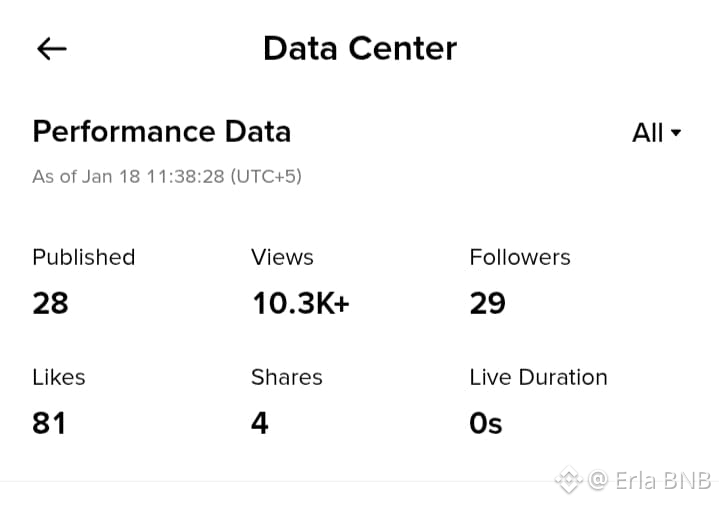
Binance Squareでの投稿レベルの分析(ビュー、いいね、シェア、個々の投稿のエンゲージメント)を表示するには、プロフィールのクリエイターセンターに移動します。これにより、全体の統計を超えた詳細な内訳が提供されます。アプリまたはウェブプラットフォームを使用して、最も明確なアクセスを行ってください。
アプリの手順:
アプリでBinance Squareを開き、プロフィールアイコンをタップして、クリエイターセンターまたはダッシュボードに入ります。データセンターまたは分析を選択し、公開リストから特定の投稿を選択します。その投稿の下に、投稿のビュー、いいね、シェア、コメント、ライブの期間などのメトリックを直接表示します。利用可能な場合は時間フィルターを適用してください。
追加のヒント投稿レベルのデータは定期的に更新されます。トレンドを確認するために頻繁にチェックしてください。より深い洞察を得るために、サポートされている場合はデータをエクスポートするか、詳細なフィルター用のクリエイターツールを確認してください。
#Squredata #Binanceaqure #binanceSqurefamily #MarketRebound #createrdata
Binance Squareでの投稿レベルの分析(ビュー、いいね、シェア、個々の投稿のエンゲージメント)を表示するには、プロフィールのクリエイターセンターに移動します。これにより、全体の統計を超えた詳細な内訳が提供されます。アプリまたはウェブプラットフォームを使用して、最も明確なアクセスを行ってください。
アプリの手順:
アプリでBinance Squareを開き、プロフィールアイコンをタップして、クリエイターセンターまたはダッシュボードに入ります。データセンターまたは分析を選択し、公開リストから特定の投稿を選択します。その投稿の下に、投稿のビュー、いいね、シェア、コメント、ライブの期間などのメトリックを直接表示します。利用可能な場合は時間フィルターを適用してください。
追加のヒント投稿レベルのデータは定期的に更新されます。トレンドを確認するために頻繁にチェックしてください。より深い洞察を得るために、サポートされている場合はデータをエクスポートするか、詳細なフィルター用のクリエイターツールを確認してください。
#Squredata #Binanceaqure #binanceSqurefamily #MarketRebound #createrdata
アプリの手順:
アプリでBinance Squareを開き、プロフィールアイコンをタップして、クリエイターセンターまたはダッシュボードに入ります。データセンターまたは分析を選択し、公開リストから特定の投稿を選択します。その投稿の下に、投稿のビュー、いいね、シェア、コメント、ライブの期間などのメトリックを直接表示します。利用可能な場合は時間フィルターを適用してください。
追加のヒント投稿レベルのデータは定期的に更新されます。トレンドを確認するために頻繁にチェックしてください。より深い洞察を得るために、サポートされている場合はデータをエクスポートするか、詳細なフィルター用のクリエイターツールを確認してください。
#Squredata #Binanceaqure #binanceSqurefamily #MarketRebound #createrdata
17
42
ログインして、さらにコンテンツを読む
厳選トピックで世界の暗号資産トレーダーの仲間入り
⚡️ 暗号資産に関する最新かつ有益な情報が見つかります。
💬 世界最大の暗号資産取引所から信頼されています。
👍 認証を受けたクリエイターから、有益なインサイトを得られます。
メール / 電話番号
トレンドトピック
1
#HKMAPlansWholesaleCBDCByYearEnd
閲覧回数 509
62人が討論中
2
#NEARSurges26%Past$3.45
閲覧回数 5,880
67人が討論中
3
#BOJHikesRatesTo31YearHigh
閲覧回数 14,665
457人が討論中
4
#ChainlinkPowersBottomlinePaymentPlatform
閲覧回数 18,381
477人が討論中
5
#DtcpayCompletes$25MSeriesA
閲覧回数 352
21人が討論中
6
#InjectiveLaunchesINJOnSolana
閲覧回数 1,478
78人が討論中
7
#StellarActivatesProtocol28At211TPS
閲覧回数 25,836
596人が討論中
8
#SECGrantsInnovationExemptionForTokenizedStocks
閲覧回数 21,688
462人が討論中
9
#XRPGains3%AsRippleAddsMPPSupport
閲覧回数 19,626
360人が討論中
10
#SPGlobalToAcquireOpenZeppelin
閲覧回数 10,884
225人が討論中