

A Binance Pix withdrawal in Brazil works in two moves. First you sell your crypto for BRL inside Binance, then you send those reais by Bank Transfer (PIX) to a bank account held in your own name and CPF. Binance processes BRL withdrawals on business days from 07:00 to 17:00, and its BRL FAQ says execution can take up to 2 business days. The fee and your limit for the order appear on the withdrawal screen before you confirm.
👉 Open a Binance account with GETREWARD
Below is a checklist in three parts: before you sell, while you withdraw, and after the reais land. One worked example runs through all of it, 1,000 USDT turned into BRL and sent to a Nubank account, so you can see where each number comes from.
What has to be true before the first Pix withdrawal?
Most rejected cash outs fail on the account details, not on the market. Tick these off before you sell anything.
Verified account: The BRL channel is open to individual and corporate users who finished identity verification. If BRL or Bank Transfer (PIX) doesn't show up in your withdraw menu, finish that first.
Same holder: The receiving bank account must belong to the same person as the Binance account. Your partner's account or a parent's account will be refused.
No joint accounts: Binance's BRL FAQ says joint accounts are not accepted, even if you are one of the holders.
No MEI or EIRELI: Individual company accounts are excluded too. Owning the company yourself doesn't change that.
Correct account type: You must pick corrente or poupança correctly. The FAQ names a wrong account type as one reason a withdrawal fails.
Your CPF at hand: The form asks for bank name, agência, account number, account type and CPF.
Security set up: The website flow asks for your security checks before the order goes through, so have 2FA working.
Since the October 2026 migration, Brazilian residents hold an individual account for reais at Binance Brasil Corretora de Câmbio e Valores Mobiliários S.A., CNPJ 68.757.681/0001-70, the former Sim;paul. Binance says the app and website work the same as before, and for now direct deposits and withdrawals in reais are allowed only between accounts of the same holder. A Pix area for sending to and receiving from other people is announced for later, with notice in advance.
How do you turn crypto into BRL first?
Pix only moves reais, so the crypto has to become BRL in your Spot wallet before the withdraw button can help. You have two common routes.
Convert: Pick the coin you hold in the From field and BRL in the To field. You get a quote that holds for a few seconds. The rate already includes the cost, so compare the BRL figure you receive with the market price before you accept.
Spot market: Sell on a BRL pair such as USDT/BRL. A limit order lets you choose your price, and the trading fee shows on the order panel and in your trade history afterwards.
Worked example, part one: Ana holds 1,000 USDT. Say the USDT/BRL market sits around R$5.40, a round number used only to keep the sums easy. She places a limit sell at R$5.40 and it fills, which gives about R$5,400 before the trading fee. The fee is shown in BRL in her trade history, so she notes the real figure, for example R$5,395 left in Spot.
Two habits help here. Sell in a single order where you can, because each fill shows as a separate line in history. And if you sell in several pieces over a month, keep a running total in reais, because the monthly total matters for tax.
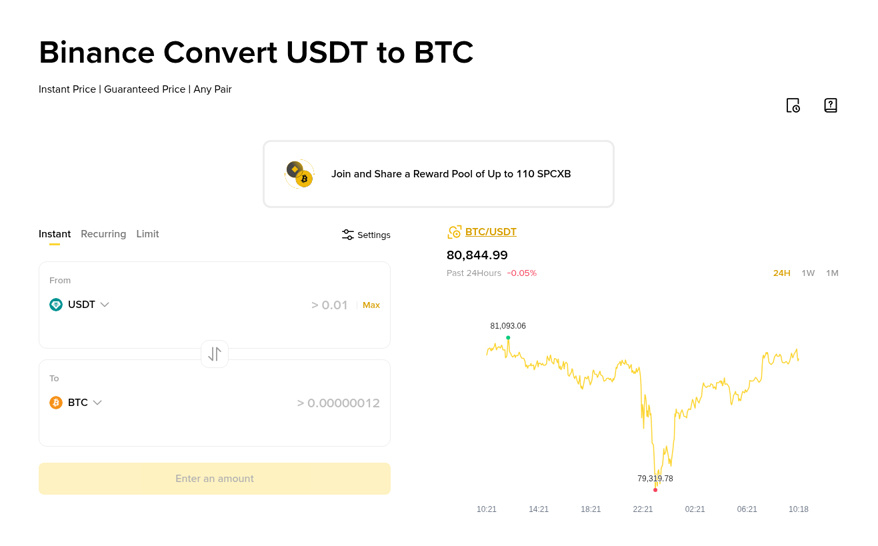
The Convert screen shows the steps as two fields, From and To. Swap the To field to BRL and the quote appears in reais.
How do you send the BRL by Pix, step by step?
These are the steps in Binance's own guide for the app. The labels may move slightly between versions.
Open withdraw: Go to [Assets], tap [Withdraw], then tap [Withdraw] again on the pop-up.
Choose the method: Select [Bank Transfer (PIX)] with BRL as the currency.
Fill in your bank: Enter bank name, agência, account number and type, and your CPF.
Enter the amount: Type the BRL amount and tap [Continue].
Check the confirmation: Read the fee, the amount you will receive and the bank details, then tap [Confirm].
Wait for the bank: Track the order under [Assets], [History], [Spot], [Withdrawals].
On the website you pick BRL under Currency, choose Bank Transfer (PIX), and the transaction fee (if any) shows before you click [Preview Order]. The steps match the app.
Worked example, part two: Ana withdraws R$5,395 to her Nubank corrente account. Binance's BRL transfer FAQ lists a withdrawal fee of R$3.50 for personal accounts and adds that withdrawal fees are subject to change. So she checks the preview. If it shows R$3.50, about R$5,391.50 reaches her bank. If the preview shows a different fee, that number is the one that counts.
When does the money reach your bank?
The name Pix makes people expect seconds. Binance runs BRL withdrawals on banking hours instead.
Inside banking hours: An order created Monday to Friday between 07:00 and 17:00 is processed right away.
Outside banking hours: An order created at night, on a weekend or after 17:00 waits for the next business day.
Clearing time: The FAQ allows up to 2 business days for execution, and says some transactions take up to 48 hours.
Ana's timing shows the difference. A Tuesday 10:00 order is processed that morning. A Friday 18:00 order sits until Monday's banking hours, and with the 2 business day window it could reach her account as late as Wednesday. The FAQ doesn't spell out holidays, so if a feriado falls next to your withdrawal, count it as a non-business day and give yourself an extra day.
Deposits follow a different clock. Pix deposits are credited around the clock, which is why topping up feels instant and cashing out doesn't. If you want the deposit side, here is the Pix deposit walkthrough for BRL.
How much can you withdraw in BRL?
Limits on BRL are shared across deposits, withdrawals, buys and sells. A big sell in the morning uses up room you may have wanted for the withdrawal.
Personal accounts: The BRL FAQ table lists the first personal levels at 10,000 USD a month, roughly R$50,000, with level 1 also capped at 20,000 USD a semester.
Higher levels: The top personal level is set case by case after a compliance review of your financial capacity.
Your real number: Go to [Account], [Identification] to see the limits on your own profile. The withdrawal screen shows them too.
The FAQ notes that to raise limits, BRL deposits and withdrawals have to pass the required amount, and buys and sells don't count toward it.
Why not send USDT to a bank or another exchange instead?
You can move crypto out and sell it elsewhere, but that route has picked up paperwork. From 1 November 2026, sending crypto to or receiving it from people or companies abroad requires you to state the purpose and confirm the other party's details. Binance says those details are reported monthly to the Banco Central, withdrawals go out only after the form is complete, and deposits stay pending until it is filled.
A Pix withdrawal of reais to your own bank skips that form. It stays inside Brazil, in your name, and leaves a short and clear trail.
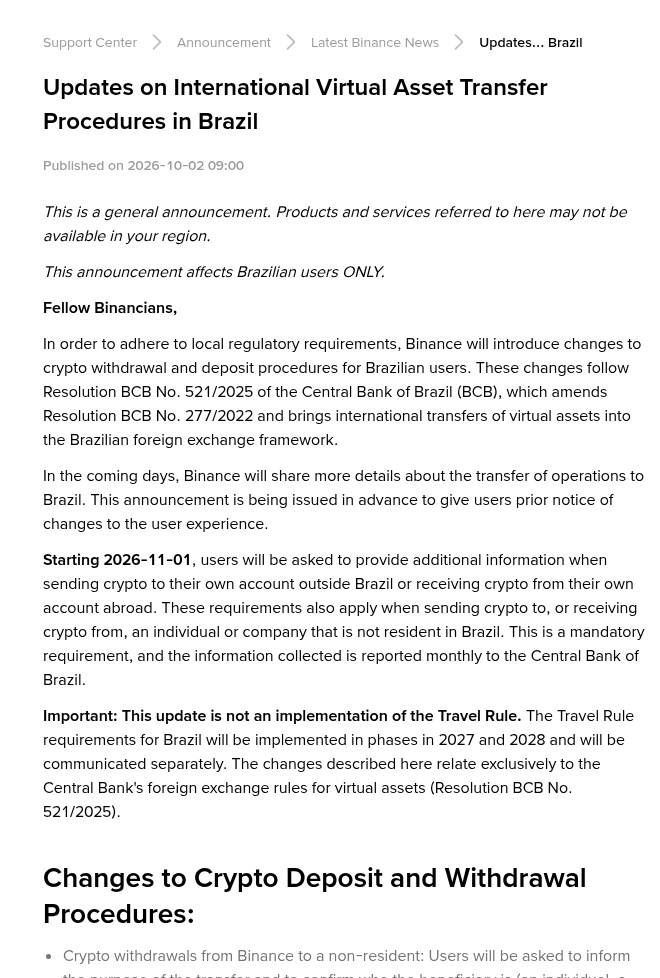
The announcement above covers crypto sent abroad. A BRL Pix withdrawal to your own account is a different route and doesn't use that form.
What proof should you keep for your bank?
Banks in Brazil ask where larger credits come from, and a clear file answers that in one email. Keep these four records together for each cash out.
The sale record: The trade history line or Convert history line that shows the coin, the amount, the BRL price, the fee and the time.
The withdrawal record: The entry under [Assets], [History], [Spot], [Withdrawals], showing the BRL amount, the fee, the status and the date.
The bank statement line: The credit on your Nubank, Itaú or Bradesco statement. Check which institution appears as sender and note it, because after the migration the reais come from the Binance Brasil account side.
The cost of the coins: When and at what price you bought them. That's what turns a sale into a gain or a loss, and the bank or your accountant may ask for it.
Binance says history from before the migration stays available and exportable in the app and on the website, next to the new history. Download a statement once a month rather than at tax time, when you may not remember which sale went with which withdrawal.
Worked example, part three: Ana's file for this cash out has the USDT/BRL fill at R$5.40, the R$5,395 BRL balance, the withdrawal record with the fee, the Nubank credit, and the original USDT purchase. If her bank asks about the R$5,391.50, she forwards those five lines.
Does selling to cash out count for tax?
Yes, the sale is what counts, not the Pix. Binance's Brazil FAQ says that from 29 October 2026 the rules for crypto investments in Brazil apply to the local account. Gains are exempt when your total crypto sales in a month stay at or below R$35,000. Above that, the whole month's gain is taxed at progressive rates from 15% to 22.5%, and swapping one coin for another counts as a sale.
Ana's R$5,400 sale sits well under R$35,000. If she sold R$40,000 across several days in the same month, her whole gain for that month would be taxable. Who reports what to Receita Federal is covered in the DeCripto reporting FAQ for Brazil. This is general information, not tax advice.
What if the Pix withdrawal is rejected or late?
Wrong bank details: When the receiving bank rejects the transfer, Binance emails you. Follow the steps in that email, correct the details, and the withdrawal is processed again.
Wrong account type: Corrente chosen for a poupança, or the other way round, is a common cause. Fix it in the same way.
Nothing after two business days: Check the order status first. If it shows completed and your bank shows nothing, ask your bank with the date and amount. If it still shows processing after 48 hours, contact Binance support through Chat with the order details.
Name mismatch: If the bank account isn't in your name and CPF, the transfer won't go through. Use your own personal account.
What should you check after the cash out?
Status: The withdrawal shows completed in history.
Bank: The credit matches the amount on the preview, after the fee.
Records: Sale, withdrawal, bank line and purchase cost are saved in one folder.
Monthly total: Your crypto sales for the month are added up in reais.
Next time: Your bank details are saved correctly, and you know whether to send before 17:00 on a business day.
New to Binance? Sign up with code GETREWARD and check the welcome bonus terms for new users, worth up to $19,800 for eligible users.
Pix withdrawal FAQ
Can I withdraw BRL by Pix to someone else's account?
No. The receiving account must be in the same name as your Binance account. Binance has announced a Pix area for third parties in the future, with notice before it opens.
Why didn't my Pix withdrawal arrive instantly?
Binance processes BRL withdrawals Monday to Friday from 07:00 to 17:00. Orders outside those hours go to the next business day, and execution can take up to 2 business days.
What is the fee for a Binance Pix withdrawal?
The BRL transfer FAQ lists R$3.50 for personal accounts and notes that fees can change. The fee for your order shows on the preview before you confirm.
Can I withdraw to a joint or MEI account?
No. Joint accounts, even ones where you are a holder, and individual company accounts such as MEI and EIRELI are not accepted.
Do I need to sell my crypto before withdrawing by Pix?
Yes. Pix moves reais only, so sell or convert to BRL first, then withdraw the BRL balance from your Spot wallet.
Disclosure: this article contains a Binance sign-up link with the code GETREWARD. Crypto prices move both ways and you can lose money. Nothing here is financial or tax advice.