

If you live in the Emirates and your Binance account is verified, you can move dirhams in and out by local bank transfer. At launch in June 2026 an AED deposit cost nothing, an AED withdrawal cost a flat AED 10, and most transfers were reported to land within the same business day. You open Deposit, pick AED, choose bank transfer and send from your own Emirati account.
👉 Create your Binance account with code GETREWARD
This guide goes through the deposit and the withdrawal one step at a time. After each part there is a "what to do if" list for the usual hiccups, plus dirham examples you can redo with your own figures.
Who can use AED bank transfers?
The AED rail is meant for people who live in the Emirates. Binance's own announcement said AED bank deposits and withdrawals are only for users in the Emirates and that identity verification is required first. Launch coverage described it as open to eligible Emirates residents aged 18 or over.
Two bodies sit in the background. Binance FZE appears on the public register of VARA, Dubai's virtual asset regulator, with VASP licence VL/24/04/001 issued on 15 April 2024. Separately, since 5 January 2026 Binance's global platform has run through three entities authorised by the FSRA in Abu Dhabi Global Market (ADGM).
Which entity serves you and which products you see depend on your profile and the terms shown in your app. Read those terms rather than assuming every feature is open to every Emirates resident.
What do the fees and limits look like?
These are the figures reported when the service went live in early June 2026. Fees and limits can change, so check the deposit page in the app before every transfer.
Deposit fee: AED 0.
Deposit size: minimum AED 10, maximum AED 7,200,000 per day.
Withdrawal fee: a flat AED 10 per withdrawal.
Withdrawal size: minimum AED 11, maximum AED 7,200,000 per day.
Timing: usually the same business day, and up to one business day depending on your bank's cut-off times.
Banking partner: the rail runs through a direct link with Abu Dhabi Commercial Bank (ADCB), set up under the Emirates' Client Money Account framework.
Everything stays in dirhams from your bank to your Binance balance, so there is no currency conversion on the transfer itself.

How do you send an AED deposit, step by step?
Finish verification: Complete identity checks with your Emirati address. Without them the AED option is usually hidden or greyed out.
Open Deposit: From the wallet overview tap Deposit, choose fiat rather than crypto, and select AED.
Pick bank transfer: The app then shows the receiving bank details for your account. Menu names can shift between app versions, so follow the labels you see.
Copy every detail exactly: Beneficiary name, IBAN and any reference number. If a reference is shown, it is how the deposit gets matched to you, so paste it into the transfer note without changes.
Send from your own account: Log in to your Emirati bank and send the dirhams from an account in your own name.
Keep the receipt: Save the bank confirmation with the date, amount and transaction number until the funds appear.
What to do if the deposit has not arrived
It was sent after the cut-off: A transfer made late in the day, on a weekend or on a public holiday often moves on the next business day. Give it one full business day before you worry.
You left out the reference: Open a support chat, attach the bank receipt and give the amount, date and time. Unmatched transfers usually need a manual check.
The sender name does not match: A transfer from a spouse, a friend or a company account can be held or sent back, because the name has to match your verified profile. Ask your bank about the return and send again from your own account.
The amount was below AED 10: Very small transfers may sit outside the minimum and not be credited automatically. Contact support with the receipt rather than sending a second tiny amount on top.
You hit the daily cap: Large transfers above the daily maximum need to be split across days. Check the current limit on the deposit page first.
Your bank asks questions: Some banks review transfers linked to crypto. Answer honestly, and keep your statement handy in case Binance asks for proof of funds later.
For a wider look at what each funding method costs, see this breakdown of Binance deposit fees by method.
Turning dirhams into USDT
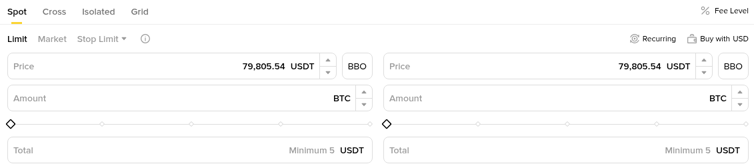
A USDT/AED Spot pair opened on 4 June 2026, so you can buy USDT directly with dirhams instead of going through P2P. You can place a limit order at your own price or a market order that fills at the going rate.
Worked example (illustration only): You deposit AED 3,675 at no cost. Suppose the USDT/AED ask is 3.675. Your AED 3,675 buys 1,000 USDT before fees. At a Spot fee of 0.1%, used here only as an example rate, you give up 1 USDT and end with 999 USDT.
The rate in that example is invented to keep the maths clean. Real prices move all day, and the fee for your account sits under Fee Level on the trading page.
Limit orders: Set the AED price you want and wait for a fill. Good when the spread looks wide.
Market orders: Fill straight away at the visible price, which can be a little worse on a thin order book.
Check the total: On this pair the price and total are in AED, while the amount is in USDT.
How do you withdraw AED to a Emirati bank?
Sell to dirhams first: If your balance is in USDT or another coin, sell it on the AED pair so that you hold AED.
Check which wallet holds it: If Withdraw shows less AED than you expect, the money may be in another wallet. Use Transfer to move it across.
Open Withdraw and pick AED: Choose bank transfer as the method.
Add your bank account: Enter the IBAN of an Emirati account in your own name. The name on the account should match your verified profile.
Enter the amount: Watch the line that shows the fee and the amount you will receive.
Confirm with two-factor authentication: Approve the withdrawal and keep the reference until it reaches your bank.
What to do if the withdrawal is stuck or short
It still shows as processing: Allow one business day, more if the request went in late on a Friday or before a holiday.
Less arrived than you asked for: Subtract the AED 10 fee first. If the gap is still unexplained, contact your bank before support, since some banks add their own incoming charges.
The button is greyed out: Open orders lock part of your AED, and some security changes, such as a new password, can pause withdrawals for a while. Cancel unneeded orders and check your security page.
It came back: A returned withdrawal usually points to a wrong IBAN or a name mismatch. Fix the bank details and try again.
If a bank asks for documents along the way, this bank statement troubleshooting guide for deposits covers what usually goes wrong with statements.
How much does a full round trip cost?
Worked example (illustration only): Carry on from the deposit above. You later sell your 999 USDT at a bid of 3.670 and get AED 3,666.33. A 0.1% fee takes about AED 3.67, leaving AED 3,662.66. The flat AED 10 withdrawal fee brings what reaches your bank to AED 3,652.66.
From AED 3,675 in to AED 3,652.66 out, the total cost is about AED 22.34 with the price unchanged. That splits into:
Buy fee: about AED 3.68.
Spread between buy and sell price: about AED 5.00.
Sell fee: about AED 3.67.
Withdrawal fee: AED 10.
In practice the price will have moved by the time you sell, and that move will usually outweigh these costs, in either direction.
Is one large withdrawal cheaper than several small ones?
Because the fee is flat, its weight depends on size. These are illustrations using the launch fee of AED 10.
AED 500 out: AED 490 arrives, so the fee is 2% of the amount.
AED 5,000 out: AED 4,990 arrives, so the fee is 0.2%.
Four withdrawals of AED 500: AED 40 in fees, against AED 10 for a single AED 2,000 withdrawal.
If you cash out regularly, grouping withdrawals keeps more of your money. Near the AED 11 minimum, the fee would eat almost the whole amount.
Edge cases worth checking before you send
Moving out of the Emirates: The rail is tied to Emirati residency. If your address changes, update your profile and expect the AED option to change with it.
Joint or company accounts: A joint account may or may not match your verified name, and a company account belongs to a different legal person. Use a personal account in your own name.
Salary just landed: Some banks hold large outgoing transfers for a check. Plan around that if you need the dirhams on Binance by a set time.
Ramadan and public holidays: Bank hours can shift, so a transfer that normally clears the same day may take longer.
Common mistakes with AED transfers
Typing bank details by hand: Copy and paste the IBAN and reference instead. A single wrong digit can send the transfer to the wrong place.
Trusting a screenshot of someone else's details: Only use the details shown inside your own account. Anyone sharing "Binance bank details" in a chat group is a red flag.
Using P2P when the bank rail is open to you: P2P ads carry their own spread, so compare before you pick it.
Forgetting the fee on tiny withdrawals: A flat charge hurts most on small amounts.
Relying on old numbers: The figures here are the June 2026 launch figures. Look at the current deposit and withdrawal pages first.
Risks to keep in mind
A bank transfer only moves dirhams, and crypto prices can still drop sharply after you buy. Fees, limits, eligibility and the entity serving you can all change. The amounts above are examples, not quotes or forecasts. This is general information, not financial or tax advice.
Opening a Binance account
If you do not have an account yet, you can sign up with code GETREWARD and then complete verification with your Emirati details. Eligible new users can also check the welcome bonus event for new Binance accounts, where completing listed tasks can lead to rewards of up to $19,800.
FAQ
Is depositing AED to Binance free?
At launch in June 2026 AED bank deposits had no fee from Binance. Your own bank may still have its own transfer charges, so check with it.
How long does an AED deposit take?
Usually the same business day. Transfers made after your bank's cut-off or on a non-working day can take up to the next business day.
What is the AED withdrawal fee?
A flat AED 10 per withdrawal at launch, with a minimum withdrawal of AED 11. Confirm the current figure on the withdraw screen.
Can I deposit from a bank account that is not in my name?
Use an account in your own name. Transfers from someone else can be held or returned.
Do I need P2P to buy USDT with dirhams?
No. Once AED is in your account you can trade on the USDT/AED Spot pair. P2P remains another option.
Can I use the AED rail if I live outside the Emirates?
No. It is limited to users in the Emirates who have passed identity verification.
Disclosure: the account link near the top carries GETREWARD, a code that belongs to me. All dirham amounts are examples, not quotes or forecasts.