



Say Bitcoin spends a whole week bouncing between $78,000 and $84,000. You could try to buy every dip and sell every pop by hand, or you could hand the job to a grid bot that does it around the clock. That's the promise of Binance Grid Trading, and it works well in exactly one kind of market.
The short answer: a Binance Spot Grid bot places a ladder of buy orders below the current price and sell orders above it, inside a range you choose. Each time price moves one step down and back up, the bot pockets the gap minus trading fees. It earns in sideways markets, lags simple holding in strong uptrends, and holds a falling coin in downtrends. The bot itself costs nothing extra; you pay normal Spot trading fees on every fill.
👉 Open a Binance account and claim the new-user bonus
Instead of a dry feature tour, this guide runs one $1,000 grid through four realistic scenarios, so you can see where the profit comes from and where it quietly leaks away.
What does a grid bot actually do with your money?
You give the bot three things: a lower price, an upper price and a number of grids. It splits the range into equal steps and puts an order on each line.
Below the current price: Buy orders waiting for dips, funded with USDT.
Above the current price: Sell orders waiting for pops. To have something to sell, the bot buys part of your position in BTC the moment you start it.
After every fill: A filled buy becomes a sell one step higher, and a filled sell becomes a buy one step lower. That buy-low, sell-one-step-higher loop is the whole engine.
So a grid is never "all in" or "all out". At any moment you hold a mix of the coin and USDT, and that mix shifts as price moves: more coin as price falls, more USDT as it rises.
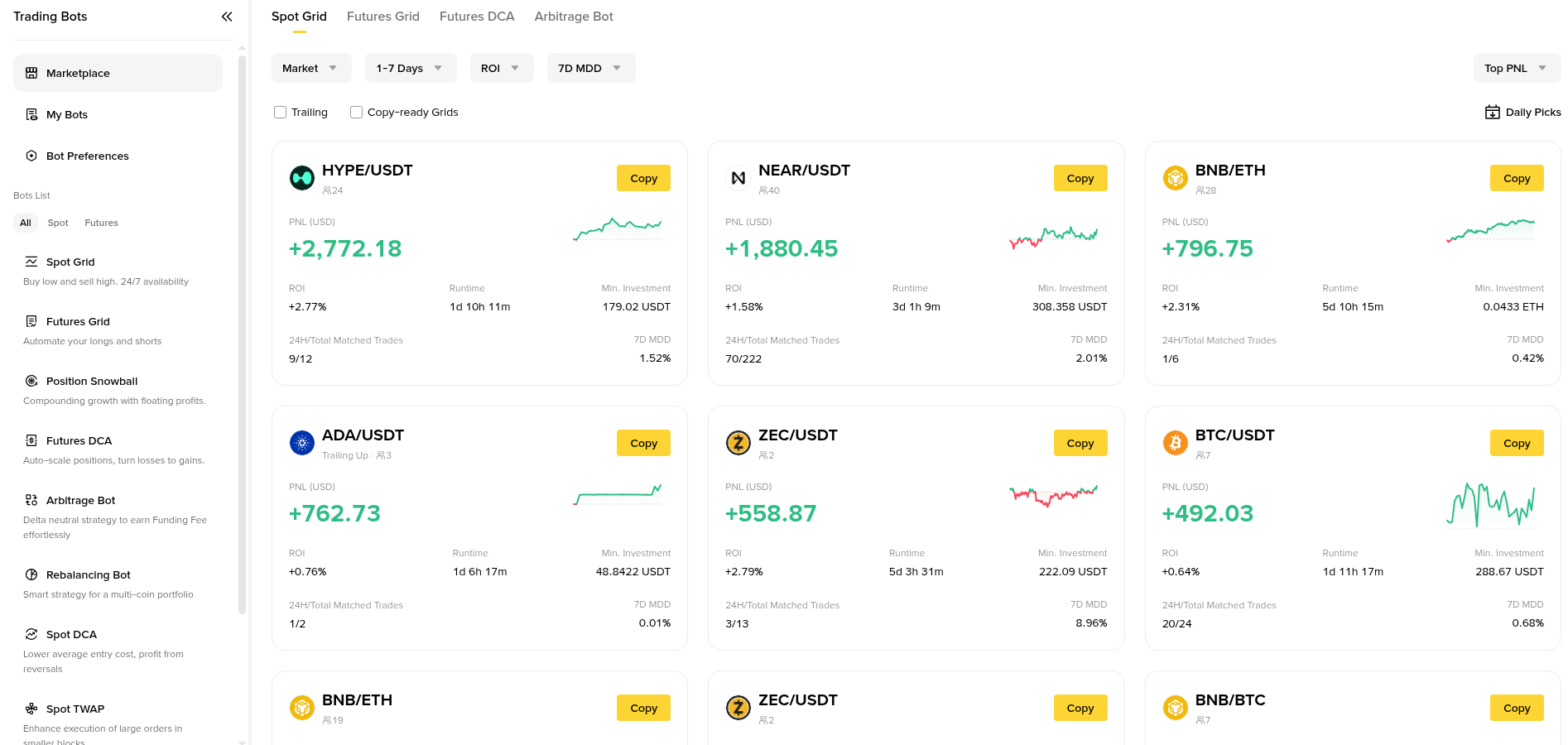
Binance's Trading Bots marketplace lists Spot Grid, Futures Grid and other bot types, with shared strategies showing PnL, ROI and runtime.
Scenario 1 - BTC chops sideways for a week
This is the market grids are built for. Here's the setup we'll reuse throughout.
Pair: BTC/USDT, price around $80,800 at launch.
Range: $76,000 to $86,000.
Grids: 20, arithmetic, so each step is $500.
Investment: 1,000 USDT, roughly $50 per grid line.
Fees: The standard 0.1% Spot fee on each fill.
One completed cycle means the bot buys about $50 of BTC at $80,000 and sells it at $80,500.
Gross gain: $50 x (500 / 80,000) = about $0.31.
Fees: 0.1% on the buy plus 0.1% on the sell = about $0.10.
Net per cycle: roughly $0.21, or about 0.43% of that grid line.
If choppy price action completes 30 cycles across different lines in a week, that's around $6.30 on $1,000, or 0.63% for the week. Not life-changing, but it came from noise that a holder simply sat through. Busy weeks can do better and quiet weeks worse; nothing about this number is guaranteed.
The key insight: grid profit comes from how many times price crosses your lines, not from which direction it ends up going.
Scenario 2 - the grid that loses money on every trade
Many beginners think more grids means more profit. Let's test it with the same $1,000 and range, but 100 grids instead of 20.
Step size: $10,000 / 100 = $100, about 0.125% at $80,000.
Round-trip fees: 0.2% at the standard rate.
Result: Every completed cycle loses about 0.075%. The bot is very busy and slowly bleeds.
Binance shows a "profit per grid" figure while you set the bot up, and it already accounts for fees. If that number is tiny or close to zero, the grid is too dense. A practical rule of thumb: keep profit per grid comfortably above the round-trip fee, ideally 0.4% or more for a small account.
Fees are the silent partner in every grid. Paying fees in BNB lowers the standard Spot rate from 0.1% to 0.075%, which cuts the round trip to 0.15%. For a full breakdown of maker, taker and VIP rates, see our guide to Binance Spot and Futures trading fees.
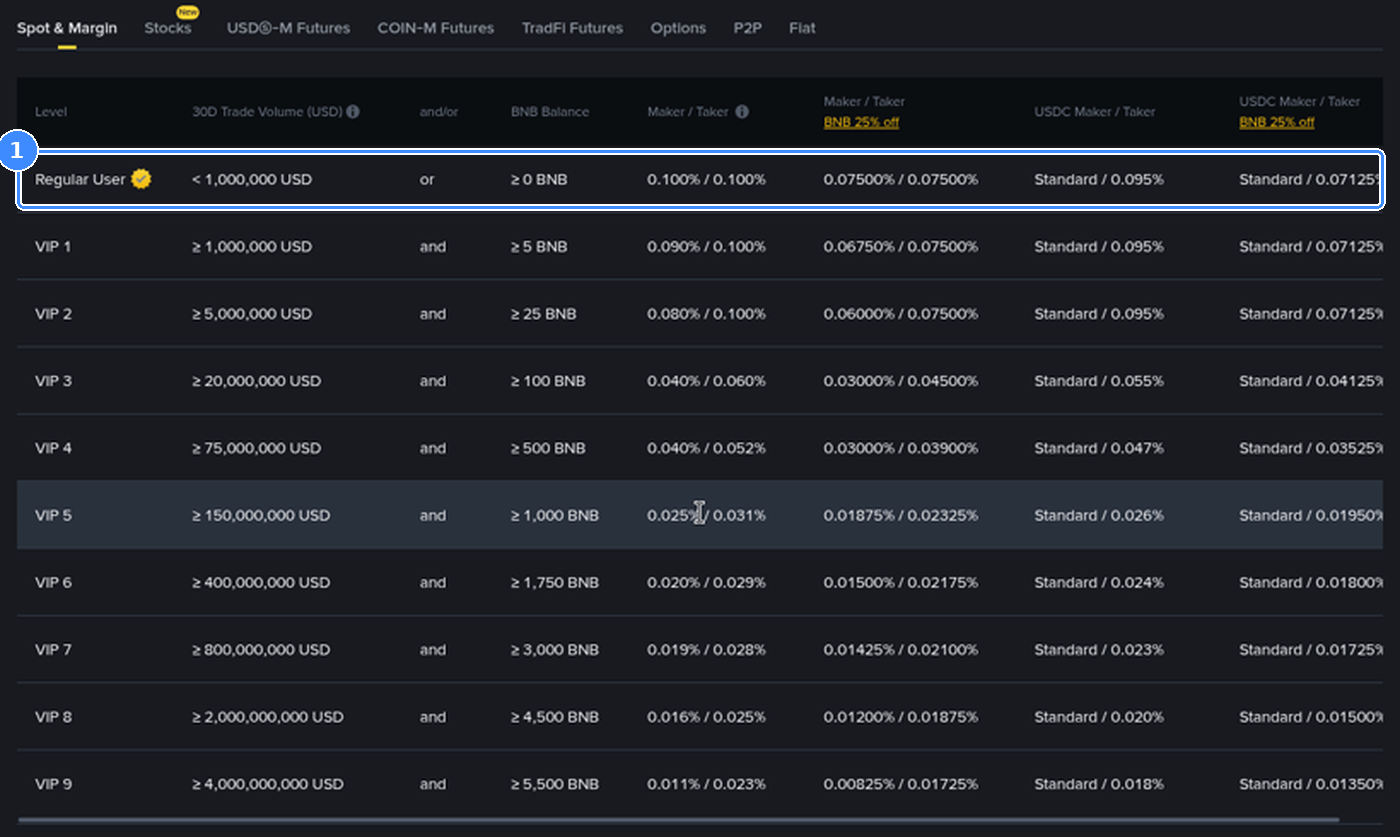
The Spot fee schedule shows the Regular User rate of 0.100% maker and taker, or 0.075% when fees are paid in BNB.
Scenario 3 - price falls out of the bottom of the range
Now the uncomfortable case. BTC slides from $80,800 to $72,000, below your $76,000 floor.
On the way down, every buy order fills. By the time price leaves the range, the bot has spent all its USDT and holds only BTC.
BTC bought at launch: about $500 worth at $80,800, roughly 0.0062 BTC.
BTC bought by the ladder: about $500 spread from $80,000 down to $76,000, averaging near $78,000, roughly 0.0064 BTC.
Position at $72,000: about 0.0126 BTC, worth around $907.
Compare that with the alternatives. Holding $1,000 of BTC from $80,800 would be worth about $891, and holding USDT would still be $1,000. The grid softened the fall versus holding but still lost about 9%, and it stops trading until price climbs back inside the range.
That's the real risk of grid trading: in a downtrend you end up holding the coin you were trying to trade.
Scenario 4 - price breaks out above the range
The opposite case looks friendlier but has its own catch. BTC rallies to $90,000.
Every sell order fills on the way up, so the bot sells its BTC between $81,000 and $86,000 and ends up holding only USDT, a bit over $1,000 plus the grid profits it collected along the way.
Someone who simply held $1,000 of BTC from $80,800 would now have about $1,114. The grid made a small, safe-feeling gain and missed most of the rally. Above the range the bot sits idle in USDT.
So grids trade upside potential for steadier returns. If you strongly believe a coin is about to trend up, holding or a plain limit order usually beats a grid.
Arithmetic or geometric grids?
Binance lets you pick how the steps are spaced.
Arithmetic: Every step is the same dollar amount, like $500. Simple and fine for narrow ranges, but the percentage gain per step shrinks near the top of the range.
Geometric: Every step is the same percentage, like 0.6%. Better for wide ranges, where a fixed dollar step would be huge at the bottom and tiny at the top.
For a range within about 10-15% of the current price, arithmetic is easier to reason about. For anything wider, geometric keeps profit per grid more even.
How to set up a Spot Grid on Binance
Open the bot: On the BTC/USDT Spot trading page, switch the order panel to the Grid tab, or go through Trading Bots and choose Spot Grid.
Choose AI or Manual: AI fills in a range and grid count from recent price history. Manual lets you set everything yourself.
Set the range: Lower and upper price. Use recent support and resistance rather than round numbers you like.
Set the number of grids: Watch the profit per grid figure update and keep it well above fees.
Enter the investment: Start small while you learn how the bot behaves.
Optional extras: Under Advanced you can add a trigger price to start later, take-profit and stop-loss prices for the whole bot, and choose whether to sell all the base coin when the bot stops.
Review and create: Check the summary, then confirm. Your bot appears under running strategies with live PnL.
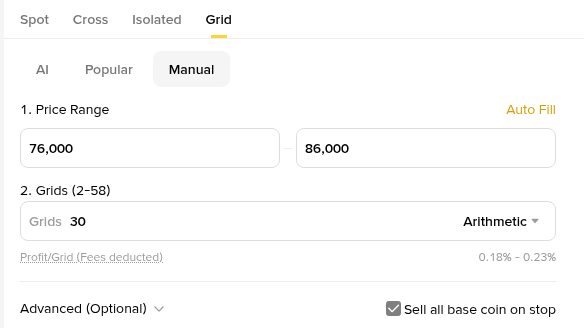
The Manual tab of a BTC/USDT Spot Grid set to $76,000-$86,000 with 30 arithmetic grids, showing a fee-adjusted profit per grid of 0.18%-0.23%.
Notice how sensitive that figure is. On the same $76,000-$86,000 range, 30 grids leaves 0.18%-0.23% per grid after fees, while the 20 grids from our scenarios work out to roughly 0.38%-0.46%. Fewer, wider steps often earn more per trade.
Should you trust the AI parameters?
AI settings are a reasonable starting point, not a forecast. They are based on how the pair moved recently, so they assume the near future looks like the near past.
Use AI when: You're new and want a sane range and grid count to study.
Go manual when: You have a view on support and resistance, want a tighter range, or the AI profit per grid looks too thin.
Either way: Read the range before confirming. If it sits far from where you think price is heading, adjust it.
Do you need a stop loss on a grid bot?
For most people, yes. Scenario 3 shows why: without one, the bot can ride a coin all the way down and hold it indefinitely.
A sensible approach is to set the bot's stop-loss price a little below the lower edge of the range, at a level where you'd accept you were wrong about the sideways market. The take-profit price works the same way at the top. If you want to understand how stop-limit and OCO orders behave first, our walkthrough on setting a stop loss on Binance covers them step by step.
Spot Grid vs Futures Grid in brief
Binance also offers Futures Grid bots with long, short and neutral modes plus leverage. They can profit in more market shapes, but leverage means a move out of the range can trigger liquidation, not just a paper loss. If you're new to grids, learn on Spot first, where the worst case is holding the coin, not losing the margin.
Five habits of people who run grids well
They pick ranging coins: Pairs that have chopped sideways for weeks, not ones in the middle of a breakout.
They check fees first: Profit per grid above roughly 0.4% after fees, not 0.05%.
They size small: A grid is one tool in a portfolio, not the whole portfolio.
They set exits: Stop loss below the range, take profit above it.
They review weekly: If price has left the range for days, they close the bot and rethink instead of waiting forever.
Is grid trading worth it?
Grid trading is a patient way to earn from sideways volatility. It is not passive income in a trending market, and it never removes the risk of holding the coin. Treat it as a strategy with a job description: collect small gains while price wanders inside a range you chose carefully.
If you don't have an account yet, signing up with the code GETREWARD gives you access to the new-user tasks, and you can see the latest Binance welcome bonus campaign for what's currently on offer to eligible users. Start with a small Spot Grid, watch how it behaves for a week, and scale only once the numbers make sense to you.
FAQ
Is the Binance grid bot free?
There's no separate charge for running the bot. Each filled order pays the normal Spot trading fee, so a busy grid pays more fees in total.
What's the minimum investment for a Spot Grid?
It depends on the pair and the number of grids, because every grid line has to meet the pair's minimum order size. The setup panel tells you if your amount is too small.
Can a grid bot lose money?
Yes. If price drops below the range you hold the coin at a loss, and a grid that is too dense can lose a little on every cycle because of fees.
What happens when price leaves the range?
The bot stops placing new trades. Below the range you hold only the coin, above it only USDT. It resumes if price returns, unless a stop loss or take profit has closed it.
Can I change the range while the bot is running?
Not directly. The usual approach is to close the bot and start a new one with fresh settings.
Which coins work best for grid trading?
Liquid pairs with steady two-way movement, such as BTC/USDT or ETH/USDT during calm periods. Thinly traded coins can gap through several lines at once.
Disclosure: GETREWARD is my Binance sign-up code. This is educational content, not financial advice. Crypto prices are volatile and trading bots can lose money.