
#wolfbot
wolfbot
26 penayangan
5 Berdiskusi
Populer
Terbaru

Mengalami error code saat pengaturan WolfBot bisa terasa seperti tembok bata, tapi kode tersebut sebenarnya memberi tahu Anda persis apa yang gagal—menghemat waktu menebak! 💡
Berikut panduan referensi perbaikan cepat untuk masalah yang paling umum:
1. **Windows 'Access denied':** Klik kanan pada installer dan pilih 'Run as Administrator.' ✅
2. **Unduhan Korup:** Unduh ulang file dari situs komunitas resmi dan verifikasi secara manual checksum SHA256 dengan nilai yang dipublikasikan. ⚠️
3. **Linux 'Port 8765 already in use':** Gunakan `sudo lsof -i :8765` untuk mengidentifikasi layanan yang bertentangan, hentikan, lalu mulai ulang WolfBot. 🐧
4. **Windows 'VCRUNTIME140.dll not found':** Instal paket Visual C++ Redistributable sebelum memulai ulang aplikasi. 💻
5. **Linux 'Docker is not installed':** Jalankan `sudo apt-get install docker.io` atau cukup jalankan ulang installer, yang akan menangani pengaturan secara otomatis. ⚙️
Untuk penjelasan lengkap tentang setiap kemungkinan error, selalu rujuk dokumentasi utama di sini: https://community.wolfbot.io/docs/error-codes
#WolfBot #TradingAutomation #ErrorFix #CryptoTools #BotSetup
Mengalami error code saat pengaturan WolfBot bisa terasa seperti tembok bata, tapi kode tersebut sebenarnya memberi tahu Anda persis apa yang gagal—menghemat waktu menebak! 💡
Berikut panduan referensi perbaikan cepat untuk masalah yang paling umum:
1. **Windows 'Access denied':** Klik kanan pada installer dan pilih 'Run as Administrator.' ✅
2. **Unduhan Korup:** Unduh ulang file dari situs komunitas resmi dan verifikasi secara manual checksum SHA256 dengan nilai yang dipublikasikan. ⚠️
3. **Linux 'Port 8765 already in use':** Gunakan `sudo lsof -i :8765` untuk mengidentifikasi layanan yang bertentangan, hentikan, lalu mulai ulang WolfBot. 🐧
4. **Windows 'VCRUNTIME140.dll not found':** Instal paket Visual C++ Redistributable sebelum memulai ulang aplikasi. 💻
5. **Linux 'Docker is not installed':** Jalankan `sudo apt-get install docker.io` atau cukup jalankan ulang installer, yang akan menangani pengaturan secara otomatis. ⚙️
Untuk penjelasan lengkap tentang setiap kemungkinan error, selalu rujuk dokumentasi utama di sini: https://community.wolfbot.io/docs/error-codes
#WolfBot #TradingAutomation #ErrorFix #CryptoTools #BotSetup
Berikut panduan referensi perbaikan cepat untuk masalah yang paling umum:
1. **Windows 'Access denied':** Klik kanan pada installer dan pilih 'Run as Administrator.' ✅
2. **Unduhan Korup:** Unduh ulang file dari situs komunitas resmi dan verifikasi secara manual checksum SHA256 dengan nilai yang dipublikasikan. ⚠️
3. **Linux 'Port 8765 already in use':** Gunakan `sudo lsof -i :8765` untuk mengidentifikasi layanan yang bertentangan, hentikan, lalu mulai ulang WolfBot. 🐧
4. **Windows 'VCRUNTIME140.dll not found':** Instal paket Visual C++ Redistributable sebelum memulai ulang aplikasi. 💻
5. **Linux 'Docker is not installed':** Jalankan `sudo apt-get install docker.io` atau cukup jalankan ulang installer, yang akan menangani pengaturan secara otomatis. ⚙️
Untuk penjelasan lengkap tentang setiap kemungkinan error, selalu rujuk dokumentasi utama di sini: https://community.wolfbot.io/docs/error-codes
#WolfBot #TradingAutomation #ErrorFix #CryptoTools #BotSetup
1
80
Lihat terjemahan
Hitting the 'Could not set up the MT5 account' error can feel like a brick wall when you're ready to automate trades. 🧱
Mastering MT5 connectivity requires following a precise diagnostic sequence to keep your connection to WolfBot rock solid. ⚙️
Here are the key steps for troubleshooting:
1. Always start testing with a Demo (testnet) MT5 account first. Connecting a Live account can fail readiness checks and is riskier for initial testing.
2. If you see the 'Could not set up the MT5 account' error, the issue is often in the per-account provisioning step. Check the control/API logs to see if the failure is due to a missing Docker socket mount or an unpulled bridge image.
3. When connection drops or order errors happen early on, always verify the strategy is set to Simulation mode first. This prevents real trades from executing due to testing errors.
4. For complex issues, examine two log sets: the Control/API logs (for provisioning status) and the MT5 bridge logs (for terminal login/order state). Providing the specific error line with the matching log frame speeds up resolution.
5. Remember: WolfBot handles symbol resolution, but you must confirm the exact symbol spelling and check the symbol mapping guide for a valid instrument reference.
For a comprehensive walkthrough of these troubleshooting steps, consult the official guide: https://community.wolfbot.io/docs/mt5-troubleshooting
#MT5 #WolfBot #TradingAutomation #AlgorithmicTrading #Crypto
Hitting the 'Could not set up the MT5 account' error can feel like a brick wall when you're ready to automate trades. 🧱
Mastering MT5 connectivity requires following a precise diagnostic sequence to keep your connection to WolfBot rock solid. ⚙️
Here are the key steps for troubleshooting:
1. Always start testing with a Demo (testnet) MT5 account first. Connecting a Live account can fail readiness checks and is riskier for initial testing.
2. If you see the 'Could not set up the MT5 account' error, the issue is often in the per-account provisioning step. Check the control/API logs to see if the failure is due to a missing Docker socket mount or an unpulled bridge image.
3. When connection drops or order errors happen early on, always verify the strategy is set to Simulation mode first. This prevents real trades from executing due to testing errors.
4. For complex issues, examine two log sets: the Control/API logs (for provisioning status) and the MT5 bridge logs (for terminal login/order state). Providing the specific error line with the matching log frame speeds up resolution.
5. Remember: WolfBot handles symbol resolution, but you must confirm the exact symbol spelling and check the symbol mapping guide for a valid instrument reference.
For a comprehensive walkthrough of these troubleshooting steps, consult the official guide: https://community.wolfbot.io/docs/mt5-troubleshooting
#MT5 #WolfBot #TradingAutomation #AlgorithmicTrading #Crypto
Mastering MT5 connectivity requires following a precise diagnostic sequence to keep your connection to WolfBot rock solid. ⚙️
Here are the key steps for troubleshooting:
1. Always start testing with a Demo (testnet) MT5 account first. Connecting a Live account can fail readiness checks and is riskier for initial testing.
2. If you see the 'Could not set up the MT5 account' error, the issue is often in the per-account provisioning step. Check the control/API logs to see if the failure is due to a missing Docker socket mount or an unpulled bridge image.
3. When connection drops or order errors happen early on, always verify the strategy is set to Simulation mode first. This prevents real trades from executing due to testing errors.
4. For complex issues, examine two log sets: the Control/API logs (for provisioning status) and the MT5 bridge logs (for terminal login/order state). Providing the specific error line with the matching log frame speeds up resolution.
5. Remember: WolfBot handles symbol resolution, but you must confirm the exact symbol spelling and check the symbol mapping guide for a valid instrument reference.
For a comprehensive walkthrough of these troubleshooting steps, consult the official guide: https://community.wolfbot.io/docs/mt5-troubleshooting
#MT5 #WolfBot #TradingAutomation #AlgorithmicTrading #Crypto
1
58

·
--
🚀 Peluncuran Resmi Pusat Sumber Daya: community.wolfbot.io
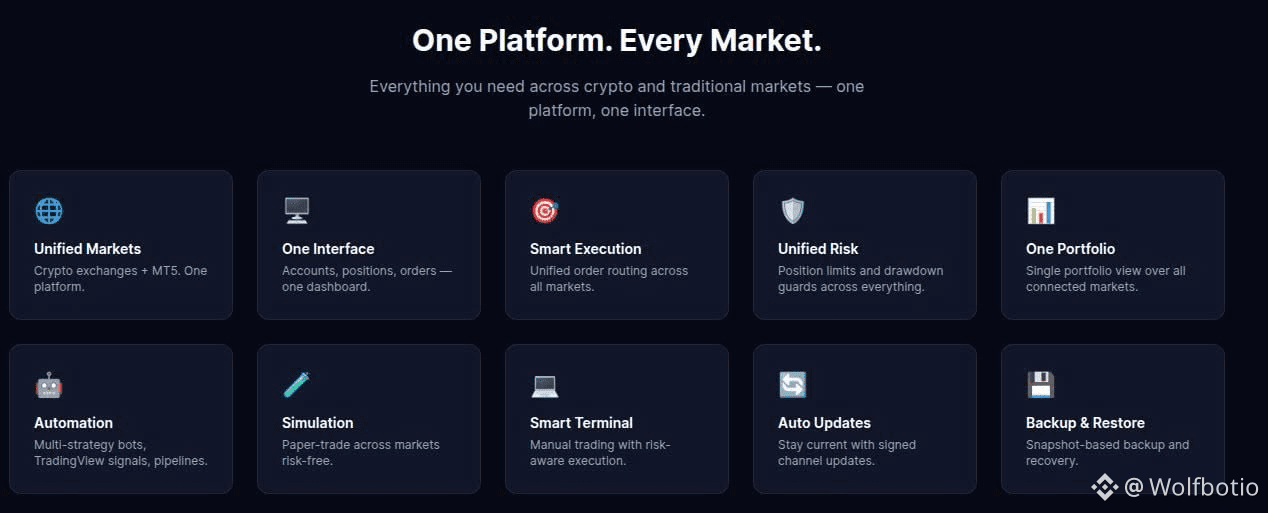
Mencari platform trading otomatis gratis, self-hosted (mandiri), dan non-custodial untuk mengonsolidasikan Crypto & Forex/MT5 (Gold, Indices) dalam satu antarmuka terpadu? Ini pusat sumber daya utama Anda!
🔥 Yang akan Anda temukan di community.wolfbot.io:
📚 Dokumentasi Mendalam (/docs): Panduan langkah demi langkah mulai dari instalasi (Windows, Linux/Ubuntu) dan penyiapan broker hingga mengonfigurasi Risk Engine serta menjalankan Simulation/Paper Trading sebelum eksekusi langsung.
🛠 Panduan Troubleshooting & Teknis: Solusi cepat untuk koneksi API, eksekusi order, dan pengelolaan posisi multi-market/multi-akun.
💬 Dukungan Komunitas & Diskusi: Tautan langsung ke GitHub Discussions/Issues untuk berbagi ide, berkontribusi fitur, atau melaporkan bug.
👉 Kunjungi community.wolfbot.io untuk melihat panduan Getting Started dan kuasai sistem trading Anda sendiri hari ini!
#WolfBot #TradingBot #AutomatedTrading #AlgorithmicTrading #SelfHosted
🚀 Peluncuran Resmi Pusat Sumber Daya: community.wolfbot.io
Mencari platform trading otomatis gratis, self-hosted (mandiri), dan non-custodial untuk mengonsolidasikan Crypto & Forex/MT5 (Gold, Indices) dalam satu antarmuka terpadu? Ini pusat sumber daya utama Anda!
🔥 Yang akan Anda temukan di community.wolfbot.io:
📚 Dokumentasi Mendalam (/docs): Panduan langkah demi langkah mulai dari instalasi (Windows, Linux/Ubuntu) dan penyiapan broker hingga mengonfigurasi Risk Engine serta menjalankan Simulation/Paper Trading sebelum eksekusi langsung.
🛠 Panduan Troubleshooting & Teknis: Solusi cepat untuk koneksi API, eksekusi order, dan pengelolaan posisi multi-market/multi-akun.
💬 Dukungan Komunitas & Diskusi: Tautan langsung ke GitHub Discussions/Issues untuk berbagi ide, berkontribusi fitur, atau melaporkan bug.
👉 Kunjungi community.wolfbot.io untuk melihat panduan Getting Started dan kuasai sistem trading Anda sendiri hari ini!
#WolfBot #TradingBot #AutomatedTrading #AlgorithmicTrading #SelfHosted
Mencari platform trading otomatis gratis, self-hosted (mandiri), dan non-custodial untuk mengonsolidasikan Crypto & Forex/MT5 (Gold, Indices) dalam satu antarmuka terpadu? Ini pusat sumber daya utama Anda!
🔥 Yang akan Anda temukan di community.wolfbot.io:
📚 Dokumentasi Mendalam (/docs): Panduan langkah demi langkah mulai dari instalasi (Windows, Linux/Ubuntu) dan penyiapan broker hingga mengonfigurasi Risk Engine serta menjalankan Simulation/Paper Trading sebelum eksekusi langsung.
🛠 Panduan Troubleshooting & Teknis: Solusi cepat untuk koneksi API, eksekusi order, dan pengelolaan posisi multi-market/multi-akun.
💬 Dukungan Komunitas & Diskusi: Tautan langsung ke GitHub Discussions/Issues untuk berbagi ide, berkontribusi fitur, atau melaporkan bug.
👉 Kunjungi community.wolfbot.io untuk melihat panduan Getting Started dan kuasai sistem trading Anda sendiri hari ini!
#WolfBot #TradingBot #AutomatedTrading #AlgorithmicTrading #SelfHosted
2
1
75
Masuk untuk menjelajahi konten lainnya
Bergabunglah dengan pengguna kripto global di Binance Square
⚡️ Dapatkan informasi terbaru dan berguna tentang kripto.
💬 Dipercayai oleh bursa kripto terbesar di dunia.
👍 Temukan wawasan nyata dari kreator terverifikasi.
Email/Nomor Ponsel
Topik Sedang Tren
1
#BitcoinSurpasses$77000
640 penayangan
43 Berdiskusi
2
#ParadigmDisclosesZECHolding
87 penayangan
35 Berdiskusi
3
#BitcoinETFsShed$450M
13,426 penayangan
125 Berdiskusi
4
#USWeeklyJoblessClaimsFallTo196K
5 penayangan
23 Berdiskusi
5
#ArkhamSaysBlackRockBuys$1.5BInETH
254 penayangan
15 Berdiskusi
6
#ElSalvadorBTCHoldingsRiseTo7777
12,774 penayangan
343 Berdiskusi
7
#MemeLaunchpads82%OfArcDayOneVolume
20,779 penayangan
528 Berdiskusi
8
#OstiumLoanDisputeHearingSetInNYFederalCourt
17,635 penayangan
389 Berdiskusi
9
#HyperliquidUSDCSupplyOvertakesSolana
6,702 penayangan
187 Berdiskusi
10
#SKPoliceRefer18PolymarketUsersToProsecutors
12,643 penayangan
350 Berdiskusi