


When the screenshot below was taken, the gap between the cheapest Bitcoin seller and the highest Bitcoin buyer on Binance was ten cents. On a coin trading near $79,700, that is about as tight as a market gets, and you can only see it if you know how to read the order book.
The short answer: the Binance order book is the live list of every open buy and sell order for a pair. Sellers (asks) sit in red on top, buyers (bids) sit in green below, and the big number in the middle is the last traded price. Reading it tells you the real price you will get, how much a market order will move it, and where a limit order should go.
👉 Open a Binance account and follow along on a live order book
This guide goes in levels. Level 1 is what every number means. By level 5 you will be spotting thin books, fake-looking walls and the moments when a market order is a bad idea.
Level 1 - What am I actually looking at?
Open any Spot or Futures pair and the order book usually sits next to the chart. It has three columns and two colours.
Price: The price at which someone is willing to buy or sell. Red rows are asks (sell orders), green rows are bids (buy orders).
Size or Amount: How much of the coin is waiting at that exact price. On BTCUSDT this is shown in BTC.
Sum or Total: A running total. It adds up all the size from the middle of the book out to that row, so you can see how much is available within a given price range.
The middle number: The last traded price. The arrow next to it shows whether the latest trade was higher or lower than the one before.
The lowest red price is the best ask. The highest green price is the best bid. Everything interesting happens around those two rows.
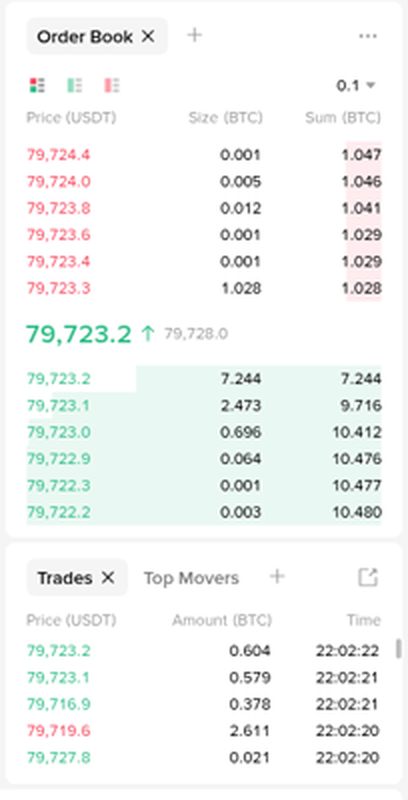
Below the book, the Trades panel lists orders that have just filled. Green rows were trades where a buyer took a seller's price, red rows were the opposite. The book shows intentions, the trades panel shows what really happened.
Level 2 - Spread and the price you really get
The spread is the gap between the best ask and the best bid. In the screenshot above the best ask is 79,723.3 USDT and the best bid is 79,723.2 USDT, so the spread is 0.1 USDT.
Why does that matter? Because the "price" you see on a chart is the last trade, not the price you can trade at right now.
If you buy at market: You pay the best ask, 79,723.3.
If you sell at market: You receive the best bid, 79,723.2.
If you buy and immediately sell: You lose the spread on top of fees, even if the price didn't move at all.
On Bitcoin that loss is tiny. On a small coin it can be the most expensive part of the trade. A token with a best ask of $1.020 and a best bid of $0.990 has a spread of about 3%, so a round trip costs you roughly 3% before fees even start.
Quick spread check: divide the spread by the best ask. Under 0.05% is very liquid, 0.1-0.5% is normal for mid-size coins, and anything above 1% means you should think twice before using market orders.
Level 3 - Depth and how far a market order travels
A market order doesn't buy "at the price". It eats through the asks one row at a time until your size is filled. The Sum column tells you how far it will go.
Worked example on the real book above: Say you market-buy 1.04 BTC.
The first 1.028 BTC fills at 79,723.3.
0.001 BTC fills at 79,723.4 and another 0.001 BTC at 79,723.6.
The last 0.010 BTC fills at 79,723.8.
Total cost is about 82,912 USDT, an average price of roughly 79,723.31. You moved the price half a dollar and paid about one cent per BTC more than the best ask. That's what a deep book looks like.
Now the same idea on a thin book, with example numbers: Picture a small token with these asks:
$1.000 with 2,000 tokens
$1.010 with 1,500 tokens
$1.030 with 3,000 tokens
$1.080 with 5,000 tokens
A $5,000 market buy takes all 2,000 at $1.000 ($2,000), all 1,500 at $1.010 ($1,515), and then about 1,442 tokens at $1.030 ($1,485). You end up with roughly 4,942 tokens at an average of about $1.012, which is 1.2% worse than the price you saw. That gap is slippage, and the order book showed it to you before you clicked.
Rule of thumb: look at the Sum column on the side you are trading. If your order is bigger than the first few rows combined, split it or use a limit order.
Level 4 - Using the book to place a better limit order
A limit order lets you choose the price instead of taking whatever the book offers. The order book tells you where that price makes sense.
Join the best bid: If you want to buy and you aren't in a hurry, set your price equal to the best bid. You join the queue and wait for a seller to come to you.
Improve the best bid by one tick: Set one step above it (for example 79,723.3 instead of 79,723.2) and you're first in line, but only if that price is still below the best ask.
Cross the spread: A buy limit at or above the best ask fills straight away, just like a market order but with a price cap that stops it from running up a thin book.
Use the BBO button: On the Binance order form, BBO fills in the best bid or offer for you, which saves typing the price by hand.
If you want the order-type basics first, this comparison of Convert, market and limit orders on Binance walks through all three with the same trade.
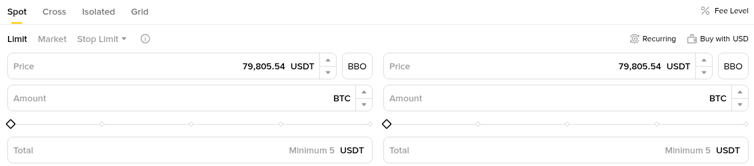
One trap: a limit buy placed far below the market looks safe but may never fill. If the price runs away from you, you either chase it or miss the move. Decide in advance which outcome you can live with.
Why maker and taker matter here
The order book is also how Binance decides your fee type. An order that rests in the book and waits is a maker order. An order that fills immediately against something already in the book is a taker order.
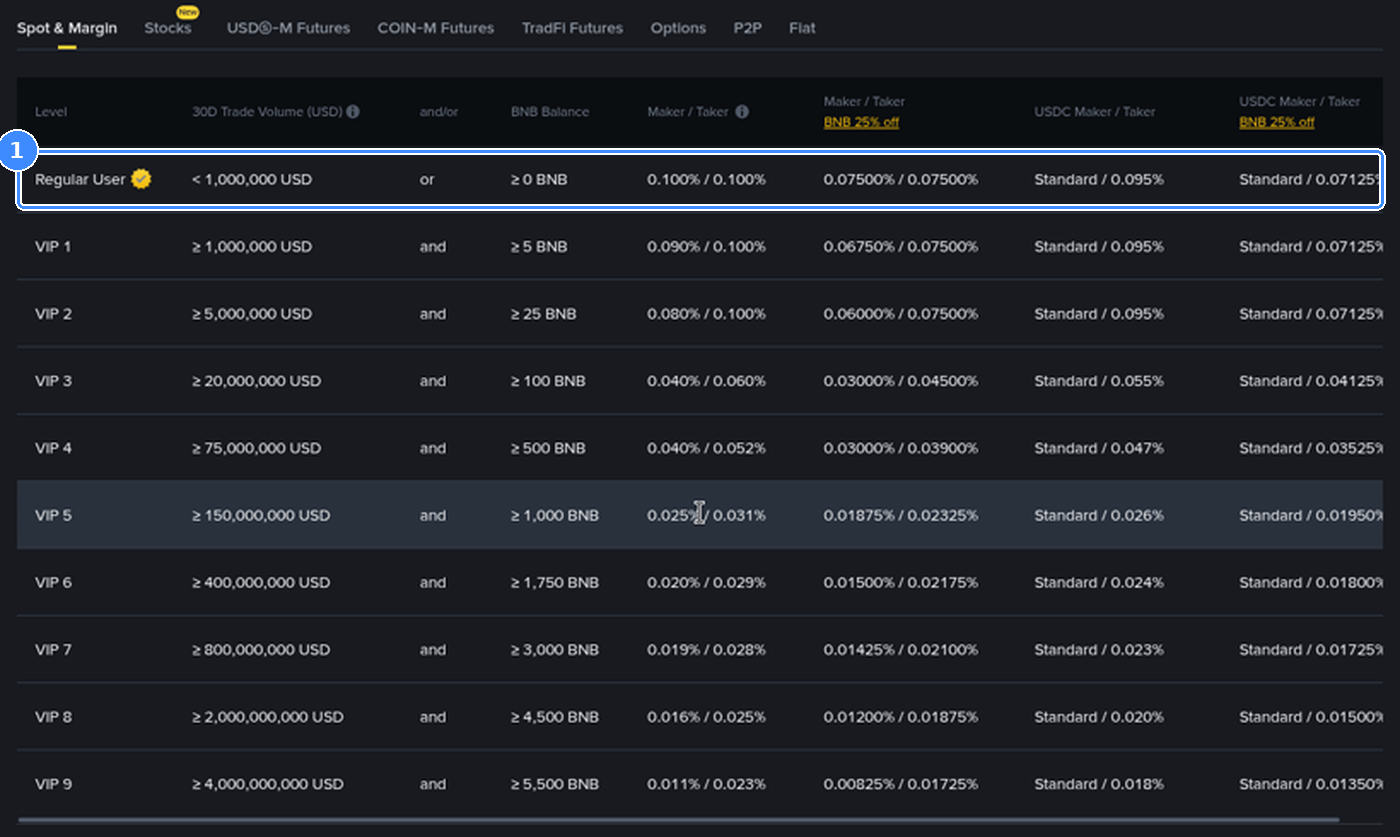
For the Regular User tier on Spot, both maker and taker are 0.100%, and paying fees with BNB brings that to 0.075%. So on Spot at the entry level, the main saving from a limit order isn't the fee, it's avoiding the spread and slippage from level 2 and 3.
A $1,000 example: the fee is $1.00 whether you're maker or taker at the base rate, or $0.75 with the BNB discount. On the thin token from level 3, the $5,000 market buy lost about $58 to slippage, against roughly $5 in fees at the base rate. The order book decides more of your cost than the fee schedule does.
At higher VIP levels maker rates drop below taker rates, so the gap grows for very active traders.
Level 5 - Reading what the book is hinting at
Once the basics are second nature, the book starts to tell you more. Treat these as clues, never as guarantees.
Walls: A single row with far more size than its neighbours, for example 50 BTC on the bid when the rows around it hold 1 BTC. It can act as short-term support because sellers have to fill it before the price drops further.
Walls that vanish: Large orders can be cancelled at any moment. If a wall disappears every time the price gets close, don't rely on it.
Imbalance: Much more total size on the bid side than the ask side near the price suggests buyers are more eager right now. In the screenshot, about 10.5 BTC sat on the top bids against about 1 BTC on the top asks.
Thin patches: Gaps with almost nothing between two prices. The price can jump through them quickly, which is where stop orders can fill worse than expected.
Grouping: The precision menu (0.1, 1, 10 and so on) merges nearby rows. Zoom out to find the larger walls, zoom in to see the exact best bid and ask.
Those thin patches are also why the order type behind your stop matters. This guide on setting a stop loss on Binance, from stop-limit to OCO and trailing stops explains how each one behaves when the book is thin.
Order book myths that cost beginners money
Myth: the last price is the price I'll pay.
Fact: you pay the best ask when buying and receive the best bid when selling. The last price is history.
Myth: a big bid wall means the price can't fall.
Fact: the wall can be cancelled or simply filled. It's information, not protection.
Myth: market orders are always fine for small amounts.
Fact: on a thin book even a few hundred dollars can move the price. Check the Sum column first.
Myth: more green in the book means the price will go up.
Fact: imbalance changes by the second, and many large orders never get filled. Combine it with the chart and your own plan.
A 30-second order book check before every trade
Note the best ask and best bid, and work out the spread as a percentage.
Compare your order size with the Sum column on the side you're trading.
If your size goes past the first few rows, use a limit order or split the trade.
Look for walls or empty gaps near your entry and your stop.
Glance at the Trades panel to confirm the market is actually active.
The easiest way to learn this is to watch a live book for a few minutes on a pair you know well, then a small coin, and compare how differently they behave. If you're new to the platform, you can also look at the current Binance welcome bonus campaign for new users before you start.
FAQ
Is the Binance order book the same on Spot and Futures?
The layout and logic are the same. Each market has its own book, so BTCUSDT Spot and BTCUSDT Perpetual show different orders and slightly different prices.
What does the Sum column mean?
It's the running total of size from the best price outward. It shows how much you could buy or sell before reaching that row's price.
Can I see who placed an order?
No. The book is anonymous and only shows price and size at each level.
Why do orders appear and disappear so fast?
Market makers and bots constantly place, adjust and cancel orders as prices move. That's normal, and it's why the book is a snapshot rather than a promise.
Disclosure: the sign-up link in this article uses my code GETREWARD. Trading involves risk and the order book shows intentions, not guarantees. Not financial advice.