


To find your Binance wallet address, open Wallets, click Deposit, choose the coin, then pick the network you will send on. Binance then shows your deposit address for that coin and network, plus a memo or tag if the network needs one. Copy it with the copy button instead of typing it by hand.
👉 New to Binance? Sign up on Binance with a bonus and get your first deposit address in minutes.
What is a Binance wallet address?
A wallet address is the string other wallets and exchanges send crypto to. On Binance it is a deposit address that belongs to your account.
One address per coin and network - your USDT address on BNB Smart Chain is not the same as your USDT address on Tron.
Some networks share a format - BNB Smart Chain, Ethereum and other EVM networks use addresses starting with 0x, which makes mix-ups easy.
Some networks need a memo or tag - coins like XRP, XLM or TON use a shared address plus a personal memo.
How do you find your deposit address on the Binance website?
It takes less than a minute once you're logged in.
Log in and open Wallets, then Overview or Spot.
Click Deposit at the top of the wallet page.
Select the coin you want to receive, for example USDT.
Select the network that the sending wallet or exchange will use.
Copy the deposit address shown in step 3, and the memo if there is one.

The Deposit button sits at the top of the Binance wallet overview, next to Withdraw, Transfer and History.
How do you find it in the Binance app?
The steps are the same in the app, just in a different place.
Tap Assets at the bottom of the screen.
Tap Deposit and choose Deposit Crypto.
Search for the coin and pick the network.
Tap the copy icon next to the address, or use Share to send it to yourself.
Why does the network matter so much?
The network is the blockchain the coins travel on. The sender and Binance must use the same network, or the funds can be lost or need a slow recovery request.
Check which networks the sending platform supports before you copy an address.
Pick the same network on Binance, for example BNB Smart Chain (BEP20) on both sides.
Look at the estimated arrival time and number of confirmations shown next to each network.
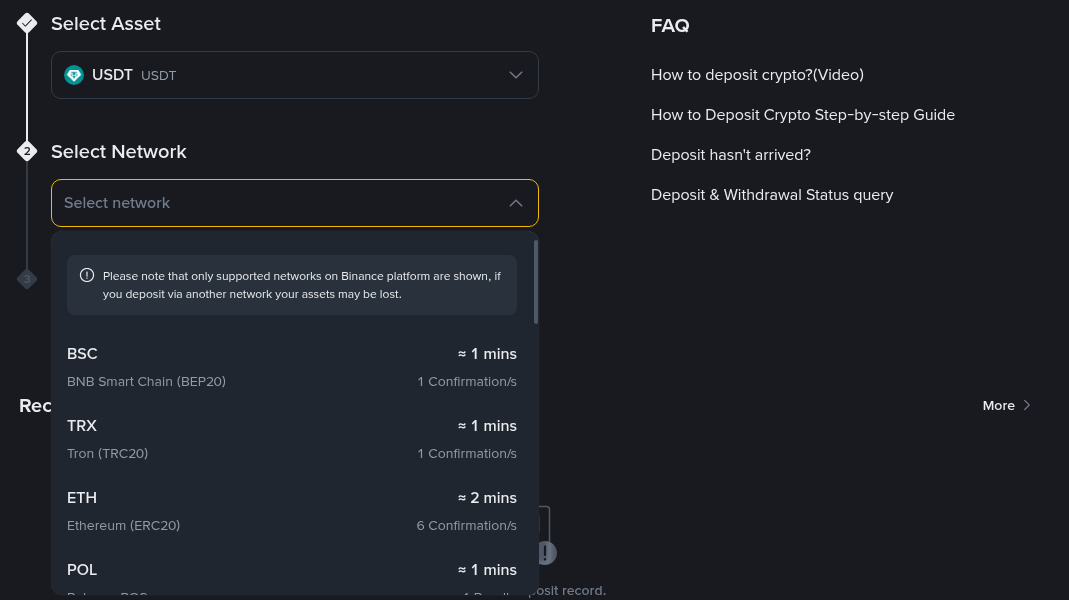
After choosing a coin, Binance lists every supported network with its estimated arrival time and required confirmations.
Related guide: how to deposit on Binance with crypto, card or bank.
When do you need a memo or tag?
Some networks use one shared address for many users and tell them apart by a memo, tag or comment. If Binance shows a memo, you must send both.
Copy the address and the memo as two separate fields.
Paste the memo into the memo or tag field on the sending side.
If the sender has no memo field, use a different network that doesn't need one.
Missing memos are one of the most common reasons a deposit doesn't show up.
How can you check the address before you send?
A few quick checks prevent most mistakes.
Compare the first and last 4-6 characters after pasting, since clipboard malware can swap addresses.
Confirm the network name matches on both sides.
Send a small test amount first when you use a new address or network.
Check the minimum deposit shown under the address, as smaller amounts may not be credited.
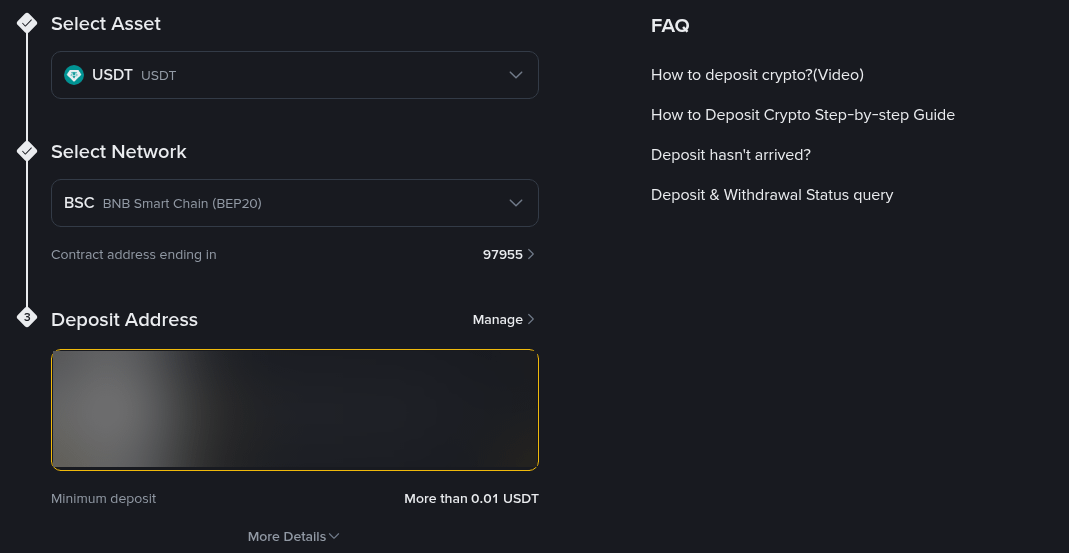
The deposit address appears in step 3 once a coin and network are selected, with the minimum deposit amount shown below it.
Is your Binance Wallet address the same as your exchange address?
No. Binance Wallet, the self-custody Web3 wallet inside the app, has its own addresses that you control. Your exchange deposit address is managed by Binance and only credits your exchange account.
To move coins between your own Binance accounts or to another Binance user, you can often use an internal transfer or Binance Pay instead, which skips the network fee.
What should you do if a deposit doesn't arrive?
Start with the basics before you open a ticket.
Check the transaction hash on a block explorer to see if it's confirmed.
Open Deposit History on Binance to see the current status.
If you used the wrong network or forgot the memo, use the deposit recovery option in the Support Center.
New to the exchange? Eligible new users who sign up with code GETREWARD can join the task-based welcome bonus of up to $19,800. You can see the latest Binance welcome bonus offer before you register.
FAQ
Does my Binance deposit address change?
It usually stays the same for a given coin and network, but always copy it fresh from the Deposit page before each transfer.
Can I use the same address for USDT on different networks?
Only if Binance shows the same address for both networks. Even then, always select the network the sender uses.
Where do I find my BNB Smart Chain address on Binance?
Open Deposit, choose the coin, then select BNB Smart Chain (BEP20). The address starting with 0x is your BSC address for that coin.
Is it safe to share my deposit address?
Yes. People can only send funds to it. Never share your password, 2FA codes or seed phrase.
Ready to receive your first crypto?
If you don't have an account yet, open your Binance account here and your deposit addresses are ready as soon as you log in.
Disclosure: GETREWARD is my sign-up code. If you use it, I may earn a commission from Binance at no extra cost to you. This is not financial advice.