👀 KNOW YOUR FEE OPTION BEFORE YOU SEND
Have you ever reached the final step of a token transfer and paused because the network fee options were unclear?
You know which asset you want to send and where it needs to go. But choosing how to pay the fee can introduce another decision—especially when several options appear in the wallet.
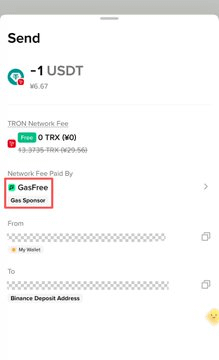
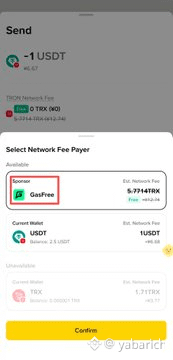
Binance Wallet now displays a Sponsor label next to the GasFree option when sending TRC-20 tokens, according to the announcement.
It is a small interface change with a practical purpose: making the GasFree option easier to recognize before you confirm your transfer.
WHY A CLEAR LABEL MATTERS
A payment feature is useful only when people can find and understand it.
For someone unfamiliar with GasFree, the Network Fee Payer screen may raise questions: Which option should I choose? What does the sponsor do? Which asset will cover the fee?
The visible Sponsor label provides a clearer identifier for the GasFree option. Returning users can recognize it more quickly, while new users have a more explicit route to follow.
The label helps with navigation. The transaction quote provides the information needed to decide.
WHERE TO FIND THE GASFREE SPONSOR OPTION
The announced navigation path is:
Binance Wallet → Send → Select Token → Network Fee Payer → GasFree Sponsor → USDT
Start by selecting the TRC-20 token you want to transfer. Enter the recipient and amount as required, then review the Network Fee Payer options.
Look for GasFree Sponsor and select USDT within the supported flow.
Before proceeding, check the displayed fee, the asset used to pay it, and the total balance required. The confirmation screen should be your reference for that specific transaction.
WHAT “SPONSOR” DOES—AND DOES NOT—TELL YOU
The word Sponsor identifies the GasFree option in the interface. It should not automatically be interpreted as a promise that every transfer is free.
A sponsored transaction flow can handle network-resource payment while charging the user through a supported asset. Any discount or promotional coverage depends on the terms applicable to that transaction.
In this announced flow, USDT is the selectable fee-payment asset.
That distinction keeps the experience clear: identify the service through the label, then verify the cost through the quote.
HOW THIS HELPS IN EVERYDAY SITUATIONS
You are using GasFree for the first time. The label gives you a specific option to look for instead of guessing which fee-payment route matches the instructions.
You are helping someone complete a transfer. A named sequence of screens makes guidance easier: open Send, choose the token, review Network Fee Payer, then locate GasFree Sponsor.
You regularly send TRC-20 tokens. A more recognizable option can reduce repeated searching. You should still review each quote because the label itself does not establish a fixed fee.
You are sending a token other than USDT. Distinguish the asset being transferred from the asset used to pay the fee. Choosing USDT as the fee payer does not mean the transfer itself must be denominated in USDT; availability depends on the supported token and flow.
KEEP THE FINAL CHECK SIMPLE
Check the recipient. Confirm that the destination address and network match the intended transfer.
Check the transferred asset. Review the token and amount separately from the fee-payment selection.
Check the fee. Confirm how much USDT is required and whether any promotional benefit has actually been applied.
Check the total. Make sure the wallet has enough of the relevant assets to complete the transaction.
Clear labels reduce confusion. These final checks help prevent avoidable mistakes.
THE SIMPLE FRAMEWORK
Need to find GasFree? Look for the Sponsor label. Need to understand the cost? Read the quote. Ready to send? Verify the details.
The best wallet improvements make familiar actions easier to complete with confidence.
On your next supported TRC-20 transfer, open Network Fee Payer in Binance Wallet and explore the GasFree Sponsor option before confirming.
@Binance Wallet @JUST DAO @Justin Sun孙宇晨 #TRONEcoStar