

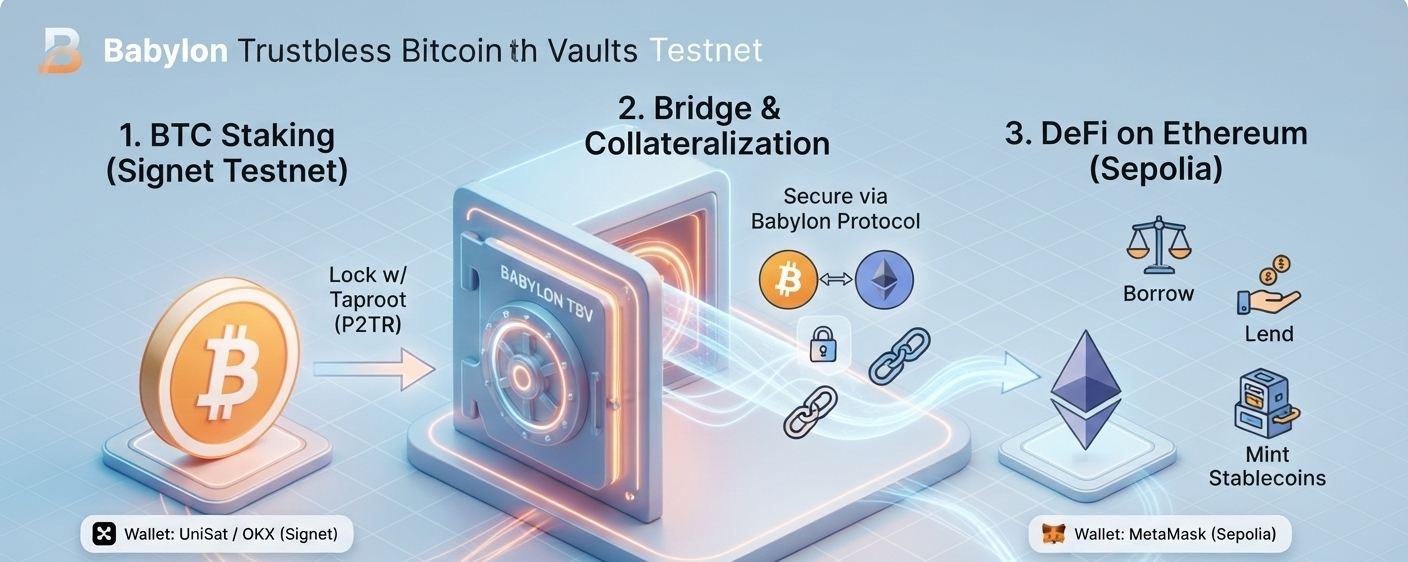

Comment utiliser les coffres Bitcoin sans confiance de Babylon (Testnet TBV)
🚀 Guide étape par étape : Explorer les coffres Bitcoin sans confiance de Babylon (TBV) Testnet ! 🌐
Vous voulez utiliser votre Bitcoin comme garantie dans la DeFi sur Ethereum sans enrouler (wrapping) ni faire de pont (bridging) ? Le testnet TBV de Babylon le rend possible ! Voici un guide complet pour aider notre communauté à le tester étape par étape :
🛠️ Prérequis (Ce dont vous avez besoin) :
Portefeuille Bitcoin : un portefeuille comme UniSat configuré pour le réseau Bitcoin Signet (l’adresse doit être définie sur Taproot / P2TR).
Portefeuille Ethereum : MetaMask ou tout autre portefeuille pris en charge sur le testnet Sepolia.
Jetons de test :
Signet BTC (depuis le robinet officiel du testnet).
Sepolia ETH (pour les frais de gas).
📝 Guide étape par étape pour la communauté :
Étape 1 : Ouvrir l’application Testnet
Accédez au tableau de bord officiel du TBV Testnet : [https://btcvaults.testnet.babylonlabs.io/](https://btcvaults.testnet.babylonlabs.io/)
Étape 2 : Connecter les portefeuilles
Cliquez sur Connect et liez à la fois votre portefeuille Bitcoin Taproot et votre portefeuille Ethereum. Assurez-vous que votre portefeuille Bitcoin est explicitement configuré sur le type d’adresse Taproot (P2TR).
Étape 3 : Créer un coffre (Peg-In)
Accédez à la section Garantie et cliquez sur Déposer.
Saisissez le montant de test BTC que vous souhaitez verrouiller dans les limites du testnet public.
Choisissez un fournisseur de coffre dans le menu déroulant et confirmez les transactions Bitcoin et Ethereum.
Une fois vérifié, cliquez sur Activer pour fournir le coffre en garantie.
Étape 4 : Emprunter des Stablecoins
Rendez-vous dans la section Loans et cliquez sur Borrow.
Sélectionnez un actif (comme USDC, USDT ou WBTC), saisissez le montant et signez la transaction.
Surveillez le facteur de santé de votre position sur le tableau de bord.
Étape 5 : Rembourser et récupérer (Redeem)
Pour fermer votre position plus tard, allez dans Loans, cliquez sur Repay, puis remboursez votre dette empruntée afin de déverrouiller votre coffre.
💡 Remarque : Il s’agit d’un environnement de testnet public exécuté sur Bitcoin Signet et Ethereum Sepolia. Les fonds sont strictement destinés aux tests et n’ont aucune valeur monétaire réelle.
Testons l’avenir du Bitcoin DeFi sans confiance ! Déposez vos questions ci-dessous si vous avez besoin d’aide. 👇
#Babylon #Bitcoin #DeFi #Web3 #CryptoEducation #Testnet