


Here is a number that surprises most new users. Moving the same 100 USDT out of Binance can cost 1.5 USDT on one network and 0.01 USDT on another, and both transfers land in about a minute.
The short answer: TRC20 is USDT on the Tron network. It is widely supported and fast, but on Binance its withdrawal fee is higher than BEP20 (BNB Smart Chain). Pick the network the receiving side supports first, then the cheapest one on that shortlist. ERC20 (Ethereum) is usually the most expensive, so keep it for when nothing else is accepted.
👉 Create a Binance account and check the new-user welcome tasks
The rest of this guide compares the three networks side by side, runs the fee math on real amounts, and covers the mistakes that actually cost people money.
One coin, several roads
USDT is a single stablecoin, but it is issued on several blockchains. Each version lives only on its own chain. A Tron wallet can't read BEP20 USDT, and an Ethereum address won't see TRC20 USDT.
So when Binance asks you to "Select Network", it is really asking which road the coins travel on. The road must exist on both ends. If it doesn't, the transfer either fails or the coins arrive somewhere the other side can't reach.
Think of it this way: the coin is the same, the price is the same, but the address format, the fee and the support list change with the network.
TRC20 (TRX on Binance): USDT on Tron. Addresses start with a capital T.
BEP20 (BSC on Binance): USDT on BNB Smart Chain. Addresses start with 0x.
ERC20 (ETH on Binance): USDT on Ethereum. Addresses also start with 0x.
Notice that BEP20 and ERC20 addresses look identical at a glance. That single detail is behind a large share of wrong-network transfers, and we'll come back to it.
What the deposit screen tells you
Open Wallet, tap Deposit, choose USDT and open the network list. Each row shows the network's short name, its full name, an estimated arrival time and the number of block confirmations Binance waits for.
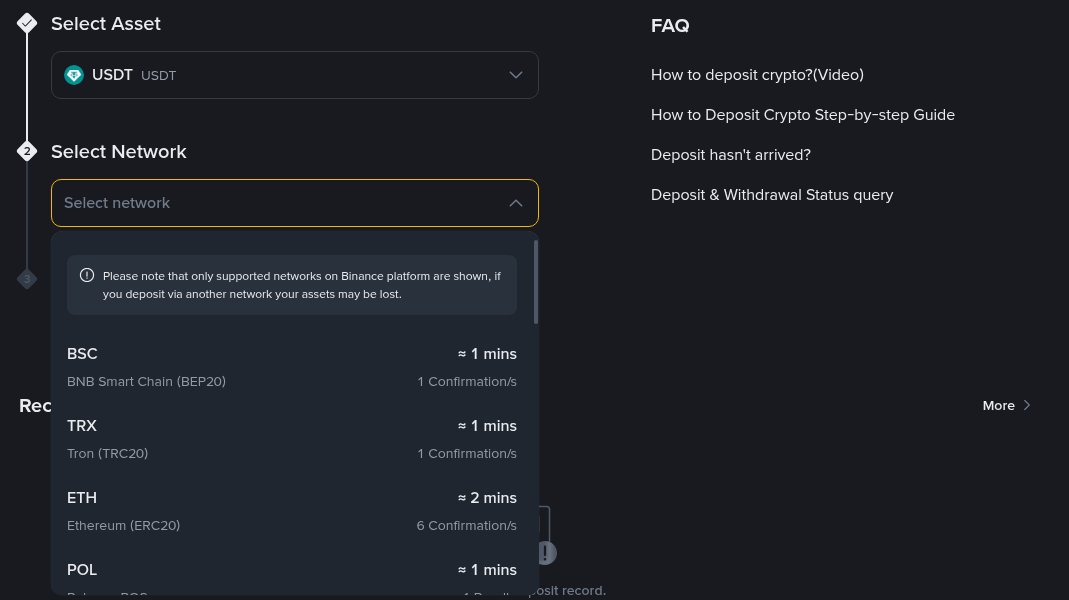
Two rows matter for TRC20 users. Tron needs 1 confirmation and shows roughly a minute. BNB Smart Chain also needs 1 confirmation. Ethereum asks for 6 confirmations, so it tends to take a little longer even when the network is quiet.
Confirmations are the reason a deposit can show as "pending" for a while. The coins have left the sender, but Binance won't credit them until the chain has added enough blocks on top. Busy periods stretch that, especially on Ethereum.
TRC20 vs BEP20 vs ERC20 compared
Here is how the three stack up for an everyday user moving USDT in and out of Binance.
Withdrawal fee from Binance: BEP20 is the cheapest of the three, TRC20 sits in the middle, and ERC20 is normally the highest because Ethereum gas is expensive.
Speed: TRC20 and BEP20 both settle in about a minute in normal conditions. ERC20 is still quick, but the extra confirmations add a few minutes.
Support on other platforms: TRC20 is accepted by a very large number of exchanges and wallets. BEP20 support is common but not universal. ERC20 is supported almost everywhere, which is its main selling point.
Gas on a private wallet: To send USDT out of your own wallet you need the chain's native coin. That means TRX for TRC20, BNB for BEP20 and ETH for ERC20. Binance covers this for you on withdrawals by charging the listed fee.
Address format: TRC20 starts with T, so it is hard to confuse. BEP20 and ERC20 both start with 0x, so the network choice is the only thing separating them.
None of the three is "best" in every case. The right one is the cheapest network that both sides support.
The fee math on real amounts
Fees are charged as a flat amount of USDT, not a percentage. That's why the network choice matters most on small transfers and barely at all on large ones.
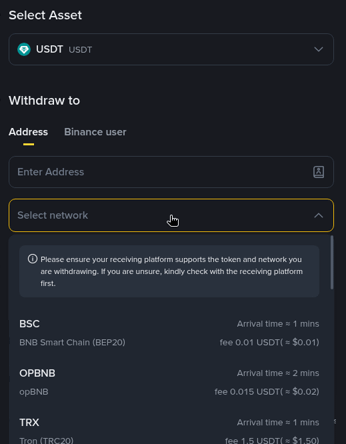
The figures below use the fees shown on the withdrawal form in the screenshot: 0.01 USDT on BEP20 and 1.5 USDT on TRC20. Binance adjusts these with network conditions, so always read the fee line on your own form before you confirm.
Sending $50 to a friend: On TRC20 the fee is 1.5 USDT, which is 3% of the transfer. On BEP20 it is 0.01 USDT, or 0.02%. If your friend's wallet supports BEP20, that's an easy saving.
Moving $500 to another exchange: TRC20 costs 1.5 USDT, or 0.3%. BEP20 costs 0.01 USDT. The gap is $1.49, which is small but not nothing if you do it often.
Four $300 withdrawals a month: On TRC20 you pay 6 USDT a month, about 72 USDT a year. On BEP20 you pay 0.04 USDT a month. Over a year that difference is roughly the cost of a decent hardware wallet.
A one-off $10,000 transfer: 1.5 USDT is just 0.015% of the amount. At this size, pick the network that's safest and best supported on the other side and don't worry about the fee.
One more detail: the fee comes out of the amount you enter. Withdraw 100 USDT over TRC20 and the other side receives 98.5 USDT, unless the form lets you add the fee on top. Check the "receive amount" line before you press the final button.
How to pick a network in three questions
Run through these in order and the choice usually makes itself.
What does the receiving side accept? Open the deposit page on the other exchange or wallet and look at its USDT network list. Anything missing there is off the table, however cheap it is.
Which of those is cheapest on Binance right now? Compare the fee lines on the withdrawal form. Usually BEP20 wins, with TRC20 next.
Does anything argue against the cheapest one? A network marked suspended, a deposit page that warns about delays, or a wallet you've never used on that chain are all good reasons to choose the next option.
If a network suddenly disappears from the list or shows as suspended, wait for it to come back or pick another supported option. Never force a transfer onto a network the other side has paused.
Depositing TRC20 USDT step by step
Receiving USDT is free on Binance's side. The sender pays the network fee. The steps are the same for every network, only the selection changes.
Open the deposit page: Go to Wallet, then Deposit, then pick USDT.
Choose the network: Select TRX Tron (TRC20) if the sender is on Tron, or BSC if they are sending BEP20. Match exactly what the sender will use.
Copy the address: Use the copy button rather than typing it. A TRC20 address starts with T. A BEP20 address starts with 0x.
Check the minimum: Deposits below the minimum shown on the page may not be credited.
Send a small test first: For a new route, send a few dollars, wait until it shows up, then send the rest.
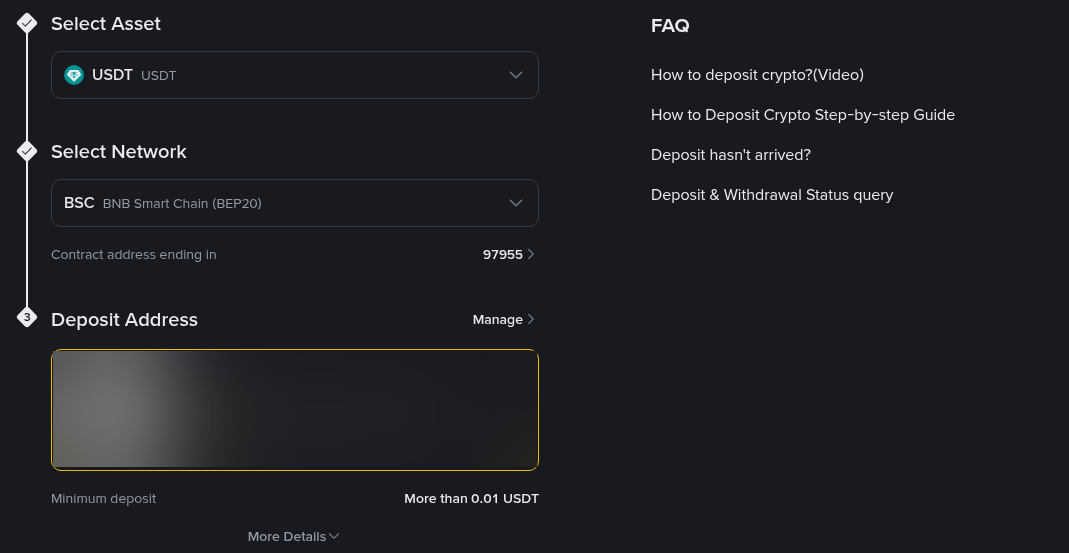
USDT on Tron, BNB Smart Chain and Ethereum doesn't use a memo or tag, so you only need the address and the right network. If a deposit page ever asks for a memo for some other coin, include it, but don't invent one for USDT. For a full walkthrough of finding and checking your address on each network, see our guide to finding your Binance deposit address, network and memo.
Mistakes that cost real money
Most lost USDT isn't stolen. It's sent down the wrong road. These are the ones that come up again and again.
Choosing ERC20 out of habit: It works, but on a small transfer the fee can eat a noticeable slice. Check whether TRC20 or BEP20 is accepted first.
Mixing up BEP20 and ERC20: Both addresses start with 0x, so the address alone won't stop you. If the other side only lists ERC20 and you send BEP20, the coins may not appear, and getting them back can take a long recovery process, if it's possible at all.
Sending from a private Tron wallet with no TRX: The transfer fails because there is nothing to pay the network cost. Keep a few TRX in the wallet before moving TRC20 USDT.
Pasting an old or edited address: Clipboard malware can swap addresses. Compare the first and last four characters after you paste.
Forgetting the fee comes off the top: If the other side must receive an exact amount, add the fee before you send.
Skipping the test transfer: A few dollars and two minutes is cheap insurance on any route you haven't used before.
What to do if your USDT hasn't arrived
Don't panic and don't send it again. Work through this list first.
Find the TxID: On the sending platform, open the withdrawal record and copy the transaction ID.
Check a block explorer: Tronscan for TRC20, BscScan for BEP20, Etherscan for ERC20. If the explorer shows the transfer as confirmed to the right address, it's on its way to being credited.
Count confirmations: If it's still short of what the deposit page requires, give it time.
Compare networks: If the explorer shows a different chain from the one you selected on Binance, that's a wrong-network deposit.
For confirmed transfers that still don't show up, our step-by-step guide to recovering a missing Binance deposit walks through the self-service options and when to contact support.
A quick cheat sheet
Cheapest route between Binance and a platform that supports it: BEP20.
Widest support with a moderate fee: TRC20.
When the other side accepts nothing else: ERC20.
Moving to another Binance account: Use the "Binance user" tab on the withdrawal page instead of a blockchain network.
Large transfers: Pick the safest, best-supported network. The fee hardly matters at that size.
If you're setting up a fresh account to try this, the active Binance bonus event for new users lists the welcome tasks available right now, up to $19,800 for eligible users.
FAQ
Is TRC20 the same as TRX?
Not quite. TRX is Tron's native coin. TRC20 is the token standard on Tron, and USDT TRC20 is USDT issued on that chain. On Binance, the network row is labelled TRX with "Tron (TRC20)" underneath.
Can I send TRC20 USDT to a BEP20 address?
No. The address formats are different and the chains don't talk to each other. Pick one network and use it on both sides.
Why is the TRC20 fee higher than BEP20 on Binance?
Each chain has its own transaction costs, and Binance sets the withdrawal fee to cover them. Tron transfers of USDT use more network resources than BNB Smart Chain transfers, so the fee is higher.
Does Binance charge to deposit USDT?
Binance doesn't charge for crypto deposits. The sender pays the network fee on their side.
Do I need a memo for USDT TRC20?
No. USDT on Tron, BNB Smart Chain and Ethereum only needs the address and the correct network.
Disclosure: the sign-up link in this article uses my code GETREWARD. Crypto transfers are irreversible, so double-check every address and network. Not financial advice.