
🚀Jupiter (JUP) Airdrop – Tout ce que vous devez savoir :
🛑En bref :
Découvrez comment obtenir le parachutage de Jupiter (JUP) dans ce guide complet. Découvrez comment vérifier si vous êtes éligible, le processus de réclamation et les avantages de l'utilisation de Trust Wallet.
🛑Un crypto airdrop est un processus par lequel un projet blockchain distribue des jetons ou des pièces gratuits à des adresses de portefeuille crypto éligibles appartenant aux membres de sa communauté. Les parachutages sont souvent utilisés à des fins promotionnelles, pour l’engagement des utilisateurs ou pour des récompenses. Dans ce guide, nous couvrirons tout ce que vous devez savoir sur le largage Jupiter afin que vous puissiez savoir si vous êtes éligible et réclamer des jetons JUP en utilisant Trust Wallet.
🛑Voici ce que nous aborderons dans ce guide :
Aperçu du largage :
Qu'est-ce que Jupiter ?
Qu'est-ce que le jeton JUP ?
Comment vérifier si vous êtes éligible au largage JUP et réclamer
🛑Si vous souhaitez participer à cet airdrop, vous aurez besoin d'un portefeuille Solana. Assurez-vous donc d'avoir la version la plus récente de Trust Wallet avant de commencer.
🛑Comment vérifier votre éligibilité au largage Jupiter (JUP) ?
Tout d’abord, assurez-vous de disposer de la version la plus récente de Trust Wallet.
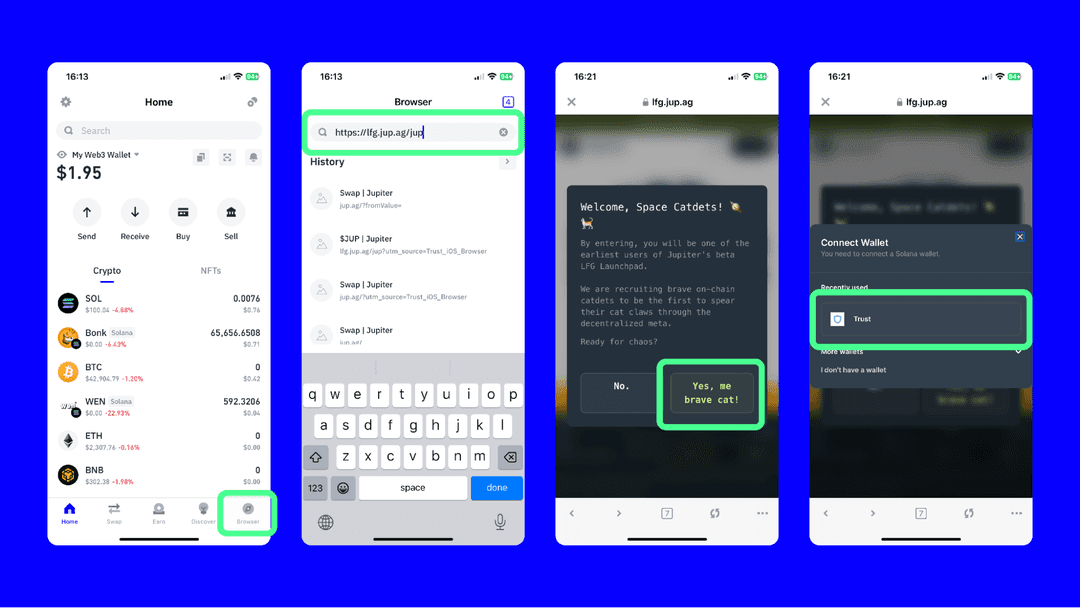
Ouvrez Trust Wallet et sélectionnez l'onglet « Navigateur ».
🛑Entrez l'URL lfg.jup.ag/jup dans la barre de recherche et sélectionnez le bouton « Terminé ».
🛑Une fois la page chargée, sélectionnez « Oui, mon brave chat ! » option. Choisissez ensuite l’option Trust Wallet.
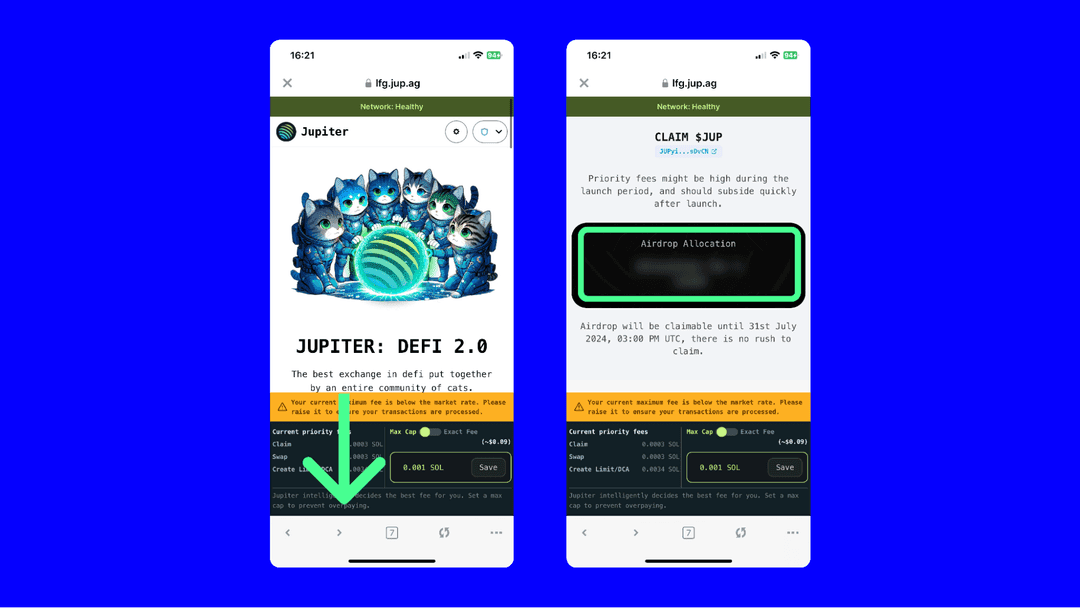
🛑Une fois votre portefeuille connecté à la page de réclamation, faites défiler jusqu'à la section Allocation Airdrop.
🛑Si vous avez une allocation, vous devriez la voir sur cette page de réclamation.
🛑Suivez les instructions restantes pour réclamer vos jetons JUP.
🛑Assurez-vous de suivre les communications officielles de l'équipe Jupiter sur leur page X officielle pour toute mise à jour et pour obtenir de l'aide.
#Write2Earn #JUP #Airdrop
🛑En bref :
Découvrez comment obtenir le parachutage de Jupiter (JUP) dans ce guide complet. Découvrez comment vérifier si vous êtes éligible, le processus de réclamation et les avantages de l'utilisation de Trust Wallet.
🛑Un crypto airdrop est un processus par lequel un projet blockchain distribue des jetons ou des pièces gratuits à des adresses de portefeuille crypto éligibles appartenant aux membres de sa communauté. Les parachutages sont souvent utilisés à des fins promotionnelles, pour l’engagement des utilisateurs ou pour des récompenses. Dans ce guide, nous couvrirons tout ce que vous devez savoir sur le largage Jupiter afin que vous puissiez savoir si vous êtes éligible et réclamer des jetons JUP en utilisant Trust Wallet.
🛑Voici ce que nous aborderons dans ce guide :
Aperçu du largage :
Qu'est-ce que Jupiter ?
Qu'est-ce que le jeton JUP ?
Comment vérifier si vous êtes éligible au largage JUP et réclamer
🛑Si vous souhaitez participer à cet airdrop, vous aurez besoin d'un portefeuille Solana. Assurez-vous donc d'avoir la version la plus récente de Trust Wallet avant de commencer.
🛑Comment vérifier votre éligibilité au largage Jupiter (JUP) ?
Tout d’abord, assurez-vous de disposer de la version la plus récente de Trust Wallet.
Ouvrez Trust Wallet et sélectionnez l'onglet « Navigateur ».
🛑Entrez l'URL lfg.jup.ag/jup dans la barre de recherche et sélectionnez le bouton « Terminé ».
🛑Une fois la page chargée, sélectionnez « Oui, mon brave chat ! » option. Choisissez ensuite l’option Trust Wallet.
🛑Une fois votre portefeuille connecté à la page de réclamation, faites défiler jusqu'à la section Allocation Airdrop.
🛑Si vous avez une allocation, vous devriez la voir sur cette page de réclamation.
🛑Suivez les instructions restantes pour réclamer vos jetons JUP.
🛑Assurez-vous de suivre les communications officielles de l'équipe Jupiter sur leur page X officielle pour toute mise à jour et pour obtenir de l'aide.
#Write2Earn #JUP #Airdrop