Stop worrying about frozen cards!
If you’re still using C2C and sweating over every transaction, it’s time to level up.
Binance now supports direct withdrawals to HK bank cards. It’s legal, safe, and incredibly smooth. 🛡️🔗
🌟 Why this is a Game Changer
* Zero "Dirty Money" Risk: No more C2C headaches.
Withdrawals are handled through official channels—completely legal and secure. ⚖️
* Spend Everywhere: Link your HK card to Alipay or WeChat Pay.
Use it for Meituan, JD, Taobao, or even that small milk tea shop downstairs! 🥤🛍️
* Fee Hack: Linking Zhong An (ZA) Bank to WeChat means zero extra fees for purchases over 200 RMB.
(Unlike U-cards which usually bite you with fees at that limit!) 💸
🏦 Why ZA Bank? (The Beginner’s Choice)
I personally use Zhong An Bank. Why?
* Zero Barriers: No annual fees, no minimum deposit. 🙅♂️💰
* Easy Setup: Just hop on a Wi-Fi signal in Hong Kong and you can open it on your phone.
Much faster than the "big" banks like HSBC or BOC. 📱⚡
📊 The Cost & Speed
* Flat Fee: Binance charges a $25 remittance fee per transaction.
Whether you withdraw a little or a lot, it’s the same—so it’s better for larger amounts! 💵
* Exchange Rate: The USDT to USD conversion loss is tiny—almost negligible. 📉
* Speed: Binance says 5 days, but my test arrived in ~24 hours! ⏱️🚀
📝 The Withdrawal Checklist
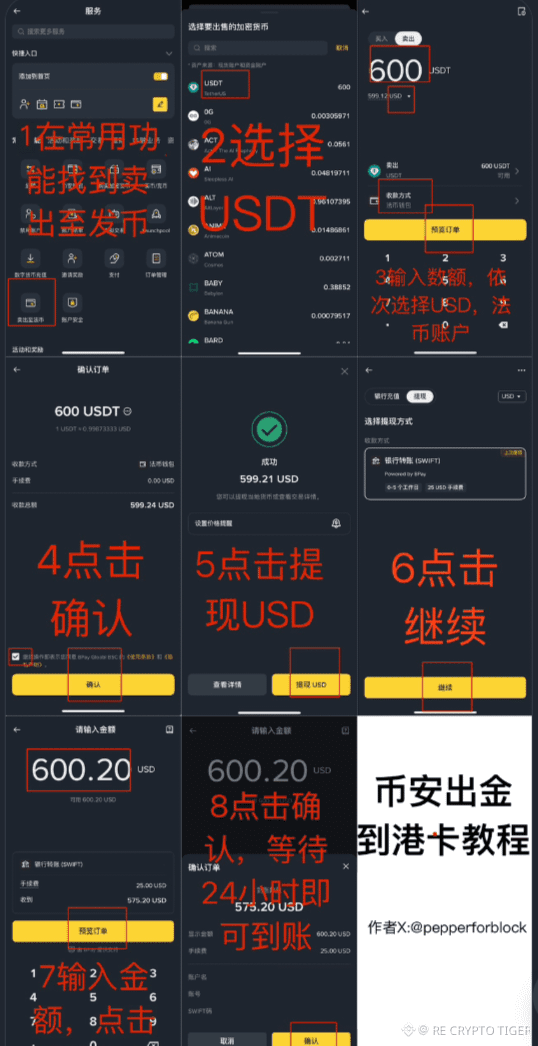
* Convert your USDT to USD in Binance.
* Select Withdrawal -> Fiat -> USD.
* Choose "Bank Transfer (SWIFT)".
* Enter your ZA Bank details (don't forget your SWIFT code!).
* Wait for that "Deposit Successful" notification! 🔔
💡 Pro Tip:
Save this post now!
Even if you don't have an HK card yet, you’ll want this guide when you finally make that trip across the border. 🇭🇰✈️
Check the images below for the step-by-step UI flow! ⬇️
#出金 #港卡 #Binance #Write2Earn #reCryptoTiger