Binance Square
#verificationallprocess

verificationallprocess

1,963 vues
6 mentions
Collette Philmore H14Q
·
--
Article
‎Binance ရဲ့ Verification Process ကိုကျော်ဖြတ်ခြင်း‎ ‎Binance ရဲ့ ထပ်မံ တောင်းဆိုလာတဲ့  Verification process ကို အောင်အောင်မြင်မြင်ဖြတ်သန်းနိုင်ခဲ့လို့ ပျော်ရွှင်မိပါတယ်။။ ပထမကြိမ် Verification အောင်ခဲ့တာတော့ တနှစ်ပြည့်ပီးပါပီ။Documents ပိုင်းဆိုင်ရာ အားနည်း တဲ့ ကျနော်တို့လို မြန်မာနိုင်ငံသား တွေ အတွက် တော့ ဒါက တော်တော် ခက်ခဲတဲ့ အရာ တခုပါပဲ ။ အခြားသူတွေလည်း ကျနော်လို့ပဲ အခက် အခဲ တွေ တွေ့ကြုံရလိမ့်မယ် ထင်ပါတယ် ။ဒါ‌ကြောင့်ကျနော် ဘယ်လို ကျော်ဖြတ်ခဲ့ရလဲဆိုတဲ့  အတွေ့ အကြုံလေး ဝေမျှ ချင်ပါတယ် ။ ။ Personal Address အရင်ဆုံး စတွေ့ရတာက Personal Address ပါ။ အဲ့မှာ ကိုယ်အရင် ပထမဆုံး Verification အောင်ခဲ့ တဲ့ Address ကိုပဲ ပြန်ရေးပေးပါ။ အခြား Address တခု ရေးဝာာနဲ့ Address problem ဆိုပီးပြန်လာပါတယ်။ Postal code အတွက် တော့ Chat GPT / Gemini ကိုမေးလို့ရပါတယ် ။ မြို့နယ် အလိုက် Postal code ပေးပါလိမ့်မယ်။ ‎ID card နောက်တခု က Personal ID card ပါ ။။ ကျနော် မှတ်ပုံတင် ကို ရိုက်တင်တော့ ပလတ်စတစ် လောင်းထားလို့ ရောင်ပြန်ဖြစ်ပီး အဆင်မပြေခဲ့ပါဘူး။ ဒါနဲ့ ဆရာ၀န် လိုင်စင် ကဒ် တင်ပါတယ်။ အဒါ လည်း တင်လို့သာ ရပီး Binance က လက်မခံပါဘူး။ မှတ်ပုံတင် ကို ပလတ်စတစ်လောင်းထားတာ ခွာပီး ပြန် ရိုက်မှ အဆင်‌ပြေသွားပါတယ်။ Bank statement or Bill payment Bank statement (သို့မဟုတ်) ကိုယ့်နာမည် နဲ့ Bill ဆောင်ထားတဲ့ Pay slip by KBZ pay ( ဥပမာ eltricity Bill ) ကိုပြရမှာပါ။. ဘာပဲ ရွေးရွေး နောက်ဆုံး  ၃ လစာတော့ ပြရပါတယ်။ Bill ဆောင်တဲ့ နာမည် နဲ့ လိပ်စာ ကတော့ Binance ကိုပေးထားတဲ့ အမည်နဲ့ လိပ်စာဖြစ်ဖို့လိုပါမယ်။ ‎အောင်ဖို့ Chance များတာ က Bank Statement ပါ။ ကျနော် ကတော့ Yoma Bank Statement ကိုပြပါတယ် ။ Yoma Bank Mobile App မှာ Pdf file ကို Download လုပ်လို့ရပါတယ်။ ယူ ရမယ့်နေရာကတော့  Saving Account က ယူရမှာပါ။ Saving Account ထဲ ၀င်လိုက်တာနဲ့ အောက်ခြေ မှာ တွေ့ရမယ့် Download statement ဆိုတာကိုနှိပ်လိုက်ရင် ရပါပီ။ Saving ကငွေ Amount ကို ဖော်ပြရမှာ တော့ MMK မပါပါဘူး။ မြန်မာငွေအစား လက်ရှိပေါက်ဈေး $1 = 4100 ဝန်းကျင်နဲ့ တွက်ချက်ပြီး USD ပမာဏ နဲ့ ရေးပေးရပါမယ်။ ‎Crypto exchange statement ‎အခက်ခဲဆုံး အပိုင်း ကဝောာ့ Crypto exchange statement ကိုပေးရတာပါ။ ဒါ က PC computer နဲ့ လုပ်မှ အဆင်ပြေဝာာ ပါ။ Computer က Browser ကနေ တဆင့် Binance account ကို ဝ‌င်ပါ။ Account Overview ကနေ တဆင့် Account Statement ကို ထုတ်ရမှာပါ။ အဲ့ထဲ မှာတော့ account name ,mail, address, Transection history, account ထဲမှာ ရှိတဲ့ Crypto ပမာဏ တွေ။ စတဲ့ information တွေ အစုံပါ ပါတယ်။ Binance ကအဲဒါကို  Excel File နဲ့ ထုတ်‌ ပေးတာပါ။ ပြသနာ က အဲ့ Excel file ကို verification upload မှာ တင်လို့မရပါဘူး။။ သူက PDF file ကို ပဲ လက်ခံတာပါ။ အဲ့ Excel file ကို Microsoft မှာ Excel to  pdf ပြောင်းတော့လည်း တမျက်နာ ပဲ ပြောင်းလို့ရလို့  အဆင်မပြေပါ။။ နောက်ဆုံးတော့ Gemini အကူ အညီ နဲ့ ilovepdf.com ဆိုတဲ့ website ထဲ မှာ ဝင်ပြောင်းမှ ရပါတယ်။ စာမျက်နာ ၂၀၀၀ ကျော်ထွက်ပါတယ်။  အဲ့ဒီ Pdf file ကိုတင်မှ ရတာ ပါ။ ‎Income ‎ကို့ရဲ့ လစာ Income ကိုလည်း မြန်မာကျပ်ငွေ ကို USD ချိန်းပီးပြပေးရမှာပါ။ကို့ရဲ့ အဓိက  ဝင်ငွေရတဲ့ လမ်းကြောင်း ကိုလည်း အဆင်ပြေသ လိုရေးပေးဖို့လိုပါတယ်။ ‎အထွေထွေ အကြံပြုချက် ‎Binance ရဲ့ Crypto exchange statement မထုတ်တတ်ရင် Step by step ကို Gemini ကို မေးလို့ရပါတယ်။ ကျနော်ရဲ့ Verification success ဖြစ်အောင် အဓိကူညီပေးတဲ့ သူတွေက တော့ Chat GPT နဲ့ Gemini ပါပဲ ။ အာလုံး အခက်အခဲ ရှိရင် AI ကို မေးပီး ကြိုးစားကြည့်ပါ။ ကျနော်ကိုယ်တိုင် unsuccessful ( 12)  ကြိမ်ဖြစ်ပီးမှ ရတာမို့ စိတ်ရှည်လက်ရှည် လုပ်ရဖို့လိုပါတယ်။Binance က ပြန်ပို့လာတဲ့ စာ ကို သေချာဖတ်ပီး လိုအပ်တာ ပြန်ပြင်ပေးရင် ရပါတယ်။ တစ်ကနေ ပြန်ပြန်စ နေရတာလေးတခုတော့ရှိတာပေါ့။  အားလုံး ပဲ အဆင်ပြေကြပါစေ ဗျာ။#Verificationallprocess

‎Binance ရဲ့ Verification Process ကိုကျော်ဖြတ်ခြင်း


‎Binance ရဲ့ ထပ်မံ တောင်းဆိုလာတဲ့  Verification process ကို အောင်အောင်မြင်မြင်ဖြတ်သန်းနိုင်ခဲ့လို့ ပျော်ရွှင်မိပါတယ်။။ ပထမကြိမ် Verification အောင်ခဲ့တာတော့ တနှစ်ပြည့်ပီးပါပီ။Documents ပိုင်းဆိုင်ရာ အားနည်း တဲ့ ကျနော်တို့လို မြန်မာနိုင်ငံသား တွေ အတွက် တော့ ဒါက တော်တော် ခက်ခဲတဲ့ အရာ တခုပါပဲ ။ အခြားသူတွေလည်း ကျနော်လို့ပဲ အခက် အခဲ တွေ တွေ့ကြုံရလိမ့်မယ် ထင်ပါတယ် ။ဒါ‌ကြောင့်ကျနော် ဘယ်လို ကျော်ဖြတ်ခဲ့ရလဲဆိုတဲ့  အတွေ့ အကြုံလေး ဝေမျှ ချင်ပါတယ် ။ ။

Personal Address
အရင်ဆုံး စတွေ့ရတာက Personal Address ပါ။ အဲ့မှာ ကိုယ်အရင် ပထမဆုံး Verification အောင်ခဲ့ တဲ့ Address ကိုပဲ ပြန်ရေးပေးပါ။ အခြား Address တခု ရေးဝာာနဲ့ Address problem ဆိုပီးပြန်လာပါတယ်။ Postal code အတွက် တော့ Chat GPT / Gemini ကိုမေးလို့ရပါတယ် ။ မြို့နယ် အလိုက် Postal code ပေးပါလိမ့်မယ်။
‎ID card
နောက်တခု က Personal ID card ပါ ။။ ကျနော် မှတ်ပုံတင် ကို ရိုက်တင်တော့ ပလတ်စတစ် လောင်းထားလို့ ရောင်ပြန်ဖြစ်ပီး အဆင်မပြေခဲ့ပါဘူး။ ဒါနဲ့ ဆရာ၀န် လိုင်စင် ကဒ် တင်ပါတယ်။ အဒါ လည်း တင်လို့သာ ရပီး Binance က လက်မခံပါဘူး။ မှတ်ပုံတင် ကို ပလတ်စတစ်လောင်းထားတာ ခွာပီး ပြန် ရိုက်မှ အဆင်‌ပြေသွားပါတယ်။

Bank statement or Bill payment

Bank statement (သို့မဟုတ်) ကိုယ့်နာမည် နဲ့ Bill ဆောင်ထားတဲ့ Pay slip by KBZ pay ( ဥပမာ eltricity Bill ) ကိုပြရမှာပါ။. ဘာပဲ ရွေးရွေး နောက်ဆုံး  ၃ လစာတော့ ပြရပါတယ်။ Bill ဆောင်တဲ့ နာမည် နဲ့ လိပ်စာ ကတော့ Binance ကိုပေးထားတဲ့ အမည်နဲ့ လိပ်စာဖြစ်ဖို့လိုပါမယ်။

‎အောင်ဖို့ Chance များတာ က Bank Statement ပါ။ ကျနော် ကတော့ Yoma Bank Statement ကိုပြပါတယ် ။ Yoma Bank Mobile App မှာ Pdf file ကို Download လုပ်လို့ရပါတယ်။ ယူ ရမယ့်နေရာကတော့  Saving Account က ယူရမှာပါ။ Saving Account ထဲ ၀င်လိုက်တာနဲ့ အောက်ခြေ မှာ တွေ့ရမယ့် Download statement ဆိုတာကိုနှိပ်လိုက်ရင် ရပါပီ။ Saving ကငွေ Amount ကို ဖော်ပြရမှာ တော့ MMK မပါပါဘူး။ မြန်မာငွေအစား လက်ရှိပေါက်ဈေး $1 = 4100 ဝန်းကျင်နဲ့ တွက်ချက်ပြီး USD ပမာဏ နဲ့ ရေးပေးရပါမယ်။

‎Crypto exchange statement

‎အခက်ခဲဆုံး အပိုင်း ကဝောာ့ Crypto exchange statement ကိုပေးရတာပါ။ ဒါ က PC computer နဲ့ လုပ်မှ အဆင်ပြေဝာာ ပါ။ Computer က Browser ကနေ တဆင့် Binance account ကို ဝ‌င်ပါ။ Account Overview ကနေ တဆင့် Account Statement ကို ထုတ်ရမှာပါ။ အဲ့ထဲ မှာတော့ account name ,mail, address, Transection history, account ထဲမှာ ရှိတဲ့ Crypto ပမာဏ တွေ။ စတဲ့ information တွေ အစုံပါ ပါတယ်။ Binance ကအဲဒါကို  Excel File နဲ့ ထုတ်‌ ပေးတာပါ။

ပြသနာ က အဲ့ Excel file ကို verification upload မှာ တင်လို့မရပါဘူး။။ သူက PDF file ကို ပဲ လက်ခံတာပါ။ အဲ့ Excel file ကို Microsoft မှာ Excel to  pdf ပြောင်းတော့လည်း တမျက်နာ ပဲ ပြောင်းလို့ရလို့  အဆင်မပြေပါ။။ နောက်ဆုံးတော့ Gemini အကူ အညီ နဲ့ ilovepdf.com ဆိုတဲ့ website ထဲ မှာ ဝင်ပြောင်းမှ ရပါတယ်။ စာမျက်နာ ၂၀၀၀ ကျော်ထွက်ပါတယ်။  အဲ့ဒီ Pdf file ကိုတင်မှ ရတာ ပါ။

‎Income

‎ကို့ရဲ့ လစာ Income ကိုလည်း မြန်မာကျပ်ငွေ ကို USD ချိန်းပီးပြပေးရမှာပါ။ကို့ရဲ့ အဓိက  ဝင်ငွေရတဲ့ လမ်းကြောင်း ကိုလည်း အဆင်ပြေသ လိုရေးပေးဖို့လိုပါတယ်။

‎အထွေထွေ အကြံပြုချက်

‎Binance ရဲ့ Crypto exchange statement မထုတ်တတ်ရင် Step by step ကို Gemini ကို မေးလို့ရပါတယ်။ ကျနော်ရဲ့ Verification success ဖြစ်အောင် အဓိကူညီပေးတဲ့ သူတွေက တော့ Chat GPT နဲ့ Gemini ပါပဲ ။ အာလုံး အခက်အခဲ ရှိရင် AI ကို မေးပီး ကြိုးစားကြည့်ပါ။ ကျနော်ကိုယ်တိုင် unsuccessful ( 12)  ကြိမ်ဖြစ်ပီးမှ ရတာမို့ စိတ်ရှည်လက်ရှည် လုပ်ရဖို့လိုပါတယ်။Binance က ပြန်ပို့လာတဲ့ စာ ကို သေချာဖတ်ပီး လိုအပ်တာ ပြန်ပြင်ပေးရင် ရပါတယ်။ တစ်ကနေ ပြန်ပြန်စ နေရတာလေးတခုတော့ရှိတာပေါ့။  အားလုံး ပဲ အဆင်ပြေကြပါစေ ဗျာ။#Verificationallprocess
·
--
3. Why Repeated Verification Every Time? If you keep receiving verification requests, it could be: 🔐 Security checks (OTP, email confirmation, identity verification). 🔎 Anti-fraud system reviewing your activity. 📋 KYC (Know Your Customer) process. Or sometimes platforms do this to delay payouts intentionally. If verification happens every single time without progress, that’s not normal. What You Should Do: Contact official customer support and ask for clear written confirmation about your payout. Check reviews online about the platform. Do not share sensitive personal documents unless you fully trust the company. Stop investing more time or money until payment is confirmed. #Verificationallprocess #SecurityAlert #CryptoPatience #BiananceSquare
3. Why Repeated Verification Every Time?

If you keep receiving verification requests, it could be:
🔐 Security checks (OTP, email confirmation, identity verification).
🔎 Anti-fraud system reviewing your activity.
📋 KYC (Know Your Customer) process.
Or sometimes platforms do this to delay payouts intentionally.
If verification happens every single time without progress, that’s not normal.

What You Should Do:
Contact official customer support and ask for clear written confirmation about your payout.
Check reviews online about the platform.
Do not share sensitive personal documents unless you fully trust the company.
Stop investing more time or money until payment is confirmed.
#Verificationallprocess #SecurityAlert
#CryptoPatience #BiananceSquare
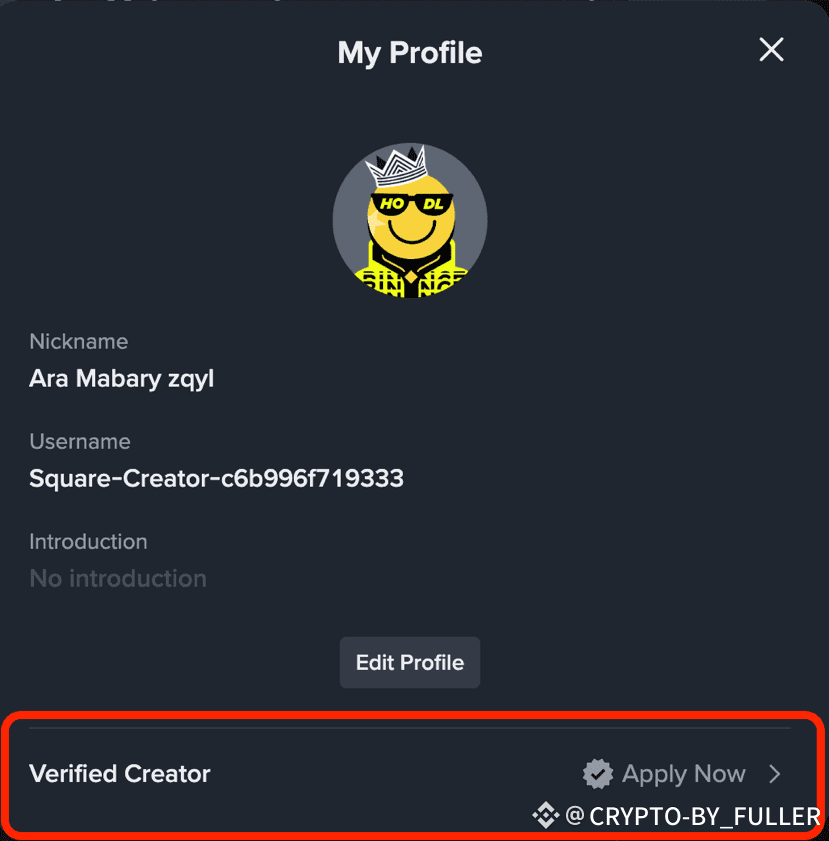
$ ✅ Binance Square Verification Checkmark Explained Binance Square now offers two verification badges: ⚫ Black Checkmark – For official Binance accounts 🟡 Gold Checkmark – For verified KOLs, media, organizations & listed projects To get the Gold Checkmark, you must be verified, active, and credible — with at least 30K followers and strong engagement (300K+ views or $1M Write-to-Earn volume this quarter). Apply directly from your Binance Square profile and get recognized as an official expert 🔥 #Binance #BinanceSquare #CryptoInfluencer #Verificationallprocess $4 $GIGGLE
$
✅ Binance Square Verification Checkmark Explained

Binance Square now offers two verification badges:
⚫ Black Checkmark – For official Binance accounts
🟡 Gold Checkmark – For verified KOLs, media, organizations & listed projects

To get the Gold Checkmark, you must be verified, active, and credible — with at least 30K followers and strong engagement (300K+ views or $1M Write-to-Earn volume this quarter).

Apply directly from your Binance Square profile and get recognized as an official expert 🔥

#Binance #BinanceSquare #CryptoInfluencer #Verificationallprocess

$4 $GIGGLE
Connectez-vous pour découvrir d’autres contenus
Rejoignez la communauté mondiale des adeptes de cryptomonnaies sur Binance Square
⚡️ Suviez les dernières informations importantes sur les cryptomonnaies.
💬 Jugé digne de confiance par la plus grande plateforme d’échange de cryptomonnaies au monde.
👍 Découvrez les connaissances que partagent les créateurs vérifiés.
Adresse e-mail/Nº de téléphone