

#pinescript
pinescript
441 vistas
20 están debatiendo
Hot
Lo último
·
--
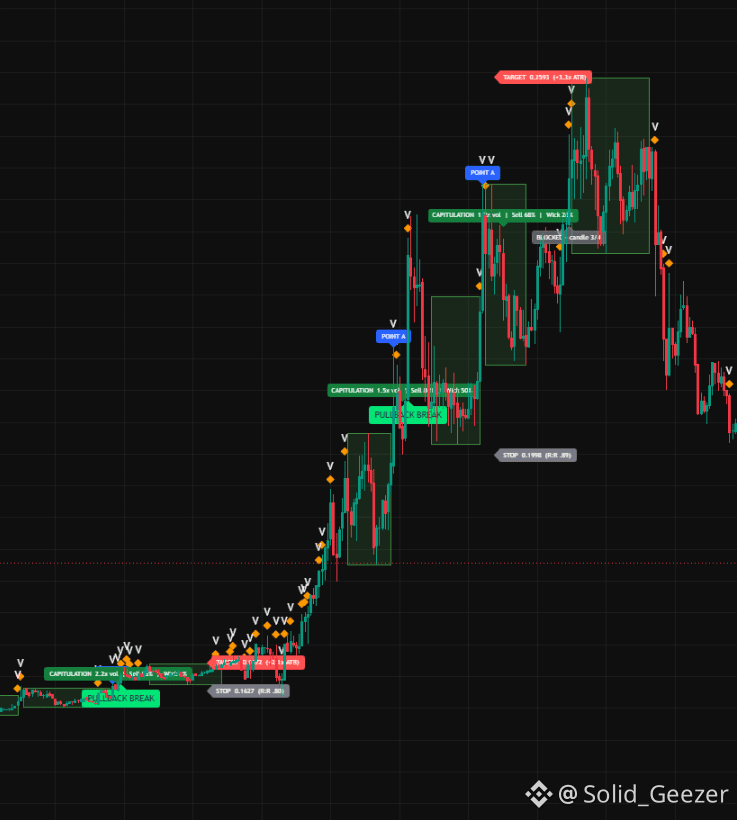
😍TASA DE ÉXITO 99%😍😍 SÍ ENCONTRÉ UNA ESTRATEGIA CON UNA TASA DE ÉXITO DEL 99% 😍 DESPUÉS DE TANTOS INTENTOS FALLIDOS… 👀
He pasado mucho tiempo construyendo, probando, rompiendo y volviendo a construir Pine Scripts.
Algunos parecían geniales.
Algunos fallaron por completo. 😂
Pero seguí adelante.
Y finalmente, encontré un script que me dio una tasa de victorias en backtest de alrededor del 90%.
¿Es perfecto? No.
¿Está garantizado? No.
Pero después de todo este camino…
Por fin tengo algo del que me siento orgulloso. 🚀
Más pronto. 👀
Comenta cualquier nombre de moneda y te mostraré exactamente dónde ocurrió la ruptura
⚠️ No es asesoramiento financiero. Los resultados de los backtests no garantizan el rendimiento futuro. Opera con responsabilidad.
#PineScript #TradingView #CryptoTrading #BinanceSquare
😍TASA DE ÉXITO 99%😍😍 SÍ ENCONTRÉ UNA ESTRATEGIA CON UNA TASA DE ÉXITO DEL 99% 😍 DESPUÉS DE TANTOS INTENTOS FALLIDOS… 👀
He pasado mucho tiempo construyendo, probando, rompiendo y volviendo a construir Pine Scripts.
Algunos parecían geniales.
Algunos fallaron por completo. 😂
Pero seguí adelante.
Y finalmente, encontré un script que me dio una tasa de victorias en backtest de alrededor del 90%.
¿Es perfecto? No.
¿Está garantizado? No.
Pero después de todo este camino…
Por fin tengo algo del que me siento orgulloso. 🚀
Más pronto. 👀
Comenta cualquier nombre de moneda y te mostraré exactamente dónde ocurrió la ruptura
⚠️ No es asesoramiento financiero. Los resultados de los backtests no garantizan el rendimiento futuro. Opera con responsabilidad.
#PineScript #TradingView #CryptoTrading #BinanceSquare
He pasado mucho tiempo construyendo, probando, rompiendo y volviendo a construir Pine Scripts.
Algunos parecían geniales.
Algunos fallaron por completo. 😂
Pero seguí adelante.
Y finalmente, encontré un script que me dio una tasa de victorias en backtest de alrededor del 90%.
¿Es perfecto? No.
¿Está garantizado? No.
Pero después de todo este camino…
Por fin tengo algo del que me siento orgulloso. 🚀
Más pronto. 👀
Comenta cualquier nombre de moneda y te mostraré exactamente dónde ocurrió la ruptura
⚠️ No es asesoramiento financiero. Los resultados de los backtests no garantizan el rendimiento futuro. Opera con responsabilidad.
#PineScript #TradingView #CryptoTrading #BinanceSquare
125

·
--
🚀 ¿El trading manual en criptomonedas está muerto? (Aquí está mi desglose)
- 100% lógica, 0% emoción: los algoritmos no entran en pánico ni venden durante un flash crash o por FOMO
- Personalización poderosa: en lugar de una cuadrícula genérica, el verdadero alpha proviene de escribir tu propia lógica y parámetros
- Backtesting > Adivinar: probar una estrategia con datos históricos del mercado y conocer la tasa exacta de aciertos, el factor de beneficio y otras métricas
- Dormir bien: las criptomonedas nunca cierran; la automatización gestiona tu riesgo de forma dinámica mientras estás fuera de línea.
💻💵 para sobrevivir al mercado actual, programa la lógica y deja que la máquina haga el trabajo pesado; sigue para saber más sobre automatización y desarrollo de algoritmos
#ALGO #Crypto2026 #pinescript #SmartMoneyConcepts #PEPE
🚀 ¿El trading manual en criptomonedas está muerto? (Aquí está mi desglose)
- 100% lógica, 0% emoción: los algoritmos no entran en pánico ni venden durante un flash crash o por FOMO
- Personalización poderosa: en lugar de una cuadrícula genérica, el verdadero alpha proviene de escribir tu propia lógica y parámetros
- Backtesting > Adivinar: probar una estrategia con datos históricos del mercado y conocer la tasa exacta de aciertos, el factor de beneficio y otras métricas
- Dormir bien: las criptomonedas nunca cierran; la automatización gestiona tu riesgo de forma dinámica mientras estás fuera de línea.
💻💵 para sobrevivir al mercado actual, programa la lógica y deja que la máquina haga el trabajo pesado; sigue para saber más sobre automatización y desarrollo de algoritmos
#ALGO #Crypto2026 #pinescript #SmartMoneyConcepts #PEPE
- 100% lógica, 0% emoción: los algoritmos no entran en pánico ni venden durante un flash crash o por FOMO
- Personalización poderosa: en lugar de una cuadrícula genérica, el verdadero alpha proviene de escribir tu propia lógica y parámetros
- Backtesting > Adivinar: probar una estrategia con datos históricos del mercado y conocer la tasa exacta de aciertos, el factor de beneficio y otras métricas
- Dormir bien: las criptomonedas nunca cierran; la automatización gestiona tu riesgo de forma dinámica mientras estás fuera de línea.
💻💵 para sobrevivir al mercado actual, programa la lógica y deja que la máquina haga el trabajo pesado; sigue para saber más sobre automatización y desarrollo de algoritmos
#ALGO #Crypto2026 #pinescript #SmartMoneyConcepts #PEPE
77

Muchos traders pueden construir o copiar estrategias en #tradingview .
Pero el verdadero desafío es convertir esas estrategias en algo ejecutable.
Un flujo de trabajo práctico a menudo se ve así:
estrategia #tradingview / #pinescript
→ conversión de estrategia
→ backtesting
→ trading en papel
→ implementación de la API de Binance
→ monitoreo en vivo
El mayor punto de fallo suele no ser el diseño de la estrategia, sino la fiabilidad de la ejecución.
La lógica de señales por sí sola no resuelve:
• configuración de la API
• slippage
• tamaño de posición
• controles de riesgo
• monitoreo
Conectar la creación de estrategias y la ejecución en vivo es donde comienza la mayor complejidad de la automatización.
Hemos estado explorando este flujo de trabajo de estrategia a ejecución de cerca en #VegaXArchitect , particularmente en torno a simplificar el movimiento de #pinescript a la implementación en vivo.
¿Cómo están manejando otros aquí esta transición?
Muchos traders pueden construir o copiar estrategias en #tradingview .
Pero el verdadero desafío es convertir esas estrategias en algo ejecutable.
Un flujo de trabajo práctico a menudo se ve así:
estrategia #tradingview / #pinescript
→ conversión de estrategia
→ backtesting
→ trading en papel
→ implementación de la API de Binance
→ monitoreo en vivo
El mayor punto de fallo suele no ser el diseño de la estrategia, sino la fiabilidad de la ejecución.
La lógica de señales por sí sola no resuelve:
• configuración de la API
• slippage
• tamaño de posición
• controles de riesgo
• monitoreo
Conectar la creación de estrategias y la ejecución en vivo es donde comienza la mayor complejidad de la automatización.
Hemos estado explorando este flujo de trabajo de estrategia a ejecución de cerca en #VegaXArchitect , particularmente en torno a simplificar el movimiento de #pinescript a la implementación en vivo.
¿Cómo están manejando otros aquí esta transición?
Pero el verdadero desafío es convertir esas estrategias en algo ejecutable.
Un flujo de trabajo práctico a menudo se ve así:
estrategia #tradingview / #pinescript
→ conversión de estrategia
→ backtesting
→ trading en papel
→ implementación de la API de Binance
→ monitoreo en vivo
El mayor punto de fallo suele no ser el diseño de la estrategia, sino la fiabilidad de la ejecución.
La lógica de señales por sí sola no resuelve:
• configuración de la API
• slippage
• tamaño de posición
• controles de riesgo
• monitoreo
Conectar la creación de estrategias y la ejecución en vivo es donde comienza la mayor complejidad de la automatización.
Hemos estado explorando este flujo de trabajo de estrategia a ejecución de cerca en #VegaXArchitect , particularmente en torno a simplificar el movimiento de #pinescript a la implementación en vivo.
¿Cómo están manejando otros aquí esta transición?
6
7
El trading en papel puede ser el paso más pasado por alto en el despliegue de estrategias automatizadas.
Muchos traders pasan directamente de la retroalimentación a la ejecución en vivo, y ahí es donde a menudo comienzan fallas evitables.
Una buena retroalimentación no toma en cuenta:
• Comportamiento real de órdenes en el intercambio
• Problemas de conexión API
• Deslizamiento
• Tamaño de posición bajo condiciones en vivo
• Fallos en la monitorización
• Comportamiento inesperado de la estrategia
El trading en papel ayuda a cerrar la brecha entre “la estrategia se ve bien” y “la estrategia se comporta correctamente.”
Un flujo de trabajo de despliegue más seguro a menudo se ve así:
#tradingview / #pinescript estrategia
→ Retroalimentación
→ Trading en papel
→ Despliegue en vivo pequeño
→ Automatización completa
Saltar la prueba en papel puede convertir pequeños problemas de ejecución en costosos errores en vivo.
En muchos casos, el riesgo de despliegue importa tanto como la lógica de la estrategia.
En #VegaXArchitect , nos hemos enfocado de cerca en reducir esta brecha entre estrategia y ejecución al hacer que los flujos de trabajo de validación y despliegue sean más prácticos.
¿Qué tanta importancia le das al trading en papel antes de ir en vivo?
El trading en papel puede ser el paso más pasado por alto en el despliegue de estrategias automatizadas.
Muchos traders pasan directamente de la retroalimentación a la ejecución en vivo, y ahí es donde a menudo comienzan fallas evitables.
Una buena retroalimentación no toma en cuenta:
• Comportamiento real de órdenes en el intercambio
• Problemas de conexión API
• Deslizamiento
• Tamaño de posición bajo condiciones en vivo
• Fallos en la monitorización
• Comportamiento inesperado de la estrategia
El trading en papel ayuda a cerrar la brecha entre “la estrategia se ve bien” y “la estrategia se comporta correctamente.”
Un flujo de trabajo de despliegue más seguro a menudo se ve así:
#tradingview / #pinescript estrategia
→ Retroalimentación
→ Trading en papel
→ Despliegue en vivo pequeño
→ Automatización completa
Saltar la prueba en papel puede convertir pequeños problemas de ejecución en costosos errores en vivo.
En muchos casos, el riesgo de despliegue importa tanto como la lógica de la estrategia.
En #VegaXArchitect , nos hemos enfocado de cerca en reducir esta brecha entre estrategia y ejecución al hacer que los flujos de trabajo de validación y despliegue sean más prácticos.
¿Qué tanta importancia le das al trading en papel antes de ir en vivo?
Muchos traders pasan directamente de la retroalimentación a la ejecución en vivo, y ahí es donde a menudo comienzan fallas evitables.
Una buena retroalimentación no toma en cuenta:
• Comportamiento real de órdenes en el intercambio
• Problemas de conexión API
• Deslizamiento
• Tamaño de posición bajo condiciones en vivo
• Fallos en la monitorización
• Comportamiento inesperado de la estrategia
El trading en papel ayuda a cerrar la brecha entre “la estrategia se ve bien” y “la estrategia se comporta correctamente.”
Un flujo de trabajo de despliegue más seguro a menudo se ve así:
#tradingview / #pinescript estrategia
→ Retroalimentación
→ Trading en papel
→ Despliegue en vivo pequeño
→ Automatización completa
Saltar la prueba en papel puede convertir pequeños problemas de ejecución en costosos errores en vivo.
En muchos casos, el riesgo de despliegue importa tanto como la lógica de la estrategia.
En #VegaXArchitect , nos hemos enfocado de cerca en reducir esta brecha entre estrategia y ejecución al hacer que los flujos de trabajo de validación y despliegue sean más prácticos.
¿Qué tanta importancia le das al trading en papel antes de ir en vivo?
1
121

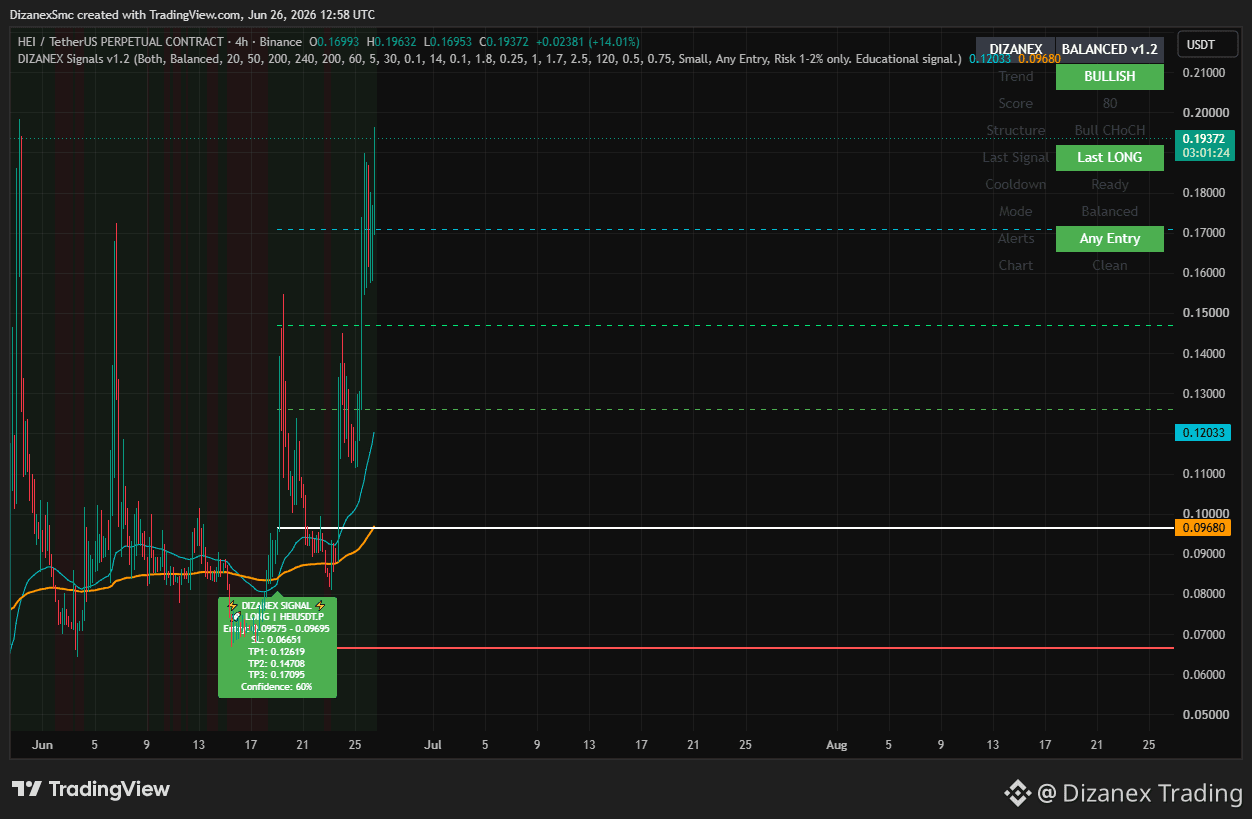
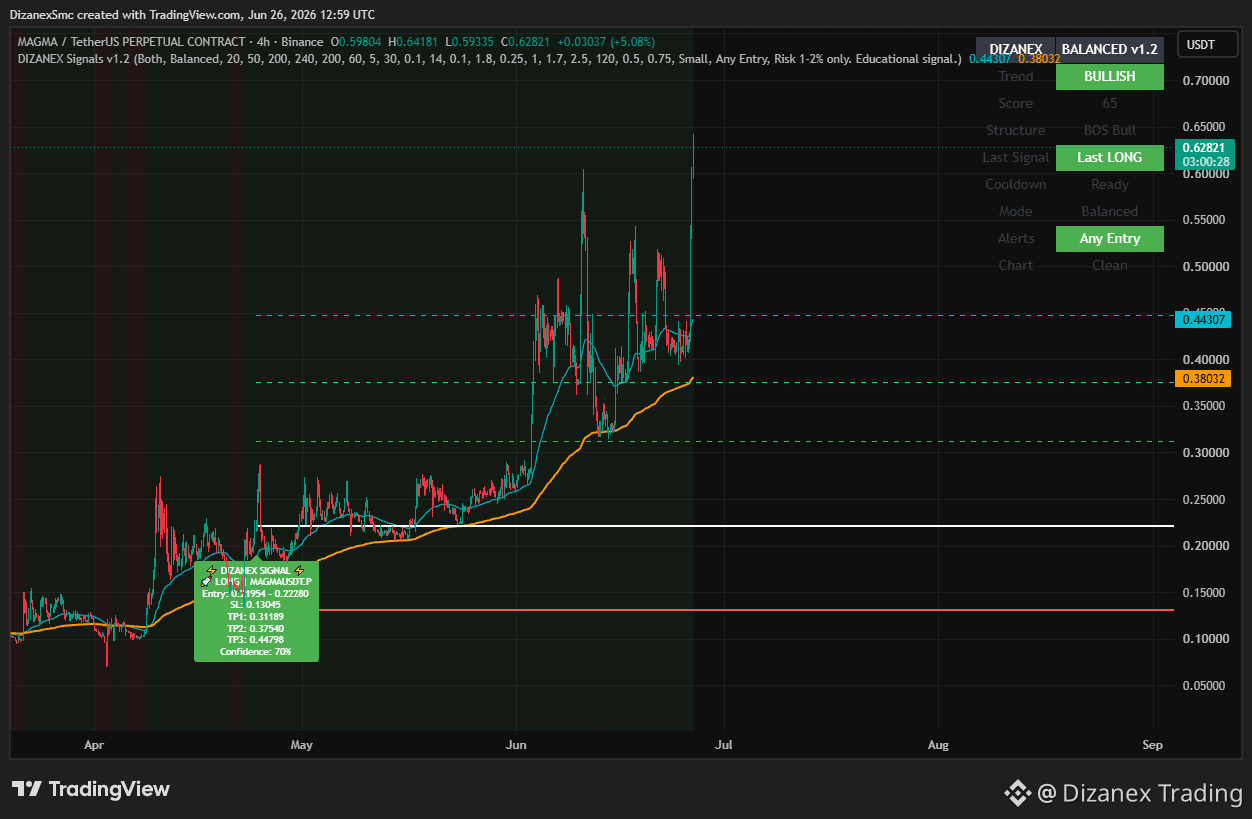
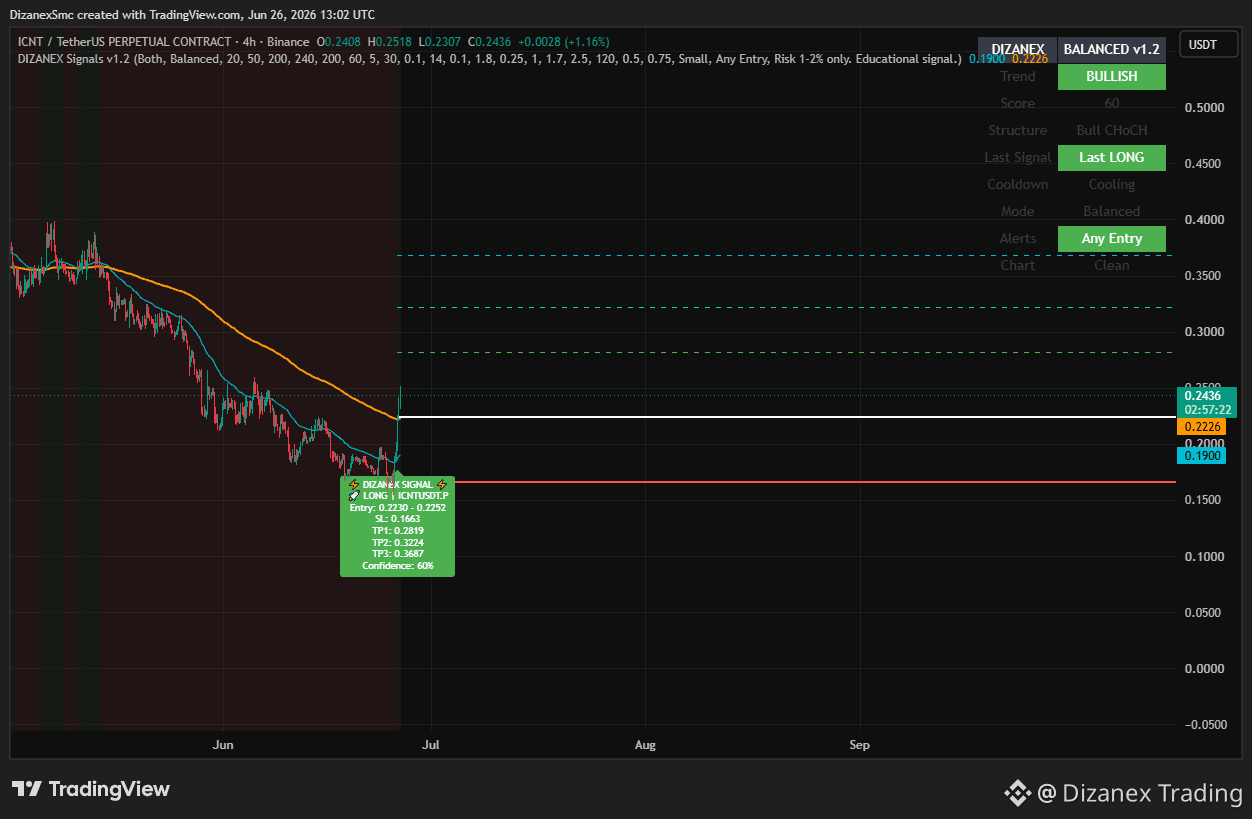
No perseguir más señales. Trabajar para tomar mejores decisiones.
Un update a la vez. 🚀 #DIZANEX #PineScript #Trading #TradingView #CryptoSignals $HEI $MAGMA $ICNT
{future}(ICNTUSDT)
{future}(MAGMAUSDT)
{spot}(HEIUSDT)
No perseguir más señales. Trabajar para tomar mejores decisiones.
Un update a la vez. 🚀 #DIZANEX #PineScript #Trading #TradingView #CryptoSignals $HEI $MAGMA $ICNT
Un update a la vez. 🚀 #DIZANEX #PineScript #Trading #TradingView #CryptoSignals $HEI $MAGMA $ICNT
312

·
--
🚨 Te construiré un INDICADOR GRATUITO personalizado de TradingView
Sí. GRATIS. Sin truco.
Aquí está el porqué 👇
Soy desarrollador de Pine Script v5, especializado en Smart
Money Concepts y la metodología ICT.
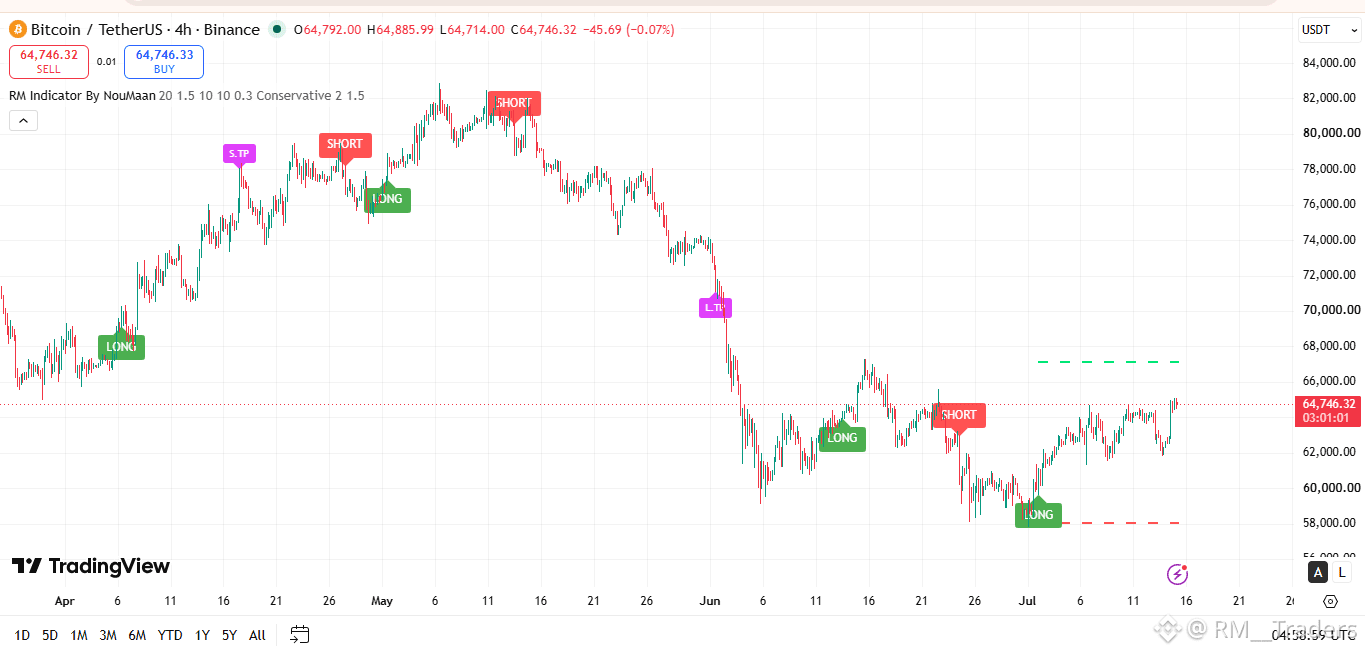
Construí este indicador que ves en el gráfico — señales
LONG/SHORT limpias, zonas de nubes dinámicas, niveles de TP
automáticos en BTC, Forex, Acciones e Índices.
Ahora quiero construir UNO para TI — basado en TU
estrategia — completamente GRATIS.
Todo lo que tienes que hacer es:
💬 Comenta abajo o envíame un DM con:
→ Tu idea de estrategia
→ En qué mercado operas
→ Qué marco de tiempo usas
Lo codificaré en Pine Script v5 para TradingView
y te lo entregaré personalmente.
¿Por qué estoy haciendo esto?
Porque estoy lanzando mi servicio de desarrollo de
indicadores personalizados y quiero mostrarte
lo que puedo construir para TI.
Deja tu estrategia abajo 👇
#TradingViewSetup #pinescript #FIT21
#cryptotrading #forextrading
$BTC $NVDAB
🚨 Te construiré un INDICADOR GRATUITO personalizado de TradingView
Sí. GRATIS. Sin truco.
Aquí está el porqué 👇
Soy desarrollador de Pine Script v5, especializado en Smart
Money Concepts y la metodología ICT.
Construí este indicador que ves en el gráfico — señales
LONG/SHORT limpias, zonas de nubes dinámicas, niveles de TP
automáticos en BTC, Forex, Acciones e Índices.
Ahora quiero construir UNO para TI — basado en TU
estrategia — completamente GRATIS.
Todo lo que tienes que hacer es:
💬 Comenta abajo o envíame un DM con:
→ Tu idea de estrategia
→ En qué mercado operas
→ Qué marco de tiempo usas
Lo codificaré en Pine Script v5 para TradingView
y te lo entregaré personalmente.
¿Por qué estoy haciendo esto?
Porque estoy lanzando mi servicio de desarrollo de
indicadores personalizados y quiero mostrarte
lo que puedo construir para TI.
Deja tu estrategia abajo 👇
#TradingViewSetup #pinescript #FIT21
#cryptotrading #forextrading
$BTC $NVDAB
Sí. GRATIS. Sin truco.
Aquí está el porqué 👇
Soy desarrollador de Pine Script v5, especializado en Smart
Money Concepts y la metodología ICT.
Construí este indicador que ves en el gráfico — señales
LONG/SHORT limpias, zonas de nubes dinámicas, niveles de TP
automáticos en BTC, Forex, Acciones e Índices.
Ahora quiero construir UNO para TI — basado en TU
estrategia — completamente GRATIS.
Todo lo que tienes que hacer es:
💬 Comenta abajo o envíame un DM con:
→ Tu idea de estrategia
→ En qué mercado operas
→ Qué marco de tiempo usas
Lo codificaré en Pine Script v5 para TradingView
y te lo entregaré personalmente.
¿Por qué estoy haciendo esto?
Porque estoy lanzando mi servicio de desarrollo de
indicadores personalizados y quiero mostrarte
lo que puedo construir para TI.
Deja tu estrategia abajo 👇
#TradingViewSetup #pinescript #FIT21
#cryptotrading #forextrading
$BTC $NVDAB
34
Muchas #tradingview estrategias parecen sólidas en las pruebas retrospectivas — pero fallan rápidamente una vez que se ponen en marcha.
La razón usualmente no es la idea de la estrategia en sí.
La implementación real introduce desafíos que las pruebas retrospectivas a menudo pasan por alto:
• Deslizamiento
• Retrasos en la ejecución del exchange
• Fiabilidad de la API
• Errores en el tamaño de la posición
• Controles de riesgo
• Monitoreo en vivo
Una prueba retrospectiva rentable no significa automáticamente que una estrategia esté lista para capital real.
Aquí es donde muchos traders subestiman la verdadera complejidad de la automatización.
Un proceso más realista a menudo se ve así:
#tradingview / #pinescript estrategia
→ conversión de estrategia
→ prueba retrospectiva
→ trading en papel
→ pequeña implementación en vivo
→ automatización completa
La mayor brecha en el trading automatizado a menudo no es la creación de la estrategia.
Es la ejecución.
Nos hemos centrado de cerca en esta brecha de estrategia a ejecución en #VegaXArchitect , especialmente en simplificar cómo los traders pasan de las estrategias de TradingView a la implementación en vivo.
¿Cómo están validando otros aquí sus estrategias antes de ir en vivo?
Muchas #tradingview estrategias parecen sólidas en las pruebas retrospectivas — pero fallan rápidamente una vez que se ponen en marcha.
La razón usualmente no es la idea de la estrategia en sí.
La implementación real introduce desafíos que las pruebas retrospectivas a menudo pasan por alto:
• Deslizamiento
• Retrasos en la ejecución del exchange
• Fiabilidad de la API
• Errores en el tamaño de la posición
• Controles de riesgo
• Monitoreo en vivo
Una prueba retrospectiva rentable no significa automáticamente que una estrategia esté lista para capital real.
Aquí es donde muchos traders subestiman la verdadera complejidad de la automatización.
Un proceso más realista a menudo se ve así:
#tradingview / #pinescript estrategia
→ conversión de estrategia
→ prueba retrospectiva
→ trading en papel
→ pequeña implementación en vivo
→ automatización completa
La mayor brecha en el trading automatizado a menudo no es la creación de la estrategia.
Es la ejecución.
Nos hemos centrado de cerca en esta brecha de estrategia a ejecución en #VegaXArchitect , especialmente en simplificar cómo los traders pasan de las estrategias de TradingView a la implementación en vivo.
¿Cómo están validando otros aquí sus estrategias antes de ir en vivo?
La razón usualmente no es la idea de la estrategia en sí.
La implementación real introduce desafíos que las pruebas retrospectivas a menudo pasan por alto:
• Deslizamiento
• Retrasos en la ejecución del exchange
• Fiabilidad de la API
• Errores en el tamaño de la posición
• Controles de riesgo
• Monitoreo en vivo
Una prueba retrospectiva rentable no significa automáticamente que una estrategia esté lista para capital real.
Aquí es donde muchos traders subestiman la verdadera complejidad de la automatización.
Un proceso más realista a menudo se ve así:
#tradingview / #pinescript estrategia
→ conversión de estrategia
→ prueba retrospectiva
→ trading en papel
→ pequeña implementación en vivo
→ automatización completa
La mayor brecha en el trading automatizado a menudo no es la creación de la estrategia.
Es la ejecución.
Nos hemos centrado de cerca en esta brecha de estrategia a ejecución en #VegaXArchitect , especialmente en simplificar cómo los traders pasan de las estrategias de TradingView a la implementación en vivo.
¿Cómo están validando otros aquí sus estrategias antes de ir en vivo?
11
65
Hacer backtesting de una estrategia en #tradingview es fácil.
Ejecutar esa misma estrategia en vivo en Binance es donde muchos traders se quedan atascados.
Los mayores desafíos usualmente no son la estrategia en sí:
• Convertir el código #pinescript a otro lenguaje para el bot de trading.
• Configuración de la API del exchange
• Slippage y fiabilidad en la ejecución
• Pruebas en papel antes del despliegue real
• Dimensionamiento de posiciones y monitoreo en vivo
Una estrategia que rinde bien en TradingView puede fallar una vez que se introducen variables reales de ejecución.
Por eso, los flujos de trabajo construidos en torno a:
Estrategia de TradingView
→ conversión de estrategia
→ backtest
→ trading en papel
→ despliegue en vivo
están convirtiéndose en cada vez más importantes para los traders que quieren ir más allá del backtesting.
Hemos estado enfocados en resolver esta brecha de estrategia a ejecución en #VegaXArchitect .
Curioso sobre cómo otros aquí están abordando el despliegue en vivo de estrategias de TradingView.
Hacer backtesting de una estrategia en #tradingview es fácil.
Ejecutar esa misma estrategia en vivo en Binance es donde muchos traders se quedan atascados.
Los mayores desafíos usualmente no son la estrategia en sí:
• Convertir el código #pinescript a otro lenguaje para el bot de trading.
• Configuración de la API del exchange
• Slippage y fiabilidad en la ejecución
• Pruebas en papel antes del despliegue real
• Dimensionamiento de posiciones y monitoreo en vivo
Una estrategia que rinde bien en TradingView puede fallar una vez que se introducen variables reales de ejecución.
Por eso, los flujos de trabajo construidos en torno a:
Estrategia de TradingView
→ conversión de estrategia
→ backtest
→ trading en papel
→ despliegue en vivo
están convirtiéndose en cada vez más importantes para los traders que quieren ir más allá del backtesting.
Hemos estado enfocados en resolver esta brecha de estrategia a ejecución en #VegaXArchitect .
Curioso sobre cómo otros aquí están abordando el despliegue en vivo de estrategias de TradingView.
Ejecutar esa misma estrategia en vivo en Binance es donde muchos traders se quedan atascados.
Los mayores desafíos usualmente no son la estrategia en sí:
• Convertir el código #pinescript a otro lenguaje para el bot de trading.
• Configuración de la API del exchange
• Slippage y fiabilidad en la ejecución
• Pruebas en papel antes del despliegue real
• Dimensionamiento de posiciones y monitoreo en vivo
Una estrategia que rinde bien en TradingView puede fallar una vez que se introducen variables reales de ejecución.
Por eso, los flujos de trabajo construidos en torno a:
Estrategia de TradingView
→ conversión de estrategia
→ backtest
→ trading en papel
→ despliegue en vivo
están convirtiéndose en cada vez más importantes para los traders que quieren ir más allá del backtesting.
Hemos estado enfocados en resolver esta brecha de estrategia a ejecución en #VegaXArchitect .
Curioso sobre cómo otros aquí están abordando el despliegue en vivo de estrategias de TradingView.
9
124
Inicia sesión para explorar más contenidos
Únete a usuarios globales de criptomonedas en Binance Square
⚡️ Obtén información útil y actualizada sobre criptos.
💬 Avalado por el mayor exchange de criptomonedas en el mundo.
👍 Descubre perspectivas reales de creadores verificados.
Email/número de teléfono
Temas populares
1
#UKFCAWinsCourtOrderToRecover851400Pounds
22,818 vistas
686 están debatiendo
2
#ChainlinkLaunchesCCIP2WithEnterpriseVerification
37,240 vistas
881 están debatiendo
3
#GoldFallsTo$4144
13,235 vistas
148 están debatiendo
4
#QNTFallsOver40%FromMorningHigh
80,619 vistas
1,304 están debatiendo
5
#USDTAdds845900HoldersInPast7Days
14,426 vistas
386 están debatiendo
6
#KospiFalls2.7%SamsungSKHynixDropOver5%
25,197 vistas
562 están debatiendo
7
#BitgetCEOConfirms$388MStolenInHack
5,077 vistas
41 están debatiendo
8
#BTCFallsBelow$83000
30,025 vistas
163 están debatiendo
9
#BitgetDetailsSecurityIncidentTimeline
44,605 vistas
716 están debatiendo
10
#BitcoinSpotETFs$2.39BWeeklyNetInflow
14,097 vistas
49 están debatiendo