



Many crypto traders prefer to store their cryptocurrencies in web3 wallets, where they own their private keys themselves. While Binance offers a secure crypto custody solution, you may want to experiment with storing your crypto assets yourself. In this case, we recommend that you always keep your funds in a secure, non-custodial wallet such as Trust Wallet. However, remember that once you gain control of your private keys, you must keep them secure or risk losing your funds.
This article will teach you how to transfer cryptocurrency from Binance to your Trust Wallet in just a few steps.
How to withdraw funds from Binance
Before you can begin withdrawing funds from Binance, you will need to create a Trust Wallet (if you have not already done so).
You can download the Trust Wallet app on your Android or iOS smartphone and go through a simple setup process.
Then go to Binance.com, log into your account and complete the two-factor authentication (2FA) process. You can also log into your Binance account through the app.
You can now check the digital currency balance in your Binance wallets.
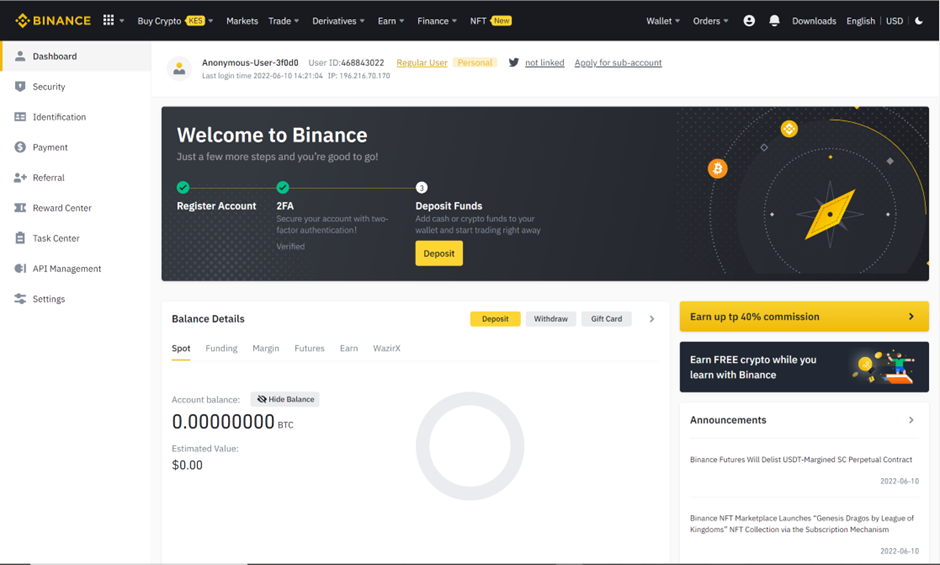
Since the Trust Wallet app allows users to securely store over three million digital assets across 64 blockchains, you will be able to transfer almost any cryptocurrency you own on Binance to Trust Wallet by following these steps:
1. Go to the Trust Wallet app and activate the cryptocurrencies you want to receive from Binance.
To do this, open the application and click on the icon in the upper right corner.
Scroll the page to find the tokens you need.
Move the button next to the selected token and it will become available (as shown below). In this article, we will use BNB as an example.
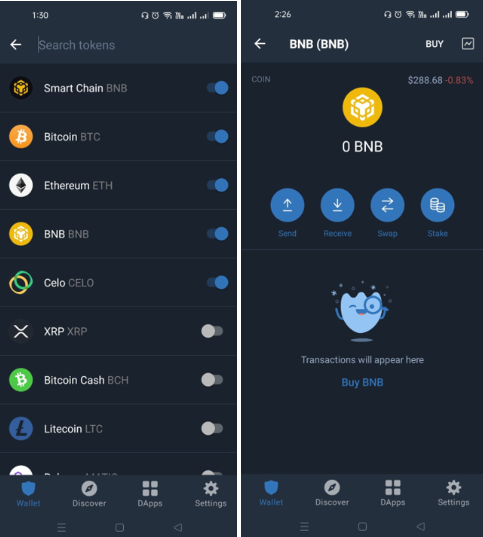
2. Select the token you want to receive and click on it.
3. Click “Receive” and then copy the BNB wallet address. Make sure you select the correct network. BNB is available on BNB Beacon Chain (BEP-2) and BNB Smart Chain (BEP-20), which have different address types.
4. Login to your Binance account and select “Security” from the profile menu.
5. Scroll down to the “White List of Withdrawal Addresses” section, select “Manage Addresses - Add Address”.
6. Enter the required BNB wallet details. The address label must include the name of your BNB wallet.
7. Paste the BNB wallet address you copied from Trust Wallet into the Address field. Binance.com will automatically match the wallet address you add to the appropriate network to prevent loss of funds.
8. Then specify the address type. You will be offered two options: “Exchange” or “Wallet”. Select “Wallet – Trust Wallet”.

9. Check the box next to “Whitelisted” and click “Save.”
10. Binance will require you to complete a security verification process. After successful verification, Binance will add your wallet address as shown below.

You can add an unlimited number of addresses.
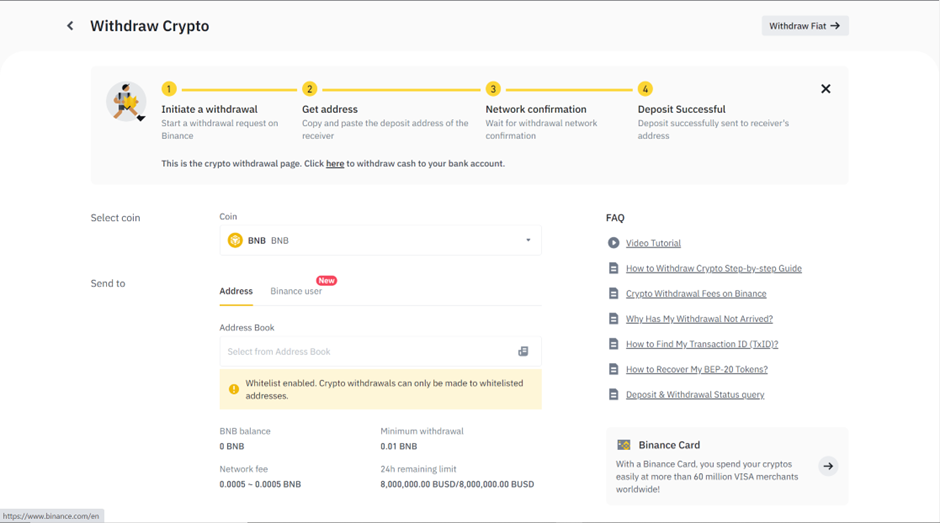
11. To withdraw BNB from Binance to Trust Wallet, open “Wallet” and click “Browse”.
12. Next, click “Withdraw” and select “Withdraw cryptocurrency” in the upper right corner of the screen.
13. Select the cryptocurrency you want to withdraw - in our case, BNB.
14. In the address section, click Select from Address Book, add the withdrawal amount, then click Withdraw.
15. Complete two-factor authentication and click “Confirm” to complete the operation.
Make sure you have enough BNB in your account to pay the fee.
You can now go to the Trust Wallet app and check your BNB balance. Click on BNB to see details of all recent transfers.
And it's all! Transferring cryptocurrency from Binance to Trust Wallet is very simple.
Why transfer crypto from exchanges like Binance to Trust Wallet?
Binance.com and the Binance app provide custodial wallets for exchange users. This means that Binance holds the private keys of its users' wallets, essentially holding the digital assets on behalf of its users.
Some users prefer to be responsible for storing their funds themselves. This allows them to have complete control over their cryptocurrency, but they still need to monitor the security of their private keys themselves.
When your cryptocurrency is stored on Binance, most of it is in cold storage. This provides a high degree of security in which private keys will never be available on the Internet.
Exchanges are often targeted by hackers, and you can feel safer managing your assets yourself in Trust Wallet.
Download Trust Wallet now and start transferring your cryptocurrency from Binance.