

Author: Milko Trajcevski. Translated by: Cointime.com QDD
This article contains instructions on how to run a BSC full node. But if you are looking for an easy way to access a Binance Smart Chain node, you can use NOWNodes, a reliable BSC node provider.
Running a BSC full node allows you to participate in the network, contribute to its decentralization, and access real-time data directly from the blockchain. In this comprehensive guide, we will guide you through the process of running a BSC node, covering everything from hardware requirements to setting up the BSC full node software. As well as showing you the easiest way to access a BSC full node using NOWNodes.
1. Use NOWNodes to access the BSC full node
NOWNodes is a BSC node provider that gives you easy access to BSC full nodes without having to set up and maintain your own infrastructure. With NOWNodes, you can quickly connect to a BSC full node and start interacting with the network.
A BSC node provider is a service that provides pre-configured and maintained BSC nodes for users to connect to. There are several factors to consider when choosing a BSC node provider, such as reliability, performance, price, and additional features.
For those who prefer easy access to BSC nodes, NOWNodes provides a simple solution. Here is how you can access BSC nodes through NOWNodes:
l Visit the NOWNodes website www.nownodes.io and register an account.
l After registration, you need to choose a tariff plan. You only need to choose a free plan to enjoy instant access to the BSC full node service.

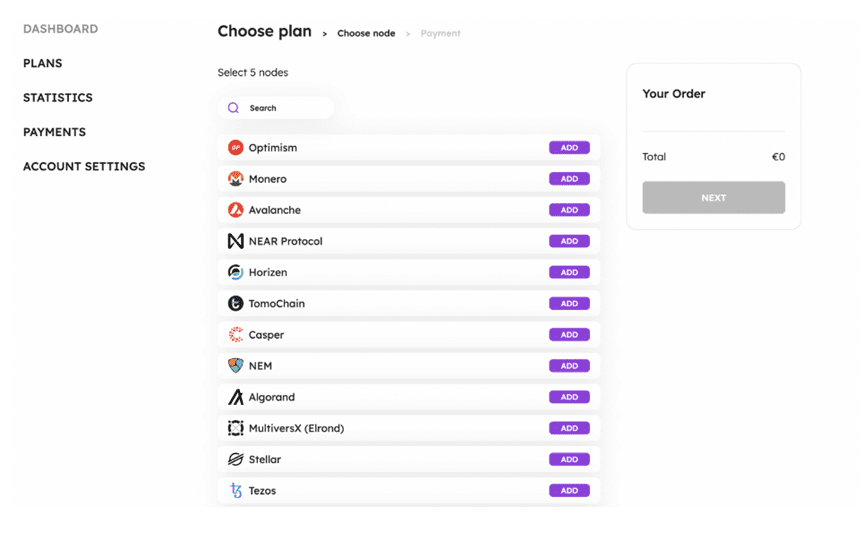
If you want to start with the free plan, then you need to choose 5 blockchains to access out of 77 available. Select the BSC node in the list and click on the "ADD" button.
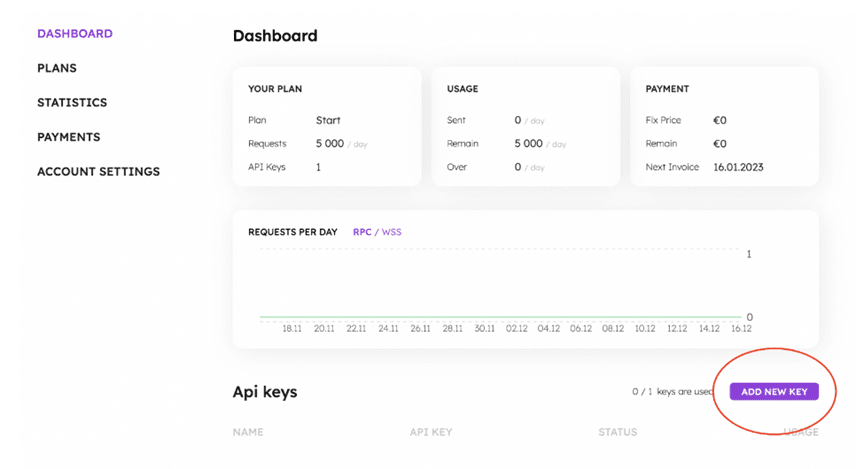
l You then need to navigate to "DASHBOARD" in your account, scroll down the page and press the "ADD NEW KEY" button.
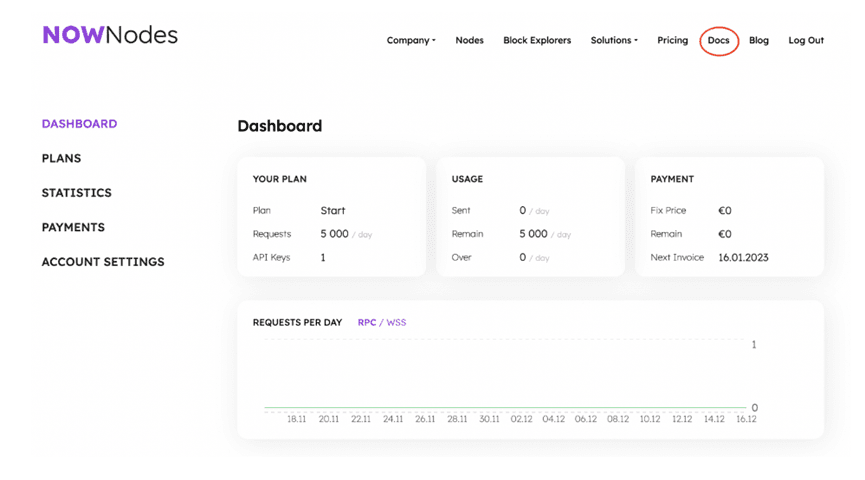
l You can then navigate to the "Docs" and follow the instructions provided to connect to the selected node using all available methods. NOWNodes will provide you with the necessary API endpoints and credentials.
l Start interacting with the BSC network using the provided API endpoints. You can send requests to retrieve blockchain data, execute smart contracts, and perform various other operations.
By using NOWNodes, you can quickly and easily connect to BSC nodes and WSS BSC nodes without complicated setup and maintenance. This allows you to focus on building your applications, sales and marketing while leveraging the BSC network capabilities of NOWNodes SaaS.
2. Set up your dedicated BSC full node
Running a private BSC full node provides you with the highest level of security and autonomy, as you have full control over the operation of the node. Here is a step-by-step guide to setting up a BSC full node:
Prerequisites for running a BSC full node
Running a BSC node requires some prerequisites, including hardware and software requirements. You must ensure that your hardware meets the recommended requirements to ensure that the node runs smoothly and efficiently. The following are the main prerequisites for running a BSC full node:
Hardware requirements
Running a BSC full node requires hardware that meets the recommended specifications.
l Processor: Multi-core processor with a clock speed of at least 16 GHz.
l Memory: At least 64 GB of memory.
l Storage: A disk with enough available storage space, at least twice the size of the BSC blockchain snapshot. The disk has at least 5TB of available storage space.
l Stable and reliable network connection ensures uninterrupted communication with the BSC network.
Software requirements
l BSC client software, such as Geth or Erigon, depending on the type of node you want to run.
l Command line tools required to download, decompress and manage BSC snapshots and blockchain data.
l Basic knowledge of the Command Line Interface (CLI) and the ability to execute commands.
Download and extract the snapshot
To set up a BSC full node, you need to download and unzip the BSC snapshot. The snapshot contains a compressed copy of the BSC blockchain and is used to bootstrap your Binance Smart Chain node. Please follow the steps below to download and unzip the snapshot:
l Copy the snapshot URL provided by the BSC node provider.
l Use the wget command to download the snapshot. For example: wget -O geth.tar.lz4 " ".
l Wait for the download to complete. Depending on the size of the snapshot, this may take one to two hours.
l Use the tar command to uncompress the snapshot. For example: tar -I lz4 -xvf geth.tar.lz4
l Wait for the decompression process to complete. This may take several hours, so you can put it in the background using the nohup command.
Replace data and restart BSC client
After downloading and unzipping the snapshot, you need to replace the existing data with the data in the snapshot. Please follow the steps below to replace the data and restart the BSC client:
1. Stop the BSC client if it is running (if any). Use the kill command and enter the process ID (PID) of the BSC client.
2. Consider backing up the original data and move the chaindata and triecache directories to the backup location. For example: mv
${BSC_DataDir}/geth/chaindata
${BSC_DataDir}/geth/chaindata_backup; mv
${BSC_DataDir}/geth/triecache
${BSC_DataDir}/geth/triecache_backup
3. Replace the data in the snapshot by moving the chaindata and triecache directories from the snapshot location to the BSC data directory. For example: mv server/data-seed/geth/chaindata ${BSC_DataDir}/geth/chaindata; mv server/data-seed/geth/triecache
${BSC_DataDir}/geth/triecache
4. Start the BSC client again and check the logs to ensure that the node is synchronized with the network.
Configuring the BSC RPC Node
To configure a BSC RPC node, you need to specify the necessary parameters and settings. These settings include the network ID, port number, API endpoint, and other options. The following are the key steps to configure a BSC RPC node:
l Open the configuration file of the BSC client. For example, if you are using Geth, open the geth.conf file.
l Find the RPC Settings section and specify the required parameters, such as the network ID, port number, and API endpoint. Refer to the documentation for the BSC client for specific configuration options.
l Save the configuration file and exit the text editor.
With these steps, you have successfully set up a BSC full node and replaced the data with the snapshot data.
3. Optimize the performance of BSC nodes
Running a BSC node involves many aspects of management to ensure optimal performance and efficiency. By implementing certain optimizations, you can improve the speed and reliability of your BSC node. Here are some tips for optimizing BSC node performance:
Increase download speed with Aria2c
To speed up the download of BSC snapshots, you can use a tool called Aria2c. Aria2c is a command line utility that supports parallel downloads, significantly increasing download speeds. Here's how to use Aria2c to download BSC snapshots:
l Install Aria2c on your computer or server using the appropriate package manager. For example, on Linux, you can use the following command: sudo apt-get install aria2
l Copy the snapshot URL provided by the BSC node provider.
l Execute the Aria2c command using the snapshot URL to start the download. For example: aria2c -o geth.tar.lz4 -s14 -x14 -k100M .
By using Aria2c, you can significantly reduce the download time of BSC snapshots, allowing you to set up BSC nodes faster.
Split files into chunks for granular upload and download
To avoid errors due to file size during upload and download, you can split the file into smaller chunks. This way, you can upload and download files more efficiently without running into issues related to file size. Here's how to split a file into smaller chunks using Aria2c:
l Install Aria2c on your computer or server.
l Copy the file to be split into blocks to the specified directory.
l Execute the Aria2c command with appropriate parameters to split the file. For example: aria2c -s14 -x14 -k100M .
By splitting files into smaller chunks, you can overcome file size limitations and ensure a smoother upload and download process.
Concatenate and decompress files
After splitting the file into chunks, you need to concatenate them before decompressing them. By concatenating the file chunks, you can reconstruct the original file and continue the decompression process. Here is how to concatenate and decompress files:
l Use the cat command to concatenate file chunks. For example: cat ./chunk* > mdbx.tar.lz4
l Use the appropriate tool to execute the decompression command. For example: tar -I lz4 -xvf mdbx.tar.lz4
With these steps, you can effectively connect and unpack the files, ensuring that your BSC node is running with the latest blockchain data.
4 Conclusion
Running a BSC node is a vital step for anyone looking to participate in the Binance Smart Chain network. By running a BSC node, you will contribute to the security, decentralization, and overall efficiency of the network. In this comprehensive guide, we cover everything you need to know about setting up and running a BSC node.
We discussed the prerequisites, the process of setting up a BSC full node, and accessing a BSC node and a WSS BSC node using NOWNodes. With this knowledge, you can optimize the performance of your BSC node and you are now equipped to participate in the exciting world of blockchain technology and contribute to the growth of the Binance Smart Chain network.
https://nownodes.io/nodes/bsc
This article describes how to run a BSC full node: accessing a BSC full node using NOWNodes and setting up a dedicated BSC full node. For simple access needs, you can choose to use the service provided by NOWNodes to quickly connect to a BSC full node. For users who need a higher level of security and autonomy, you can choose to set up a dedicated BSC full node. When using NOWNodes to access a BSC full node, you need to register an account and choose a suitable plan. Then, interact with the BSC network on the API endpoint provided by NOWNodes.
Setting up a dedicated BSC full node requires meeting certain hardware and software requirements, and obtaining a copy of the blockchain data by downloading and decompressing a BSC snapshot. Then, the data in the snapshot replaces the existing data and restarts the BSC client. In addition, the article provides some tips for optimizing BSC node performance, such as using Aria2c to speed up downloads, splitting files into blocks for fine upload and download, and connecting and decompressing files.