

Highlights
Account takeover (ATO) attacks can result in the loss of private data, monetary damage, and identity theft.
In this article we will list several ways that individuals and organizations can defend themselves against these types of attacks. Learn what you should do if your account has been compromised.

Account takeover attacks (ATO) can harm both businesses and individuals. Financial losses and reputational damage are just some of the negative impacts that victims of ATO attacks have to face.
Do you suspect your cryptocurrency account was compromised? We've categorized some of the measures you can take to mitigate the impact of an ATO attack.
If you suspect that your account has been accessed
Change the password
If you believe your account may have been compromised, change your password immediately. Opt for a strong, distinctive password that you haven't used for any of your other accounts. This will help protect your account and minimize the chances of unauthorized access.
Enable two-factor authentication (2FA) to add another layer of protection. Visit the Binance 2FA FAQ library to learn more about 2FA methods.
How to change password on Binance
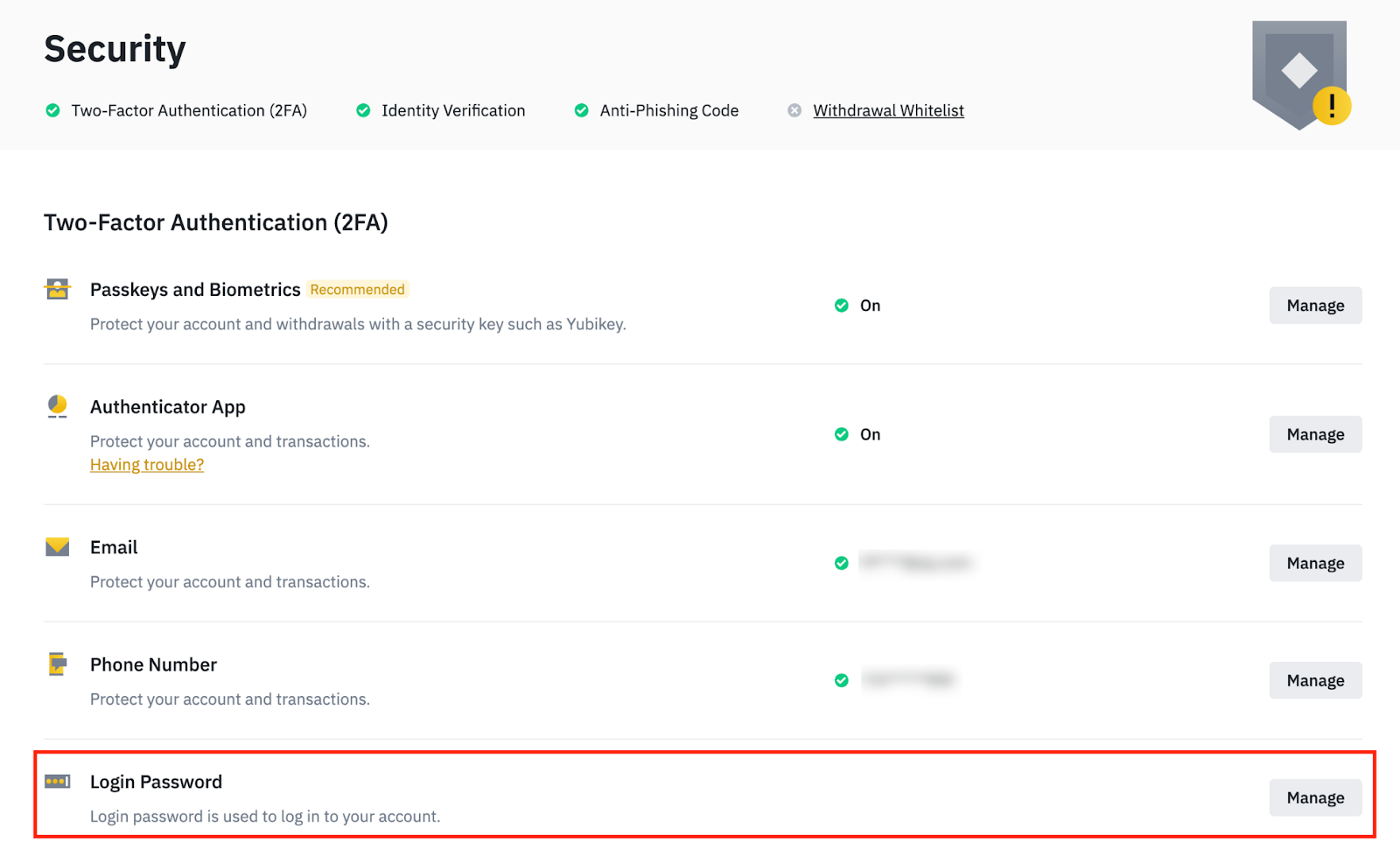
Sign in to your account and go to Security.
Go to [Access Password] - [Manage] to change your password.
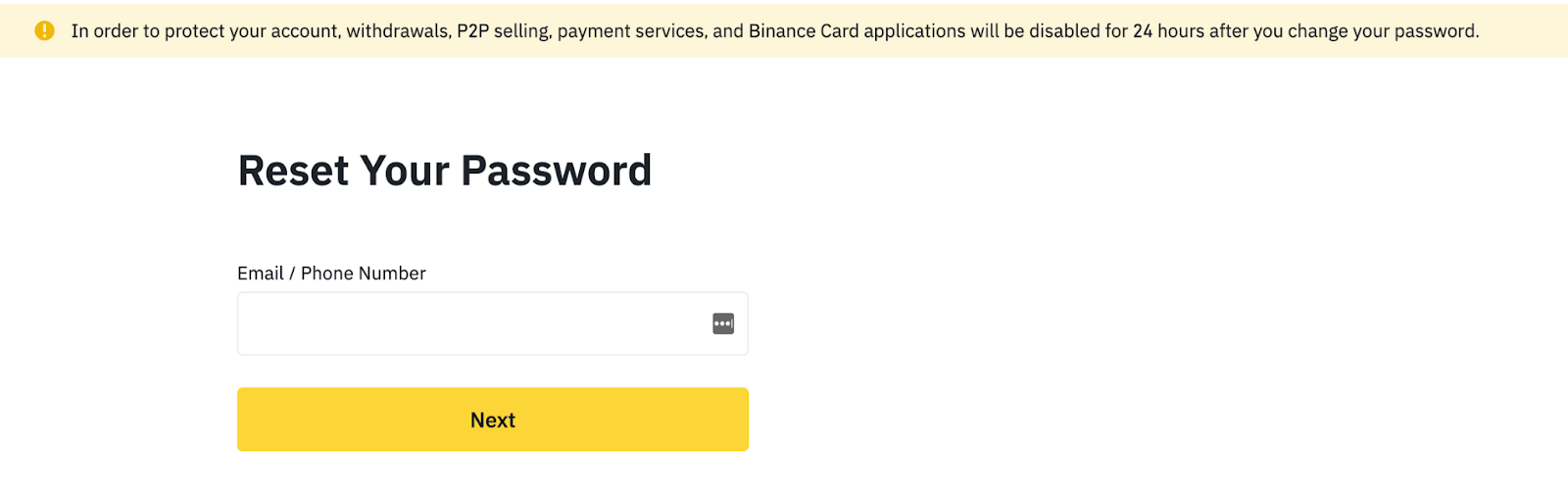
Can't log in to your Binance account?
You can reset your password through our self-service page.
Manage devices authorized to access your account
Sign in to your account and go to Security.
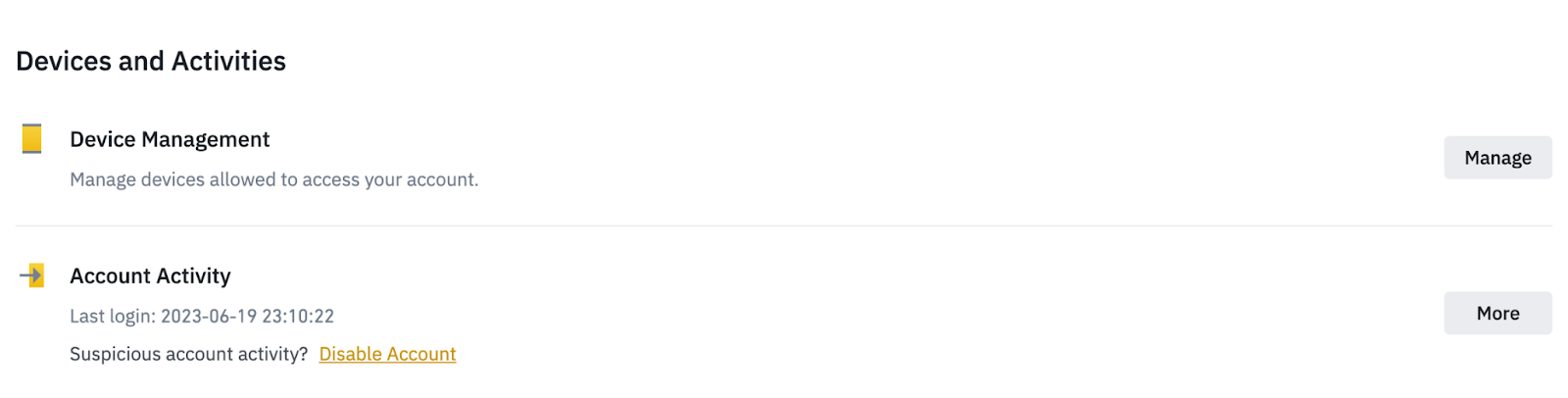
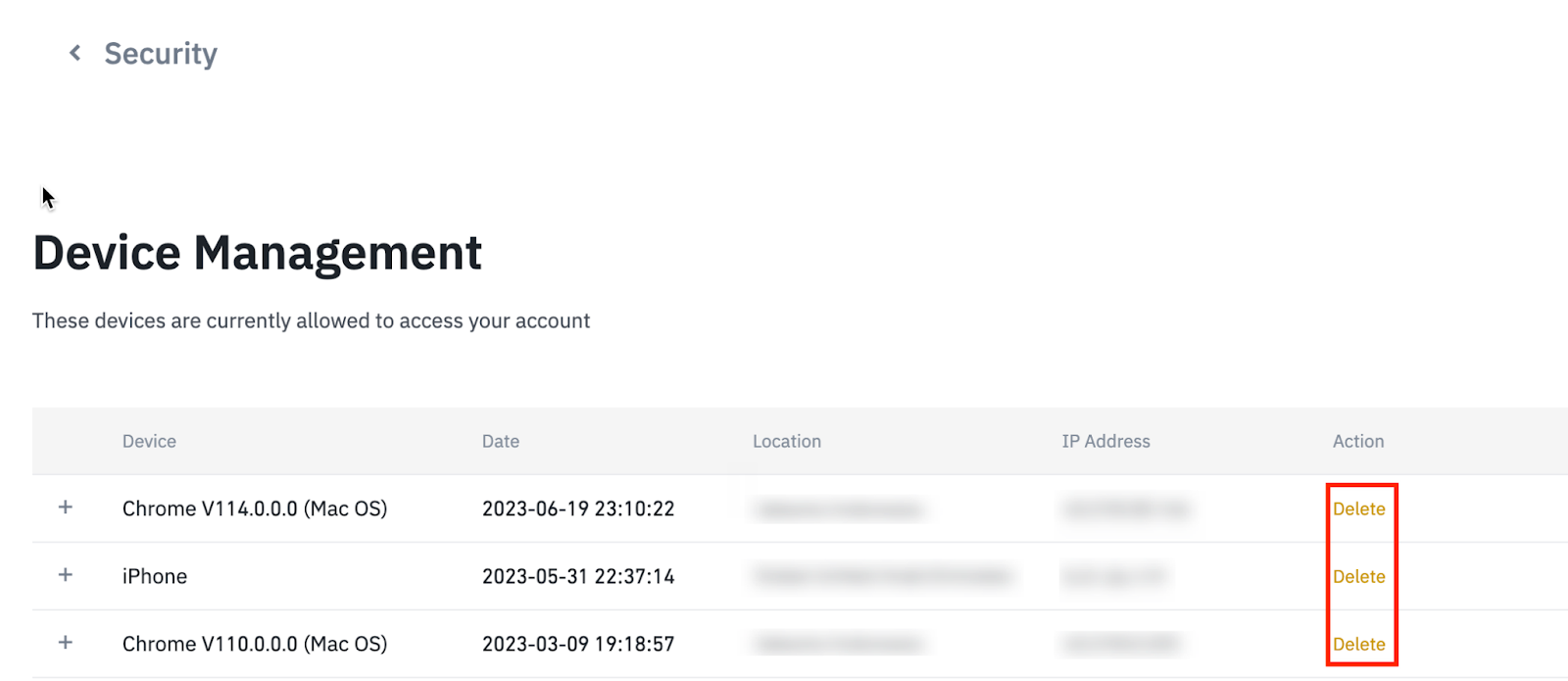
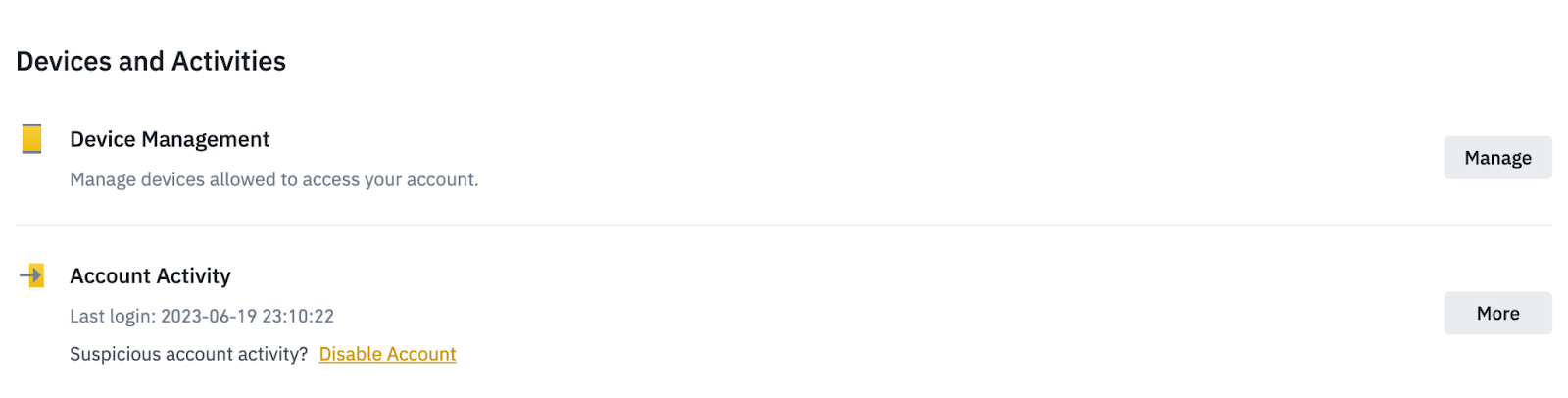
Go to [Devices & Activities] - [Device Management] to delete unused devices.
Check your account activity
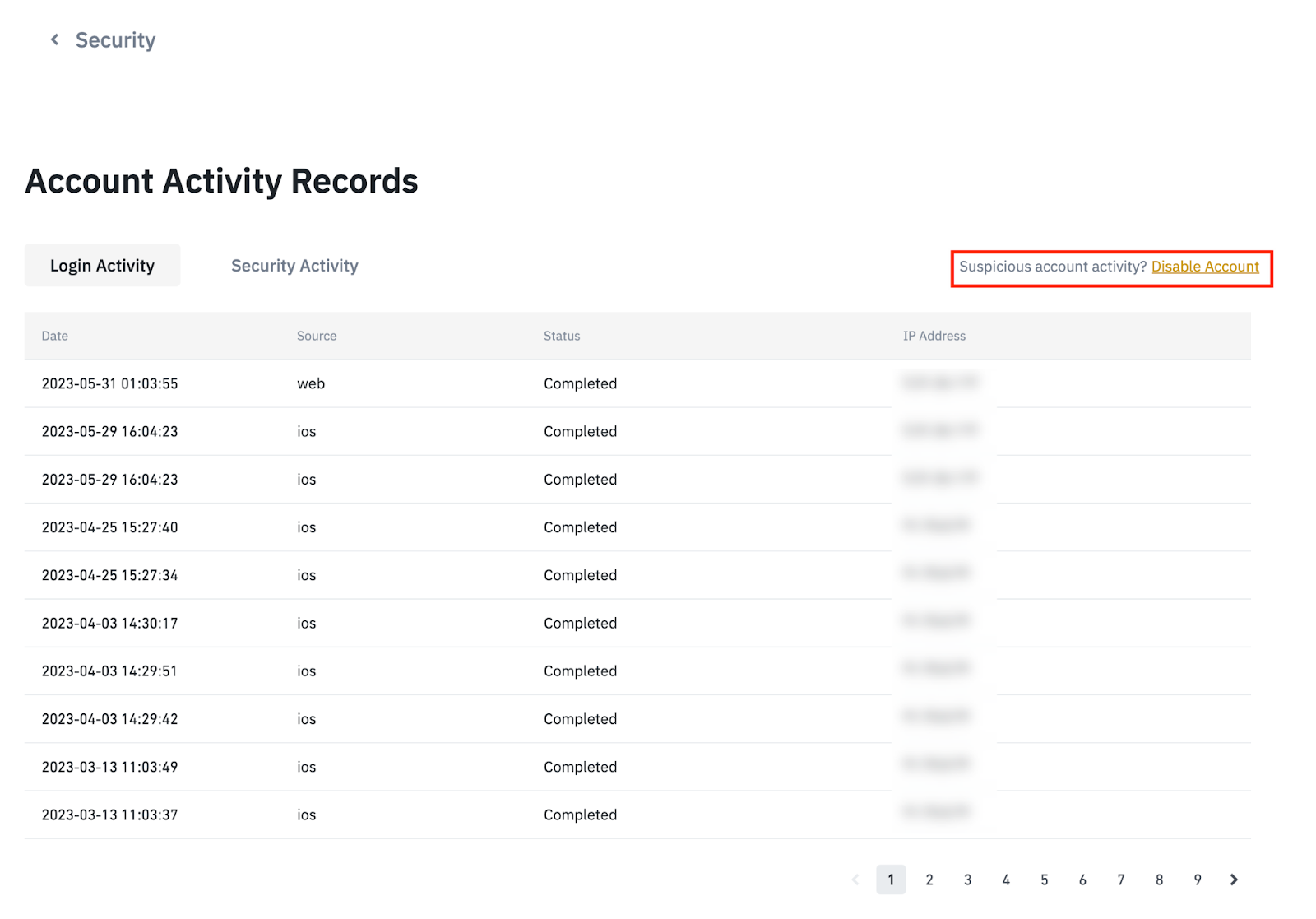
Inspect your account activity log or transaction history for any undetected access or unusual activity. Be sure to carefully document any actions or modifications that you don't recognize. This can help you understand the extent of the unauthorized access and assist in any further investigation.
How to check your Binance account activity
Sign in to your account and go to Security.
You can check your last login in [Account Activity] as well as Most Recent Logs in Account Activity.
 Qué hacer si tu cuenta sufre un ataque
Inform your service provider
If you can't access your account or notice suspicious activity, notify your service provider as soon as possible. Indicate that your account has been breached and share any related information, such as when you first observed unauthorized activity or any strange behavior. Try to offer any evidence or data that may help your investigation, including questionable emails, login attempts, or transaction logs.
How to Contact Binance Customer Service
If you notice any suspicious activity on your Binance account, please contact Customer Support for further investigation.
Consider freezing or suspending your account
If your credit card is connected to the compromised account, you may be able to freeze your card to prevent future losses. As an additional measure, you may also consider disabling your account to protect the security of your personal information and assets.
Monitor your accounts and update security settings
Closely monitor your financial and online accounts for irregular activity, especially if you reuse passwords. Set up alerts or notifications to stay aware of suspicious changes or transactions to quickly detect potential security breaches and protect your data.
Take a look at our list of best practices to prevent attacks on your other accounts.
Protect your account from future attacks
Improve account security
To strengthen account security, consider rotating passwords every 60 to 90 days and creating complex, unique passwords for each account. Enable two-factor authentication to add an extra layer of protection against unauthorized access.
Learn how to defend yourself against these types of attacks with our blog Protect Yourself: Best Practices to Prevent Account Takeover Attacks.
Pay attention to warning signs
How to avoid account takeover attacks:
Be wary of suspicious emails and avoid sharing sensitive information.
Check the legitimacy of links and organizations before clicking or downloading attachments.
Beware of phishing attempts and refrain from opening attachments of questionable origin.
If you need to download or open an attachment, but are not sure about the legitimacy of the email you received, please search for that information or service through the official website or official customer service channels.
Keep your software and antivirus programs up to date and use spam filters to minimize risks.
Learn about the characteristics of account takeover and how to be alert to these attacks in the Protect yourself: how to detect account takeover attacks blog.
Prioritize your account protection today
A proactive approach to strengthening your online security today can save you future heartache and potential losses. By taking the time and effort to implement strong security measures, such as creating complex passwords, enabling two-factor authentication, and staying alert against phishing attempts, you can significantly reduce the risk of unauthorized access.
Further reading
Protect yourself: What are account takeover attacks?
Protect yourself: Best practices to prevent account takeover attacks
Protect yourself: How to spot account takeover attacks
Legal Notice and Risk Warning: This content is presented “as is” for general information and educational purposes only, without representation or warranty of any kind. It should not be construed as financial advice, nor is it intended to recommend the purchase of any specific product or service. Digital asset prices can be volatile. The value of an investment may go down as well as up, and it may be the case that the user does not recover the amount invested. Only the user is responsible for their own investment decisions and Binance is not responsible for any losses they may incur. This should not be construed as financial advice. For more information, please see our Terms of Use and Risk Warning.