


Key points to remember
Derived from the English verb 'to fish', phishing (or 'hameçonnage' in French) is a type of cyberattack where scammers 'go fishing' for sensitive personal information by impersonating a reputable individual or company that you trust.
The most common phishing tactics include identity theft, using pressuring or threatening language, and sending dangerous links.
Attackers often change the sender's identity to make it look like their email comes from a trusted source.
If in doubt about the legitimacy of an email supposedly sent by Binance, contact Binance customer service and forward them the EML file of the email along with relevant screenshots.
Your Binance account could be targeted by phishing attempts. Learn how to protect your crypto funds with our comprehensive guide.
The skills required to break into Binance's security system are not within the reach of average hackers, but they do have the necessary tools to trick you into revealing your username, password, and two-factor authentication code (A2F).
Why bother forcing an ultra-secure safe when you can simply persuade its owner to give you the keys? This is the basic principle of phishing: exploiting human errors and emotions.
Continue reading to learn more about phishing, discover how this scam works, and learn how to protect your cryptos from the most common phishing techniques.
What is phishing and how does it work?
Derived from the English verb 'to fish', phishing (or 'hameçonnage' in French) is a widespread type of cyberattack where scammers 'go fishing' for sensitive personal information by impersonating a well-known individual or company that you trust, such as Binance. The most common phishing tactic is sending emails: indeed, these sneaky messages are easy to write and some look almost identical to their legitimate counterparts.
It's a method that seems simple, but it works: most cyberattacks actually start with a phishing email. A study conducted by Valimail, an email security specialist, found that more than three billion messages impersonating a person or company are sent each day, accounting for 1% of the total emails in circulation.
Knowing how to identify and not fall into the trap of phishing emails is vital to protect your cryptos and personal information. Let’s first look at some common examples.
Three examples of phishing emails
The following paragraphs briefly present the tactics used by scammers to send their phishing emails: identity theft, pressuring or threatening language, dangerous links… We have also included several real-life examples to help you better understand each technique.
1. Identity theft
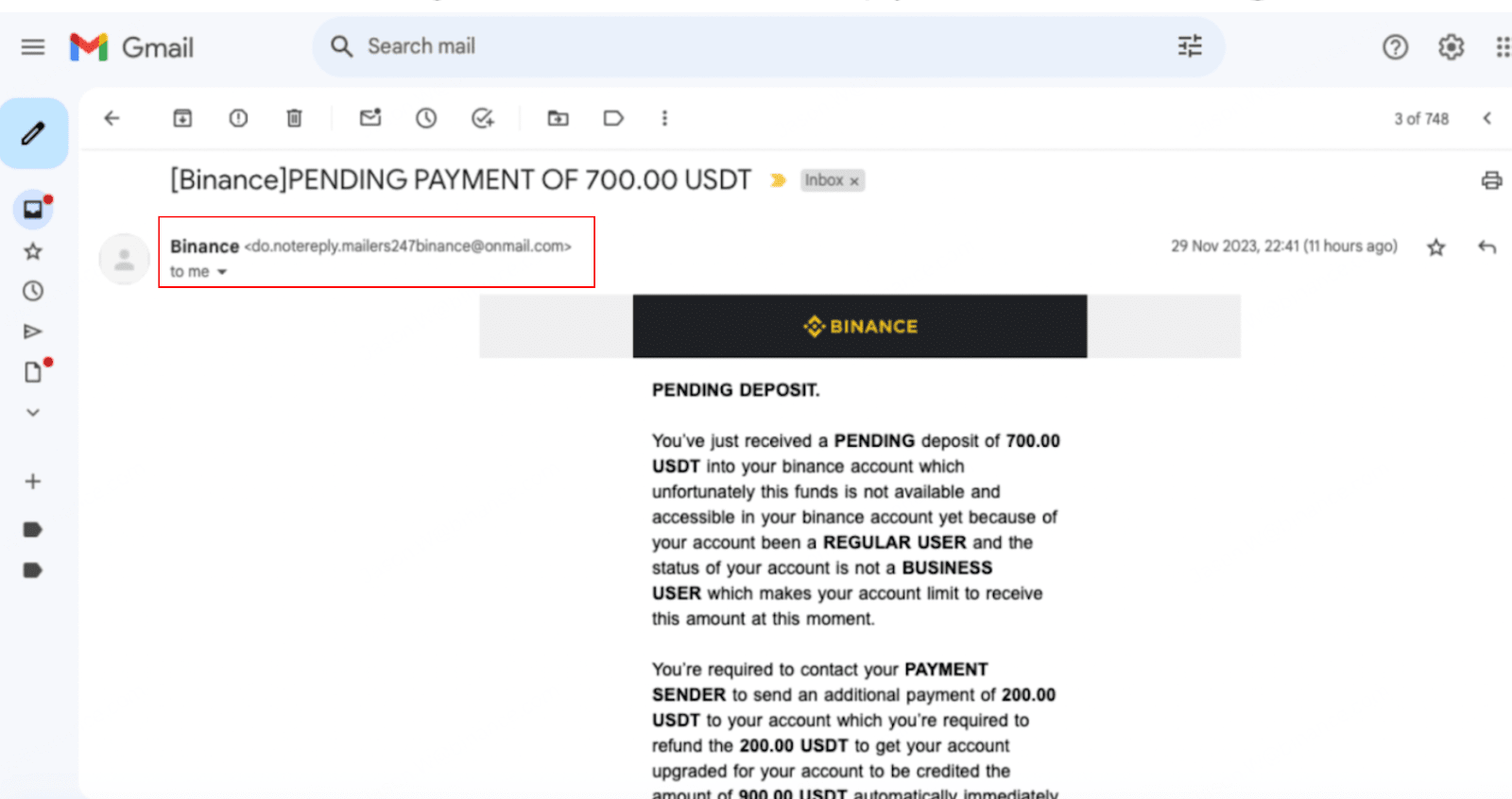
Identity theft is a tactic that involves creating fake domain names and sender addresses resembling official names to deceive the recipient. The goal is to make them believe that the email is legitimate because part of the sender's address seems trustworthy, for example, 'binance.com'.
Here is a real-life example where scammers used the address 'do.notereply.mailers247binance@onmail.com', which seems official until one notices the extra 'onmail' in the address.
2. Pressuring or threatening language
Phishing emails often create a sense of urgency, fear, or curiosity in the recipient to manipulate their emotions and prompt them to take immediate action. For example, it may lead you to believe that an unexpected withdrawal has been made from your account, prompting you to 'reset' your password when in reality, you are about to reveal it to a scammer.
Here is an example of a phishing email that claims the user has made an unexpected withdrawal: note the tone of the highlighted section, which is deliberately written to disturb and scare the recipient with phrases like 'block your account' and 'protect all your funds'.

3. Dangerous links and fake attachments
Phishing emails usually contain links that redirect to fake websites similar to their legitimate counterparts. They may also include attachments such as PDFs, executable files, or repackaged applications that contain scripts or malware. Opening these attachments can give hackers unauthorized access to your devices, allow them to steal sensitive information, or transfer funds without your consent.
Here is an example of a phishing email containing a malicious link: clicking on [Verify email] leads to a fake Binance login page that prompts for a username and password. This can then allow scammers to collect users' data to sell or steal their account and funds.

Four ways to uncover a phishing attempt
Now that we have presented some examples of phishing emails, let's discuss several ways to identify them.
1. Binance Verify
Did you receive a suspicious email from Binance? First, check the sender's address on Binance Verify: if the tool indicates 'Unverified Source', it means this email is probably dangerous.

Even if the source address is validated by Binance Verify, it could be an identity theft: as explained earlier, this tactic is commonly used by scammers to make their communications seem legitimate. They use domain names that are very similar to their legitimate counterparts or spoofed headers in the 'Reply' or 'Return-path' fields.
Aside from sender addresses, Binance Verify can also verify any account on social networks and any website link contained in the suspicious email.
Social media accounts
If the received email invites you to contact a 'Binance employee' on social media (e.g., Telegram, Facebook, or WeChat), consider verifying their username on Binance Verify.
The image below shows the screen that appears when the Binance account username is real. Remember that criminals often impersonate employees of the company: Binance Verify is just one of many steps to verify an individual's identity.

Website links
Be cautious when clicking on website links contained in emails. To verify a Binance URL, right-click on it and select 'Copy link', then paste it into Binance Verify to check the authenticity of the website. The image below illustrates the screen that appears when Binance Verify determines that the website is an official Binance domain.

2. Anti-phishing code
We strongly recommend setting up an anti-phishing code if you haven't already. It is a simple procedure that takes only a few minutes, and once completed, every email genuinely sent by Binance will mention the unique combination of numbers and letters that you have defined.
Here’s what a Binance email looks like with and without the anti-phishing code: beware of emails supposedly sent by Binance that do not contain your anti-phishing code.

3. Verifying the EML file
Download the email as an EML file to recover additional hidden information for verification purposes. Although more technical, this method is very effective for detecting phishing attempts.
SPF/DMARC/DKIM
For example, you can open the file and perform an SPF/DMARC/DKIM check. If all checks or some of them fail (for example, if the check indicates 'dkim=fail'), the email most likely comes from an unauthorized source.

IP address reputation
In the EML file, you can also find the IP address and compare it to addresses reported for illicit activities. Just copy and paste the address into an IP reputation checker like abuseipdb or virustotal. Note: these databases sometimes contain no information if the verified IP address is too recent. Always consult multiple sources before drawing your own conclusions.

4. Contact Binance customer service
If you have doubts about a received email, we recommend contacting Binance customer service by sending screenshots and the EML file. Among all the methods described in this guide, this one is truly foolproof: once your case is received, our highly experienced team in phishing attempts will help you verify the authenticity of the email.
To download the EML file, follow the detailed steps in the paragraph below.
Downloading an EML file
Let's see how to download the content of an email as an EML file from Gmail and Outlook.
Gmail
Open the email you want to download in EML format. Click on the three dots in the upper right corner of the email.
In the dropdown menu, select 'Download the message'.

Outlook
Open the email you want to download in EML format. Click on the three dots in the upper right corner of the email.
In the dropdown menu, select 'Download'.
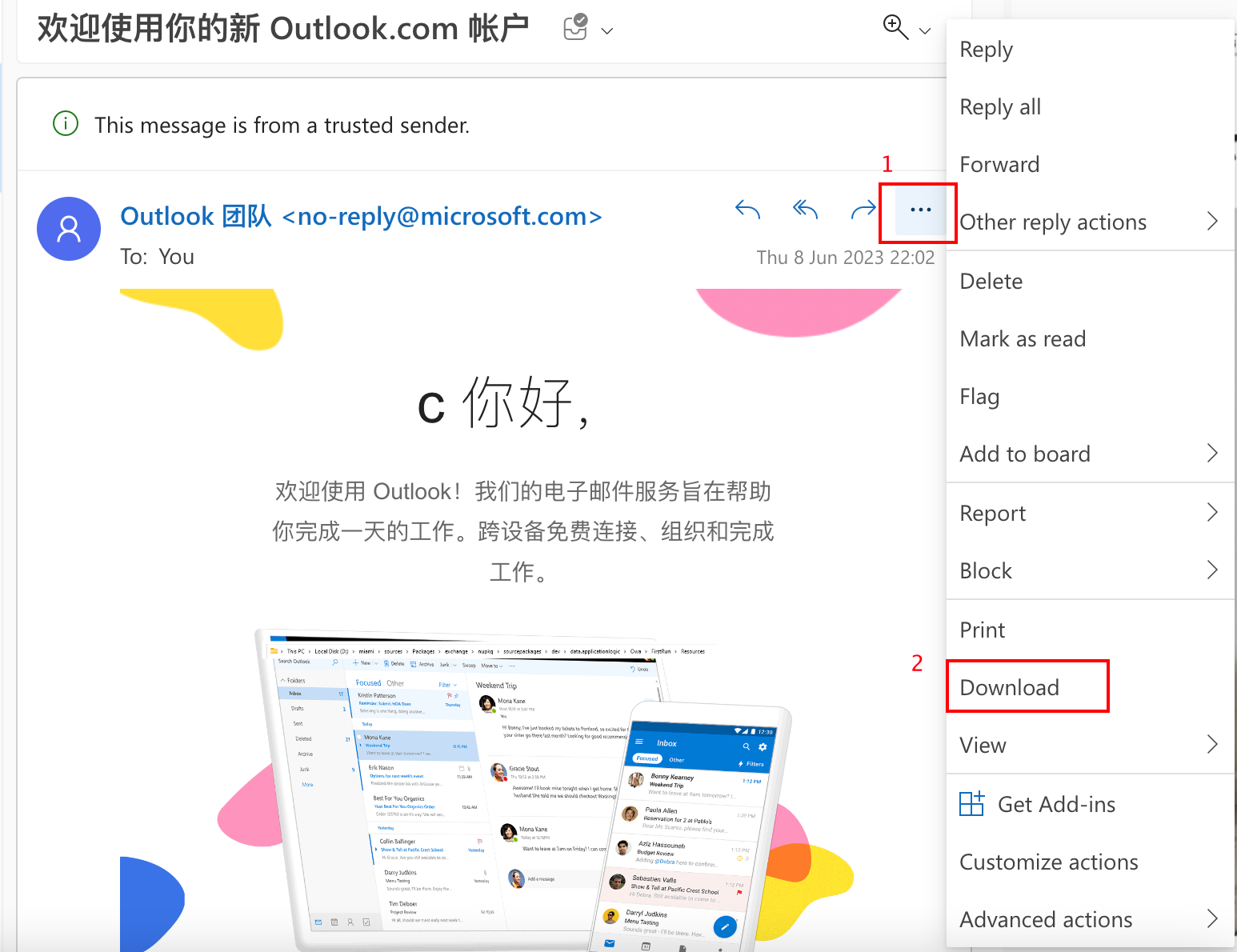
Once the email is downloaded, right-click on the EML file and select [Open with], then [Other]. Then select TextEdit on macOS or Notepad(++) on Windows.

How to escape phishing attempts?
Stay vigilant against phishing attempts and learn to protect your funds today to avoid a future disaster. Here’s a quick summary of best practices to adopt:
Set up your anti-phishing code with this guide.
First things first, search for any email address, URL, or any username of 'Binance' on Binance Verify.
Do not click on suspicious links: you could accidentally install malware on your device or access a fake site created to retrieve your sensitive information.
Do not disclose any personal information to a stranger, including your login information, phone numbers, bank accounts, wallet recovery phrases, or private keys.
Enable two-factor authentication (A2F): if your account information is stolen, A2F can make it harder for the scammer trying to take over your account.
Only interact with legitimate businesses in the context of activities, and be wary of invitations to 'free contests' or 'airdrops' received by email.
If you still have doubts about an email, ask for help from Binance customer service: we will be happy to check the EML file for you.
For more information
Today's takeaway: anti-phishing codes and how to protect yourself
Stay safe: what to do if your account has been compromised?
How to protect your cryptos from SMS identity theft attacks?
Trade anywhere with the Binance crypto trading mobile app (iOS/Android)
Find us at:
Instagram: https://www.instagram.com/binancefrench
Twitter: https://twitter.com/LeBinanceFR
Facebook: https://www.facebook.com/BinanceFrance
Telegram: https://t.me/BinanceFrench
Warning regarding risks: Digital asset prices are subject to high market risk and price volatility. The value of your investment may decrease or increase, and you may not recover the invested amount. You are solely responsible for your investment decisions, and Binance is not responsible for any losses you may incur. Past performance is not a reliable indicator of future performance. You should only invest in products that you are familiar with and understand the risks. You should carefully assess your investment experience, financial situation, investment goals, and risk tolerance and consult an independent financial advisor before making any investment. This should not be construed as investment advice or an inducement or recommendation to trade any digital asset.