

Mentioning transaction ID or TXID refers to important "digital traces" in the world of cryptocurrency trading. When you transfer coins (be it Bitcoin, Ethereum, USDT, Litecoin, Ripple, and many others) to someone, they will usually ask you for a TXID so they can check their transaction. So what exactly is TXID? Let's explore the details through our BrokerBoss.
What is TXID (Txhash or Transaction hash)? How to check the transaction Txid of any Coin
Discover what TXID (Txhash or Transaction hash) is?
TXID, also known as Txhash or Transaction hash, is an important concept in the cryptocurrency space. Simply put, TXID is a type of "proof" of a transaction on the Blockchain. When you make a coin transfer transaction from wallet A to wallet B, the system creates a unique string of letters and numbers to identify that transaction in the Blockchain network.
It's like getting a receipt when you send money to the bank; TXID is a way for you to check and verify that your transaction was successfully completed and recorded on the Blockchain. Each coin has its own Blockchain, and TXID is a way to identify transactions in that Blockchain, which cannot be changed or deleted once created. This is an important mechanism that helps ensure the transparency and safety of cryptocurrency transactions.
Where can you find the transaction ID?
You can access the transaction ID through blockchain explorers, which publicly display all the details of the associated transactions. This transparency allows anyone to check information related to a specific transaction or address. Although these IDs do not explicitly reveal the identities of the sender and receiver in the real world, there are methods capable of establishing these connections.
Specific example of how to check TXID
Let's look at a concrete example of how to check the TXID of a transaction. Let's say you want to transfer about 0.01 Ethereum (ETH) from wallet A to wallet B, with the following address:
Ví A: 0xaaa042c0632f4d44c7cea978f22cd02e751d44c7 Ví B: 0x7dabb9a63b907ef93a71df6c665f83b755f907ef
To check whether this transaction was successful, you can perform the following steps:
Step 1: Visit the website https://etherscan.io/
Step 2: Enter the address of wallet A or wallet B in the “Search by Address…” box and click “GO”
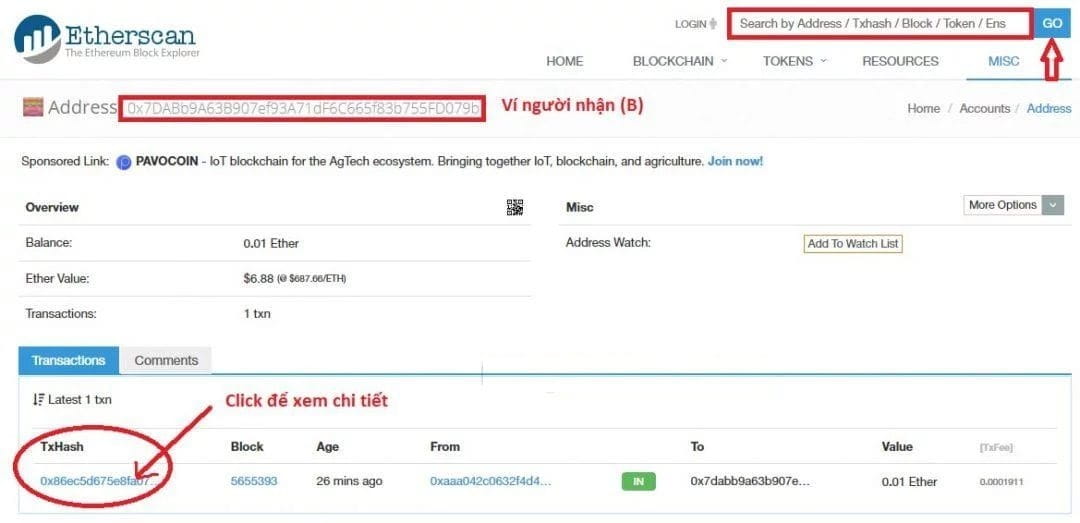
The results will show the transaction history of wallet A or wallet B, depending on the address you entered. The important thing is to search for the TXID (or TxHash) of the specific transaction you are interested in. You will see a list of transactions with the corresponding TXID, and you can click on that TXID to view transaction details, including information about the amount of ETH transferred, time, and other details.
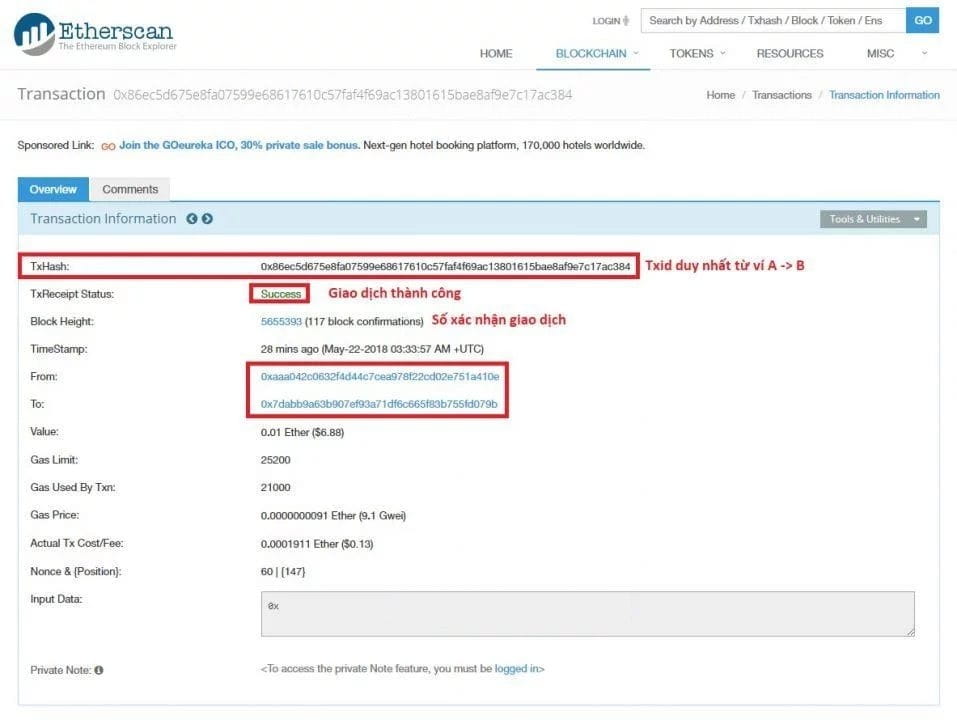
Based on the image above, you can notice the Txid or Txhash code of the transaction you just made. Note the “TxReceipt Status” section: if it shows “Success”, this means the transaction has been completed successfully and the ETH amount has been transferred to your wallet B. On the contrary, if the status is displayed as “Pending”, the transaction is still waiting for confirmation and the ETH amount has not been transferred to your wallet B.
Example 2 of transaction ID?
This is the TXID code of the first Bitcoin transaction that Satoshi Nakamoto sent to Hal Finney: F4184fc596403b9d638783cf57adfe4c75c605f6356fbc91338530e9831e9e16.
The TXID code of the famous Bitcoin transaction “Bitcoin Pizza” is: Cca7507897abc89628f450e8b1e0c6fca4ec3f7b34cccf55f3f531c659ff4d79.
To generate these TXID codes, Bitcoin uses the SHA-256 hash algorithm, a 256-bit encryption method. This algorithm takes transaction data as input and produces a hash string 64 characters long, expressed as a hexadecimal number.
To check these transactions, you can copy the TXID code and paste it into a Bitcoin block explorer, such as blockchain.com or blockchair.com.
Here is a list of some useful websites to check the Txid of coin transactions:
When you make a cryptocurrency withdrawal from a centralized exchange (CEX) like Binance, the platform will provide you with the TXID of that withdrawal. On Binance, this information can be found in the Transaction History section of your account. By clicking on the TXID corresponding to a specific withdrawal, you will be taken to the transaction's details page on the blockchain browser.
In case you send funds to an incorrect address (or incorrect blockchain), the TXID code in your withdrawal transaction history becomes an important factor in determining the possibility of canceling the transaction and getting your funds back. However, there is no guarantee that you will be successful in this, and it is best to contact support on the platform you deposited funds to for the most accurate and specific assistance.
Bitcoin: https://blockchain.info
Bitcoin cash: https://blockchair.com/bitcoin-cash/blocks
Litecoin: https://chainz.cryptoid.info/ltc/
Ripple: https://xrpcharts.ripple.com/#/graph/
Ethereum classic (ETC): http://gastracker.io/
Zcash (ZEC): https://explorer.zcha.in/
Dash: https://chainz.cryptoid.info/dash/
NEO: https://neotracker.io/
If you are interested in another coin but don't know the website to check, don't hesitate to leave a comment below, we will provide you with information.
Finally, hopefully the article “What is TXID (Txhash or Transaction hash)? How to check the transaction Txid of any Coin" has brought you the most useful information. If you have any questions about Txid, don't hesitate to leave a comment below the article, the Virtual Currency Blog team will be happy to assist you. Don't forget to like, share and rate 5 stars to support BrokerBoss if you find this article useful. Good luck!
https://brokerboss.net/id-giao-dich-la-gi-tim-txid-giao-dich-txhash-hay-transaction-hash-o-dau/