

1. Before the Tutorial
This article mainly introduces the following contents:
1. LTC full node wallet
2. LTC-20 IPO
3. Deployment of LTC-20 tokens
Before the tutorial, let's first figure out which tools are used in various tutorials on the market:
1. Wallet (required)
1. Atomic Wallet: https://atomicwallet.io/litecoin-wallet (recommended for beginners)

This wallet interface is relatively simple and suitable for beginners.
2. electrum-ltc: Litecoin light wallet https://electrum-ltc.org/
This wallet interface is not friendly enough for beginners, but it can be used as a full-node wallet.

3. litecoin.org: LTC wallet, can be used for full node wallet
http://litecoin.org
2. Mint Tools
Mint tools are also known as proxy tools. There are three mainstream Mint tools:
1. Litescribe, easy to use, but limited in number of times, generally used within 50 Mint cards (with query function);
2. Ordinalslite, the service fee is very high;
3. Ordieverse, the entry threshold is high, you need to enter the code, the fee is low, generally mint more than 50 cards;
I also found a tool developed by Chinese people, such as: ltc20.net
It should be noted that the above four tools are all proxy tools, and the gas fee of using proxy tools is much higher than the gas fee of the full node.
2. Wallet Registration
There are two wallets available for Ltc:
One is Atomic, which has a relatively simple interactive interface. You will basically know how to use it after downloading it, so I will not repeat the introduction in this article.
The other is electrum-ltc, which has a more traditional interactive interface. This article introduces the installation of this wallet. This wallet can be used as an LTC full node wallet. The installation steps are as follows:
Step 1: Download
Go to the electrum-ltc website. If your computer is Win, select "Windows Installer" and download the wallet to your desktop (it is best to exit the antivirus software when installing);

Step 2: Install the wallet
Select "Mark Wallet";

Select "Create a new secret seed". If you have an LTC wallet before, you can choose the second one.

(This section is limited to importing mnemonics. If you are a new wallet, please jump to (III)) If you selected "Already have a seed..." in the above picture, after you enter the mnemonic, click "Options" and select BIP39 seed;

Citation: https://spiny-authority-3ae.notion.site/Lite-20-fc780043bda240358fe0129f9fa5eb71
Enter the script type and derivation path interface, select the address type "native segwit (p2wpkh)" and click Next. This address type is actually the native segregated witness address starting with ltc1, which has the advantage of low transfer gas fee.

Citation: https://spiny-authority-3ae.notion.site/Lite-20-fc780043bda240358fe0129f9fa5eb71
Step 3. Copy down the displayed secret key;
Copy the mnemonic and fill in the password;

Step 4: Adjust the interface
The interface you enter at the beginning is like this, with only functions such as history, send, receive, channel, etc. You need to call out the hidden "address", "coin selection", and "console" functions.

Click "View" and select them one by one;

Step 5. Select the address
After calling up the hidden function, click on the address, select the first address in the pop-up interface, right-click, and edit the label, such as "Common Addresses"
When transferring or receiving money, the first address has the best compatibility. If you randomly choose one, the tokens may not be displayed.

Step 6. Set up trading preferences
Click the tool option in the lower right corner. In the pop-up dialog box, select the "Transaction" column, check "Advanced Preview", uncheck "Use new change address", and then click Close.

Basically, the wallet settings are here. It is recommended to click "File", select "New", and create 2 wallets;

One to receive the inscription, the other to pay for it;
Buy LTC on the exchange and transfer most of the tokens to the payment wallet. It is enough to transfer 0.0002 LTC to the wallet that receives the inscription to avoid paying the inscription as gas fee;
3. Familiarity with IPO websites
Step 1: Enter the new stock website
https://litescribe.io/ltc20

You will see that most of the tokens have been minted. To find the projects that are being minted efficiently, just click on the "Progress %" above;

Step 2: Query inscription information
For example, if you want to type $MILK, right-click the bar and select "Open in new tab"

The interface of the ordinaryslite website will pop up, as shown below:

Here you can see the latest inscriptions:

Let's first figure out what this picture means:
The string of numbers after Inscription indicates the serial number of the inscription you are looking for. This will be needed in the subsequent search.
The following characters are in the picture:
{"p":"ltc-20","op":"deploy","tick":"MILK","max":"44000000","lim":"4000"}
“p”:”ltc-20” means the operation takes place on the LTC-20 blockchain;
"op":"deploy" means the operation is to deploy a new token;
If it is "op":"mint", it means the operation is to mint tokens (commonly known as new issuance);
These two points are very important. Many people find that there is no green hook in the upper left corner of the token they are trading. This may be because they have confused mint and deploy.

"tick":"Milk" means the ticker of these new tokens is "Milk";
The number after max indicates the total amount of the inscription;
The number after lim indicates the number of tokens for that inscription;
Official documentation:
https://litecoinlabs.gitbook.io/ltc-20-experiment-forked-from-brc-20/
3. Mint
Method 1: Use the litescribe.io website to mint
step 1
Go to https://litescribe.io/ltc20, click “INSCRIBE” and select “Ltc-20”;

The following dialog box will pop up:

1. Mint option, don’t make the wrong choice;
2. Nameplate name. If a red prompt appears, it means that the coin you selected has been minted. Please select again.
If the token you selected can still be minted, the tick box will turn green and the amount column will automatically pop up.

3. The number of single mints corresponds to the lim in the figure below:
4. Mint times. The number of mints on the Litescribe website is limited. If you want to mint a lot of copies (for example, more than 20 copies), please mint in Ordieverse;
It should be noted that: the total number of mint coins = the number of single mints * the number of mints. The more times you mint, the more money you need to spend.
After selecting, click Upload to confirm.
Step 2. Payment
In the pop-up dialog box, paste the wallet address where you received the inscription and submit;

Step 3. Payment interface
1. Remember the LTC you need to pay this time;
2. Copy the payment address;

Step 4: Enter your wallet and transfer funds
1. If you are using the electrum-ltc wallet, select your payment wallet, fill in the address and amount as shown above, and select payment;

2. If you are using Atomicwallet, click Wallet, Send, fill in the address and token, and click Send.

Step 5. Check
1. After completion, refresh the litescribe website and check the block below to confirm.

2. After about ten minutes, you can see "Paid" indicating success;

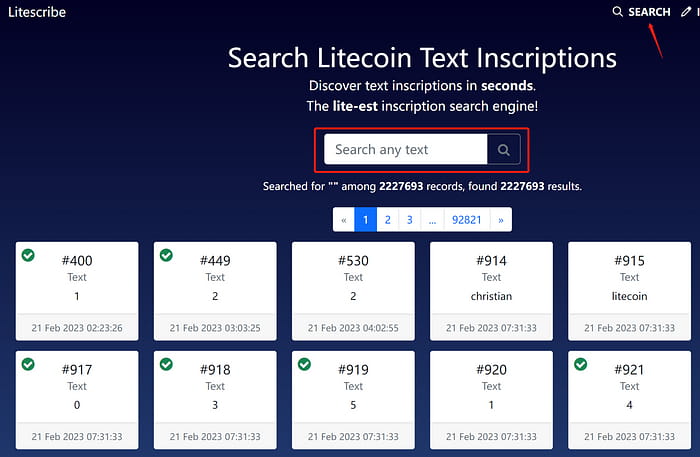
3. On the litescribe website, select Search and enter the token you want to search for in the search box;
The instructions for these green hooks are on the chain.
Method 2: Use Ordieverse to buy new shares
Go to https://inscribe.ordieverse.wtf/ and select either Text or Ltc-20. The difference is:
Ltc-20 can mint 100 copies
Text unlimited copies

Demonstration with Ltc-20
Step 1. If you choose LTC-20, select LTC-20, Mint, fill in the token name in the pop-up dialog box, and fill in the Amount yourself. The filling method is shown in Section 2; select the number of Repeat Mints.
Then keep clicking Next;

Step 2: Paste the address where you receive the inscription and click Submit

Step 3. Payment
Click Play now, select LTC payment in the pop-up dialog box, copy the address, and pay in the wallet.

2. Demonstration with Text
Click Text and select bulk in the pop-up dialog box;
Step 1. Paste the string of the token you want to mint, for example: {"p":"ltc-20","op":"deploy","tick":"musk","max":"21000000","lim":"1000"}
Change "deploy" to "mint", as shown below:
Make as many copies as you want, and then go to the next step;

Step 2: Paste the address where you receive the inscription and click Submit
Step 3. Payment
Click Play now, select LTC payment in the pop-up dialog box, copy the address, and pay in the wallet.
appendix:
1. LTC20 OTC Discord:
Join the LTC OTC & Litoshi Discord Server!Check out the LTC OTC & Litoshi community on Discord - hang out with 902 other members and enjoy free voice and text…discord.gg
2. ORC20, LRC20 Exchange (under development)
Litoshi MarketWeb site created using create-react-appwww.litoshi.appThat’s all for today. I’ve been very busy these days, so the tutorials are coming out very slowly. But one advantage of being very slow is that you can compile information from all aspects and organize the content into collections.