

Key takeaways
Do you want to sell one or more of your NFTs? The Binance NFT marketplace provides you with several ways to list them easily and securely.
You can auction your NFTs, set fixed prices or simply accept proposals from potential buyers. You can even list up to 50 NFTs at a time.
Keep reading to learn how to list, delist and modify your listings on the Binance NFT marketplace.
Binance NFT allows you to sell NFTs in three ways: at auction, at a fixed price and at the price offered by the buyer. Discover the features and benefits of each listing option with this detailed guide to selling NFTs on Binance.
Artists, musicians, creators: if you plan to list your NFTs on Binance NFT, consider going to the Binance NFT marketplace, a platform that provides you with an intuitive and simple portal to buying, selling and trading NFTs.
This guide describes the complete process of listing NFTs on Binance NFT. Whether you are new to the world of NFTs or a seasoned creator looking to reach a wider audience, this guide contains all the information you need to successfully list your NFT on Binance NFT.
The advantages of listing on Binance NFT
Greater visibility and better accessibility
Millions of people use Binance around the world: by listing your assets on Binance NFT, you will reach many more potential buyers and collectors, and improve the accessibility of your NFTs.
A guarantee of trust and security
Binance is a reputable and trustworthy platform, which has always provided its users with reliable and secure services. Rest easy: your assets are in safe hands, and your transactions will be processed efficiently and securely.
Low fees
NFT listing is completely free, and we charge only 1% platform fee for each successful NFT sale. These low operating costs help you maximize your earnings.
Three ways to sell NFTs on Binance NFT
Auctions
This option allows you to set a starting price for your NFT and let buyers bid for a specific period of time. At the end of the auction, your NFT will be sold to the highest bidder.
Benefits :
The price of your NFT is likely to increase.
Sellers have the freedom to set the deadlines and sales prices of their choice.
Disadvantages:
Sellers only have a limited time to sell their NFTs.
Buyers must wait until the auction ends to receive the NFTs.
Fixed price
This option allows you to set a fixed price for your NFT to make any purchase instant.
Benefits :
Sellers have the freedom to set the deadlines and sales prices of their choice.
Sales are immediate.
Disadvantages
Buyers can only purchase NFTs at specified prices.
Accept the offer
This option allows you to accept a buyer's offer. With the arrival of the NFT asset exposure feature, all NFT assets registered on the Binance NFT platform (even if they are not available for sale) are visible to all users, which means they can discover and bid on your NFTs at any time.
You will receive a notification on your profile when a buyer makes an offer on your NFT or Mystery Box. To view it, go to your [Profile] - [Offer], then click on [Offers received].
Benefits :
Sellers can receive offers without listing their NFTs.
Sellers can decide whether or not to accept offers.
Disadvantages:
Buyers do not see the selling prices of NFTs, and their offers are sometimes lower than the asking price.
Choose your listing option wisely
The ideal listing option depends on your preferences and sales goals. To find out how high the selling price of your NFT can go, we advise you to opt for the auction.
On the other hand, listing at a fixed price is the best solution if you want to sell quickly at a specific price. If you agree to negotiate and would like to receive multiple offers, choose the “Accept Offer” option instead.
How to sell NFTs on Binance NFT?
Step 1: Select your NFT
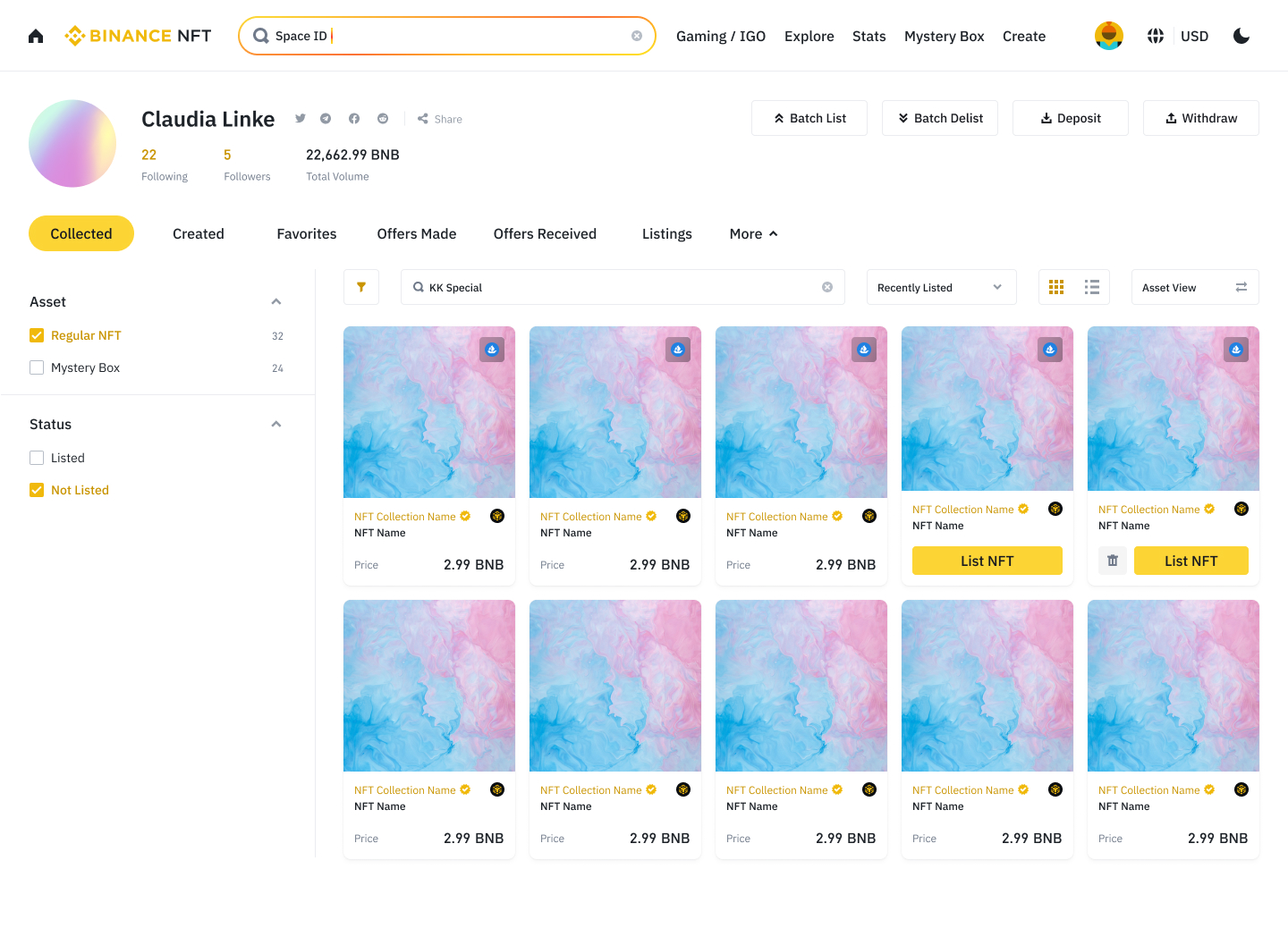
List an NFT or Mystery box by accessing your [Profile] - [Collected] then clicking on [List an NFT] under the asset in question. You can also click [List an NFT] from the asset details page.
Step 2: Enter the listing information
Select your selling method: Auction or Fixed Price.
Auction: Your NFT will be auctioned and sold to the highest bidder. Select the crypto you wish to receive in exchange and indicate the [Starting price], i.e. the minimum bid amount and the price at which the auction will begin.
Fixed price: buyers will be able to instantly acquire your NFT at the price you set. Select the crypto you want to receive in exchange and indicate the selling price of your NFT. This feature will also allow buyers to make an offer on your NFT.
The minimum bid amount must be greater than 0.1 BUSD for auction and fixed price sales. You can also set the selling price of your choice in the [Purchase price] field. The asset will then be immediately sold if an Internet user offers the purchase price or if the auctions reach this amount.
Once the sale price is entered, select the minimum markup percentage: This number limits the buyer's bid to 5%, 10%, or 20% more than the minimum price increase. Now choose a date. You can decide to list the NFT upon review of your listing, which will be carried out by an automatic verification system. An exam takes an average of 10 minutes.
You can also select a specific date and time to list your NFT, at least 12 hours after the listing is submitted for review. The sale must last a minimum of 12 hours and a maximum of seven days from the date of listing. Note: If review is not completed by the scheduled listing time, your NFT will be listed upon approval.
Step 3: Confirm and distribute your listing
Make sure you have read and understood the fees associated with selling your NFT before clicking [Submit]. Each NFT is evaluated by an automatic verification system that ensures it meets our standards before being listed. This process takes on average 10 minutes.
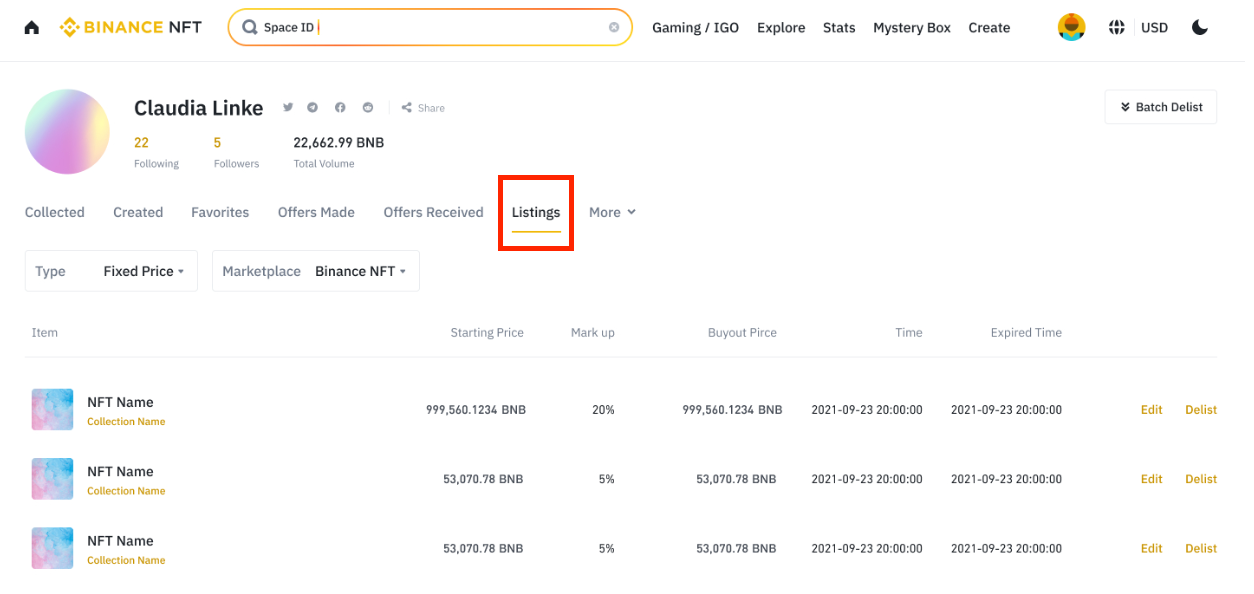
If your NFT or Mystery box has never been listed, he or she will be subject to a 10-day clearing period and you will be notified as soon as your asset is listed. To view your listed NFTs or Mystery boxes, go to your [Profile] - [My NFTs] > [Listings].
Once your NFT is listed, a pop-up window with the message [Listing Complete] appears, and you have the option to distribute the listing to several social networks including Facebook, Twitter and Telegram.
How to list multiple NFTs at once?
The Batch Listing functionality allows you to list or delist several NFTs and Mystery Boxes at once on the Binance NFT marketplace.
Step 1: Select your NFTs or Mystery boxes
Go to your [Profile] - [Collected] - [Batch Listing].
Asset View:
You can select multiple NFT/Mystery boxes to list. To select all assets on a page, check the box next to the [All] option.
The number of selected assets as well as the maximum number of assets that can be listed appear in the upper right corner.
Collection view:
Click on the collection to select the NFT/Mystery boxes and list them. To select all assets on a page, check the box next to the [All] option.
Note: It is not possible to list a collection. You must select a collection and access its page to choose the NFT/Mystery boxes to list.
Additional note: You will automatically exit the selection process if you change tabs or refresh the page.
Remember that you cannot list more than 50 NFTs/Mystery boxes at a time. Assets marked as Listed, Frozen, Banned, and with a status set to "Issuing Not Completed" or "Withdrawals Only" cannot be selected, and a "Listing Not Supported" message appears when hovering over these assets with your cursor. Once the NFT/Mystery boxes to be listed are selected, click [List now].
Step 2: Enter the listing information

You can set a single sale price for all NFTs and Mystery Boxes in a selected batch or different prices for each NFT and Mystery box. Just like listing a single NFT, you have the choice between selling at auction or at a fixed price.
Auctions
Click [Proceed to Auction] and enter the minimum bid amount, purchase price and minimum margin percentage.
Edit the details of each NFT or use the fields at the top of the page to apply the same settings to all the assets you list.
Fixed price (default)
Select the currency you want to be paid in: BNB, BUSD or ETH.
Edit the details of each asset or enter a price in the [Set a fixed price for all] field to apply it to all the assets you list.
Step 3: Set the listing period
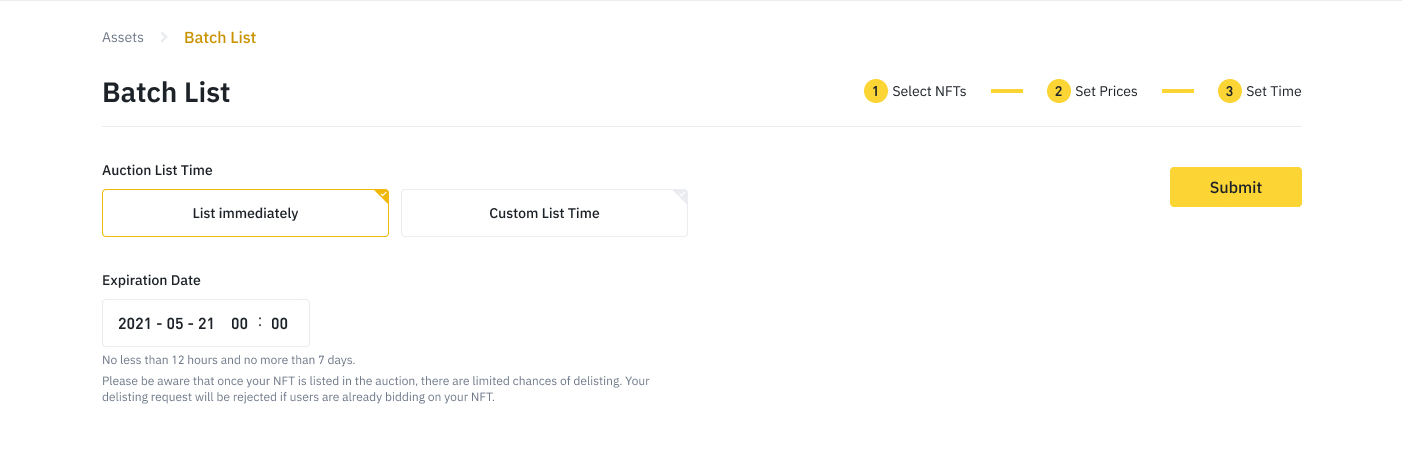
Select a listing expiration date. This date will be the same for all assets in the batch.
A pop-up window with the message [Current Listing] will then appear; Wait until you receive an email informing you that the listing is complete.
Once the listing is completed, the message [Listing Complete] appears on the screen.
How to edit NFT listings?
Once your NFTs are listed, you can:
Change the expiration date of your listings.
Change the price of your NFTs if you have opted for a fixed price.
Log in to your Binance account and navigate to the Binance NFT homepage. Click on your [Profile] - [My NFTs].

On your profile page, select the [Collected] tab. If you own multiple NFTs, you can filter them based on their listing status (listed or unlisted) on the left of the page. You can also find your NFTs in the [Listings] tab.
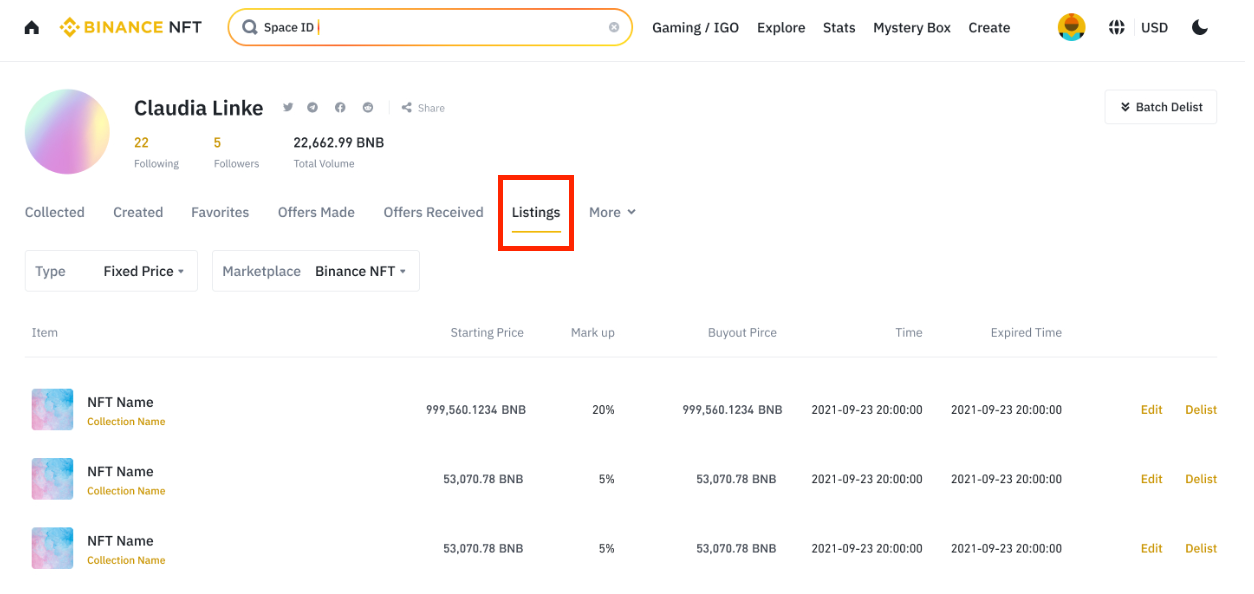
Locate the NFT listing you want to modify, then click [Edit].
How to change the price of an NFT?
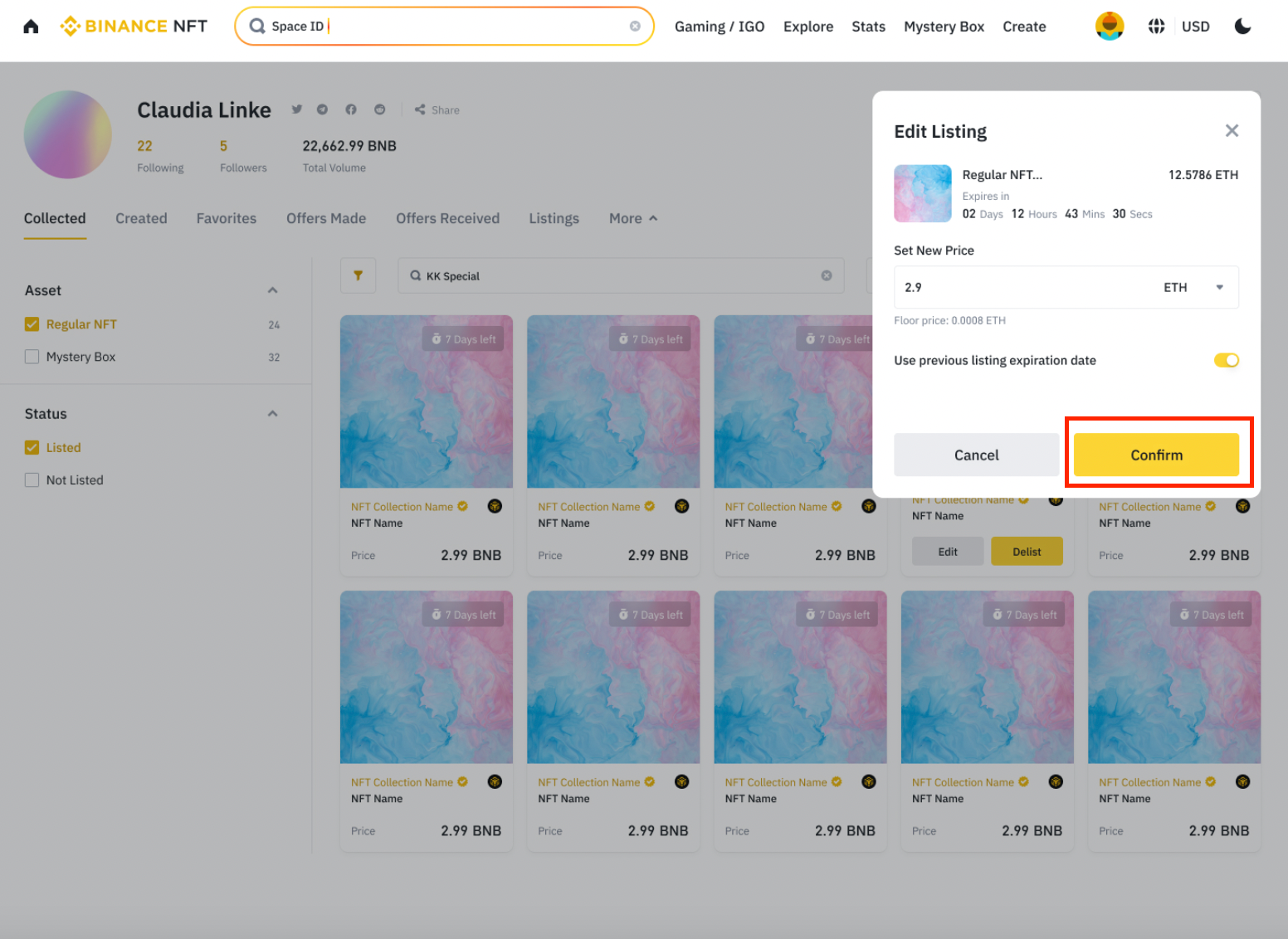
Enter the new price and select the crypto of your choice in the [Set new price] section.
Change the expiration date of your NFT listing or keep that of the previous listing.
Click [Confirm].
How to cancel a recent NFT listing?
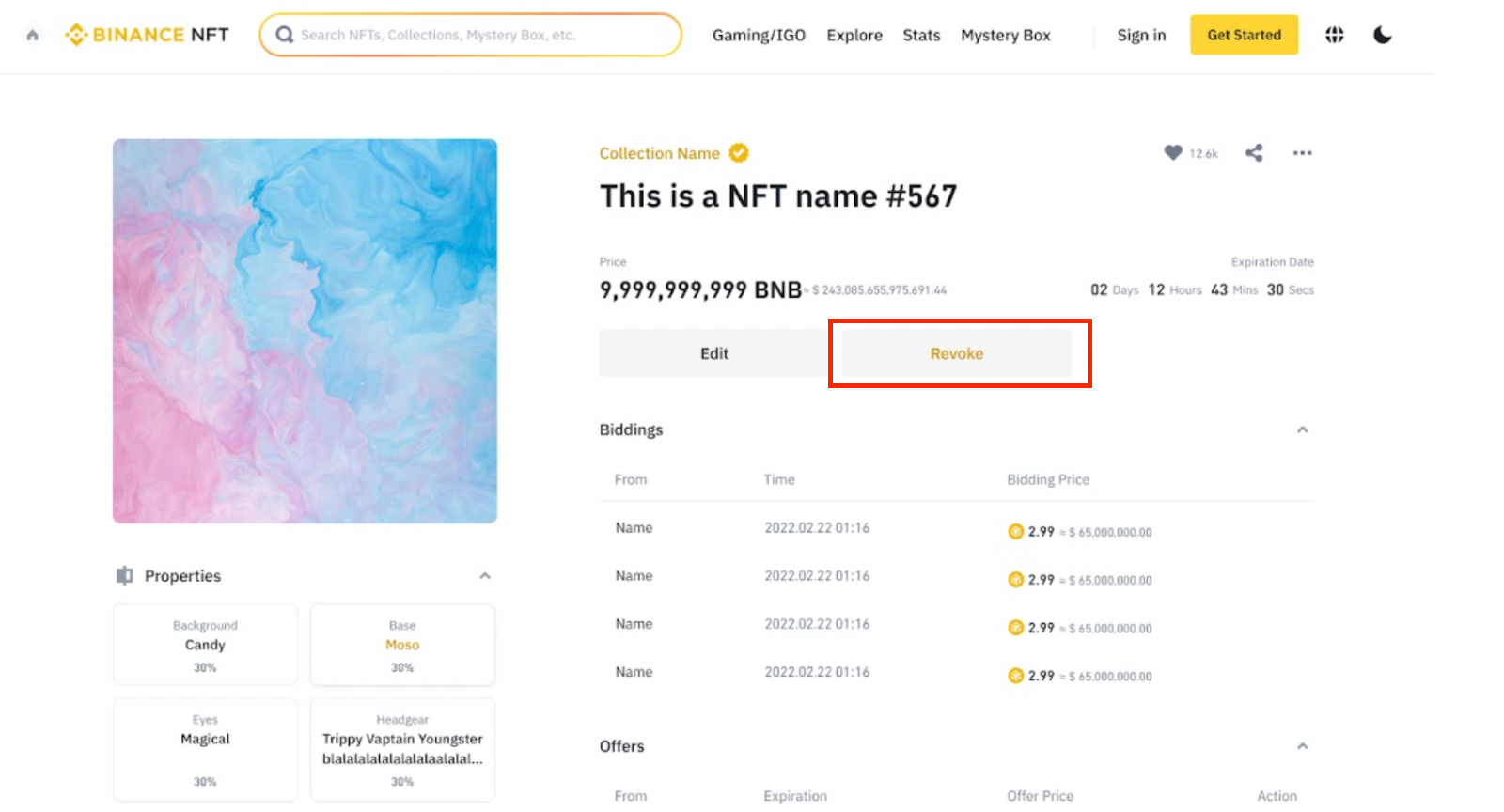
To cancel a recent NFT listing, go to its listing page and click [Cancel]. Note: Once your NFT listing is approved by the Binance NFT system, the [Unlist] button replaces the [Cancel] button. You can still delete the NFT listing by following the steps described below.
How to delist NFTs?

To immediately delist all your NFTs or delist them one by one, follow these steps:
Go to your [Profile] - [Listings].
Click the [Delist] option next to the NFT you want to delist.
Read the notes carefully, then click [Confirm] to send your delisting request.
Click [Confirm]; your NFT will be immediately delisted.

How to delist third-party NFTs?
You can also follow the steps outlined above to delist your third-party NFTs without leaving the Binance NFT marketplace; Please remember that if you decide to follow this process, your NFTs listed on Binance NFT and OpenSea must be delisted together.
Refer to the article How to delist NFTs listed on the Binance NFT marketplace? to learn more about delisting NFTs and Mystery boxes.
Conclusion
Listing your NFTs on the Binance NFT marketplace is ultimately not that complicated: be sure to follow the steps above to easily list your NFTs and reach even more potential buyers! What are you waiting for? Sell your first NFT on the Binance NFT marketplace today!
For more information
(Blog) 10 good reasons to trade NFTs on Binance NFT
(Blog) How to conduct your own research on NFT projects?
(Blog) Guide to NFT scarcity
Trade anywhere with the Binance mobile crypto trading app (iOS/Android)
Find us on :
Instagram : https://www.instagram.com/binancefrench
Twitter : https://twitter.com/LeBinanceFR
Facebook : https://www.facebook.com/BinanceFrance
Telegram : https://t.me/BinanceFrench
Risk Warning: Digital asset prices are subject to high market risk and price volatility. The value of your investment may fall as well as rise, and you may not get back the amount invested. You are solely responsible for your investment decisions and Binance is not responsible for any losses you may incur. Past performance is not a reliable indicator of future performance. You should only invest in products that you are familiar with and whose risks you understand. You should carefully consider your investment experience, financial situation, investment objectives and risk tolerance and consult an independent financial advisor before making any investment. This does not constitute investment advice, nor an incentive or recommendation to trade in any digital asset. For more information, see our Terms of Use and Risk Warning.