


Main
No matter how many NFTs you need to sell, the Binance NFT Marketplace has several options for you to sell safely and easily.
You can sell your NFTs through an auction, at a fixed price, or simply by accepting offers. You can list up to 50 NFTs for sale at a time.
Read this guide to learn how to create, delete, and edit NFT listings on the Binance NFT marketplace.
The Binance NFT platform supports three ways to sell NFTs: auction, fixed price sale, and acceptance offer. This step-by-step guide to NFTs will help you learn the benefits of each method of selling NFTs on Binance.
If you are an artist, musician, or creator and want to list your NFTs on the Binance NFT platform, check out the Binance NFT Marketplace. It is a simple and convenient portal for buying, selling and trading NFTs.
In this guide, we will walk you through all the steps of listing an NFT for sale on the Binance NFT platform. This guide contains everything you need to know about selling NFTs on the Binance NFT platform for both newbies and experienced creators looking to expand their reach.
Benefits of Listing NFTs on the Binance NFT Platform
Increasing awareness and accessibility
Binance is used by millions of people around the world, so by listing assets for sale on the Binance NFT platform, you can reach more potential buyers and increase the exposure of your NFTs.
Reliability and safety
Binance is a reputable and trusted platform that offers safe and secure services to users. You can be confident that your assets are in safe hands and transactions will be processed securely and efficiently.
Low commissions
We offer zero listing fees and charge just 1% for every successful NFT sale on the platform. These low operating costs will help you maximize your profits.
Three Ways to Sell NFTs on the Binance NFT Platform
Auction
This option allows you to set an initial price for the NFT, after which buyers can make offers over a period of time. The NFT will be sold to the highest bidder at the end of the auction.
pros
NFTs can be sold for a higher price.
Sellers can set a convenient sale date and a price that is comfortable for themselves.
Minuses
The seller only has a limited amount of time to sell their NFTs.
Buyers must wait until the end of the auction to receive their purchased NFTs.
Fix price
This option allows you to set a fixed price for the NFT, at which it can be purchased immediately.
pros
Sellers can set a convenient sale date and a price that is comfortable for themselves.
Instant sales.
Minuses
Buyers can only purchase NFTs at set prices.
Acceptance of offer
This option allows you to accept offers from buyers. With the introduction of the NFT Asset Enhanced Access feature, all NFT assets on the Binance NFT Platform—even those not listed for sale—become available to all users. This means that buyers can find your NFTs at any time and make you offers to sell them.
When a buyer offers to buy your NFT or Mystery Box, you will receive a notification in your profile under Profile - Offers - Offers Received.
pros
Sellers can receive offers without putting their NFTs up for sale.
Sellers can accept or reject offers.
Minuses
Buyers do not see the price of NFTs. As a result, sellers may receive offers at lower prices than they would like.
Selecting a placement option
The best listing option depends on your preferences and goals as a seller. If you're curious about how high a price an NFT can fetch, you can find out through an auction.
On the other hand, when you need to sell an item quickly at a set price, a fixed price listing is the way to go. If you're open to negotiations and want to see what buyers have to offer, try listing NFTs for sale and wait for offers.
How to Sell NFTs on the Binance NFT Platform
Step 1: Select NFT
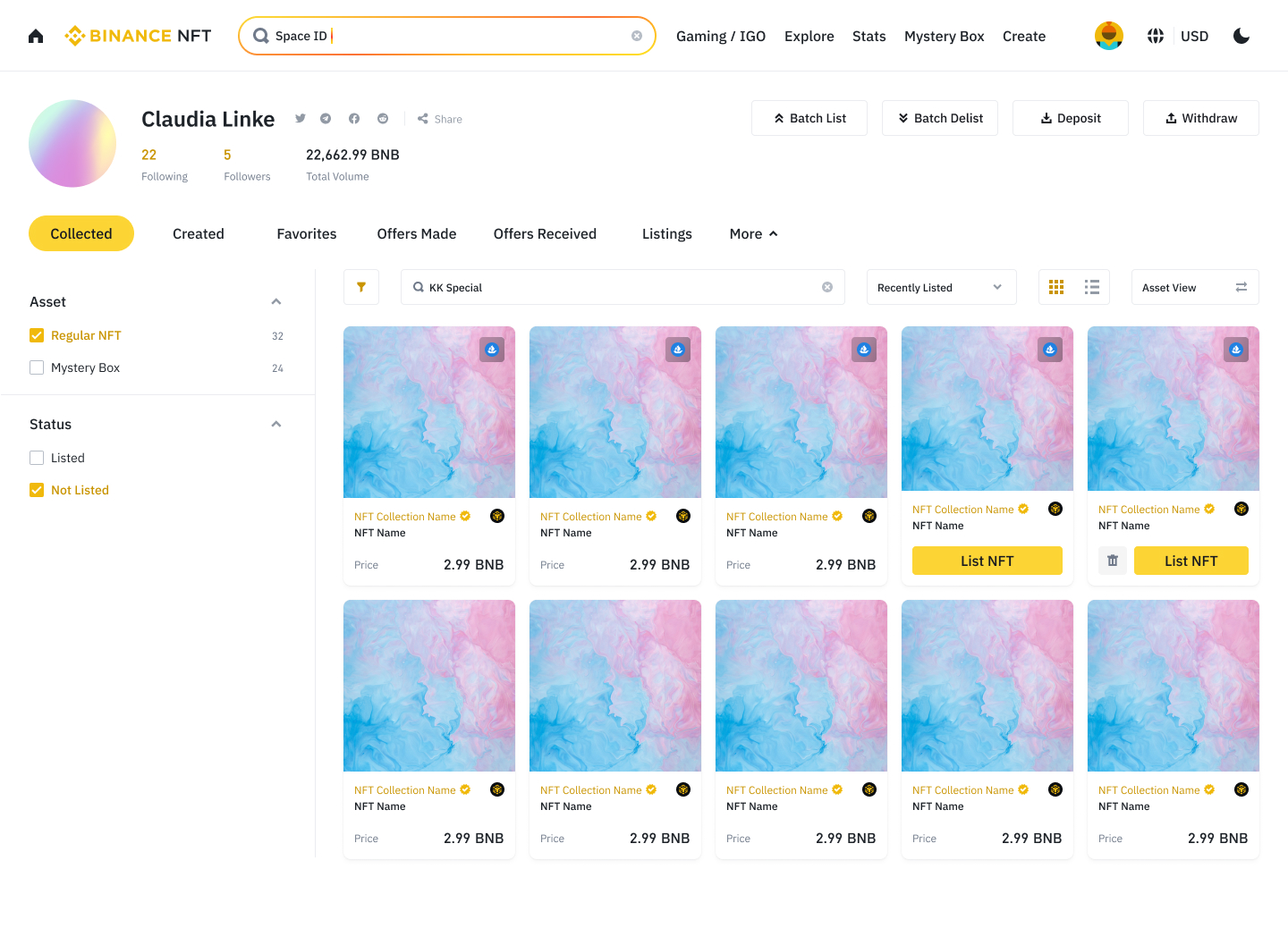
You can list an NFT or mystery box for sale in the Profile - Collection section by clicking the List NFT button under the relevant asset. You can also open the asset details page and click List NFT.
Step 2: Enter your selling parameters
Choose a selling method: auction or fixed price sale.
Auction: Your NFT will be auctioned and sold to the highest bidder. Select the cryptocurrency you want to receive and specify the starting price, i.e. the minimum bid amount and the price at which trading will begin.
Fixed Price: Buyers can instantly purchase your NFT at a price you set. Select the cryptocurrency you want to receive and enter the NFT selling price. This feature also allows buyers to make bids for your NFT.
For both fixed price and auction, the minimum bid price is 0.1 BUSD. You can also set the sale price in the Buyback price field. A buyer will be able to purchase your NFT immediately if they offer a buyout price or if the auction price reaches that level.
Once you've entered your selling price, select a minimum increment percentage (buyers will be able to raise bids by no less than 5%, 10%, or 20% above the minimum price). Now set a date: The NFT can be listed for sale as soon as we review your application. It will be assessed by an automatic verification system. Please remember that the test usually takes about 10 minutes.
Additionally, you can choose a specific time and date to list your NFT for sale. The earliest posting time is 12 hours after the NFT is submitted for review. The sale period must be at least 12 hours and no more than seven days from the date of listing. Please note that if the NFT has not yet been verified by the time you select, it will be listed for sale as soon as the application is approved.
Step 3: Confirm listing and post your NFT on social media
Before you click submit, please review the fee structure associated with selling NFTs. Each NFT is automatically verified against our standards, which typically takes 10 minutes.
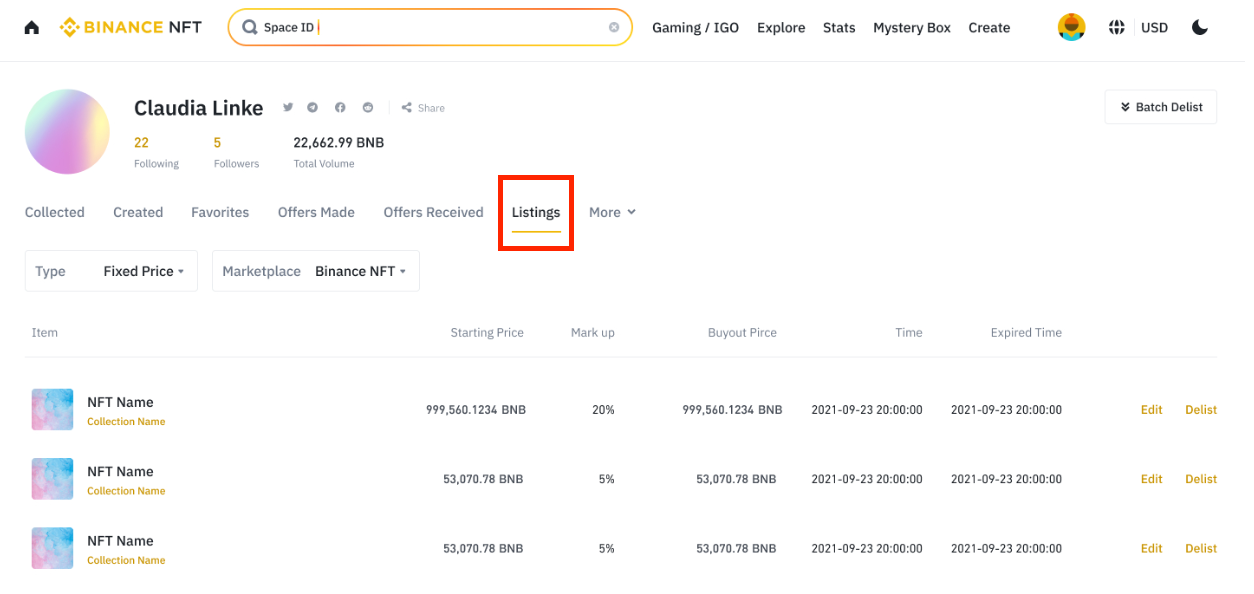
If your NFT or Mystery Box has not previously been offered for sale, it must go through a 10-day clearing period. You will be notified when your NFT is listed for sale. You can view a list of your listed NFTs or mystery boxes in the Profile - My NFTs - Listings section.
When your NFT is listed for sale, you'll see an NFT up for sale pop-up message and can also post a link to it on various social media and other channels, including Facebook, Twitter, and Telegram.
How to put multiple NFTs up for sale at once
You can list and unlist NFTs and Mystery Boxes on the Binance NFT Marketplace in a group mode using the related feature.
Step 1: Select NFTs or Mystery Boxes
Select Profile - Collection - Add Multiple.
Asset mode
You can choose multiple NFTs and mystery boxes to sell. To select all assets on the page, select the All check box.
In the top right corner you will see the number of selected assets and the maximum number of assets that can be put up for sale.
Collection mode
Click on a collection to select matching NFTs and mystery boxes to list for sale. To select all assets on the page, select the All check box.
Note. The collection cannot be put up for sale. You need to open the collection page, and then specify the NFTs and mystery boxes to sell.
Please note that if you switch to another tab or refresh the page, you will automatically exit selection mode.
Remember, you can list up to 50 NFTs and Mystery Boxes for sale at a time. It is not possible to select assets that are already put up for sale, frozen, prohibited, or assets marked “release not completed” or “withdrawal only.” When you hover your mouse over such an asset, the message “Listing not supported” appears. Once you've selected the NFTs and Mystery Boxes to sell, click Add.
Step 2: Enter your selling parameters

You can set the same selling price for all selected NFTs, or set different prices for individual NFTs and mystery boxes. Just like when listing an individual NFT, you can choose auction or fixed price mode.
Auction
Click Switch to Auction and enter the minimum bid price, buyout price, and minimum step percentage.
Edit information about each NFT, or use the fields at the top to apply one set of settings to all assets for sale.
Fixed price (default)
Select the currency you want to receive payments in (BNB, BUSD or ETH).
Edit information about each asset or enter a price in the Set Fix section. price for everyone for all assets offered for sale.
Step 3: Set your selling period.
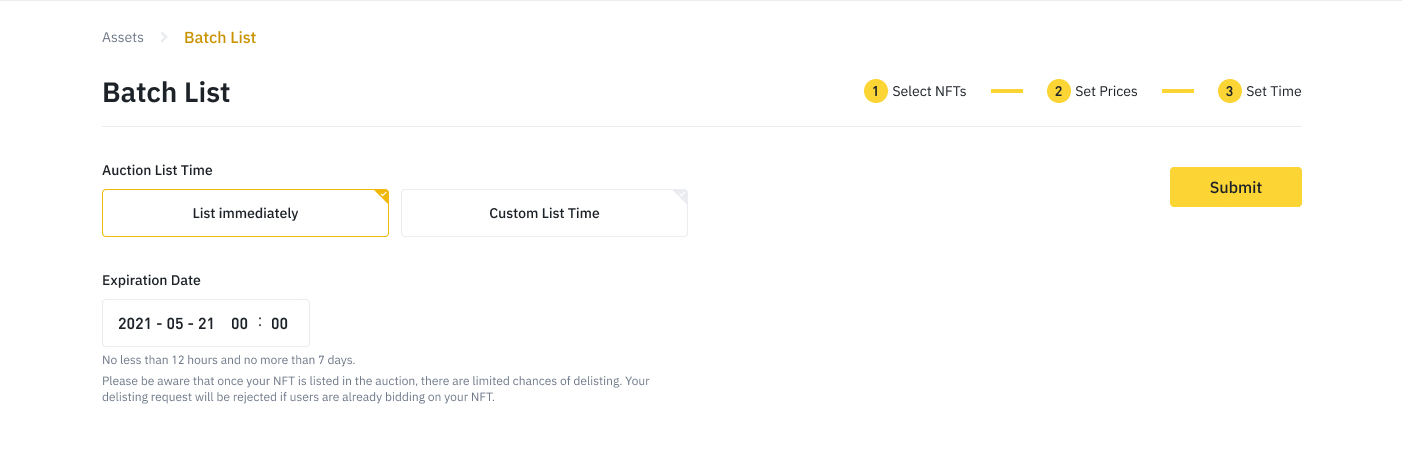
Select the end date for the sale (this will apply to all assets in the list).
The Placement in Progress pop-up window will appear. Wait for an email notification that the listing process is complete.
When posting is complete, you will see the All items posted message.
How to edit details of an NFT for sale
By putting an NFT up for sale, you can:
change the validity period of advertisements for sale;
change the price of your NFTs if they are published in fixed price mode.
Login to your Binance account and go to the Binance NFT page. Select Profile - [My NFTs].

On your profile page, go to the Collections tab. If you have multiple NFTs, you can filter them by sale status (listed or unlisted) on the left side of the page. You can also find your NFTs under the Listing tab.
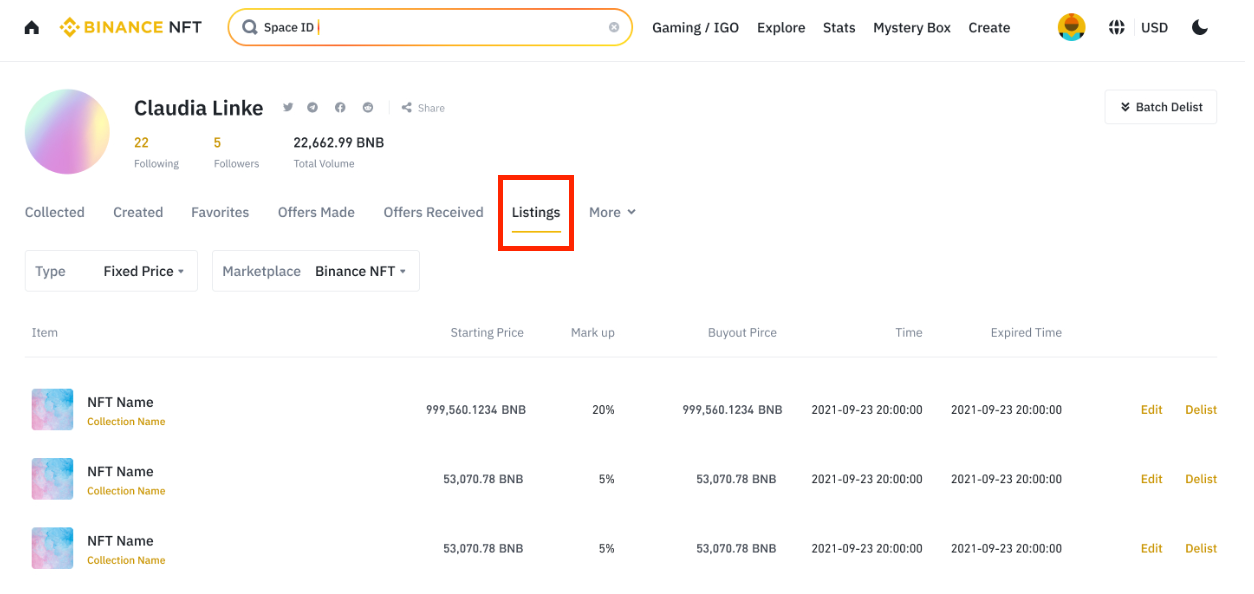
Find the listed NFT whose details you want to update and click Edit.
How to change the price of an NFT
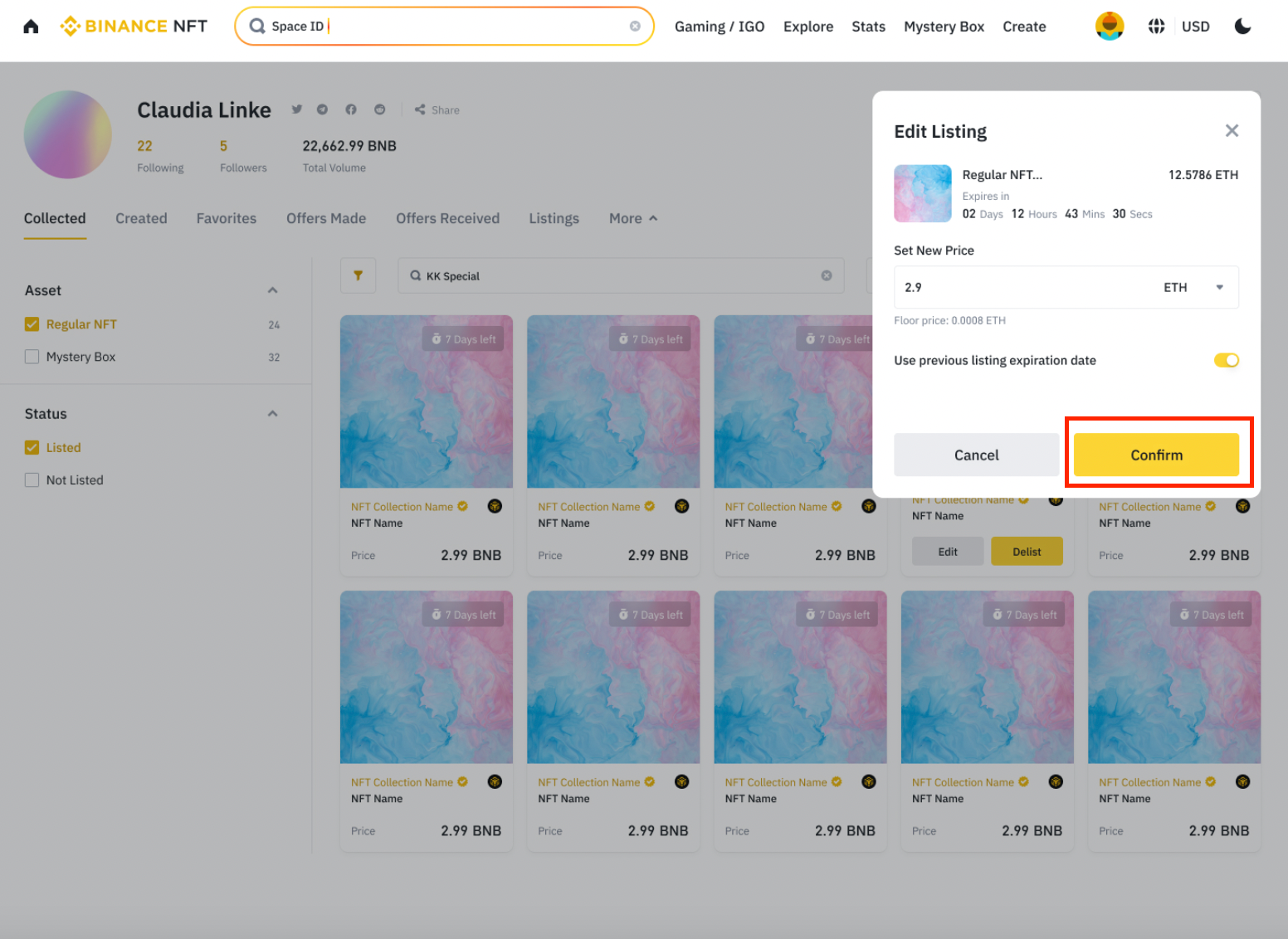
Enter a new price and select a cryptocurrency in the Set new price section.
Change the selling period for your NFT or keep the previous one.
Click Confirm.
How to cancel an NFT sale
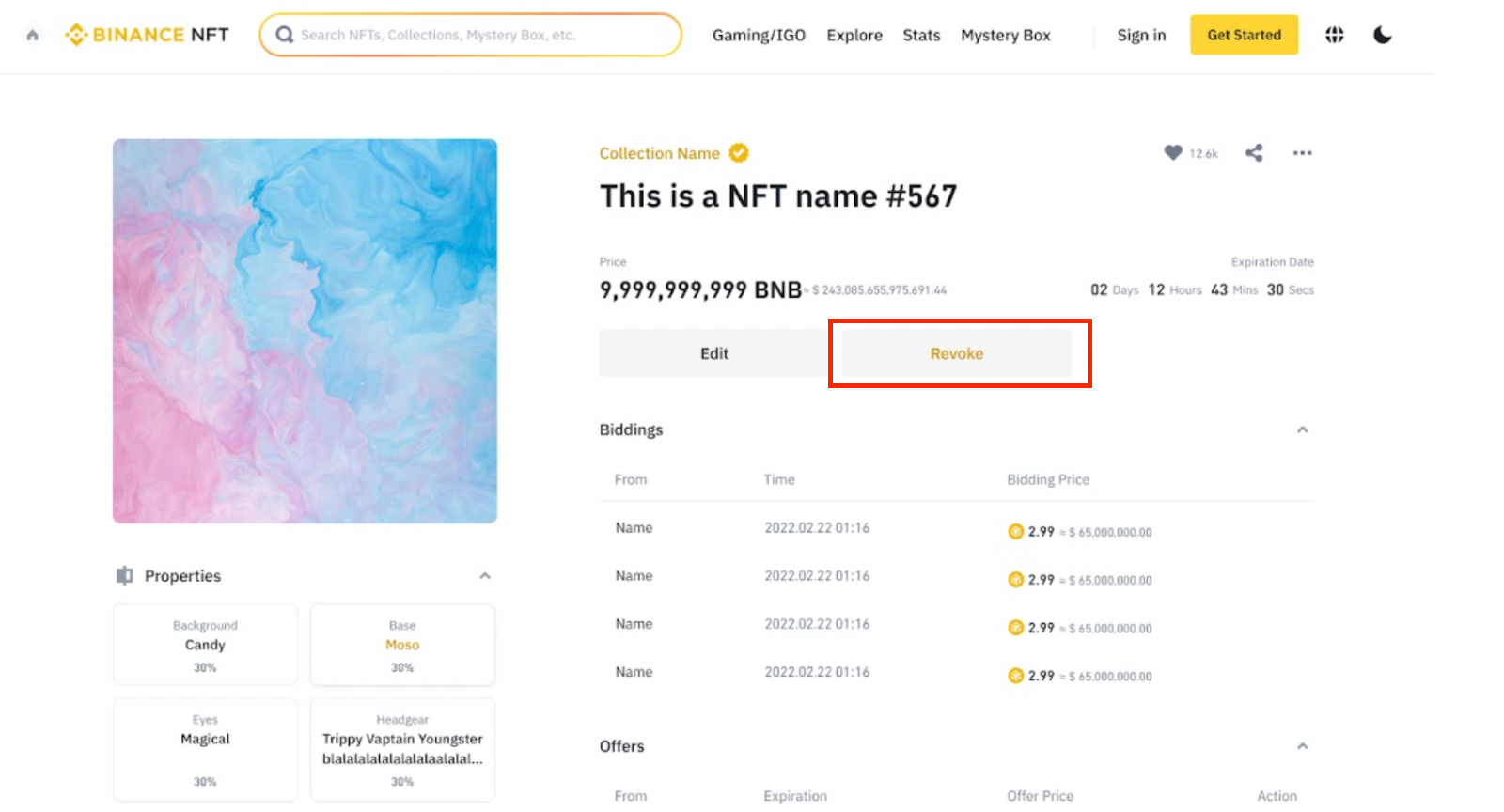
If you want to remove a new NFT from sale, go to the listing page and click Remove. Please note: Once your NFT listing is approved by the Binance NFT system, the Remove button will change to Remove from Sale. However, you can remove NFTs from sale using the procedure described in the section below.
How to remove NFTs from sale

To remove one or more NFTs from sale, follow four steps.
Go to Profile - Listings.
Click Remove from sale next to the NFT you want to withdraw.
Please read the notes carefully and click Confirm to submit your withdrawal request.
Click Confirm and your NFT will be immediately removed from sale.

How to remove a third-party NFT from sale
Using the above procedure, you can unlist an NFT listed on a third-party platform directly on the Binance NFT marketplace. However, please note that in this case, the NFT must be withdrawn from sale on the Binance NFT and OpenSea platforms at the same time.
For more information about NFTs and Mystery Boxes being removed from sale on the Binance NFT marketplace, please see this article.
Conclusion
Listing an NFT for sale on the Binance NFT marketplace is a relatively simple process. To do this, simply follow the instructions above, and your NFTs will be noticed by many more potential buyers. What are you waiting for? Sell your first NFT on the Binance NFT Marketplace today!
Additional Information
(Blog) 10 Reasons to Trade NFTs on Binance NFT
(Blog) How to Do Your Own Research (DYOR) on NFT Projects
(Blog) NFT Rarity Guide