

Transactions on the Ethereum blockchain are technically initiated by external account owners (not contracts). For example, if user A sends 1 ether to user B, the operation of debiting one account and crediting another changes the state of the blockchain.
The changes occurred exclusively on the Ethereum Virtual Machine (EVM). Ethereum transactions need to be broadcast to the entire network, and any node can broadcast requests to execute transactions on the EVM.
After broadcasting the request, validators can execute transactions and propagate state changes to the entire network. Transaction fees are incurred during the verification process, and every transaction must be included in the verification block. There are different types of transactions on the Ethereum network:
Regular Transaction: A transaction that occurs from one account to another.
Contract Execution Transaction: A transaction that interacts with a deployed smart contract (the "to" address is the smart contract address).
Contract deployment transaction: A transaction without a "to" address (the data field is only used to deploy the smart contract's code).

How to check the status of an Ethereum transaction
Here is a brief step-by-step guide on how to track Ethereum transactions:
Step 1: Choose an Ethereum Blockchain Explorer
Some blockchain explorers are Ethereum-specific, such as Etherscan, Ethplorer, and EthVM. Others support multi-chains, such as Blockchain.com and Tokenview.

Step 2: Enter the transaction hash into the search field of your blockchain explorer
For example, on Etherscan, the search field is located in the upper left corner of the screen next to the drop-down menu "All filters." Depending on the tool, users can search for information based on wallet address, transaction hash (txid), block, token, or domain name.
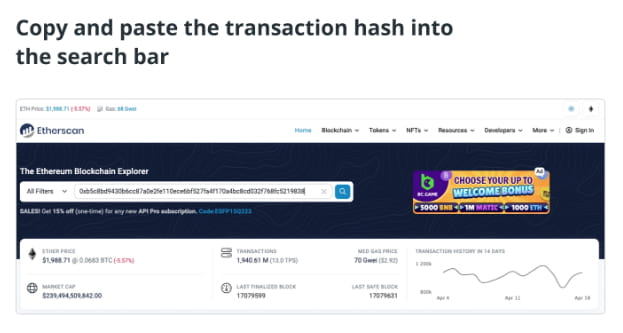
txid is a unique identifier attached to a specific transaction. All transactions made on-chain, or to and from external addresses, have a unique txid found in the transaction details.
Depending on the platform, it may also be called a "hash" or a "txn hash". It usually looks like a string of random letters and numbers. For example, on MetaMask, users can see the txid immediately after clicking on the Activity tab and selecting a transaction.

In addition to the txid, traders can also use their public address (a 42-character string that corresponds to their public account). In this case, they will be taken to an overview of their wallet activity, allowing them to independently navigate to specific transactions.
Step 3: Click the "Search" or "Enter" icon in the blockchain browser


Step 4: Check if the transaction is successful

How to know if an ETH transaction was successful: Details indicating the status of the transaction will be displayed on the blockchain explorer. If the transaction was successfully verified and is now on the blockchain, it will say "success" or "success".

If no errors are displayed, the transaction was completed successfully. ETH should be credited to the destination wallet or exchange account within 24 hours of sending.
On the other hand, in the case of failed Ethereum transactions, several error messages may appear:
Error Message or Symbol: A red exclamation point or error message "Bad Order" or "Out of Gas" indicates that the transaction was unsuccessful and the funds did not reach the intended destination. In the event of a "low gas" error, users can double their originally specified gas limit and try again.
Recovered: This was related to smart contract user error. This means users should carefully check the details of the transaction.
Transaction not found: The transaction is not completed or does not yet appear in the blockchain explorer. Try using another explorer. If it still doesn't show up on multiple, then it most likely didn't pass.
Pending: The transaction is still waiting to be verified or processed, but it is in the browser's transaction pool. Sometimes pending transactions can still be canceled or replaced by the user.
How long does it take to process an Ethereum transaction?
The average transaction processing time on the Ethereum blockchain typically ranges from 15 seconds to 5 minutes, depending on a variety of factors. These include the amount paid to process it (the transaction fee) and how busy the network was at the time of processing.
After the merger, Ethereum transitioned from a proof-of-work to a proof-of-stake blockchain. However, transaction speed remains roughly the same. According to the Ethereum Foundation, a common misconception is that the merger significantly speeds up transactions.
However, there is a slight difference, with slots appearing exactly every 12 seconds after the merge, compared to every 13.3 seconds before the merge. Regardless, most users will barely notice the change, as processing generally still depends on network congestion and transaction fees.
When a transaction is initiated, it is logged into Ethereum’s mempool and waits for a validator to pick it up. The mempool functions much like a waiting room where pending transactions occur.
A transaction is considered complete once a validator enters the transaction data into a block and adds the block to the blockchain. It is said to be complete and irreversible after six more blocks are mined and added to it.
By checking the status of a transaction, traders can confirm whether their transaction succeeded or failed, and how many blocks have been created since their transaction was added to the chain.
Why should traders check trade status?
Ethereum participants must pay gas fees to use the network to transfer funds or deploy smart contracts. The fee depends heavily on the number of participants waiting to execute a transaction at a given time.
Therefore, network congestion and demand are directly proportional to transaction costs. When demand is high, costs rise—the reverse is true when demand is low. Regardless, checking transaction status helps traders monitor the costs of using the network.
It also helps users determine whether the gas fee they paid is enough to confirm their transaction. Low gas fees often truncate or delay transactions, leaving them pending for long periods of time, especially during periods of severe network congestion.
Such transactions will remain pending until the gas fee reaches the minimum required by the network. If this happens, the user can resend the transaction by resubmitting and increasing the gas fee while ensuring it carries the same nonce.
In addition to transaction status, the Ethereum Blockchain Explorer can also reveal the following useful information:
Timestamp: The date and time the transaction was added to the blockchain.
Block Confirmations: The number of blocks mined since the transaction was confirmed.
Transaction fee: The fee paid to miners or validators.
ETH Price: The price of ETH at the time of processing.
Base Fee: The minimum fee required to transact on Ethereum.
Gas limit: The maximum amount of gas allocated by the sender to process the transaction.
Nonce: A unique number that marks every transaction performed on the user's wallet; it is incremented by one every time a new transaction is sent.
By understanding the above, traders can take control of their ETH transactions and ensure they are processed correctly and quickly. This helps ensure smooth Ethereum transactions when sending and receiving funds or deploying smart contracts. Understanding transaction status can also help users adjust spending habits and optimize network usage.