



When browsing X, I often come across situations like this:
You see a great post and want to join the discussion. You have your own thoughts, but when it’s time to write a reply, you have to figure out how to phrase them all over again.
Especially with posts in English. X now has built-in translation, so understanding the content isn’t difficult anymore. But understanding it and replying naturally in English are two different things.
I used to often switch back and forth between X, ChatGPT, and translation tools: copy a post, open GPT, describe what I needed, generate a reply, then copy it back.
It’s the same with Chinese replies. Sometimes you just want to rephrase something or adjust the tone, but it still takes several steps.
So I decided to build my own Chrome extension, called X Reply Copilot.
Now, just click a few buttons under an X post, and AI will read the post, use the context, and generate reply drafts in different styles.
You can work in Chinese or English. Adjust the tone, rewrite a sentence, or enter your own thoughts first and let AI help you put them into words—all right there.
No more copying and pasting back and forth or constantly switching pages.
You make the final choice and any edits, then, once you're happy with everything, click X's Send button yourself.
Install from the Chrome Web Store:
https://chromewebstore.google.com/detail/x-reply-copilot-%E5%9B%9E%E5%A4%8D%E5%89%AF%E9%A9%BE%E9%A9%B6/afkaifpgillpmdomdlgnlbkbpohohbnf?authuser=0&hl=zh-CN
──── ✦ ────
Contents | What Can This Extension Do?
Read the Current Post and Understand the Context
Generate Multiple Replies in One Click
Switch Freely Between Five Reply Tones
“What I Want to Say”—Start With Your Own Point
Rewrite Individual Replies and Adjust Their Length
English and Chinese Replies, With Translation on Demand
Floating and Inline Modes
Custom AI Models and API Settings
Learn Your Writing Style
Custom Prompts and Send Controls
Let's take a look at each feature in the interface.
──── ✦ ────
01. Read the Current Post and Understand What You're Replying To
This is the extension's most fundamental feature.
Open an X post, and the extension will work with the post you're viewing.
Besides reading the post itself, it also uses relevant context available on the page, such as quoted content, the parent post, and media descriptions.
Why build this?
Because a sentence can be easy to misunderstand when you read it on its own. This is especially true of quoted posts: without seeing the original content, AI may reply to the wrong thing.
No more copying posts by hand. Just open the extension to generate replies based on the post you're viewing.
If it can't read the post, it won't let the AI guess, either.

02. Generate Multiple Replies in One Click
After the extension reads a post, click Generate to get several reply suggestions.
Each reply can take a different approach, so you can choose the one you like best.
Sometimes you want to simply agree, sometimes add your perspective, and sometimes just make a lighthearted joke.
Get several options at once, instead of starting from a blank input box every time.
If there are fewer than three suitable replies, it won't pad the list with irrelevant content.
03. Five Tones, So Every Comment Doesn't Sound the Same
Five tones are currently available:
Auto: Choose an appropriate style based on the post.
Playful: Keep it light, perfect for community interaction.
Thoughtful: For discussing ideas and professional conversations.
Supportive: Express agreement and support.
Curious: Keep the conversation going with a specific question.
I personally like playful comments, but you can't joke around on every post.
Some people talk about tech, others about markets, and others share everyday life. Different situations call for different ways of expressing yourself.
So I haven't locked in a single tone. You can choose for yourself.

04. “What I Want to Say”: Start With Your Own Point, Then Let AI Help You Phrase It
I added this feature later, based on real-world use.
Sometimes you see a post and already have an idea, but haven't quite figured out how to put it into words.
For example:
“I agree with this point, but I think there's another issue when it comes to putting it into practice.”
Enter that thought in “What I Want to Say,” then let AI use the current post to help you draft a reply.
It takes your idea, the post, and your selected tone into account when putting the reply together.
One thing I care about is that the AI shouldn't change what the user originally meant just to make the wording sound better.
If you originally disagree, it shouldn't turn that into agreement. If you were just adding a point, it shouldn't turn that into full support.
Lead with your own idea, and let AI help you phrase it smoothly.
05. Rewrite Individual Replies and Control Their Length
If you only dislike one of the three replies, there's no need to regenerate the whole set.
Now you can rewrite just the reply you've selected.
For example:
Make the tone a little more casual.
Make it shorter.
Make it less formal.
Keep the meaning, but phrase it differently.
The extension also offers short and long length preferences.
This feature has also evolved over time.
At first, I was strict about word limits. But testing showed that AI sometimes makes a simple sentence overly complicated just to hit a target word count.
So I changed the word count to a flexible guideline.
Close enough is fine. There's no need to make natural-sounding words read like a robot just to hit a word count.

06. English and Chinese Replies, With Translation on Demand
This feature is especially useful if you often browse content from around the world.
X's built-in translation has made reading English posts much easier.
But understanding English and writing a natural-sounding reply in English are two different things.
I used to read a post on X, switch to ChatGPT or another translation tool, work out what to say in English, and then copy it back.
Now you can do it all right on the X page.
English posts get English replies, and Chinese posts get Chinese replies.
If you want to understand a generated reply in English, click the translate button to see what it means in Chinese.
Translation is on demand, too. The model isn't called when you don't need it.
The translation is for reading only. When you copy or insert a reply, it remains in the original language.

07. Two Ways to Use It: Floating and Inline
This part has gone through many rounds of changes.
At first, it was just a simple reply card. Later, I changed it into a movable floating panel.
During use, I noticed that the floating panel sometimes covered the post, so I added details like adjustable height and saved positioning.
Later, I added inline mode as well.
You can now switch between two modes:
Floating mode: Move it around and adjust its height—ideal for writing a reply while reading a post.
Inline mode: Sits right below the post's action bar and follows the page layout.
Choose either mode to suit your habits. Your existing drafts are preserved when you switch.

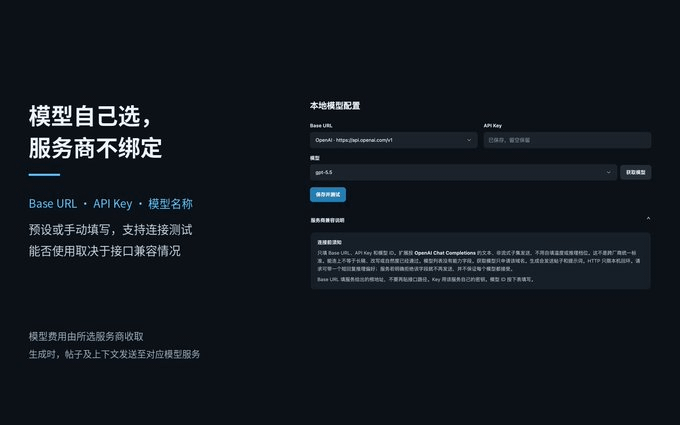
08. Choose Your Own Model—No Vendor Lock-In
AI models change quickly. You might use GPT today, switch to DeepSeek tomorrow, or try another model.
I don't want to have to edit the extension's code every time I switch providers.
So you can currently configure these yourself:
Base URL
API key
Model name
Some provider URL presets are included, too. Choose one or enter the details manually.
The extension also offers limited compatibility handling for differences between some APIs, as well as connection tests and error messages.
Of course, this doesn't mean every model API will work out of the box. It depends on the provider's API protocol and compatibility.
Model usage fees are charged by the provider you choose. When generating a reply, the post and relevant context are sent to that model service.
09. Learn Your Writing Style
This feature is designed to make generated replies sound more like you.
You can add samples of your writing in the settings and ask the model to identify your writing habits and create a personal style profile.
For example, whether you usually prefer short or long sentences, how you tend to express agreement, and what kind of tone you like.
Generated replies can then draw on this style information.
Of course, it can't guarantee that every reply will sound exactly like you. But it gives the model more to work with and can help drafts move closer to the style you're looking for.

10. Customize Prompts; You Always Control What Gets Sent
The default prompts include my own approach to commenting, but you can customize prompts for generation, rewriting, tone, translation, and more.
Don't like the default style? Adjust it. Want a different commenting style? Set it up yourself.
One last thing: this extension has a clear boundary:
It helps you draft—it doesn't speak for you.
You can choose a reply, edit it, copy it, or insert it into X's official reply box.
You review the content and click Send yourself. That's entirely up to you.
It won't comment, like, or follow anyone automatically.
Because a comment ultimately represents you. AI can help you put your thoughts into words, but it shouldn't decide whether you should say something.

──── ✦ ────
A Quick Update on Where Things Stand
X Reply Copilot has officially passed review in the Google Chrome Web Store and is ready to install.
It started out only showing placeholder drafts. Since then, it's grown to include post reading, multiple reply suggestions, tone control, individual rewrites, on-demand translation, floating and inline modes, and custom model settings—all shaped by extensive testing on real pages and many rounds of refinement.
Of course, there's still more to improve.
Compatibility with different models, understanding complex posts, translation quality, and the typing experience across different systems and browsers all need ongoing testing.
If you often join conversations on X, give this tool a try.
Install from the Chrome Web Store:
https://chromewebstore.google.com/detail/x-reply-copilot-%E5%9B%9E%E5%A4%8D%E5%89%AF%E9%A9%BE%E9%A9%B6/afkaifpgillpmdomdlgnlbkbpohohbnf?authuser=0&hl=zh-CN
X Reply Copilot.
Helping you draft, not speaking for you.