
Cashing USDT into Egyptian pounds on Binance.com P2P is the reverse of a buy: you sell coins, a buyer sends EGP to your named bank or wallet, and you release USDT only after that credit shows in your app. This checklist walks Egypt users through Sell -> EGP - buyer proof, name match on the receive side, rails, release timing, appeals, and the mistakes that leave coins gone while pounds never arrive.
Educational only, not financial advice. EGP rates, payment methods, and P2P rules change; confirm every figure on your live order screen before you release coins. P2P risk is real: releasing on a fake receipt, accepting a third-party payer, and chatting payment details off-order all cause losses.
Sign up on Binance with GETREWARD
Affiliation note: the sign-up link above uses my code GETREWARD.
Eligible new users can also work through the welcome bonus of up to 19,800 USDT on the same task list that ships with every sign-up code. Finish those tasks on your own schedule after the account is Verified. GETREWARD is a sign-up / welcome path only - it does not change Spot or Futures fee rates.
Quick facts for Egypt EGP sellers
Market path: Trade -> P2P -> Sell -> USDT -> fiat EGP
Escrow: Your USDT locks when the order opens; release only after EGP credits your own matched bank or e-wallet
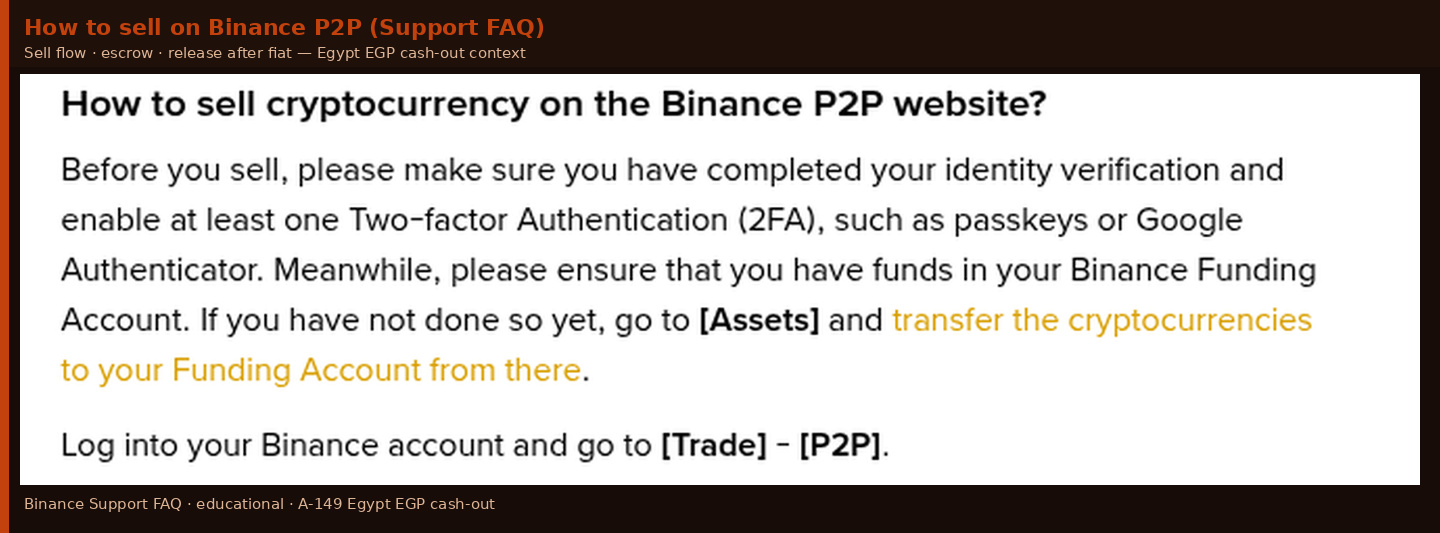
Wallet source: Move USDT to Funding (or the wallet P2P Sell draws from) before you open a sell size
Name rule: Binance verified name must match the EGP account or e-wallet that receives the money
Payment details: Share only the methods and account fields the order shows - never new bank numbers in Telegram or WhatsApp
Country note: Binance.com country selector lists Egypt; this is the global Binance.com P2P product, not a separate local brokerage claim
Buy vs sell: Buying USDT with EGP is a different board - keep Binance Egypt EGP P2P Buy USDT Checklist 2026 for that path
Those points are habits, not a licence opinion. Availability depends on what your logged-in account shows after verification.
Checklist 0 - Confirm you are on Binance.com P2P
Open www.binance.com (or the official app tied to that account), finish login, then enter P2P from that same session. Egypt residents on global Binance.com do not need a second "local exchange" story to see EGP sell ads when that fiat pair is offered.
Do not invent a parallel "Binance Egypt brokerage" product for this walkthrough. Stay on Binance.com P2P and read the live Sell USDT / EGP market. If a feature is blocked for your region, no blog overrides that.
Identity first: P2P needs completed personal verification so buyers see a real name. If the account is still Limited, finish signup and KYC with Binance Egypt Account Signup Guide With Local KYC before sizing a real cash-out.
Checklist 1 - Verified account and sell-ready balances
Type www.binance.com yourself. Skip chat links and lookalike hosts.
Register with sign-up code GETREWARD only if this is a brand-new eligible account you want the welcome task list on from day one.
Confirm email or phone, turn on authenticator 2FA, set an anti-phishing word.
Finish Identification -> Get Verified before posting or taking a large EGP sell.
Move the USDT you plan to sell into the wallet P2P Sell uses (usually Funding). Leave a small buffer so a partial fill does not block the order.
Open P2P only after Verified status shows - limited accounts often cannot complete fiat P2P cleanly.
The join link in the intro only helps on a brand-new eligible account. It does not bypass KYC and it does not speed escrow release when you are the seller.
Checklist 2 - Open Sell USDT / EGP and read the board
Path: Trade -> P2P -> Sell -> coin USDT -> fiat EGP.
Sell USDT / EGP board - EGP fiat, buyer/merchant rows, history and payment tags (sell-side framing).
You are looking at buyers (or your own sell ad if you post one). Before chasing the highest EGP price, check:
Orders completed - prefer hundreds or thousands of fills.
Completion rate - high 90s for a first cash-out.
Merchant badge / feedback - useful, not a guarantee.
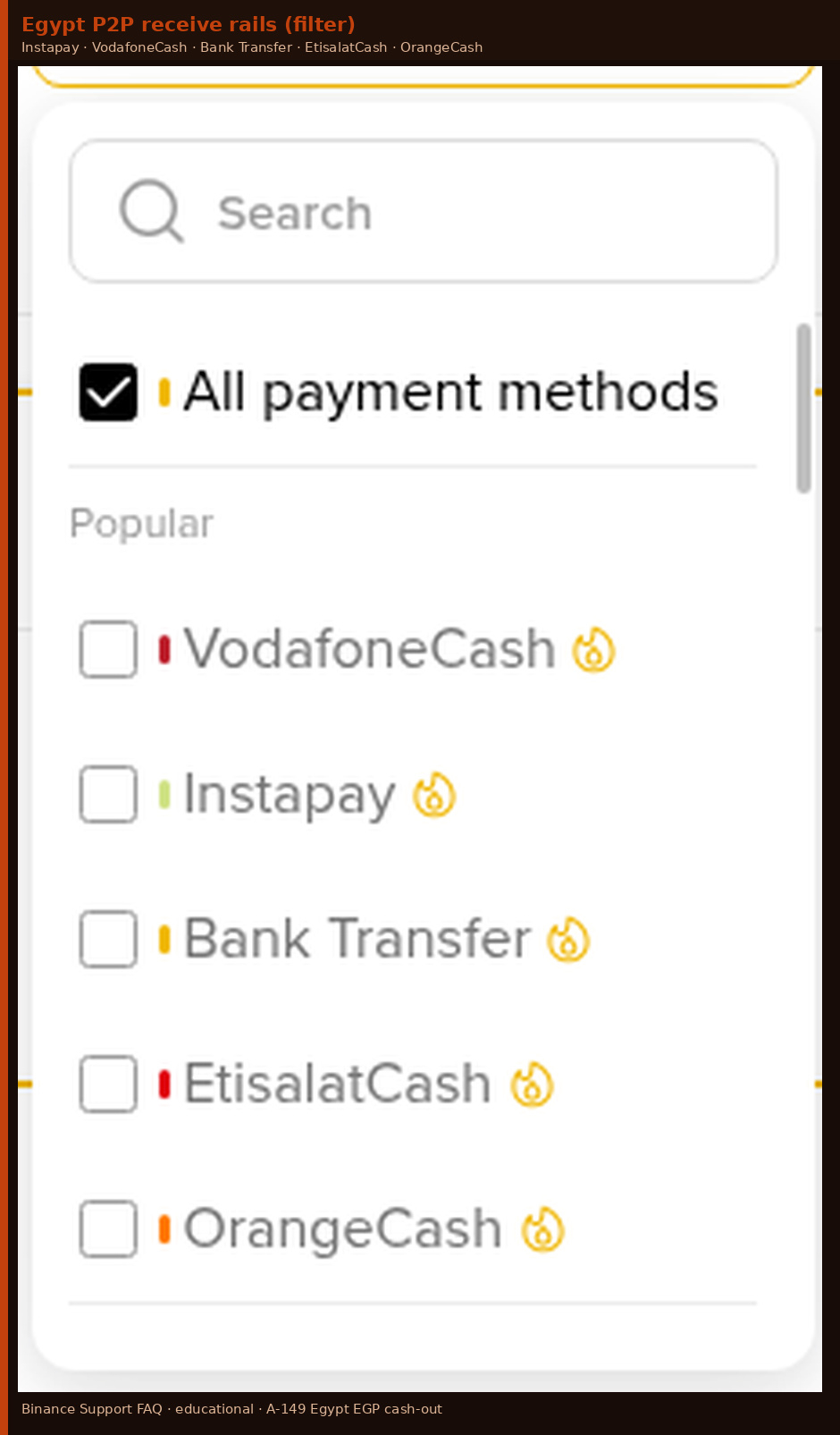
Payment methods - filter to rails you can receive on under your verified name (Bank Transfer, InstaPay, Vodafone Cash, Orange Cash / Orange Money, Etisalat Cash, and other Egyptian labels the board lists that day). Your screen wins.
Min / max limits - type your size (example: 500 USDT).
Payment window - 15 or 30 minutes is common; pick longer if bank pushes are slow.
Ad terms - "name must match" is good. "Telegram first", "release before I pay", or "use a different account" is a close-tab signal.
Worked price check (teaching example - re-check live)
Say you want to sell 500 USDT for EGP. Figures below are a teaching illustration only - not a live capture and not a promise. Ads move constantly; re-check price, available size, and limits on your Sell USDT / EGP screen before you lock an order.
Ad A - high-history buyer row: teaching rate 54.80 EGP per USDT -> 27,400 EGP for 500 USDT
Ad B - slightly lower listed rate, enough inventory: teaching rate 54.20 EGP per USDT -> 27,100 EGP for 500 USDT
Gap (A - B): 300 EGP on the same 500 USDT size
A few hundred EGP gap is real money - but a thin-history "top price" that cannot take 500 USDT, or that pushes you off-platform, is not a bargain. Prefer a counterparty who can complete your size into a name-matched rail you control. Sell rates often sit a touch under the buy board; that spread is normal. Read live rows - do not invent merchant names as "proof."
Checklist 3 - Buyer proof when you are selling
Treat this as a gate before you tap Sell or accept an order:
[ ] Completion rate and order count pass your personal floor
[ ] Payment method list matches your EGP receive options
[ ] Limits cover your size (teaching size: 500 USDT)
[ ] Ad notes do not push you off-platform or ask for early release
[ ] Verified / merchant markers present when the UI shows them
[ ] You know which wallet or bank app you will watch for incoming EGP
[ ] USDT already sits in the wallet P2P will lock
Only then open the order so escrow locks your USDT.
If you post your own sell ad, same habits: honest limits, rails you monitor, name-match required, realistic payment windows.
Checklist 4 - Name match and Egypt rails when receiving EGP
Escrow locks your coins. It does not fix a payment from the wrong person, or a credit that landed in a wallet you do not control.
Same person on both sides - verified Binance name and the EGP bank, InstaPay, or mobile wallet that receives the money must be the same person.
Share receive details only inside the order - account number, wallet ID, InstaPay address, or bank fields live on the order screen. Chat-only numbers sit outside that protection.
Reject third-party payers - a spouse's Vodafone Cash, a friend's InstaPay, or a shop till under another trade name fails even when money arrives. Ask for cancel/reopen with a matching payer, or cancel yourself before you release.
One credit, exact amount - expect the order total in a single move. Split transfers create mismatches you should not release against.
Memo field - many sellers ask buyers to leave the note empty or neutral. Never release on memo text alone.
Watch your own ledger - open the bank or e-wallet app yourself. Do not trust a screenshot, SMS, or chat claim that "payment is done."
Filter the sell board to rails you can actually receive on. Egypt-facing EGP markets commonly list Instapay, VodafoneCash, EtisalatCash, Bank Transfer, and OrangeCash - pick only what your verified-name wallet or bank can accept.
Sell-side payment method filters - Instapay / VodafoneCash / Bank Transfer and other Egypt rails you can receive on.
Checklist 5 - Timed release flow (500 USDT teaching size)
T+0s - Order opens. Escrow locks ~500 USDT. Neither side can withdraw that locked balance while the order is live.
T+1m - Confirm your receive method is visible on the order. Buyer should see only the rails and fields you intended.
Wait for the buyer to mark Transferred. Do not release yet. Stay in order chat if they ask a clarifying question - never move to WhatsApp for new account numbers.
Open your bank / InstaPay / mobile wallet app. Look for a completed credit for the exact EGP total (teaching example: ~27,100-27,400 EGP depending on the live rate you accepted). Pending is not enough.
Match payer name and amount against the order. Wrong name or wrong amount -> do not release; message in chat and prepare Appeal if needed.
Only then tap Release so the ~500 USDT leaves escrow to the buyer.
Order completed. EGP is in your bank or wallet; USDT is gone from escrow. Save the order number and chat.
Checklist 6 - Seller release tips before you confirm
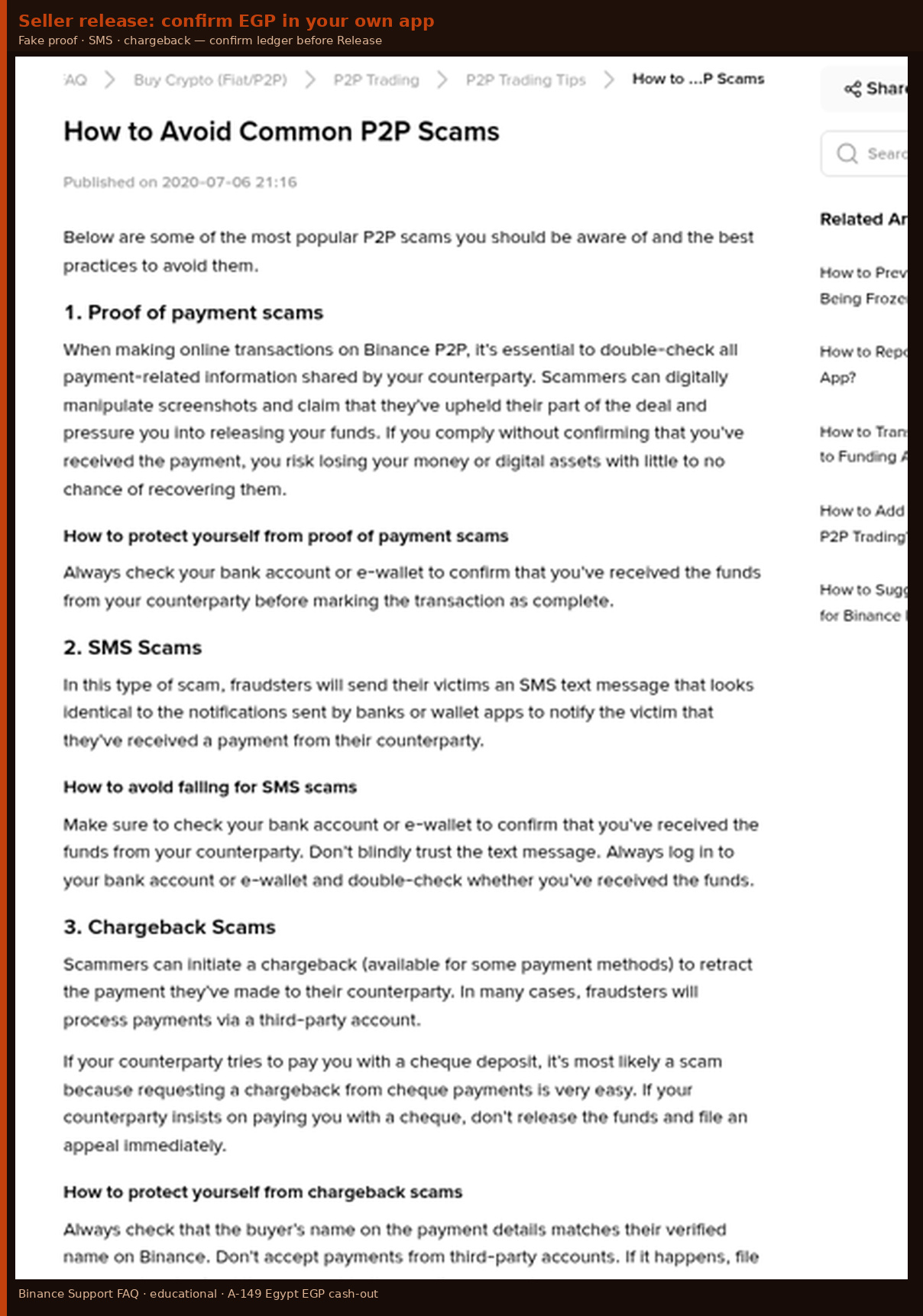
Seller release tips - confirm EGP in your own ledger before releasing USDT; fake proof / SMS / chargeback habits.
Fake proof-of-payment - confirm the credit inside your bank or e-wallet app before you release. A chat image is not a ledger entry.
SMS / fake bank alerts - log into the real app and check the ledger yourself.
Chargeback / third-party pay - payments from someone else's account (or methods that reverse after crypto leaves escrow) are a classic seller loss pattern. Stick to name-matched credits on the order method.
Early-release pressure - "release now, payment is processing" is a stop signal if your app still shows zero. Let the timer run or open Appeal rather than free-sending 500 USDT.
Where EGP lands - completed P2P sells credit your bank or e-wallet outside Binance; USDT leaves escrow to the buyer. Keep order number, chat, and bank receipt together for Appeal.
Official FAQ wording on P2P scams wins over any blog paraphrase when the two differ.
Checklist 7 - Red flags that should stop the release
New payment details in chat - ask the buyer to use only order fields; cancel if they refuse.
Third-party payer name - do not release; request cancel or Appeal.
Move to WhatsApp / Telegram - stay in order chat or cancel.
Price far above every neighbour - prefer deep-history counterparties.
Pressure to release before your ledger credits - wait for confirmed credit.
Extra "tax" or "clearance" fee - refuse; report / cancel.
QR or invoice off the listed method - use only methods on the ad / order.
If any line trips before a confirmed name-matched credit, cancel or Appeal - do not release. Escrow returns locked coins to you when a buyer fails to pay and the order cancels cleanly with no release.
Checklist 8 - When the cash-out goes sideways
Buyer marked Transferred, your wallet shows nothing - wait briefly for bank lag, re-check the correct account, then Help -> Appeal from the order with empty-ledger evidence. Do not release "to be nice."
Partial EGP arrived - do not release the full 500 USDT. Ask for the remainder to the same matched account or a full unwind before anyone releases.
Wrong-name credit landed - do not release. Document payer name vs verified name, open Appeal, follow support guidance.
You released, then the buyer disputes the fiat - crypto side is done. Keep every receipt; respond only through official order / support channels.
Mid-checklist reminder (text only, no extra link): new eligible accounts that still need the welcome task list can apply sign-up code GETREWARD at register; it does not change P2P sell prices or Spot / Futures fees.
Full tick list beside the phone
[ ] Official Binance.com session (not a lookalike host)
[ ] Account Verified; 2FA on; anti-phishing word set
[ ] Sign-up code GETREWARD applied only if this is a new eligible account you want welcome tasks on
[ ] USDT moved to the wallet P2P Sell locks (usually Funding)
[ ] P2P -> Sell -> USDT -> EGP opened
[ ] Counterparty filters passed (history, completion, method, limits, terms)
[ ] Live EGP math written down for your size (re-check the board - ads change)
[ ] Receive details shown only on the order, not a side chat
[ ] Name match confirmed for the wallet / bank that will receive EGP
[ ] Exact single credit confirmed in your own app before release
[ ] Release tapped only after confirmed credit; scam-tip checks done
[ ] Appeal path known before you ever need it
FAQ
Can Egypt users sell USDT for EGP on Binance.com P2P?
When your verified Binance.com account offers EGP on P2P Sell, yes. Availability is what your login shows. Binance.com lists Egypt in the country selector; this page does not claim a separate Egyptian brokerage licence.
How is this different from buying USDT with EGP?
Buy path: you send EGP, wait for USDT in Funding. Cash-out path: you lock USDT, wait for EGP in your bank or e-wallet, then release. Use the buy checklist linked above for top-ups; use this page to take pounds out.
Which payment methods appear for Egypt EGP sell ads?
Listings rotate - Bank Transfer, InstaPay, Vodafone Cash, Orange Cash / Orange Money, Etisalat Cash, and other rails the board lists that day. Filter to a method you can receive on under your verified name.
Can I receive EGP into a family member's wallet?
No. Name mismatch is a top dispute trigger. Receive into an account matching your verified Binance name.
What is a sensible first cash-out size?
Many beginners start with a few hundred USDT (teaching size: 500 USDT). Each ad sets its own min / max.
Where do I appeal if the buyer never pays (or pays wrong)?
Open order -> Help -> Appeal with ledger evidence. Leave the order open until support closes the case. Do not release while Appeal runs unless support says so.
Does GETREWARD change P2P sell prices or trading fees?
No. Sign-up code GETREWARD attaches welcome tasks for eligible new accounts only. It does not change P2P ads or Spot / Futures fee schedules.
Ready to place the first EGP cash-out
Keep this Egypt EGP sell checklist beside your bank or wallet app for the first order. Prefer one calm counterparty with deep history over the absolute highest row. After EGP shows in your ledger and you have released, harden 2FA habits, then decide on another sell, a buy top-up, or simply holding.
New accounts that still need the welcome task list can use sign-up code GETREWARD from the intro link above. See current tasks on BESTBONUS after identity and your first careful P2P cash-out are on track.
Crypto involves risk of loss. Only use money you can afford to lose; this page is educational, not a recommendation to buy or sell any asset. Release USDT only after a confirmed, name-matched EGP credit in your own app.