Grok Bot’s latest update: Agents are finally getting things done
This video is just over four minutes long, but it’s packed with information. Let’s break it down point by point.
01 Shopping cards
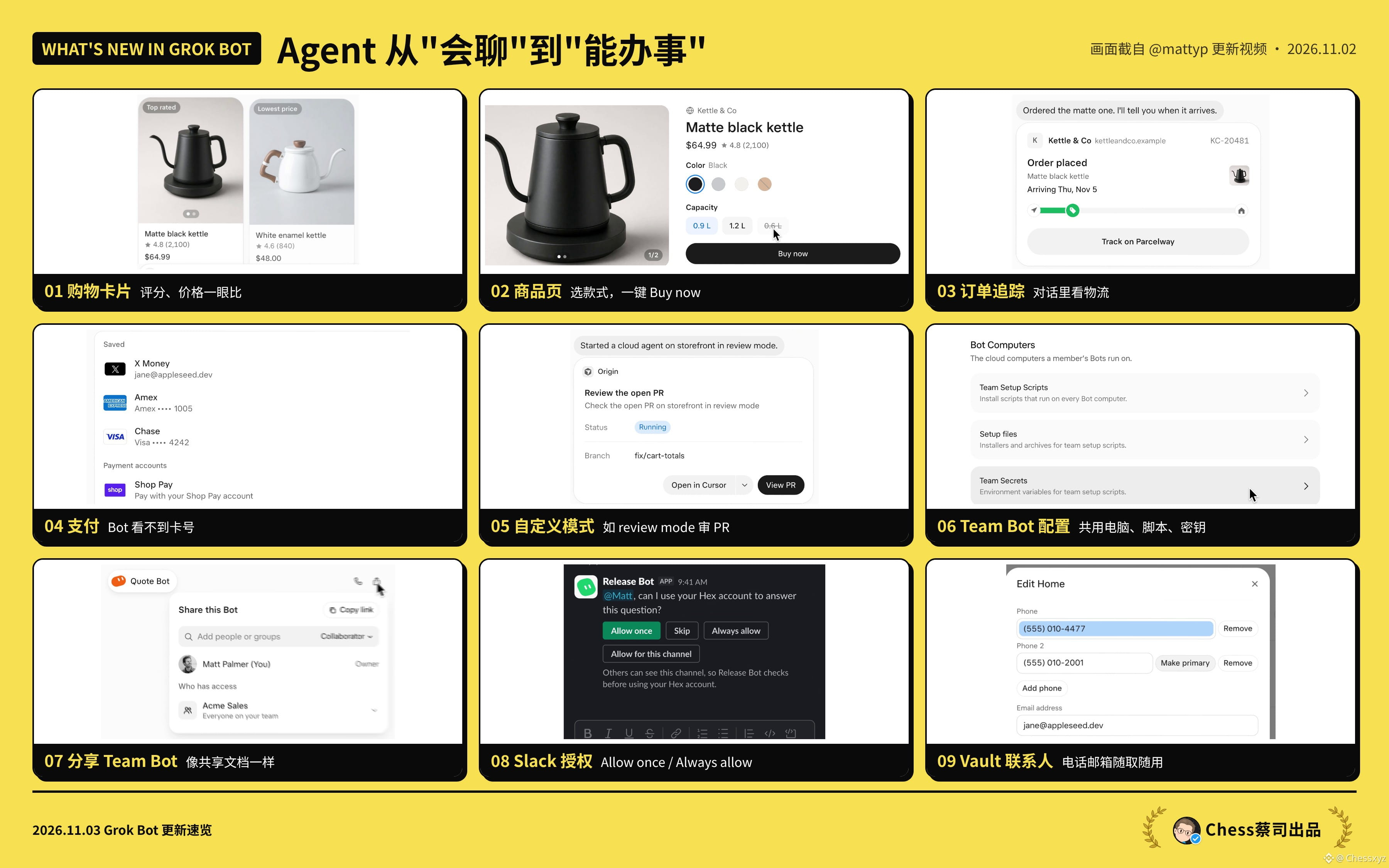
Searching for things no longer means getting a pile of links. Results now appear as product cards, with images, ratings, review counts, prices, and stores—all on the card. They’re even labeled “Top rated” or “Lowest price.” Comparing prices is now a one-glance job.
02 Product pages
Tap a card to open the full product page: choose a color and capacity, check delivery times and sellers, then tap Buy now. From “find it for me” to “buy it for me,” all without leaving the conversation.
03 Order tracking
After you place an order, the Bot says, “I’ll let you know when it arrives,” and a shipping card appears right in the conversation, showing the order number, status, estimated delivery date, and progress bar. I hate digging through emails to find tracking numbers—this solves that problem directly.
04 Payments
You can store X Money and credit cards in Vault, and connect Shop Pay too. The key promise: the Bot will never see your card number or security code. That boundary is what makes it possible to trust an Agent to spend money.
05 Custom modes
You can set up different work modes for an Agent. The example in the video is review mode: launch a cloud Agent to review a PR for your storefront, with the status and branch clearly visible. Same Bot, different mode, different role.
06 Team Bot setup
Team Bots run on a shared Bot computer, where you can centrally configure setup scripts, installation files, and Team Secrets. Set up the environment once, and everyone’s Bot can use it—no need for each person to go through the login hassle again.
07 Sharing Team Bots
Sharing a Bot is like sharing a document: add people or groups, set collaborator permissions, or open it up to the entire team. A Bot fine-tuned by one person can boost the productivity of the whole team.
08 Authorization in Slack
When a Bot needs to use your account in Slack (for example, Hex), it’ll ask you directly: Allow once, Skip, Always allow, or allow only in this channel. You stay in control of permissions without interrupting your workflow.
09 Saving contacts in Vault
You can also save contact details like phone numbers and email addresses in Vault, set a primary number, and add or remove details anytime. When filling out forms, placing orders, or making appointments, the Bot can use them directly, so you don’t have to repeat your details every time.
My take: The real dividing line for Agents isn’t how smart they are, but whether they can handle the whole loop—“find, buy, pay, follow up”—and be trusted for team use. This update fills in some of the last pieces needed to close that loop.
I use it every day to manage X, Threads, Binance Square, and my trading journal. The things I was missing most were team sharing and permission checks, and now they’re here.
One last thing about the team: Grok Bot is evolving incredibly fast. You can tell the team is highly agile and consistently building in public. That’s what I especially like about them: they have great taste, move fast, and make genuinely useful things. Their product instincts are sharp.
If you’re a builder, here’s something to think about: Is your product ready to be called by an Agent?
(This article was prepared with the help of AI)
This video is just over four minutes long, but it’s packed with information. Let’s break it down point by point.
01 Shopping cards
Searching for things no longer means getting a pile of links. Results now appear as product cards, with images, ratings, review counts, prices, and stores—all on the card. They’re even labeled “Top rated” or “Lowest price.” Comparing prices is now a one-glance job.
02 Product pages
Tap a card to open the full product page: choose a color and capacity, check delivery times and sellers, then tap Buy now. From “find it for me” to “buy it for me,” all without leaving the conversation.
03 Order tracking
After you place an order, the Bot says, “I’ll let you know when it arrives,” and a shipping card appears right in the conversation, showing the order number, status, estimated delivery date, and progress bar. I hate digging through emails to find tracking numbers—this solves that problem directly.
04 Payments
You can store X Money and credit cards in Vault, and connect Shop Pay too. The key promise: the Bot will never see your card number or security code. That boundary is what makes it possible to trust an Agent to spend money.
05 Custom modes
You can set up different work modes for an Agent. The example in the video is review mode: launch a cloud Agent to review a PR for your storefront, with the status and branch clearly visible. Same Bot, different mode, different role.
06 Team Bot setup
Team Bots run on a shared Bot computer, where you can centrally configure setup scripts, installation files, and Team Secrets. Set up the environment once, and everyone’s Bot can use it—no need for each person to go through the login hassle again.
07 Sharing Team Bots
Sharing a Bot is like sharing a document: add people or groups, set collaborator permissions, or open it up to the entire team. A Bot fine-tuned by one person can boost the productivity of the whole team.
08 Authorization in Slack
When a Bot needs to use your account in Slack (for example, Hex), it’ll ask you directly: Allow once, Skip, Always allow, or allow only in this channel. You stay in control of permissions without interrupting your workflow.
09 Saving contacts in Vault
You can also save contact details like phone numbers and email addresses in Vault, set a primary number, and add or remove details anytime. When filling out forms, placing orders, or making appointments, the Bot can use them directly, so you don’t have to repeat your details every time.
My take: The real dividing line for Agents isn’t how smart they are, but whether they can handle the whole loop—“find, buy, pay, follow up”—and be trusted for team use. This update fills in some of the last pieces needed to close that loop.
I use it every day to manage X, Threads, Binance Square, and my trading journal. The things I was missing most were team sharing and permission checks, and now they’re here.
One last thing about the team: Grok Bot is evolving incredibly fast. You can tell the team is highly agile and consistently building in public. That’s what I especially like about them: they have great taste, move fast, and make genuinely useful things. Their product instincts are sharp.
If you’re a builder, here’s something to think about: Is your product ready to be called by an Agent?
(This article was prepared with the help of AI)