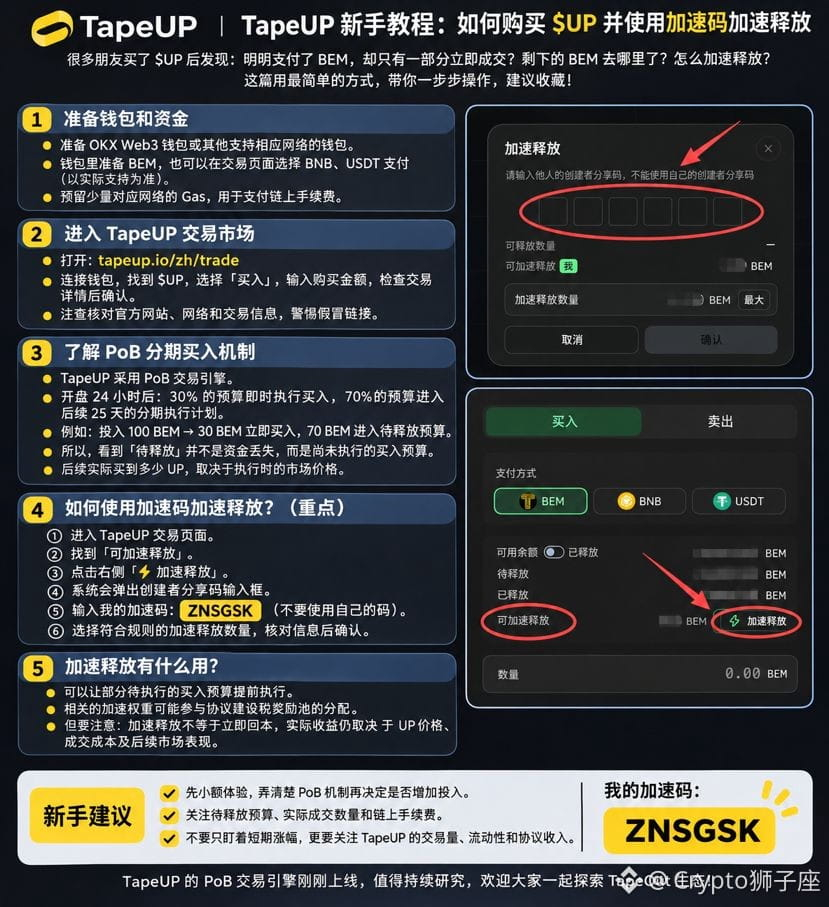
🚀 TapeUP beginner’s guide is here! Learn how to buy $UP and speed up the release!
TapeUP has recently launched in the TapeOut ecosystem, and many people aren’t yet familiar with how its trading mechanism works.
Why is only part of my purchase of $UP executed immediately? Where does the remaining money go? How can I speed up its release?
Today, I’m sharing a simple guide that takes just a few minutes to understand. Save it for later!
① Prepare your wallet and funds
Get an OKX Web3 Wallet or another compatible wallet, and deposit BEM into it. You can also pay with BNB or USDT, depending on the options supported on the page.
Remember to set aside a little for gas fees.
② Go to the TapeUP trading market
https://tapeup.io/zh/trade
Connect your wallet, select $UP, enter the purchase amount, and confirm the transaction.
③ Why wasn’t my entire purchase executed?
TapeUP uses a PoB installment-based buying mechanism.
According to the project’s published rules, 24 hours after trading opens:
* 30% of the funds are used to execute purchases immediately.
* The remaining 70% is used to execute purchases in batches over the following 25 days.
For example, if you put in 100 BEM, 30 BEM is used to buy immediately, while the remaining 70 BEM goes into a pending release schedule.
So there’s no need to worry: pending release doesn’t mean your funds are lost; the purchases just haven’t been executed yet.
④ Here’s the key part! How do you speed up the release? ⚡
Take a look at the two images I’ve included and follow these steps:
1. Go to the TapeUP trading page.
2. Find “Accelerate Release.”
3. Click “⚡ Accelerate Release.”
4. Enter the acceleration code in the pop-up box:
🔥 ZNSGSK 🔥
5. Select the amount available for accelerated release, then confirm.
Note: You can’t enter your own creator referral code. You need to use someone else’s valid referral code.
⑤ What are the benefits of accelerating the release?
If you follow the rules, some of your pending buy budget can be used to execute purchases earlier, reducing the waiting time.
However, accelerating the release doesn’t guarantee profits. Your eventual returns still depend on $UP’s market performance.
TapeUP’s PoB mechanism is pretty interesting and worth exploring. If you’re new, try it with a small amount first, and get familiar with the rules before participating.
Let’s explore the TapeOut ecosystem together!
⚡ My TapeUP acceleration code: ZNSGSK
#TapeOut #TapeUP #UP
TapeUP has recently launched in the TapeOut ecosystem, and many people aren’t yet familiar with how its trading mechanism works.
Why is only part of my purchase of $UP executed immediately? Where does the remaining money go? How can I speed up its release?
Today, I’m sharing a simple guide that takes just a few minutes to understand. Save it for later!
① Prepare your wallet and funds
Get an OKX Web3 Wallet or another compatible wallet, and deposit BEM into it. You can also pay with BNB or USDT, depending on the options supported on the page.
Remember to set aside a little for gas fees.
② Go to the TapeUP trading market
https://tapeup.io/zh/trade
Connect your wallet, select $UP, enter the purchase amount, and confirm the transaction.
③ Why wasn’t my entire purchase executed?
TapeUP uses a PoB installment-based buying mechanism.
According to the project’s published rules, 24 hours after trading opens:
* 30% of the funds are used to execute purchases immediately.
* The remaining 70% is used to execute purchases in batches over the following 25 days.
For example, if you put in 100 BEM, 30 BEM is used to buy immediately, while the remaining 70 BEM goes into a pending release schedule.
So there’s no need to worry: pending release doesn’t mean your funds are lost; the purchases just haven’t been executed yet.
④ Here’s the key part! How do you speed up the release? ⚡
Take a look at the two images I’ve included and follow these steps:
1. Go to the TapeUP trading page.
2. Find “Accelerate Release.”
3. Click “⚡ Accelerate Release.”
4. Enter the acceleration code in the pop-up box:
🔥 ZNSGSK 🔥
5. Select the amount available for accelerated release, then confirm.
Note: You can’t enter your own creator referral code. You need to use someone else’s valid referral code.
⑤ What are the benefits of accelerating the release?
If you follow the rules, some of your pending buy budget can be used to execute purchases earlier, reducing the waiting time.
However, accelerating the release doesn’t guarantee profits. Your eventual returns still depend on $UP’s market performance.
TapeUP’s PoB mechanism is pretty interesting and worth exploring. If you’re new, try it with a small amount first, and get familiar with the rules before participating.
Let’s explore the TapeOut ecosystem together!
⚡ My TapeUP acceleration code: ZNSGSK
#TapeOut #TapeUP #UP