
If you haven’t tried Grok Bot yet, congratulations—you’ve found a hidden gem.
My recommendation: whether you invest on your own or use it to gather information, you should work it into your workflow. It’s like having a research assistant available around the clock. Here are a few ways I use it; feel free to adapt them to your own needs.
1. Earnings analysis.
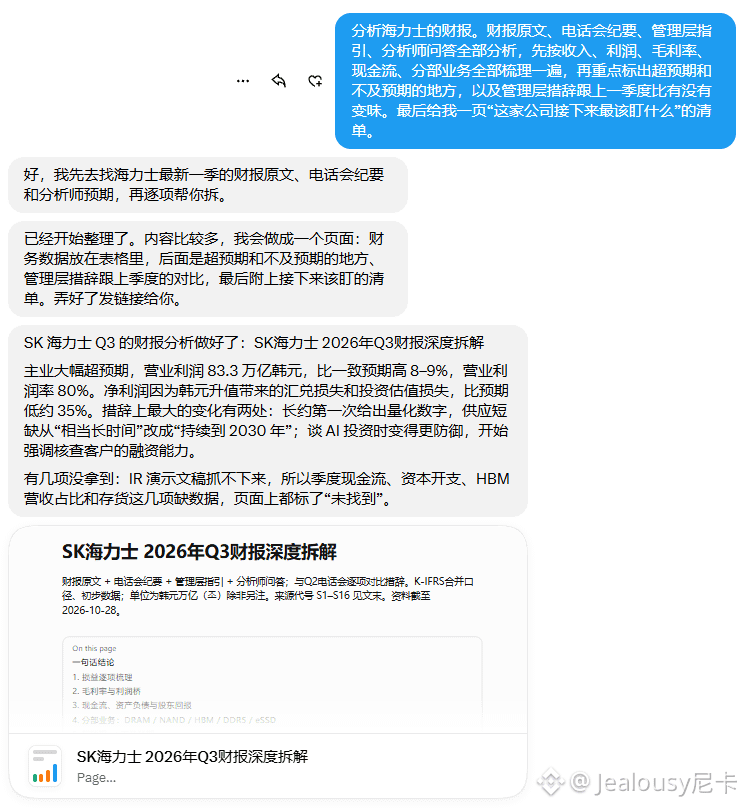
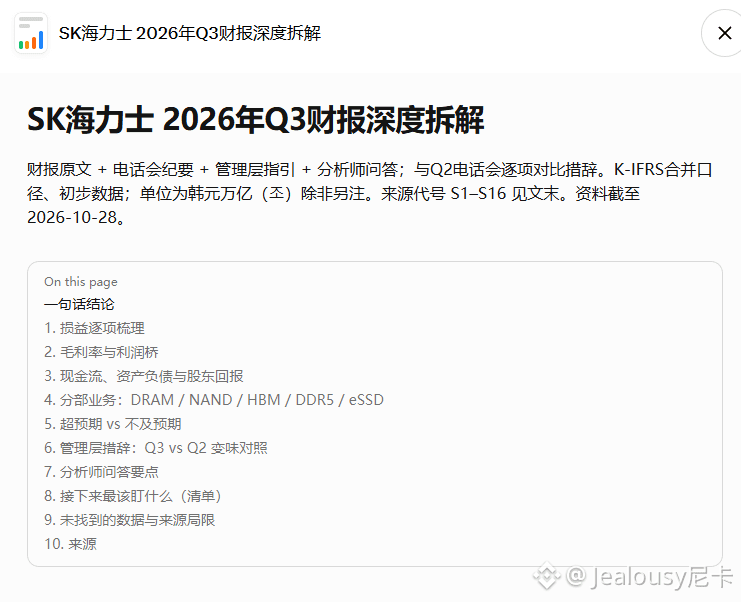
It’s earnings season, and the amount of information is overwhelming. I have the Bot analyze the earnings reports, earnings call transcripts, management guidance, and analyst Q&A. First, I ask it to organize everything by revenue, profit, gross margin, cash flow, and business segments. Then I have it highlight what beat or missed expectations, and whether management’s wording has changed compared with the previous quarter. Finally, I ask it for a one-page checklist of “what to watch most closely at this company going forward.”
It saves time and makes it less likely you’ll miss something.
2. Macroeconomic analysis.
For macroeconomic data, central bank statements, fiscal policy, and geopolitical events, you can ask the Bot to lay out the events, data, market expectations, and how they might affect asset prices. Focus on how it explains “why the market is pricing things this way,” rather than just giving you a bullish or bearish verdict.
3. U.S. stock market premarket and postmarket analysis.
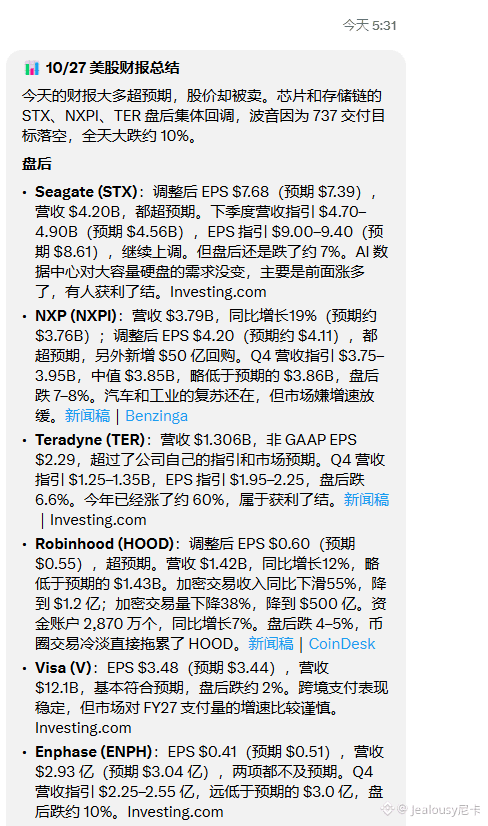
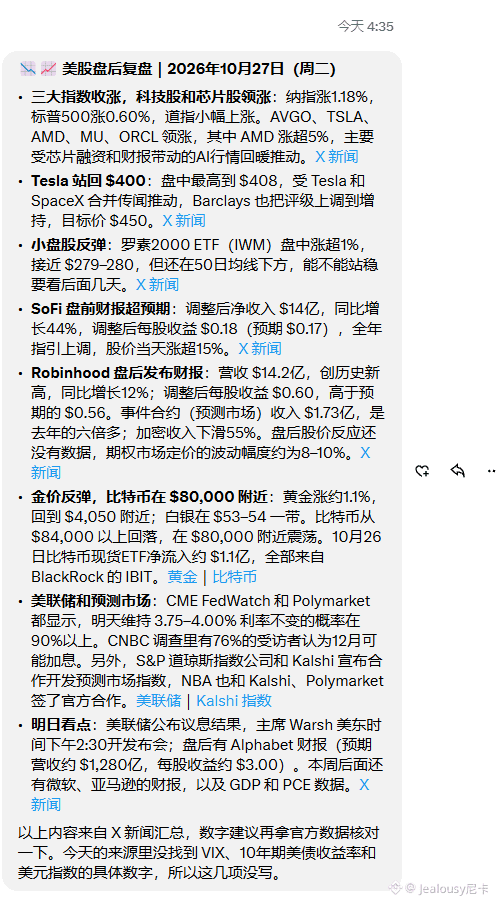
Before the market opens, it’s useful for quickly scanning overnight news, futures moves, unusual stock activity, and the day’s upcoming data releases. After the close, focus on earnings, guidance, major announcements, and after-hours price moves.
Ask the Bot to organize its response as “what happened—who is affected—what to watch tomorrow,” and you’ll be up to speed before the next day’s market open.
4. Analysis of stocks on your watchlist.
Create a list of stocks you follow over the long term, and periodically ask the Bot to summarize company announcements, earnings, news, changes among competitors, and valuation shifts. Have it lay out the bullish and bearish points, key assumptions, and risks. It won’t always get things right, but it can save you a lot of effort by helping you build a framework for tracking stocks.
5. Quickly interpreting announcements and news.
When something like a merger, share issuance, buyback, management change, or regulatory penalty comes up, ask the Bot to first lay out the facts: what happened, how much money is involved, how it might affect the financial statements and share price, and how similar events have played out in the past. Make a quick initial assessment, then decide whether it’s worth digging deeper.
The parts I’ve bolded can be copied straight into the Bot as prompts.
One last thing: I’ve now officially made Grok Bot part of my workflow.
My recommendation: whether you invest on your own or use it to gather information, you should work it into your workflow. It’s like having a research assistant available around the clock. Here are a few ways I use it; feel free to adapt them to your own needs.
1. Earnings analysis.
It’s earnings season, and the amount of information is overwhelming. I have the Bot analyze the earnings reports, earnings call transcripts, management guidance, and analyst Q&A. First, I ask it to organize everything by revenue, profit, gross margin, cash flow, and business segments. Then I have it highlight what beat or missed expectations, and whether management’s wording has changed compared with the previous quarter. Finally, I ask it for a one-page checklist of “what to watch most closely at this company going forward.”
It saves time and makes it less likely you’ll miss something.
2. Macroeconomic analysis.
For macroeconomic data, central bank statements, fiscal policy, and geopolitical events, you can ask the Bot to lay out the events, data, market expectations, and how they might affect asset prices. Focus on how it explains “why the market is pricing things this way,” rather than just giving you a bullish or bearish verdict.
3. U.S. stock market premarket and postmarket analysis.
Before the market opens, it’s useful for quickly scanning overnight news, futures moves, unusual stock activity, and the day’s upcoming data releases. After the close, focus on earnings, guidance, major announcements, and after-hours price moves.
Ask the Bot to organize its response as “what happened—who is affected—what to watch tomorrow,” and you’ll be up to speed before the next day’s market open.
4. Analysis of stocks on your watchlist.
Create a list of stocks you follow over the long term, and periodically ask the Bot to summarize company announcements, earnings, news, changes among competitors, and valuation shifts. Have it lay out the bullish and bearish points, key assumptions, and risks. It won’t always get things right, but it can save you a lot of effort by helping you build a framework for tracking stocks.
5. Quickly interpreting announcements and news.
When something like a merger, share issuance, buyback, management change, or regulatory penalty comes up, ask the Bot to first lay out the facts: what happened, how much money is involved, how it might affect the financial statements and share price, and how similar events have played out in the past. Make a quick initial assessment, then decide whether it’s worth digging deeper.
The parts I’ve bolded can be copied straight into the Bot as prompts.
One last thing: I’ve now officially made Grok Bot part of my workflow.