



Wait, don’t scroll away just yet
Approving without reading carefully, taking screenshots of your recovery phrase, clicking fake links, or having no one in your family who can inherit your assets—the crypto world can wipe you out in just a few minutes
People who haven’t had anything go wrong think, "It won’t happen to me." Those who woke up to find their accounts wiped out overnight thought so too
Cousin
@cz_binance has gone to great lengths to keep everyone safe, along with Binance’s top woman @heyibinance
who has also repeatedly reminded everyone to take responsibility for their own assets
He published a comprehensive guide back in 2020 on preventing theft and loss and making sure your assets can be inherited. Hardly anyone took it seriously. Now that there’s been another security incident, he’s brought the guide back and is practically forcing everyone to read it
WEB3 users: Take five minutes to read this and follow the steps. When something really goes wrong, you’ll thank your past self.
The key takeaway:
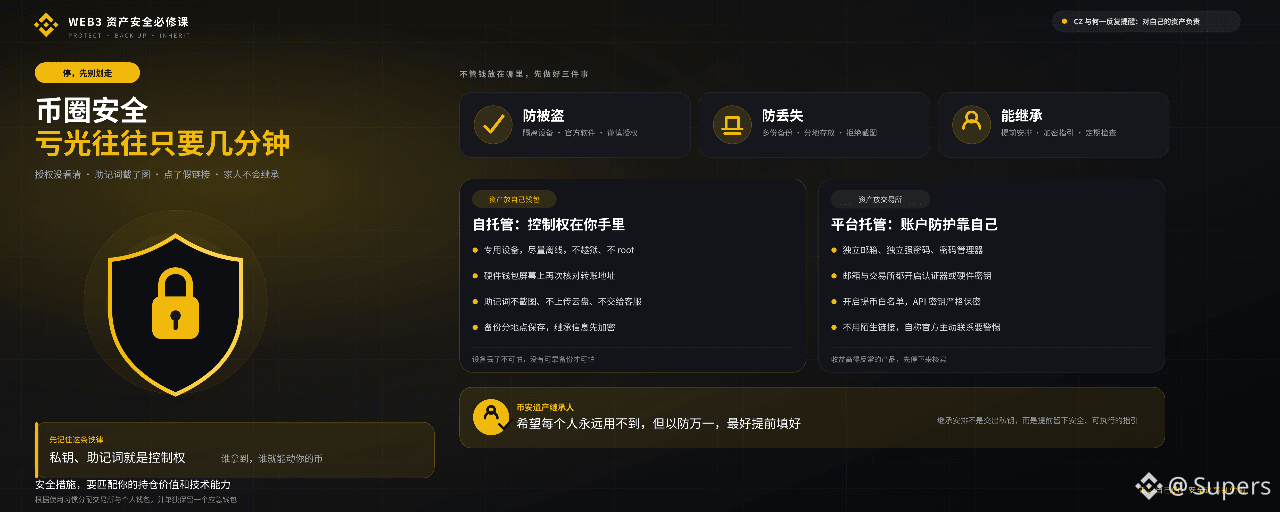
Your security measures should match the value of your holdings and your technical skills. No matter where you keep your money, prioritize these three things: **prevent theft, prevent loss, and plan for inheritance**.
Remember this golden rule: Your private key and recovery phrase give control over your funds. Whoever has them can access your crypto.
I. Keep your assets in your own wallet (self-custody)
1. Prevent theft
Computer: If possible, use a dedicated offline computer to store private keys and sign transactions. Download software only from official sources, and transfer it using a clean USB drive. Scan downloads for viruses, encrypt the hard drive, and keep the computer physically secure.
Phone: Use a dedicated phone and reset it before installing a wallet. Install only essential apps; don’t jailbreak or root it. Keep it offline most of the time, and connect only when updating or making transfers. Set a strong passcode.
Hardware wallet: Choose a reputable brand and watch out for tampering. Keep the connected device secure, too. Check the address on the hardware wallet’s screen before making a transfer. Backups are just as important as the device itself.
2. Prevent loss
Make several backups and store them in different locations
Paper backups can be damaged by water or fire and are easy to copy incorrectly; metal backups are more durable, but both can be lost or seen by others.
An encrypted USB drive can be used for an off-site backup, but make sure it’s properly encrypted.
Don’t photograph or screenshot your private key; it may automatically sync to the cloud.
3. Inheritance
Never give your private key directly to anyone. If they get it, they can transfer your funds immediately.
You can use a “dead man’s switch” that automatically sends instructions after a long period of inactivity, but research and test it first. For example, Binance has a feature for designating an heir. I hope none of us ever needs it, but just in case, fill it out!
Encrypt inheritance information before leaving it for someone (for example, using their PGP public key). They’ll also need to know how to decrypt it.
II. Keep your assets on an exchange (I keep almost all of mine on Binance)
Exchanges are responsible for custody, but account security is up to you. First, choose a platform with a good reputation, strong security measures, and a sustainable business model. Be wary of unusually high returns.
Keep these account security tips in mind:
Devices: Use a dedicated computer if possible. Enable antivirus and a firewall, keep the system up to date, and turn off automatic downloads in chat apps.
Email: Use a separate email address for each exchange and enable strong 2FA (ideally a hardware security key). Don’t use your phone number for account recovery, to protect against SIM swapping.
Passwords: Use a unique, strong password for each account and store them all in a password manager. Keep the device your password manager is on secure, too.
2FA: Enable it for both your exchange and email accounts. Prefer an authenticator app or hardware security key, not SMS verification.
Withdrawal address whitelist: Only allow withdrawals to addresses you’ve approved.
API keys: Keep them secret. For asymmetric authentication, only give the exchange your public key.
Identity verification: Complete KYC to help confirm ownership and make inheritance easier later.
Avoid phishing: Use bookmarks or type URLs yourself. Don’t click unfamiliar links, and be wary of unsolicited messages from anyone claiming to represent an official organization.
III. How to allocate your assets
Based on your technical skills and habits, divide your assets between exchanges and personal wallets. With self-custody, you’re responsible for your private keys and recovery; on an exchange, make sure your account is properly secured.
Also keep a separate wallet for emergencies, so you can still access your funds when an exchange is undergoing maintenance.
One last thing:
Your crypto is yours, so don’t cut corners on security. Your cousin’s tutorial is now in its second installment, and I’ve said all I can. The rest is up to us and how seriously we take this.