
🏃 A More Common Threat Than You Think: Device Snatching
People often worry about sophisticated cyberattacks. But in everyday life, a much more common risk is simple: someone grabs your phone while it’s unlocked or while a sensitive app is open. 🧵👇
1/ How it can happen
You’re at a busy café, station, or airport. You unlock your phone to check your portfolio, messages, or banking app. You look away for a moment.
That’s all it takes.
If someone snatches your phone while it’s unlocked, they may try to access whatever is already open before the screen locks again.
For many users, this is a more realistic day-to-day risk than a highly sophisticated remote attack.
2/ One simple setting that adds protection
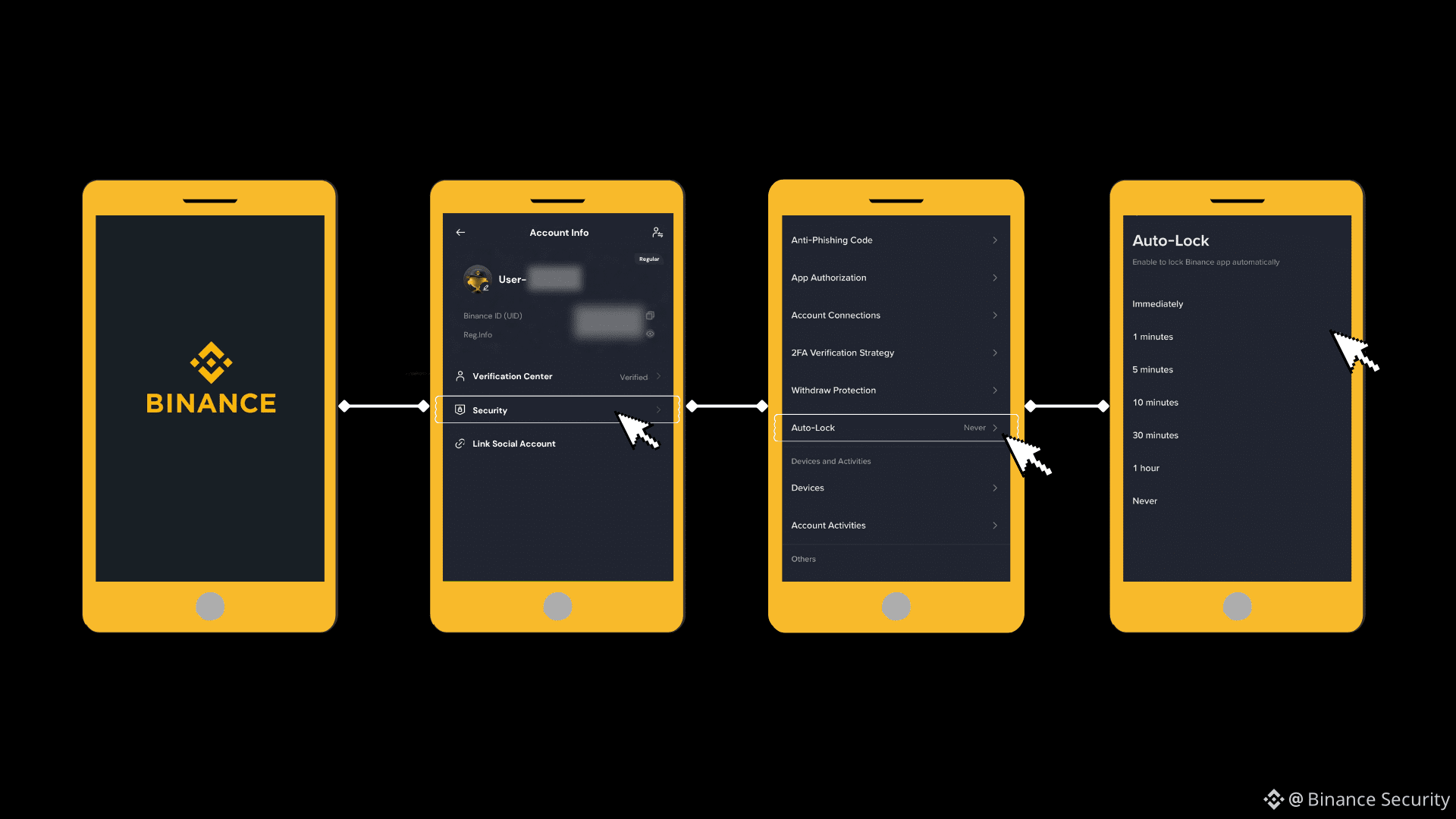
Enable App-Level Lock on Binance. This is separate from your phone's lock screen.
👉 How to turn it on:
Binance App → Profile → Security → Auto Lock
It takes 1 minute. But it could make all the difference.
3/ Extra habits that help reduce risk
- Avoid opening sensitive apps in crowded public places unless necessary
- Keep your phone out of easy reach near exits, doors, or transit queues
- Lock your screen immediately after use
- Enable "Screen Time Out" to auto-lock after short time of inactivity
- Enable biometric protection where available
💬 Quick check:
Do your sensitive financial apps have a separate lock from your phone screen?
✅ Yes, all setup
⚠️ No — fixing it RIGHT NOW
Share this with someone who manages crypto on their phone. A small setting can make a big difference.
#CryptoSafety #MobileSecurity #BinanceSquare
People often worry about sophisticated cyberattacks. But in everyday life, a much more common risk is simple: someone grabs your phone while it’s unlocked or while a sensitive app is open. 🧵👇
1/ How it can happen
You’re at a busy café, station, or airport. You unlock your phone to check your portfolio, messages, or banking app. You look away for a moment.
That’s all it takes.
If someone snatches your phone while it’s unlocked, they may try to access whatever is already open before the screen locks again.
For many users, this is a more realistic day-to-day risk than a highly sophisticated remote attack.
2/ One simple setting that adds protection
Enable App-Level Lock on Binance. This is separate from your phone's lock screen.
👉 How to turn it on:
Binance App → Profile → Security → Auto Lock
It takes 1 minute. But it could make all the difference.
3/ Extra habits that help reduce risk
- Avoid opening sensitive apps in crowded public places unless necessary
- Keep your phone out of easy reach near exits, doors, or transit queues
- Lock your screen immediately after use
- Enable "Screen Time Out" to auto-lock after short time of inactivity
- Enable biometric protection where available
💬 Quick check:
Do your sensitive financial apps have a separate lock from your phone screen?
✅ Yes, all setup
⚠️ No — fixing it RIGHT NOW
Share this with someone who manages crypto on their phone. A small setting can make a big difference.
#CryptoSafety #MobileSecurity #BinanceSquare