Muse 5-Minute Registration Method
If you use a normal webpage and a VPN, you basically end up on the waitlist.
The method that works now: open it with a cloud browser—it's like registering from an overseas computer.
Steps:
1. Open https://browser.lexmount.com
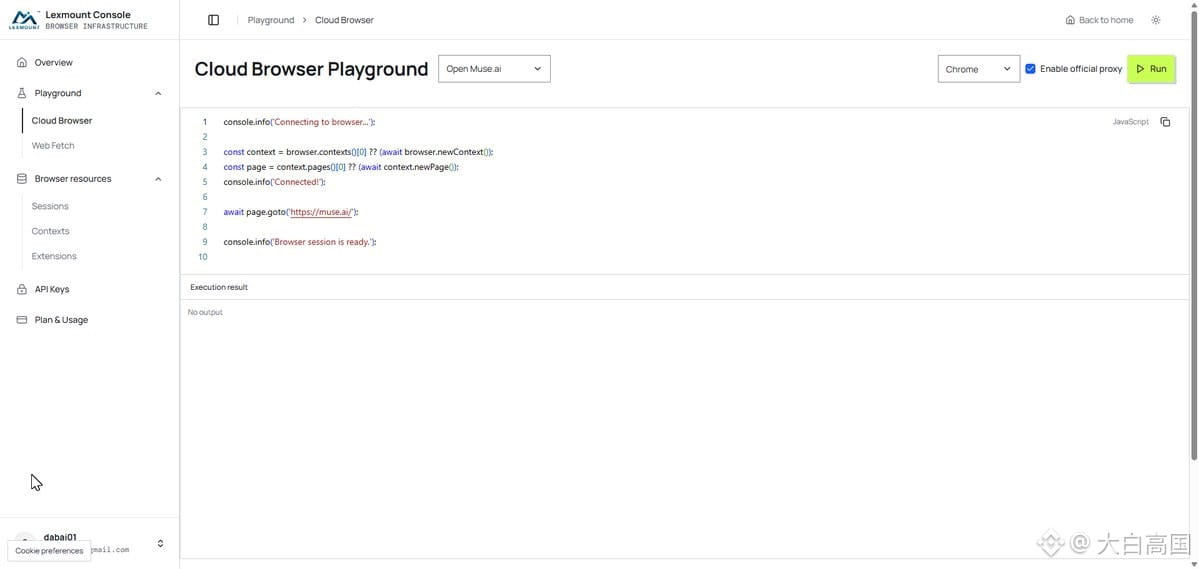
2. After logging in with your email, click Cloud Browser on the left.
3. In the middle, select Open http://Muse.ai, check Enable official proxy, then click Run.
4. Wait until the Muse page appears on the right, then register with a brand-new email. I used Google to log in directly.
5. Enter your birthday information.
6. If you can see Muse asking for your name, it means you succeeded.
Three horizontal lines at the bottom-left → Settings → General → Usage → Redeem invite code. Enter the invite code: AJ6TIA
Avoiding pitfalls:
If, after email registration, you end up in the waitlist, switch to a new email—just fill in your birthday. It’s fine even if no credit card prompt appears.
You can create another account, but don’t open many in the same environment. Using a completely new email and separating the registrations is more reliable.
Invite code: AJ6TIA
https://muse.ai/join
Redeem within 48 hours. Both sides get 1 billion (10億) each; mine can be used 30 more times.
If you use a normal webpage and a VPN, you basically end up on the waitlist.
The method that works now: open it with a cloud browser—it's like registering from an overseas computer.
Steps:
1. Open https://browser.lexmount.com
2. After logging in with your email, click Cloud Browser on the left.
3. In the middle, select Open http://Muse.ai, check Enable official proxy, then click Run.
4. Wait until the Muse page appears on the right, then register with a brand-new email. I used Google to log in directly.
5. Enter your birthday information.
6. If you can see Muse asking for your name, it means you succeeded.
Three horizontal lines at the bottom-left → Settings → General → Usage → Redeem invite code. Enter the invite code: AJ6TIA
Avoiding pitfalls:
If, after email registration, you end up in the waitlist, switch to a new email—just fill in your birthday. It’s fine even if no credit card prompt appears.
You can create another account, but don’t open many in the same environment. Using a completely new email and separating the registrations is more reliable.
Invite code: AJ6TIA
https://muse.ai/join
Redeem within 48 hours. Both sides get 1 billion (10億) each; mine can be used 30 more times.