




Because of fixed ways of thinking, many things are easy to misjudge.
You’re all too familiar with it by now: in most cases, Binance spot trading fees are 0.1%; for futures, maker orders are 0.02% and taker orders are 0.05%; and on the BSC chain, Binance fees are 0.01% #ALPHA ,.
So many people take it for granted that Binance’s prediction market fees are also just a simple ratio: the trading volume multiplied by such a proportion.
That’s completely wrong!!!
Let’s lay this whole thing out clearly today. Since this article is written for beginners, it’s a bit wordy—you can skim and jump straight to Part 2.
1️⃣|Three major different entry/forms—fees vary a lot
In the Binance app, you can actually find three prediction market entries/forms.
➤ ❶ Exchange entry
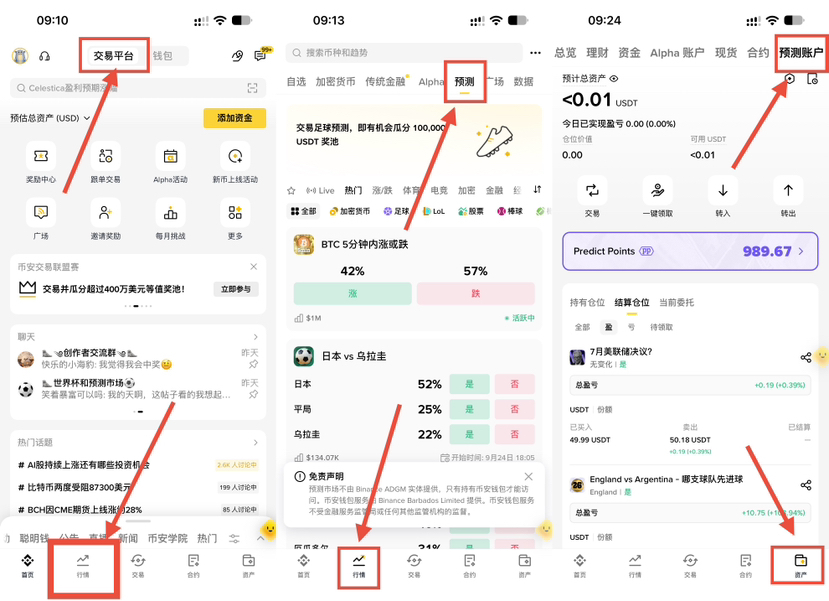
The first entry is inside the exchange. Enter the exchange homepage, click the second tab at the bottom called “Markets/行情,” and select the “Prediction” category at the top—that’s it.
After activating this entry, Binance will create a “Prediction” account for you. In form, it’s similar to your spot account, futures account, savings/wealth account, and alpha account. You can find it in the Assets Center—see the third screenshot below.
There is no discount at this entry. It uses the publicly stated base fee rate of the predict fun protocol (don’t worry—more details below).
As shown in the figure below:
➤ ❷ Binance no-private-key wallet entry
People may be underestimating how widespread web3 wallets are. Many people have used Binance for years, but never proactively click the “Wallet” button at the very top of Binance’s homepage. If you are one of them, try clicking it—follow the prompts to create a no-private-key wallet and unlock a whole new world.
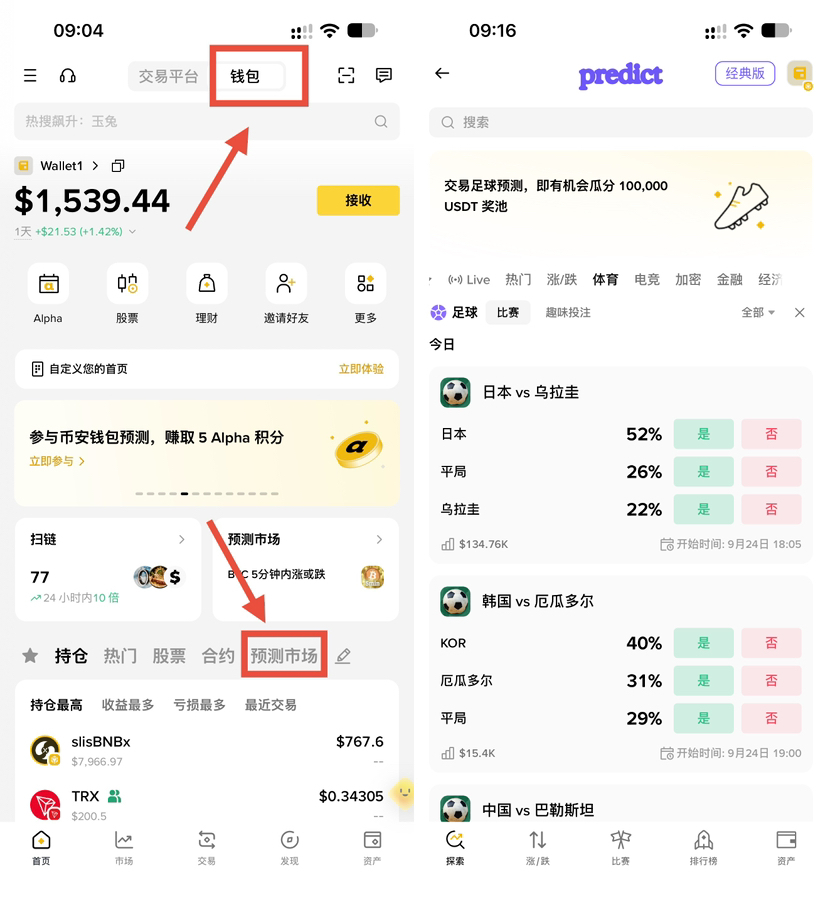
On your wallet home page (as shown below), you can see the prediction markets in your wallet. Once you go in, you’ll find the interface here is almost identical to the exchange entry.
But don’t be fooled by appearances—these two entries are independent. The assets are independent, and the fees are different too. The wallet entry is cheaper. The secret is: once you bind the code and use the wallet entry, you can get an additional 5% rebate on top of the predict fun protocol base fee rate. The exchange entry doesn’t have this rebate (I confirmed with customer service and also verified it myself).
After creating the wallet, remember to back it up.
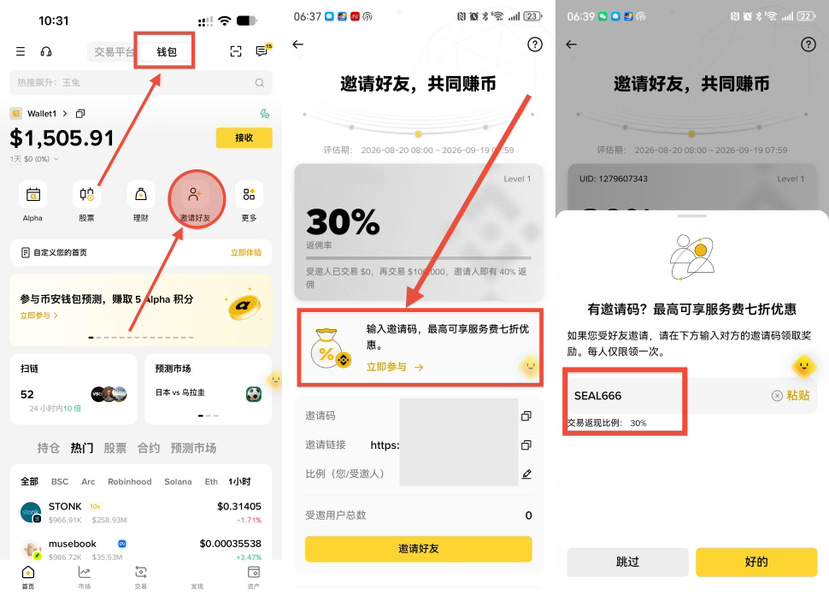
After backing it up, remember to bind a wallet invitation code. Regular trades get up to a 30% fee discount;If the person who invited you activates the prediction rebate, then when you play prediction markets in the wallet, you get a 5% fee reduction., I’ve activated it for everyone with my 【SEAL666】.No need to compare repeatedly. No matter who invited you, the maximum is now 30% and 5%.
How to bind: On the wallet home page, click the “Invite Friends” icon, then click the bind banner in the middle, and enter 【SEAL666】.
For the full explanation of Binance fees, please refer to my post here
➤ ❸ Classic Version entry
There are actually many prediction market protocols/platforms. The one integrated by Binance is a protocol called “predict fun.” It runs on the Binance Smart Chain. Public information shows this protocol has Binance-related backing, and its founder is a former Binance employee.
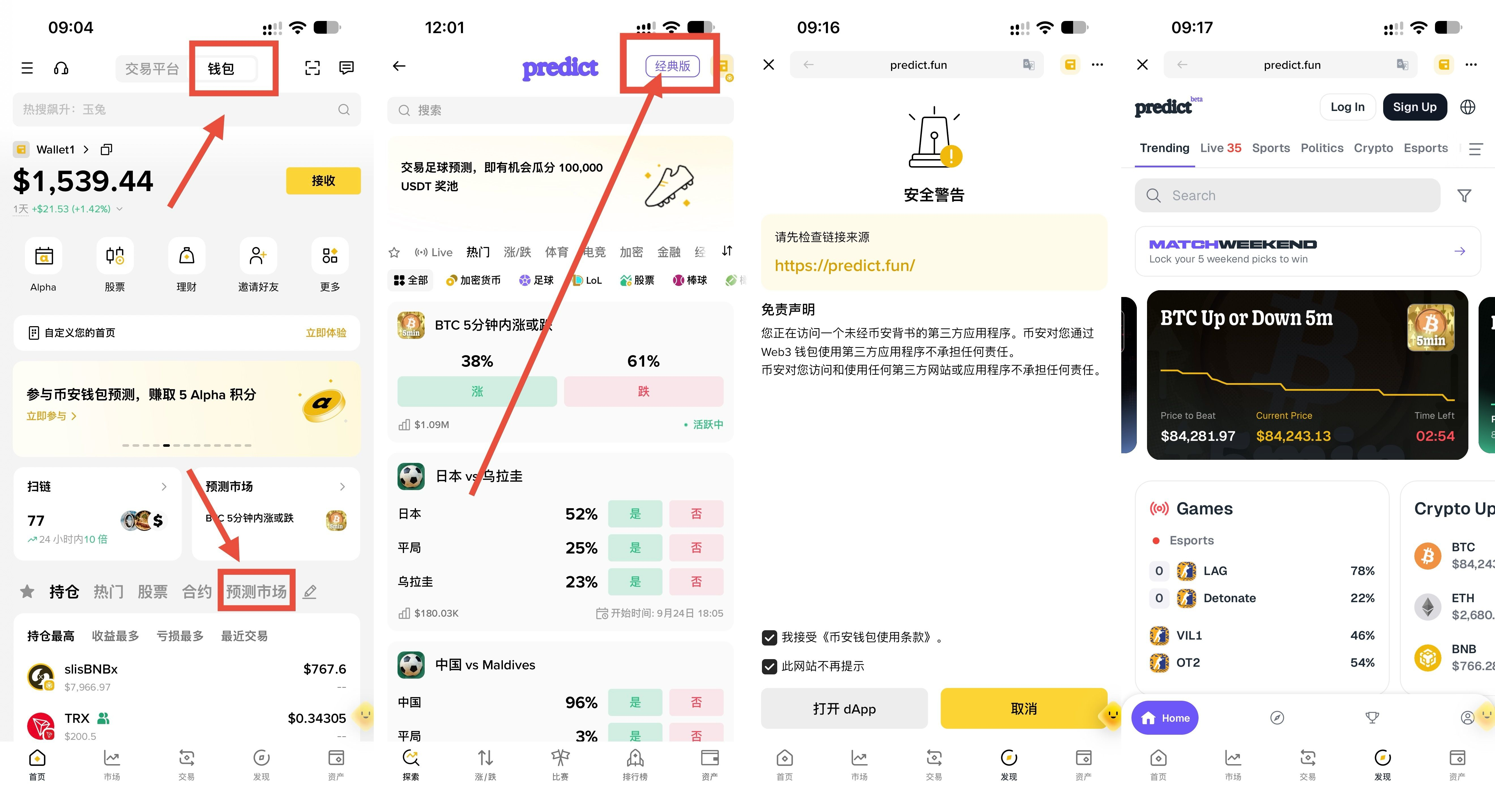
The predict fun itself can run as a third-party standalone dapp inside the Binance wallet. This is what people commonly call the “Classic Version.”
The “Classic Version” sometimes cooperates with Binance’s integrated version to hold big—but still separate—events, like this year’s World Cup and dota2. But more often, Binance will have its own independent events—for example, the current “trade 50u, soccer gives 5 #ALPHA alpha points” event.
The classic version has its own independent invitation system. Bind any invitation code (for example, mine: 1CEAC) and you can get a 10% discount. However, some Binance events—like the recent 5 alpha points event—can’t be participated in via the classic version.
Go to the classic version. Besides directly entering the dapp address in the Binance wallet—or even in a mobile browser—you can also go to the wallet-version entry ❷ mentioned earlier, then click the “Classic Version” button at the top-right. After that, a prompt will pop up, as shown below:
2️⃣|First, figure out the predict fun base rate
Now that you understand this: after receiving the rebate, on top of the base fee rate:
Classic Version: 10% fee reduction
Binance wallet: 5% fee reduction (as long as the person who invited you opened it for you)
Binance exchange: no fee reduction
If someone eats your limit order, there’s no fee charged to you. If you eat someone else’s limit order, you’ll pay the taker fee.
The taker base fee rate formula is not a fixed ratio like many people imagine. Suppose the price (i.e., probability) of the event you buy/sell is p, then:
Base rate = number of shares × min(p,1-p) × 2%
The formula is very simple; here’s how to interpret it:
When the probability is below 0.5, the base fee is fixed at 2% of the trade value. This is 20x/40x more expensive than Binance spot/perpetual contract base taker fees, and many people underestimate it.
When the probability is greater than 0.5, the higher the probability, the cheaper the fee. For example, for a time with probability 0.99, the final rate is only: number of shares × min(0.99, 1-0.99) × 2% ÷ (number of shares × 0.99) = 0.02020202…%, roughly equivalent to the Binance contract maker fee.
So, the base fee rate for the prediction market is actually 0.0202~2%.
Prediction markets on predict fun have some really interesting mechanics and mathematical properties. For example, you can hedge by “eating” orders and buying the same number of shares (note: same shares, not same amount) of yes and no. If yes and no are strictly equal to 1, then regardless of the outcome, the slippage amount is maximized at 【number of shares × 2%】. If a low-probability event happens, it’s always 2%. Using this, you can do a lot of things. If you don’t understand it for now, it’s okay—this seal will post dedicated explanations later.
Also, note that placing a limit order does not necessarily mean you’ll be charged the limit-order maker fee. Many people place a limit order at the best ask price in the order book and then it immediately gets filled by a taker order (the “taker” fills it), and you’re charged the taker fee instead. This is true for any order book—for example, Binance spot perpetuals are the same.
3️⃣|The order-book price spread is the biggest culprit of slippage/slippage-of-slippage
Understanding the fee formula alone isn’t enough—you also need to understand the order-book spread: the gap between the best bid price and the best ask price.
If you don’t understand this, one day you’re definitely going to suffer a big loss in the prediction market. For example, in that soccer event that gives 5 alpha points: you spend 51u, then after you buy at 0.91 you immediately sell, and your total slippage only needs to be 0.21u. But as soon as the spread becomes 0.02, you’ll instantly increase your slippage a lot.
Open any event, switch to the limit order mode, expand the order book—you’ll see the spread at a glance, as shown below:
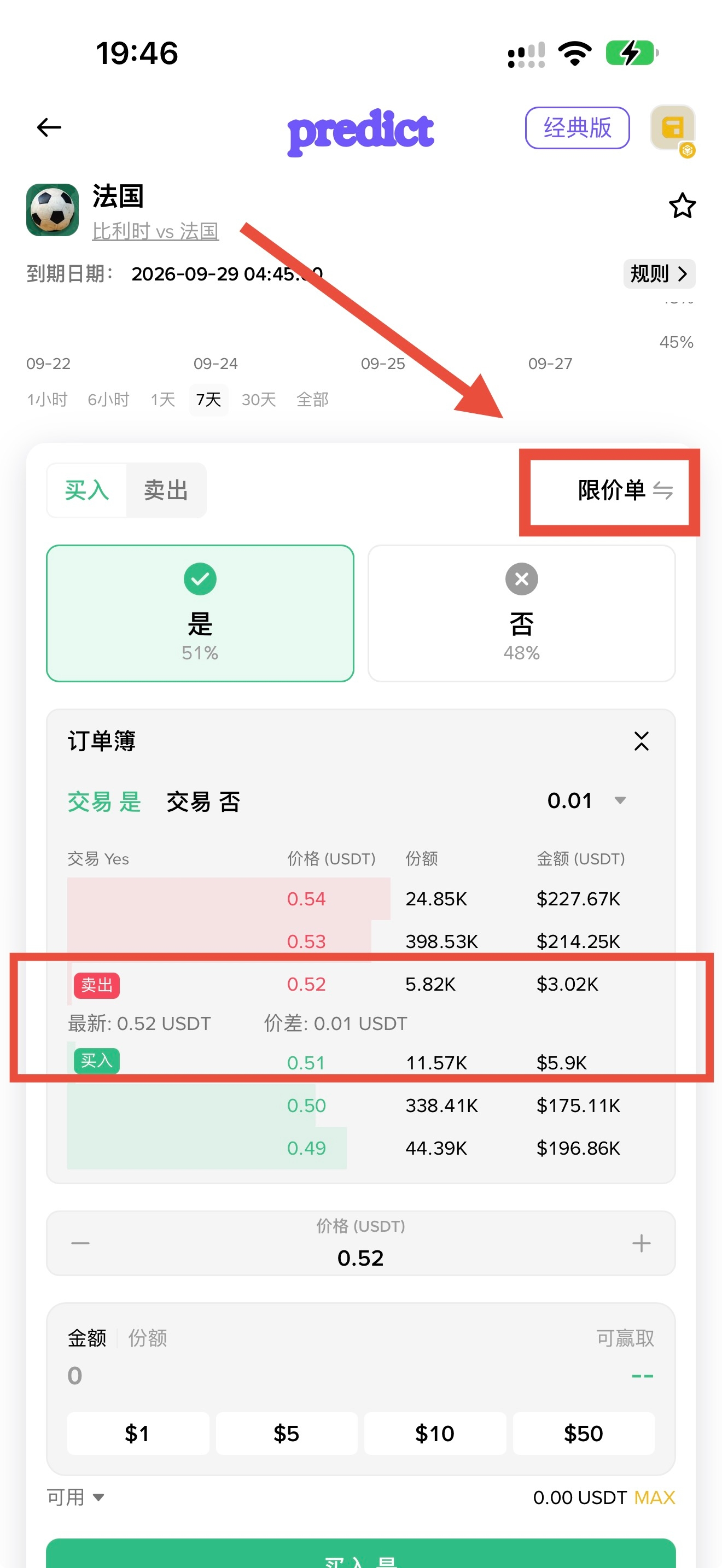
For most projects in prediction markets, the price precision is only two decimal places. Therefore, the minimum spread is 0.01, and only a very small portion uses three decimal places.
Liquidity in prediction markets is often very poor. Spreads are often 0.02, and can even reach 0.05. For example, if you do the task without paying close attention: you spend 51u, buy at 0.91 in the market, and immediately hard-cross the spread to sell at market. You will:
After deducting the fee, the amount you buy equals 51 ÷ 0.91 × (1 - 0.09 × 2% ÷ 0.91) = 55.933 shares
Sell immediately. If the spread is 0.01 and the sell price is 0.90, you’ll lose about 0.5593 u due to the spread difference, and adding the fees for both buy and sell, your total slippage is precisely: 51 - 51 ÷ 0.91 × (1 - 0.09 × 2% ÷ 0.91) × (1 - 0.10 × 2% ÷ 0.90) × 0.90 = 0.772
Sell immediately. If the spread is 0.02 and the sell price is 0.89, you’ll lose about 0.5593 × 2 = 1.119 u due to the spread difference. Then, adding the fees for both buy and sell, your total slippage is precisely: 51 - 51 ÷ 0.91 × (1 - 0.09 × 2% ÷ 0.91) × (1 - 0.11 × 2% ÷ 0.89) × 0.89 = 1.343
Sell immediately. If the spread is 0.05 and the sell price is 0.86, you’ll lose about 0.5593 × 5 = 2.797 u due to the spread difference. Then, adding the fees for both buy and sell, your total slippage is precisely: 51 - 51 ÷ 0.91 × (1 - 0.09 × 2% ÷ 0.91) × (1 - 0.14 × 2% ÷ 0.86) × 0.86 = 3.0541
See it? The order-book spread is ferocious—don’t let it inflate your slippage/misfit costs.
4️⃣|Now you know how to complete that “trade 50u, get 5 alpha points” task, right?
Notes are as follows:
Do it in the Binance wallet—not in the exchange.
Remember to first bind an invite code from someone who opened the prediction-market rebate for you. Save 5% on fees—for example, bind my 【SEAL666】.
Pick prices above 0.5—the higher, the better. This reduces fee slippage/cost.
Pick a spread of 0.01, and ensure there’s enough limit-order liquidity in the order book. This reduces spread slippage/cost.