https://www.binance.com/download?utm_medium=screenshot Suddenly, your phone shows “No Service”
And your email has also sent you a password change reminder?
What is SIM card hijacking about?
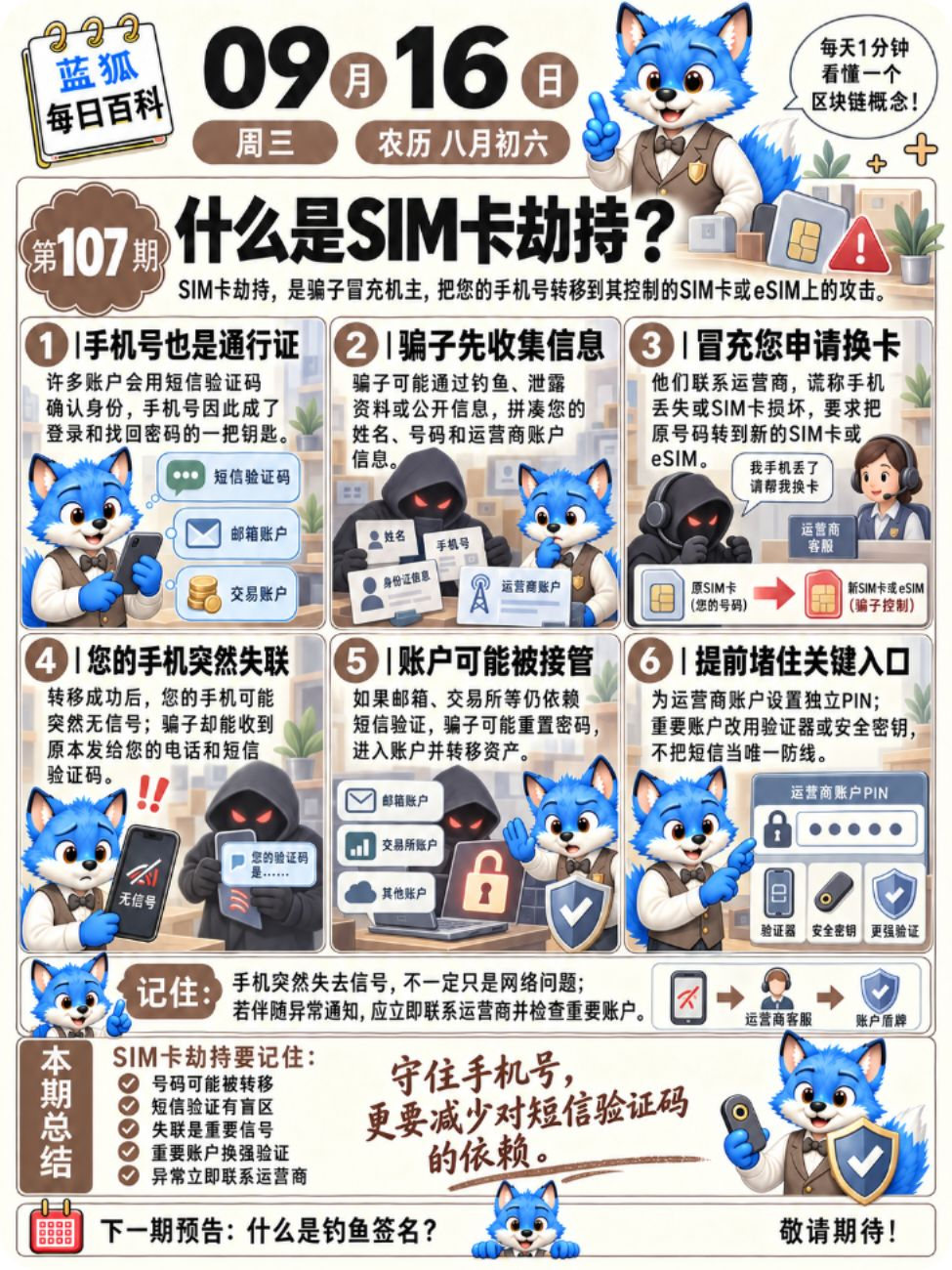
SIM card hijacking is not about breaking a physical SIM card remotely. Scammers usually first collect personal information, then impersonate the account holder to contact the mobile carrier—using excuses like the phone was lost or the SIM card is damaged—to request a SIM replacement or a number transfer. Once successful, the number may be bound to a new SIM card—or eSIM—controlled by the scammers.
At that point, your phone may be unable to make or receive calls or send or receive SMS. Meanwhile, scammers can receive SMS verification codes. If your email, exchange accounts, and other services still rely on SMS as the primary authentication method, the scammers may use this to reset your password and attempt to take over your account.
However, having your phone number transferred does not automatically mean your wallet private key is leaked. The real danger is that your phone number serves multiple roles—login, password recovery, identity verification, and more—so one entry point can affect multiple accounts.
A more secure approach is to set an independent PIN for your mobile carrier account. For important accounts, use an authenticator app or a security key first. If your phone suddenly loses signal for an extended period without reason, contact your mobile carrier immediately and also check your email and exchange accounts.
When your phone suddenly shows “No Service,” what would your first reaction be?
A. Restart the phone first and see if it recovers
B. Wait a bit—maybe it’s just a network glitch
C. Contact the mobile carrier right away to confirm whether your SIM was changed
D. Check your email and the security status of important accounts at the same time
Have you ever thought of “SMS verification codes” as an absolutely secure second lock?
And your email has also sent you a password change reminder?
What is SIM card hijacking about?
SIM card hijacking is not about breaking a physical SIM card remotely. Scammers usually first collect personal information, then impersonate the account holder to contact the mobile carrier—using excuses like the phone was lost or the SIM card is damaged—to request a SIM replacement or a number transfer. Once successful, the number may be bound to a new SIM card—or eSIM—controlled by the scammers.
At that point, your phone may be unable to make or receive calls or send or receive SMS. Meanwhile, scammers can receive SMS verification codes. If your email, exchange accounts, and other services still rely on SMS as the primary authentication method, the scammers may use this to reset your password and attempt to take over your account.
However, having your phone number transferred does not automatically mean your wallet private key is leaked. The real danger is that your phone number serves multiple roles—login, password recovery, identity verification, and more—so one entry point can affect multiple accounts.
A more secure approach is to set an independent PIN for your mobile carrier account. For important accounts, use an authenticator app or a security key first. If your phone suddenly loses signal for an extended period without reason, contact your mobile carrier immediately and also check your email and exchange accounts.
When your phone suddenly shows “No Service,” what would your first reaction be?
A. Restart the phone first and see if it recovers
B. Wait a bit—maybe it’s just a network glitch
C. Contact the mobile carrier right away to confirm whether your SIM was changed
D. Check your email and the security status of important accounts at the same time
Have you ever thought of “SMS verification codes” as an absolutely secure second lock?