$PONS How to buy? A complete 6-step tutorial for the Binance Wallet—one image to get it all
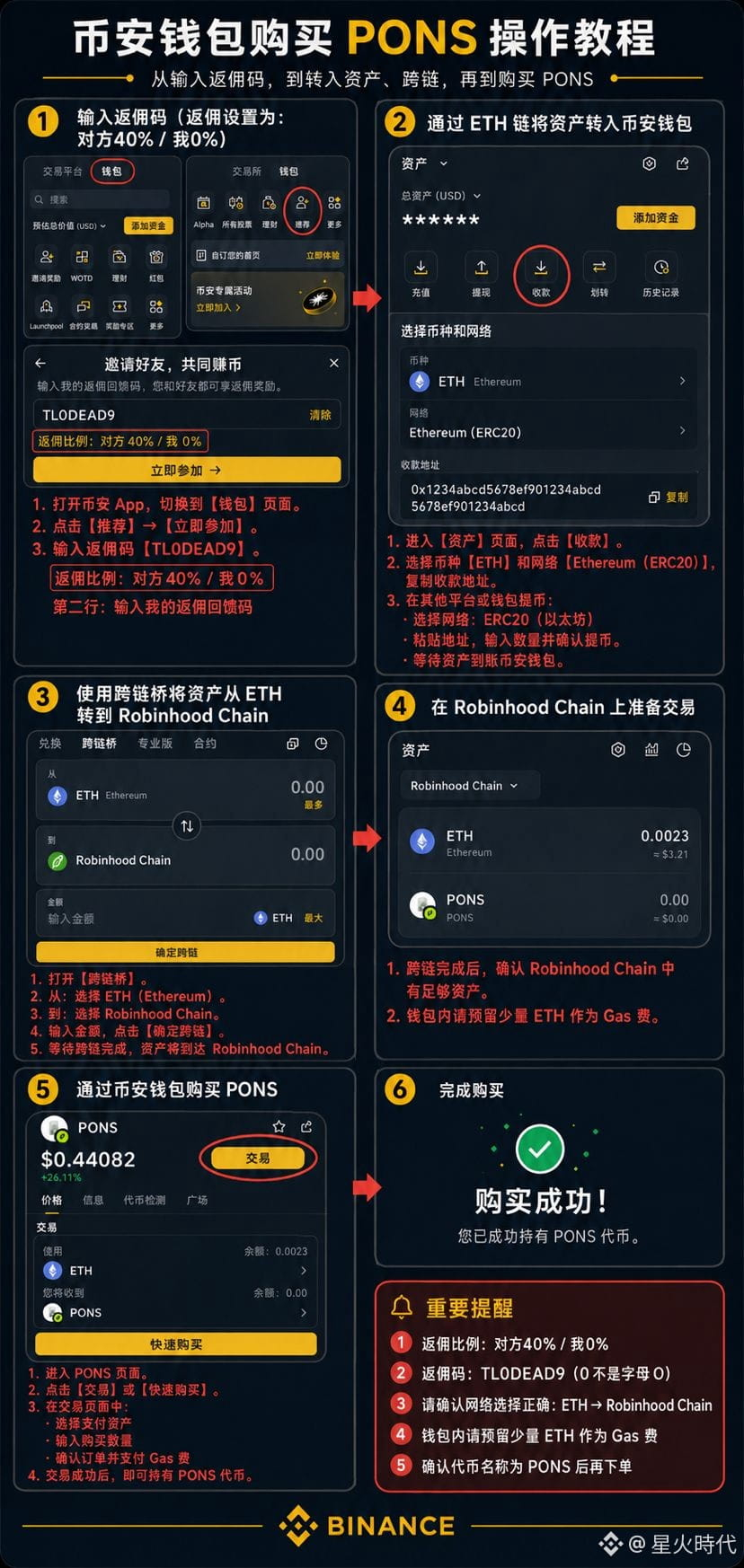
Recently, a lot of people have been asking how to buy PONS. I’ve organized the entire process into a single image, so beginners can get started quickly by following it.
The process is simple:
① Open the Binance app and go to 【Wallet】
② Go to 【Earn/Rewards】 and enter the referral code
③ Transfer your ETH into your Binance wallet via the Ethereum network
④ Use the 【Cross-chain Bridge】 to move your assets from ETH to Robinhood Chain
⑤ Find PONS in your Binance wallet and go to the trading page
⑥ After confirming the network, Gas, and the transaction amount, complete the purchase
🎁 My referral code: TL0DEAD9
Note: it’s the number 0, not the letter O.
I’ve marked exactly where to tap for each step, how to choose the network, and how to do the cross-chain transfer directly in the image. I recommend you save it first, then just follow the picture when you do it for real.
⚠️ Special reminder:
Before doing cross-chain and on-chain transactions, be sure to confirm the network is correct and leave a small amount for Gas. PONS is a high-volatility crypto asset. Don’t chase the price due to short-term pumps—testing the process with a small amount first is safer.
If this tutorial helps you, please save it. You’ll likely use a similar process when buying on-chain assets later.
#pons #BinanceWallet #币安钱包 #链上交易 #币安广场征文活动
Recently, a lot of people have been asking how to buy PONS. I’ve organized the entire process into a single image, so beginners can get started quickly by following it.
The process is simple:
① Open the Binance app and go to 【Wallet】
② Go to 【Earn/Rewards】 and enter the referral code
③ Transfer your ETH into your Binance wallet via the Ethereum network
④ Use the 【Cross-chain Bridge】 to move your assets from ETH to Robinhood Chain
⑤ Find PONS in your Binance wallet and go to the trading page
⑥ After confirming the network, Gas, and the transaction amount, complete the purchase
🎁 My referral code: TL0DEAD9
Note: it’s the number 0, not the letter O.
I’ve marked exactly where to tap for each step, how to choose the network, and how to do the cross-chain transfer directly in the image. I recommend you save it first, then just follow the picture when you do it for real.
⚠️ Special reminder:
Before doing cross-chain and on-chain transactions, be sure to confirm the network is correct and leave a small amount for Gas. PONS is a high-volatility crypto asset. Don’t chase the price due to short-term pumps—testing the process with a small amount first is safer.
If this tutorial helps you, please save it. You’ll likely use a similar process when buying on-chain assets later.
#pons #BinanceWallet #币安钱包 #链上交易 #币安广场征文活动