


When many beginners first come into contact with Binance, the first problems they encounter are: how to download Binance, how to register, how to complete identity verification, and what the differences are between the Android and iOS processes.
Actually, if you prepare the required materials in advance and follow the steps, the entire process isn’t complicated. This article will explain in detail areas such as pre-registration preparation, the Android download and registration process, the iOS download and registration process, the identity verification steps, common questions, and precautions—helping you complete account registration and real-name verification more clearly.
Binance PC registration link channel: https://www.binance.com/zh-CN/join?ref=MVP888
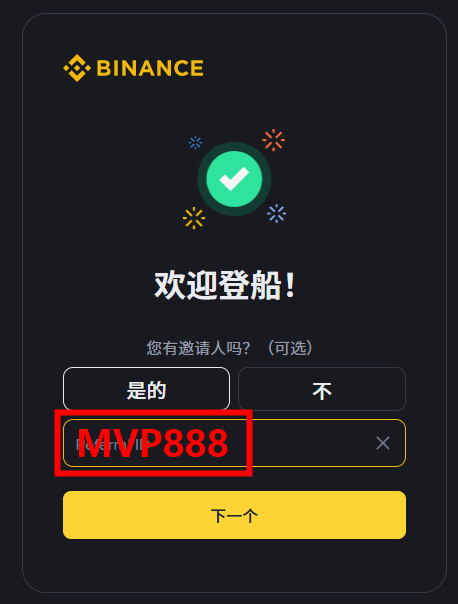
Invitation code: MVP888
Part 1. What materials do you need to prepare before registering on Binance
Before registering a Binance account, it’s recommended to prepare the following materials first. This can reduce the chance of making mistakes mid-process.
1. A commonly used mobile number or email address
When registering an account, you typically need to verify using your mobile number or email. It’s recommended to choose a contact method you’ll use long-term, so it’s easier to recover your account and receive notifications later.
2. Valid ID documents
Identity verification generally requires uploading your real and valid ID information, such as an ID card or passport. Make sure the document is within its validity period, and that the information is clear and complete.
3. A smartphone that works normally
Whether you’re using Android or iOS, registration and identity verification must be completed using your phone. It’s recommended to check in advance that your camera, network, and system version are functioning properly.
4. A stable network environment
Steps such as registration, receiving verification codes, uploading ID documents, and facial recognition all require network access. It’s recommended to operate on a stable network and avoid frequent interruptions.
5. Basic account security settings
It’s recommended to prepare a password with high security in advance and avoid reusing the same password on other platforms.
Part 2. How to download the Binance app on an Android system and register an account
Android users can download the Binance app through official channels. After installation, complete registration according to the prompts.
1. Download the official app
Android users should prioritize getting the installation entry through official app stores or the official website, and avoid downloading unknown versions.
2. Install and open the app
After the download is complete, finish installation according to the phone prompts. After installation, tap the icon to enter the homepage.
3. Go to the registration page
Find the registration entry on the homepage. It usually prompts you to register using your mobile number or email.
4. Fill in the registration information
Enter your mobile number or email according to the page prompts. After you receive the verification code, fill in the verification information, set a login password, and make sure to enter the referral code: MVP888.
5. Complete basic registration
Once verification is successful, your account can be created successfully. After that, you can continue with real-name verification and security settings.
Part 3. How to download the Binance app on an iOS system and register an account
The way iPhone users download the Binance app is slightly different from Android—mainly through the App Store.
1. Open the App Store
In the App Store, search for Binance-related app names. Confirm the developer information before downloading.
2. Install the app
Tap to get it and complete the installation, then open the app.
3. Choose a registration method
After entering the registration page, you can choose to register by email or by mobile number.
4. Enter the verification code and set your password
Follow the page prompts to enter the verification code. After setting your login password, you can complete registration by filling in the referral code as MVP888.
5. Log in to your account
After you complete registration, use your account information to log in and enter the next steps.
Part 4. Detailed Binance identity verification (KYC) process
Identity verification is usually an important step that must be completed after registration. It is mainly used to improve your account permissions and security.
1. Find the identity verification entry
After logging in, go to your personal center or the security settings page, and find the options related to identity verification.
2. Enter real identity information
Fill in information such as your name, date of birth, nationality/region, and ID document number according to the page requirements.
Note: All information must match your ID document; otherwise, it may affect the review result.
3. Upload ID document photos
Upload clear photos of both sides of your ID document according to the system requirements. While taking the photos, pay attention to:
The photo is clear
The entire ID document is shown
No glare, no obstruction
Font information is recognizable
4. Do facial recognition
Some verification steps also require facial recognition. Just complete it according to the prompts.
It’s recommended to operate in a well-lit environment with a simple background.
5. Wait for the review result
After submitting your verification materials, the system will review them. Once the review is approved, your account will usually unlock more features.
Part 5. What should you pay attention to during Binance registration and verification
To improve your chances of successful registration and verification, please pay special attention to the following:
1. Use your real information
Do not use someone else’s ID or fake information; otherwise, it may lead to verification failure and even affect account usage.
2. ID document photos must be clear
When taking photos, avoid issues such as blur, glare, and incomplete cropping—especially make sure all four corners of the ID document are included.
3. Don’t submit repeatedly and frequently
If verification fails, it’s recommended to check what went wrong first and then resubmit, to avoid repeatedly doing the same thing multiple times within a short period.
4. Pay attention to account security
After registering, it’s recommended to enable two-factor authentication as soon as possible and regularly check your account login status.
5. Watch out for fake websites and fake apps
Make sure to download and install through official channels. Do not click unknown links casually.
Part 6. Answers to common questions about Binance registration
1. What should I do if I can’t receive the verification code?
First check SMS blocking, your email’s spam folder, and your network status. If needed, resend the verification code.
2. Why does identity verification fail?
Common reasons include: incorrect information entered, blurry ID photos, the document has expired, facial recognition not passing, etc.
3. Are the registration processes different for Android and iOS?
The overall process is basically the same. The main difference is the download method: Android is usually installed through official channels, while iOS is downloaded through the App Store.
4. Do I have to verify after registering?
In general, it’s recommended to complete identity verification as soon as possible, making it easier to use account-related features later.
Part 7. Summary
Binance account registration and identity verification are not complicated. The key is to have the information ready, fill it out accurately, ensure the document photos are clear, and use official/legitimate channels for your actions.
Whether you’re using Android or iOS, users can complete registration step by step following the prompts on the page, and then proceed with identity verification and security settings.
If you’re a beginner, it’s recommended to prepare your mobile number or email, ID documents, and your mobile device before you start. This will make everything go more smoothly.