


Binance protects funds through four layers: the SAFU emergency fund, verifiable Proof of Reserves, security tools you can enable from your account, and automated fraud detection systems.
This guide explains how to use them: what backs SAFU today, how to verify your own balance, and how to configure the protections that depend on you in five minutes.
Because the most effective part of this system isn’t operated by Binance. You enable it.
Quick summary
Not much time? This is the essential:
The SAFU is fully in bitcoin today - about 15,000 BTC, close to one billion dollars. Many guides still say it’s in USDC. Not anymore.
You can verify yourself that your balance is backed: Account → Verification.
Withdrawal Protection blocks all on-chain withdrawals for 1 to 7 days. Even if someone has your password and your 2FA, they can’t take your crypto.
In P2P, the crypto is held in escrow until the seller confirms payment. If the payment name doesn’t match, it’s a violation of the rules.
Your pesos and your crypto are in different systems - the MXN portion goes through Medá; the protections in this article cover your cryptocurrencies.
Five of the eight protection layers are enabled by you, not Binance.
If you only do one thing today: go to Account → Security and review the Security Control panel. Anything in gray is pending.
Save this article to read it calmly - the step-by-step settings section will help you when you have the app open.
How do pesos go in and out?
Before talking about the global protections, it’s helpful to understand something specific about Mexico.
When you deposit or withdraw Mexican pesos in Binance, that transaction goes through Medá, a Mexican entity in the Binance group that operates with an independent team and is dedicated exclusively to moving pesos via SPEI. It was announced in September 2025 with a planned investment of more than one billion pesos over four years.
The point almost nobody explains: your pesos and your cryptocurrencies live in different systems.
The pesos segment - deposits and withdrawals in MXN - goes through Medá.
The crypto segment - what you hold in BTC, ETH, USDT or any other asset — is under Binance’s global custody, backed by the Proof of Reserves and the SAFU fund.
These are two separate things. Understanding this matters because the protections you’ll see in the rest of this article - SAFU, Proof of Reserves, Withdrawal protection - apply to your cryptocurrencies, not your peso balance.
If it’s your first time using payments in Binance, you need to open a Medá account. The registration is done in the app itself when you try your first MXN deposit: you need to enter your phone number and email, review your personal details, upload an official ID on both sides, and complete facial verification.
What backs the SAFU fund today?
Bitcoin. Completely.
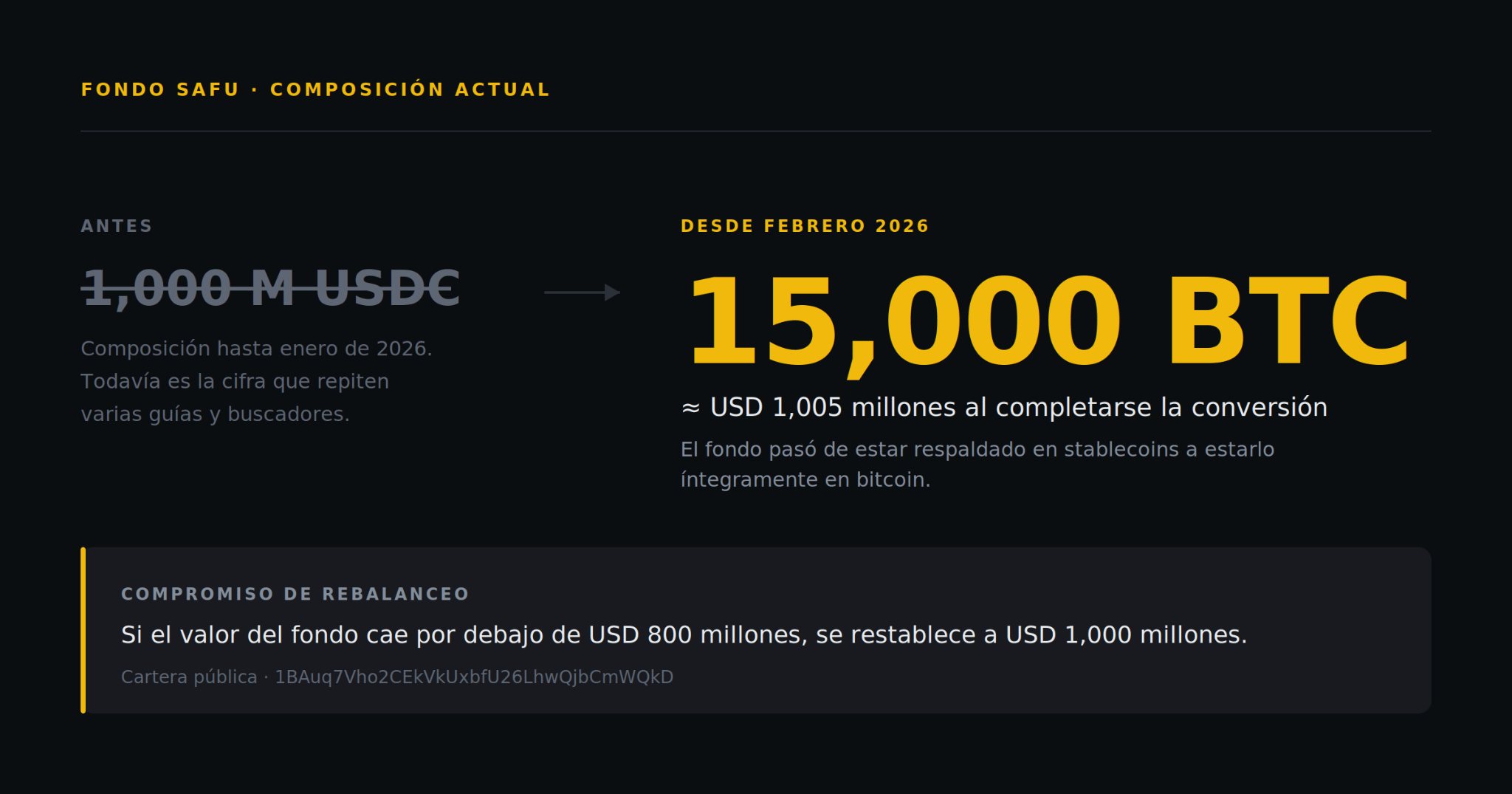
SAFU, created in July 2018, keeps about $1.000 billion worth of assets entirely in bitcoin. The conversion was completed in early 2026, before the planned schedule. Media outlets like CoinDesk reported the exact figure as 15,000 BTC when the operation closed.
Three features worth knowing:
It’s kept separate from the company’s operating accounts. It isn’t used for business expenses.
Replenishment commitment: if the value of the bitcoin holdings falls below approximately $800 million, Binance replenishes the fund.
It’s verifiable on-chain. The wallet is public: 1BAuq7Vho2CEkVkUxbfU26LhwQjbCmWQkD - paste it into any blockchain explorer and you’ll see the balance in real time.
Since the fund was created, Binance has not reported any major hack of user funds since 2019.
SAFU responds to platform-level security incidents. It doesn’t cover losses from market movements or access made with your own credentials - and this second category is the most common in practice. That’s why the following sections matter more.
How do I check that my balance is backed?
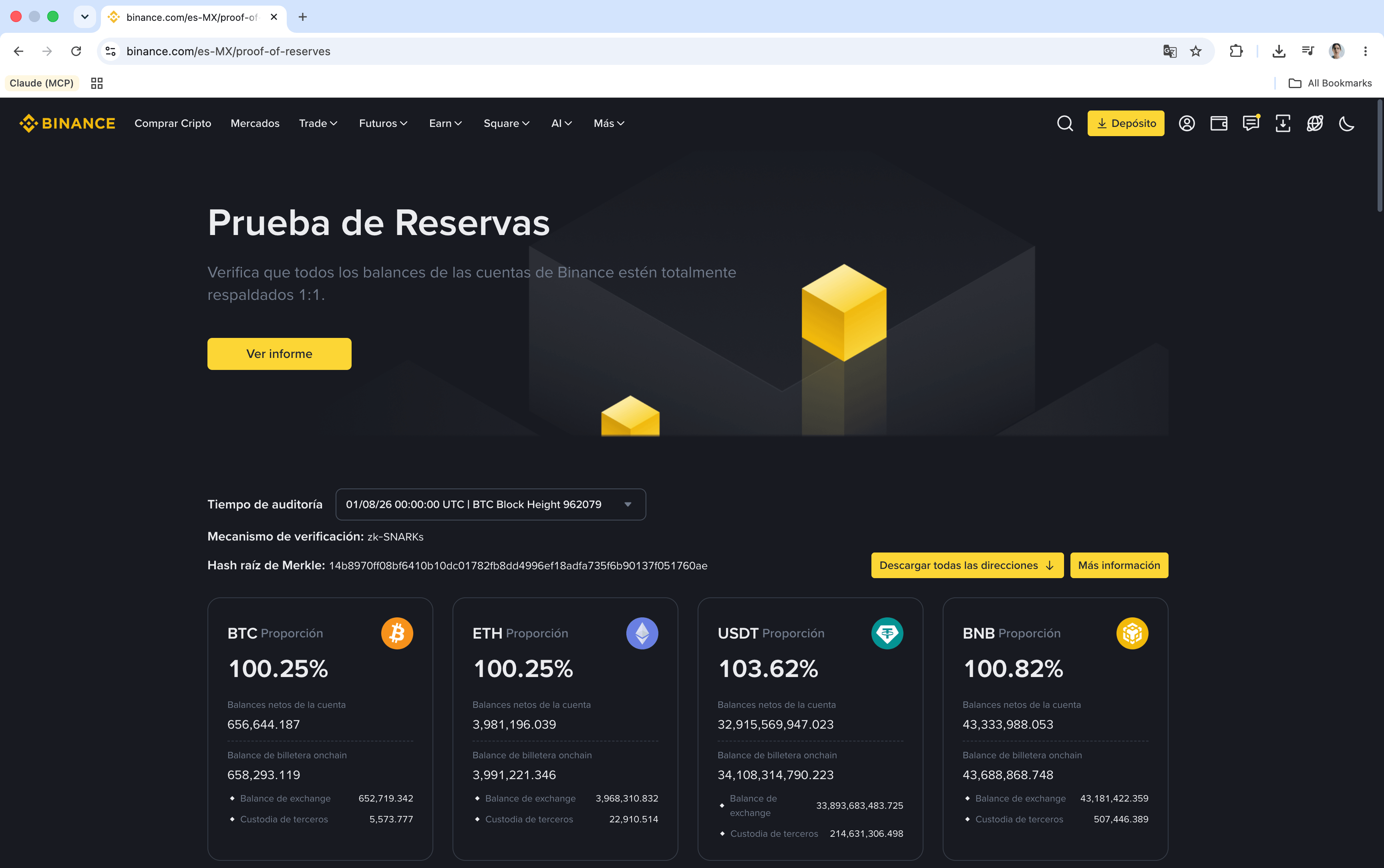
Go to binance.com/en-MX/proof-of-reserves. There you’ll see, for each audit, the proportion of backing for the main assets.
In the audit of August 1, 2026 (BTC Block Height 962079), the proportions were all above 100%: that’s the "1:1 plus additional reserves". The page also lets you download all addresses and check the Merkle root hash of each audit.
Verify your own balance
The above is the overall picture. You can also confirm that your specific account was included in the calculation:
Log in to the Binance website
Go to Account → Verification
Select the audit you want to review
You will see your registration ID, the account code, the Merkle Hash, the Merkle Sheet, and the list of supported assets in that verification. These data allow you to independently verify that your balance was included in the liabilities report.
Important: these fields are private and contain information about your account. Don’t share them or post them in screenshots.
The system uses Merkle trees validated with zk-SNARK proofs, which allows confirming that your balance is included in the total calculation without exposing other users’ balances. Binance also states that it has no debts in its capital structure.
It’s a snapshot on a given date, not continuous monitoring. It’s recommended to review it periodically.
How do I block withdrawals from my account?
This is Binance’s least-known tool and the most decisive one: Withdrawal Protection.
Once you enable it, all on-chain withdrawals from your account are automatically blocked during the period you choose. There are no exceptions. Even if someone has your password and your 2FA, they can’t withdraw your cryptocurrencies.
How to enable it
On the website: Account → Security → Advanced Security → Withdrawal Protection.
In the app: Account Center → tap your profile → Account Information → Security → Withdrawal Protection.
iOS users: requires iOS 16 or higher and the app version 3.14.0 or higher.
How to set it up
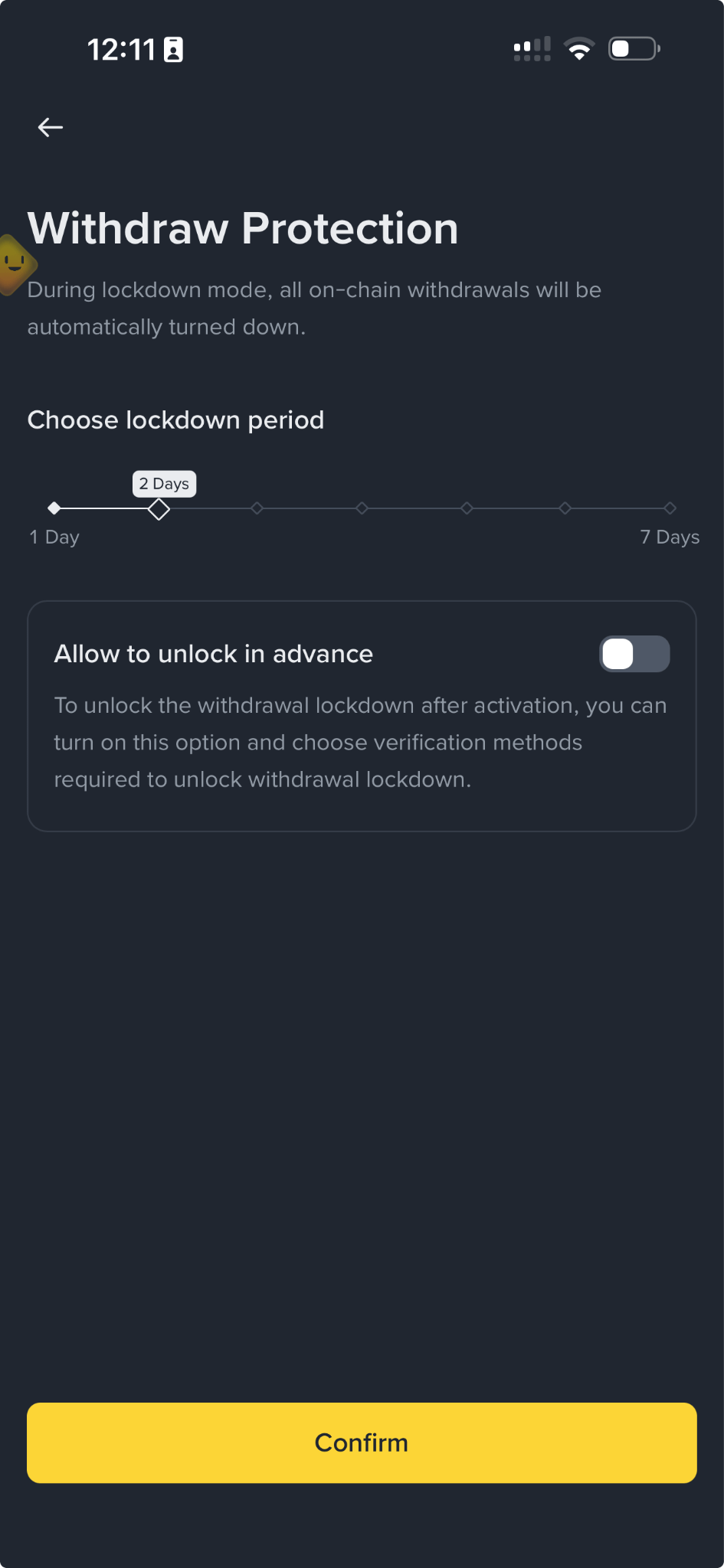
Lock period: choose between 1 and 7 days. If you don’t customize it, the default is 2 days.
Early unlock: here is the detail almost nobody explains. This option is disabled by default. If you leave it that way, the block can’t be lifted early - not by an attacker, and not by you.
If you decide to allow early unlock, the system requires two mandatory verification methods: a security key and an authenticator app. Email and phone are optional.
Practical recommendation: if you’re holding funds that you’re not actively trading, enable them and leave early unlock turned off. It’s the safest configuration available on the platform.
The feature blocks on-chain withdrawals. It’s designed for your cryptocurrencies.
The other tools you should enable today
Anti-phishing code
A unique code that you set and that Binance includes in all its legitimate emails and some SMS messages. The rule is simple: if a message claims to be from Binance but doesn’t include your code, it isn’t Binance.
Format: between 6 and 8 characters, with at least three of these types: uppercase letters, lowercase letters, digits, and underscores. In SMS it appears at the end, with the format Anti-Phishing: XXXX.
Don’t share it with anyone and update it from time to time.
Binance explains how to identify fake SMS and calls in its support center.
A rule worth remembering: all matters related to your account are handled exclusively through the Binance app or website. If you receive a message claiming to be from Binance asking you to call a number, and it isn’t confirmed in the app, it’s a scam.
If you receive a suspicious SMS:
Review your security record in Account → Security → Devices and activities
Use Binance Verify to check whether the source is official
Upload the SMS to the support chatbot for automatic verification
And something reassuring: receiving a fake SMS or a fake call does not mean your account has been compromised.
Withdrawal whitelist
Restrict withdrawals only to addresses you approved beforehand. Even if someone gets into your account, they can’t send funds to a new address.
Path: Settings → Withdrawal → Withdrawal whitelist → Enable. Addresses are managed in Address Management.
Right below, you’ll see the option Withdraw in one step, which allows withdrawing small amounts to whitelist addresses without 2FA verification. Convenience in exchange for security: if your priority is protecting funds, keep it disabled.
2FA and access keys
In the 2FA section, you’ll find Access Keys (biometric authentication), which protect your account with verification on your device or with a physical key such as a YubiKey, and the Authenticator app.
If you use traditional 2FA, prefer the authenticator app or a physical key over SMS: codes sent by text message can be intercepted via SIM-swap attacks.
Advanced Security also includes the 2FA verification strategy, which lets you customize which methods are required for each type of verification.
Emergency contact
A feature almost nobody configures: it allows you to add emergency contacts in case your account becomes inactive. It’s in Account → Security → Advanced Security → Emergency contact.
Suggested order: Anti-phishing code → 2FA with app or key → Whitelist → Withdrawal protection.
How does protection work in P2P operations?
In Mexico, P2P is one of the most used ways to deposit and withdraw in pesos, so it deserves its own attention.
Here it’s worth keeping a general principle in mind: unlike a bank account, in most cases there’s no way to recover lost or stolen cryptocurrencies. That’s why P2P protections act before the funds move, not after.
When you trade in the P2P market, Binance holds the cryptocurrency in escrow from when the order is opened. The seller doesn’t receive their crypto until they confirm they received the payment. If the payment doesn’t come through, the funds aren’t released.
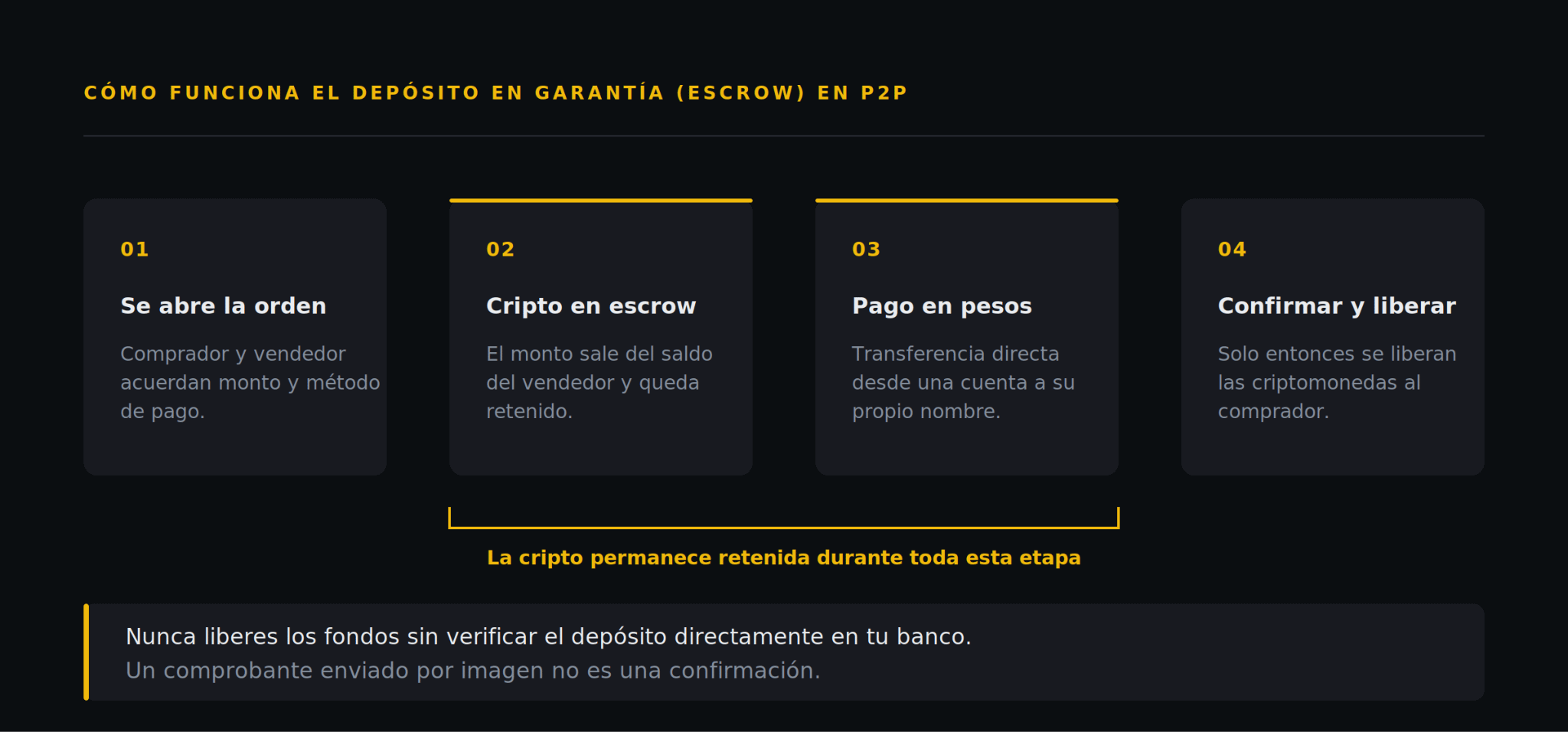
Two platform rules worth knowing
These are the transaction policy rules for Binance P2P.
The payment name must match. If the name of the bank account from which the money was sent doesn’t match the name registered on Binance P2P, the buyer violated the platform’s rules. In that case, the cryptocurrency should not be released: the seller must refund the money to the original account and the order is canceled.
Be suspicious if they suggest you move off the platform. If your counterpart insists on continuing the operation outside of Binance P2P or on another platform, that constitutes a violation of the transaction policy and is sufficient reason to open an appeal.
How does an appeal work?
If something goes wrong, this is the process:
First, the chat. In most cases, it’s faster to reach an agreement directly with the other party than to go through an appeal.
If there’s no agreement, tap the help button and open an appeal.
State the reason and attach evidence. For example: proof of payment, or proof that the payment wasn’t made.
The other party has 10 minutes to resume the chat and reach an agreement. If they succeed, you can cancel the appeal.
If there’s no agreement, the case goes to support and an agent contacts both parties by email.
While the order is under appeal, the cryptocurrency remains locked until the case is resolved. The customer support response time is 24 to 48 hours.
Two practical details: if you cancel an appeal by mistake, you need to wait 5 minutes before opening another. And when attaching evidence, don’t use screenshots of the conversation as proof of payment - attach the actual proof. Complete guide to appeals in P2P
Practical rules for staying safe
Pay only from a bank account in your own name
Never release funds before confirming the money is reflected in your account, not just "in transit"
Be cautious with proof sent as an image - verify directly with your bank
Keep all communication within the platform chat: that way the support agent can follow the conversation if an appeal is opened
If the order doesn’t have confirmed payment yet and the other party doesn’t respond, you can use Cancel order in the operation details. If the payment has already been made or the crypto has already been released, then you should appeal.
If you’re not sure, appeal before releasing. After releasing, the transaction is final
What does Binance do against scams?
The numbers give you a sense of the scale:
In the first quarter of 2026, Binance’s systems thwarted 22.9 million scam and phishing attempts, protecting approximately $1,980 million in user funds.
From the beginning of 2025 through the first quarter of 2026, the platform prevented more than $10,530 million in potential losses, protecting more than 5.4 million users.
In 2024, that figure was $4,200 million. The growth reflects the rise of AI-powered scams, deepfakes, and phishing.
Behind this are more than 100 integrated AI models across 24 or more security initiatives that monitor transactions, user behavior, and external signals in real time. When the system detects an anomaly, a human reviewer can step in.
What the system does when it detects something:
Send warning notifications before you complete a suspicious transaction
Submit risk assessment forms if it detects signs of vulnerability
It may pause withdrawals for up to 24 hours while it investigates
Blocks transfers to addresses included in its malicious address database, built together with Web3 security companies
Binance’s legal and compliance teams have processed more than 71,000 requests from authorities and contributed to hundreds of arrests.
What each layer covers
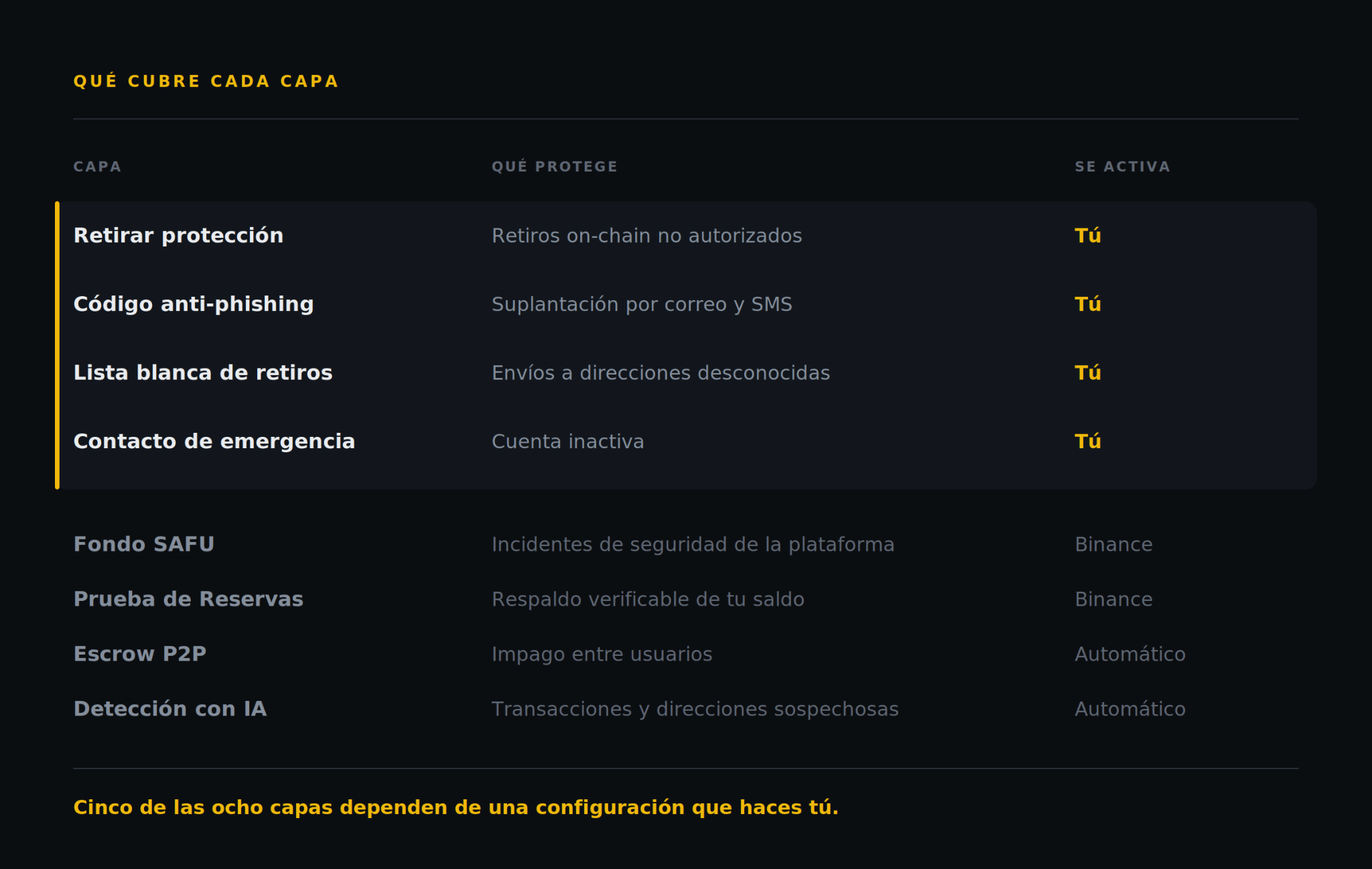
The four layers marked in yellow are the ones you enable: Withdrawal Protection, the anti-phishing code, the withdrawal whitelist, and the emergency contact. The others run on their own.
Put another way: five of the eight layers depend on a setting you make, not on Binance.
Security checklist
Start here: go to Account → Security. At the top you’ll see a panel called Security Control with four indicators. The ones shown in green are already active; the grays are pending.
It’s the fastest way to know where you stand. Then review the rest:
1. Anti-phishing code configured - 6 to 8 characters, three different types
2FA with an authenticator app or access key, not SMS
3. Withdrawal whitelist enabled
4. Withdrawal Protection enabled
5. Emergency contact added
6. Your verified balance in Proof of Reserves
7. Reviewed devices and activities - close anything you don’t recognize
8. In P2P: never release without confirming the deposit in your bank
If you have all eight, you’re better protected than the vast majority of users.
In summary
Fund protection in Binance works in layers, and not all of them do the same thing. SAFU and the Proof of Reserves account for the platform’s strength: the emergency fund is fully in bitcoin today and reserves can be verified publicly, with proportions above 100%.
But the layers that protect a user the most day-to-day are the ones enabled from within the account itself. Withdrawal Protection, the anti-phishing code, the whitelist, and the emergency contact take a few minutes to set up and cover precisely the most common scenario: someone who gets your credentials.
And if you trade on P2P, the rule is simple: escrow protects you while you don’t release. Verify the deposit in your bank, not in the receipt they sent you.
Frequently asked questions
How long can I keep my withdrawals blocked? Between 1 and 7 days per period. If you don’t customize, the default value is 2 days. When the period ends, you can re-enable it.
If I activate Withdrawal Protection, can I cancel it if I change my mind? Only if you enabled the early unlock option when you set it up. It’s disabled by default, and with that configuration the block remains until the period ends. If you turn it on, you’ll need a security key and an authenticator app to lift it.
In P2P, the other person pressures me to release the funds. What do I do? Don’t release. Verify the deposit directly in your bank, not in the receipt they sent you. Urgency is the main tool for this type of fraud and once the funds are released, the transaction can’t be reversed. If you’re unsure, open an appeal: while it’s open, the cryptocurrency remains locked. And if the other party insists on leaving the platform chat, that alone is already a reason to appeal.
What happens if Binance pauses my withdrawal without me requesting it? The platform’s systems can pause a withdrawal for up to 24 hours when they detect risk signals, or block a transfer aimed at an address marked as malicious. It’s a preventive measure: it gives time to verify the transaction before the funds leave to the blockchain, where they can’t be recovered.
Do you still have any doubts about any of these settings? Leave them in the comments so we can address them in the next post.
And if you know someone who trades in P2P without enabling any of this, share the article with them.
The figures correspond to the most recent public reports available at the time of publication. Always verify the updated data on Binance’s official pages.