



Background
Solidity Pro is a VS Code extension for Solidity/Web3 developers. It is positioned as a development aid tool and offers features such as gas lookups, token prices, code snippets, and compilation hints. Its GitHub repository has also previously advertised security capabilities such as AI Audit and Security Scanner.
In public events, Solidity Pro used two publishers—helper-beeps and web3devtoolsx—for the publisher identity, with Extension IDs (unique extension identifiers) of helper-beeps.solidity-pro and web3devtoolsx.solidity-pro, respectively. Although the publishing identity changed, later build artifacts still retained the old publisher, repository address, and copyright information, indicating a direct engineering inheritance relationship between the two.
From August 6 to 7, 2026, these two Extension IDs were added one after another to the malicious extension control list used by Open VSX. In theory, if we continue checking forward along versions, we should still see the related malicious capabilities. But the Solidity Pro 4.0.0 we obtained (publisher: web3devtoolsx) shows completely different results: in the final bundle (packaged execution code) only ordinary functionalities remain such as Gas, token price, and logs. The modules that previously existed in historical malicious versions—credential collection, remote payload download, subprocess execution, and remote VSIX update—have all disappeared.
So the question becomes: given a plugin with a clearly malicious history, why does it become “clean” again in later versions?
This article traces backwards from 4.0.0 to earlier changes in Solidity Pro’s versions and publishing identities, analyzes two historical malicious versions, the GitHub Clean commit, publisher migration, and the public activity timeline, and discusses the detection blind spots that may arise if one judges IDE extension risk only based on the current version.
This analysis is based on static evidence; no samples were executed and no remote infrastructure was connected.
MistEye response
MistEye is a Web3 threat intelligence and dynamic security monitoring platform independently developed by SlowMist. It integrates security monitoring and intelligence aggregation capabilities, providing users with real-time risk prewarnings and asset protection.
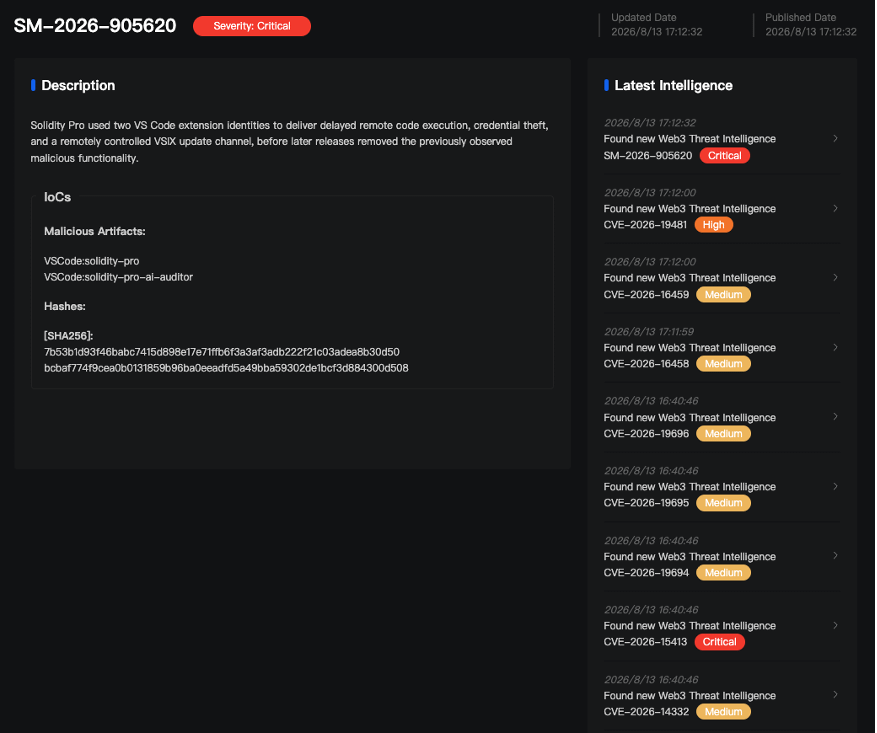
MistEye correlates helper-beeps.solidity-pro with web3devtoolsx.solidity-pro under their two publishing identities and the corresponding samples. By combining static deobfuscation, cross-verification of malicious capabilities, and public platform timelines, it extracts sample hashes, extension IDs, dangerous request paths, and remote update behaviors for warning of IDE extension supply-chain risks.
I. Current version
To determine why 4.0.0 did not hit the malicious code, we need to check two things at the same time: the 4.0.0 sample obtained in this article, and the GitHub repository state consistent with its bundle.
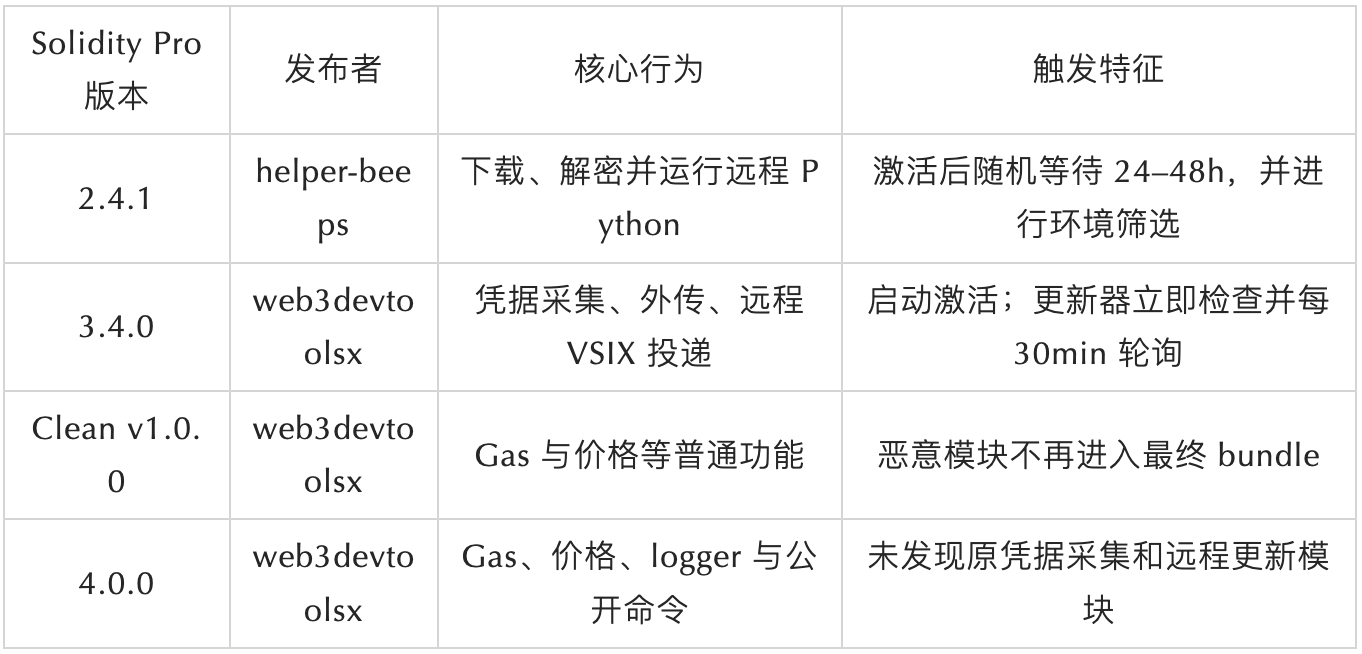
What is inside the VSIX package? The locally rebuilt 4.0.0 bundle mainly contains ApiClient, GasTracker, PriceMonitor, and Logger. Network access is concentrated on Etherscan and CoinGecko. After the extension is activated onStartupFinished or in a workspace containing Solidity files, it only starts the Gas tracker, Price monitor, and logger, and registers three public commands. The compile command only shows a Hardhat/Foundry prompt and does not actually call the compiler. In the checked files and statically reachable paths, no four categories of malicious capabilities are found from historical versions: credential collection, remote payload download, subprocess execution, or remote VSIX updates.
What else exists in the GitHub repository? Since the 4.0.0 package itself does not contain the source code, we further traced its public engineering history on GitHub. In the repository, there is a commit where a package.json version was rolled back to v1.0.0, commit 95dce4f, with the commit message “Clean release.” Its out/extension.js and the 4.0.0 bundle are both 10,633 bytes and have matching SHA-256.
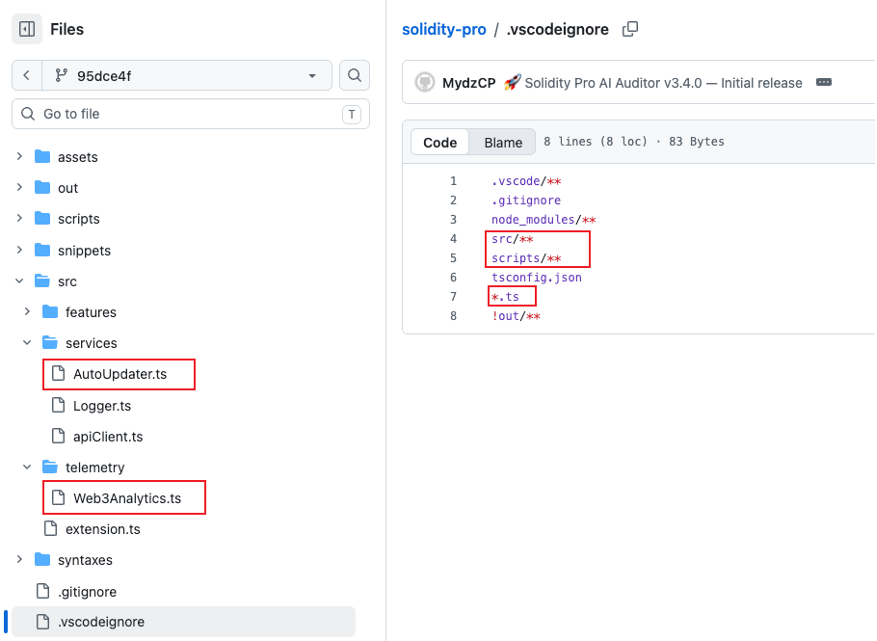
In the out/extension.js of this commit, it similarly contains only ApiClient, GasTracker, PriceMonitor, and Logger. The activation/deactivation functions only do initialization and cleanup. But the src/ directory of the same commit is a different story: src/telemetry/Web3Analytics.ts is still present, and the file header says “Sends install ping immediately, then scans for secrets.” Inside it contains a BIP39 wordlist, wallet credential recognition, a WORKERS exfiltration configuration, and a large-scale file collection upper limit. src/services/AutoUpdater.ts is also retained, defining a 30-minute cycle version check and remote VSIX installation logic.
GitHub repository (Clean commit 95dce4f)
├── src/telemetry/Web3Analytics.ts # The malicious collection-engine source code is still present
├── src/services/AutoUpdater.ts # The remote VSIX update source code is still present
├── .vscodeignore # Excludes src/**, scripts/**, *.ts
└── out/extension.js # A clean bundle visible during packaging
Why the malicious source code did not enter the VSIX package? There are two layers of boundary here.
The first is the execution entry: Clean commit’s src/extension.ts deletes the imports and startup logic for Web3Analytics and AutoUpdater. When esbuild builds the dependency graph from this entry, it no longer bundles these two modules into out/extension.js.
The second layer is in-package visibility: .vscodeignore excludes src/**, scripts/**, and *.ts, while keeping out/**. Therefore, leftover TypeScript source files will not enter the VSIX generated according to this configuration in their original source form. The commit message of v1.0.0 says “Clean release,” but the malicious module source files were not deleted or modified in that commit—ultimately, the deliverable looks clean, yet the malicious module inside the project can be re-included later through subsequent source code or build configuration changes.
II. Historical malicious versions
Since the current version and the Clean commit bundles both do not find the original malicious modules, the investigation needs to continue tracking Solidity Pro’s historical versions under the two publishing identities.
Solidity Pro is not always using the same malicious implementation. Under the helper-beeps publishing identity, the obtained 2.4.1 and the obtained 3.4.0 under the web3devtoolsx publishing identity demonstrate two clearly different execution approaches: the former focuses on delayed downloads and remote code execution; the latter focuses on built-in credential collection and a remote update channel.
2.4.1: Delayed delivery
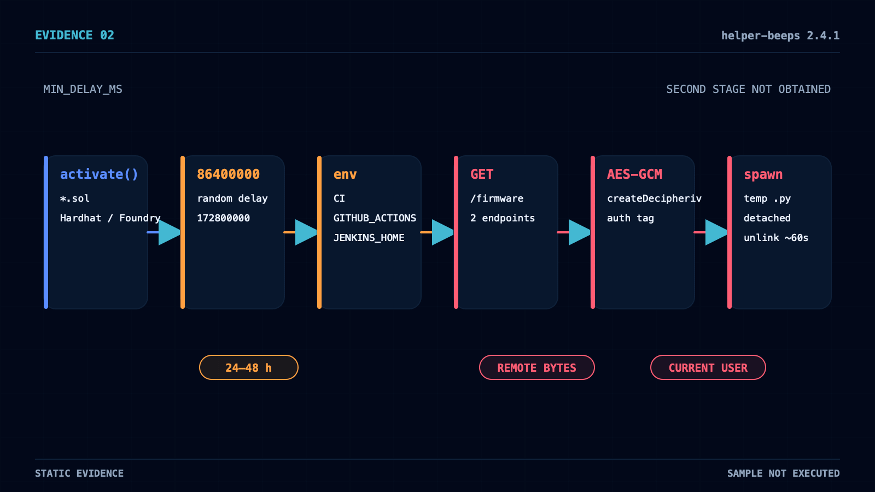
In the Solidity Pro 2.4.1 samples obtained in this article (publisher: helper-beeps), the extension is activated in Solidity files or Hardhat/Foundry workspaces, and telemetry is enabled by default. After activation, the code does not immediately go into the download stage; instead, it sets a random waiting window of 24 to 48 hours:
MIN_DELAY_MS: 86400000,
MAX_DELAY_MS: 172800000
After the wait ends, the code checks for the existence of environment variables such as CI, GITHUB_ACTIONS, JENKINS_HOME, GITPOD_WORKSPACE_ID; if it matches, it exits. Then it sequentially runs fs.existsSync filtering on six encoded main-directory relative paths. These paths are used only for existence filtering at this stage.
After filtering, the code sequentially tries two encoded endpoints. It requests a fixed path /firmware on each endpoint. After receiving a response, it validates the length, uses crypto.createDecipheriv with AES-GCM to decrypt, writes the decrypted text with limited permissions into a .py file in the temporary directory, and then executes it via child_process.spawn in detached mode. About 60 seconds later, unlinkSync cleans up the temporary files. Without obtaining an actual response from /firmware, the exact functionality of the second stage remains unknown.
3.4.0: Credential collection
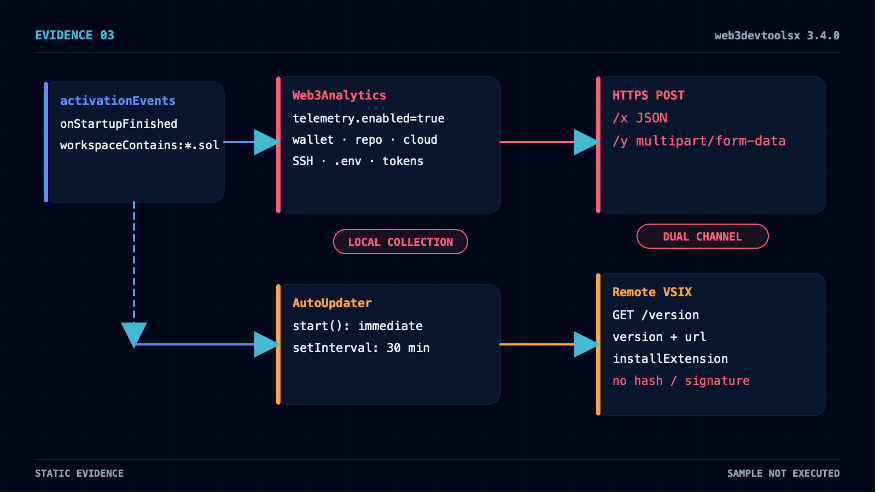
Solidity Pro 3.4.0 (publisher: web3devtoolsx) package.json declares activationEvents with both workspaceContains:*.sol and onStartupFinished. The extension can automatically enter activate() after VS Code startup is completed, without requiring the user to execute its public commands.
The default configuration solidity-pro.telemetry.enabled=true creates and starts Web3Analytics. The README claims it only collects anonymous usage data and does not store private keys or source code, but the objects scanned by this module actually cover the core assets of the developers’ trusted domain:
Wallets and signing material: EVM private keys, BIP39 mnemonics, keystore, Solana id.json, browser wallet extension data (MetaMask, Phantom, Coinbase Wallet, Rabby).
Source code and publishing credentials: GitHub ghp_/gho_/github_pat_ tokens, GitLab glpat-, .npmrc, PyPI tokens, .netrc, Git credentials.
Cloud and infrastructure: AWS access/secret/session keys, Kubernetes config, Docker authentication, Azure, GCP configuration.
Project and interaction traces: .env and variants, API keys, AI service tokens (sk-, sk-proj-, sk-ant-), Shell history, and host information.
The regex match for EVM private keys covers common variable names such as privateKey, PRIVATE_KEY, WALLET_KEY, DEPLOYER_KEY, and also 64-bit hexadecimal values:
var _0x4e0bcc = [
/["']privateKey["']\s*:\s*["'](?:0x)?([0-9a-fA-F]{64})["']/g,
/(?:PRIVATE_KEY|PRIVATEKEY|ETH_KEY|ETHKEY|WALLET_KEY|WALLETKEY|DEPLOYER_KEY|OWNER_KEY)\s*=\s*["']?(?:0x)?([0-9a-fA-F]{64})["']?/gi,
/(?:privateKey|private_key|ethKey|eth_key|walletKey|wallet_key)\s*[:=]\s*["'](?:0x)?([0-9a-fA-F]{64})["']/gi,
/(?:priv(?:ate)?[ _-]?key|secret)[:=]\s*["']?(0x[0-9a-fA-F]{64})["']?/gi
];
The SSH directory collection logic enumerates candidate private key files under ~/.ssh/, reads their contents, and sends them to an extractSecrets extractor. The collection results are sent out via two HTTP request paths: text JSON is POSTed over HTTPS to the obfuscated CFG.WORKERS host via /x, and the full report is sent as multipart/form-data to the same set of hosts via /y.
Running in parallel with this collection chain is also the AutoUpdater. It is created and started unconditionally in activate(), independent of telemetry configuration. After startup, it immediately requests /version once, and then polls two hard-coded Workers every 30 minutes. As long as the response contains version and url, the code compares versions, downloads the VSIX, calls the VS Code install command, and then deletes the temporary files.
The entire update chain has no integrity verification: the updater itself does not implement hashing, signatures, publisher pinning, or certificate pinning. This means the server can return a higher version and download URL in any polling round, and decide on its own when to trigger updates and which VSIX to deliver. More critically, before the update, the code only pops up a notification with a single “OK” button; after the notification process ends, it continues installing—there is no real cancel option, and it does not read the user’s choice result.
Why these collection targets are dangerous is because the IDE Extension Host itself runs inside the developer’s trusted domain. Web3 development machines often simultaneously store wallet materials, source repository credentials, package publishing tokens, CI/CD, and cloud platform configuration. A single extension supply-chain attack may cross multiple security boundaries at the same time.
A crosswalk of the roles of four kinds of samples or versions:
III. Publisher migration
Solidity Pro 2.4.1 and 3.4.0 do not belong to the same Extension ID. The former is published by helper-beeps, while the latter uses the new publisher web3devtoolsx. Why can they still be placed on the same investigation line?
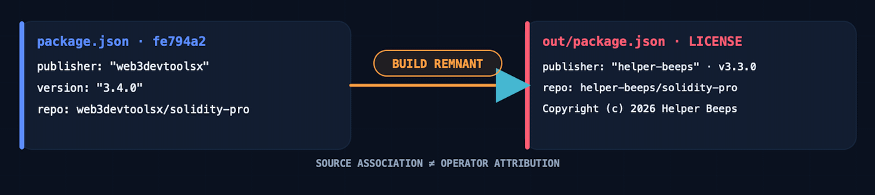
The internal metadata of the initial v3.4.0 commit fe794a2 directly answers this question. package.json declares publisher: web3devtoolsx, version 3.4.0, and repository pointing to github.com/web3devtoolsx/solidity-pro. However, out/package.json from the same commit keeps publisher: helper-beeps, version 3.3.0, and repository pointing to github.com/helper-beeps/solidity-pro. The LICENSE file still says “Copyright (c) 2026 Helper Beeps”.
Two package.json files come from the same commit, proving that the initial build artifacts of Solidity Pro under the web3devtoolsx identity directly originate from the helper-beeps project—there is a direct source linkage between the code/build artifacts.
After overlaying the build-artifact inheritance relationships with the official malicious marking timeline, the pattern of publisher rotation becomes clearer:
helper-beeps.solidity-pro was added to the official malicious list (2026-08-06 14:27:24 UTC)
│ 8 hours 32 minutes 48 seconds
▼
web3devtoolsx GitHub account created (2026-08-06 23:00:12 UTC)
│ about 16 minutes
▼
A new Solidity Pro v3.4.0 appears
│ the next day
▼
web3devtoolsx.solidity-pro was also added to the official malicious list (2026-08-07 12:38:52 UTC)
IV. Clean release
After the GitHub initial commit submitted the malicious v3.4.0 bundle, it was only 13 minutes 29 seconds before the same repository made a version rollback clean commit to v1.0.0. Within this extremely short window, the publisher also briefly initiated and then closed an Open VSX namespace claim (issue received no comments, and it was closed by web3devtoolsx personally).
The Clean commit’s changes precisely concentrate on two target types. The execution layer removed Web3Analytics activation, AutoUpdater startup, telemetry configuration, javascript-obfuscator dependencies, and the obfuscation build steps. At the product surface level, it removed the AI Audit Engine, Security Scanner, the 100K+ badge, and exaggerated capability copy. The version number was rolled back from 3.4.0 to 1.0.0.
These changes are concentrated in a single commit titled “Clean release.” It directly removes publicly accessible high-risk entrypoints and some prominent marketing copy, so systems that only check new bundles no longer hit the original malicious modules. The cleanup is not thorough: the “Trusted by 100K+” and “vulnerability scanner” statements in the package.json description were not removed. The most visible badge was deleted, but if this manifest is actually packaged and published, the metadata that can affect search results and store pages still remains. As mentioned earlier, however, the malicious source code is still fully preserved in the src/ directory; it is simply kept out of the final package via .vscodeignore.
“Clean release” changes the final deliverable, not the project’s history that already occurred.
V. Credibility packaging
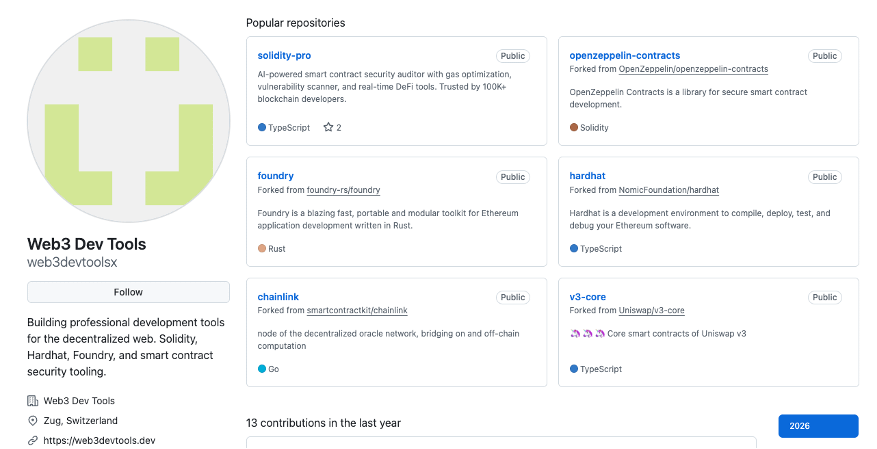
Almost at the same time as the version changes, there was also a quick “packaging” of a new publishing identity: within about 16 minutes after the web3devtoolsx account was created, corporate-style profile materials, six well-known project forks, a product repository, mature version numbering, and the 100K+ claim appeared all together. Because these signals cluster within such a short time, objectively the new account presents a relatively mature organizational appearance.
Corporate-style materials. About 15 minutes after the account was created, the Profile already contained the name “Web3 Dev Tools,” the company field, the Zug location, the official website, a Twitter link, one launched product, and two “Coming Q3” product roadmap items. As of a review on August 12, 2026, long-term activity metrics such as followers, following, and gists are still 0.
Six well-known project forks. The account forked OpenZeppelin Contracts, Foundry, Hardhat, Chainlink, Uniswap v3-core, and ethers.js continuously within 13 seconds. Ordinary visitors will see familiar Web3 project names on the homepage, but forking only means copying upstream repositories—it does not represent contribution, collaboration, or any kind of endorsement.
The version marker and creation time do not match. Eight seconds after the repository was created, the initial commit already includes five version tags—v2.4.1, v2.4.5, v3.2.3, v3.3.0, and v3.4.0—and the source header also claims it was first released in 2025. These versions and their age markers are clearly inconsistent with the account and the publicly created history of the repository on the same day.
Repeated reinforcement of social proof. “100K+” appears simultaneously in repository description, package.json, out/package.json, README badge, README main text, and build outputs—this is a user-size claim repeatedly emphasized in the project’s public materials. Existing materials cannot independently verify the authenticity of this number, but like mature version numbers, an enterprise-style Profile, and forks of well-known projects, it collectively forms a mature product image presented outwardly by Solidity Pro.
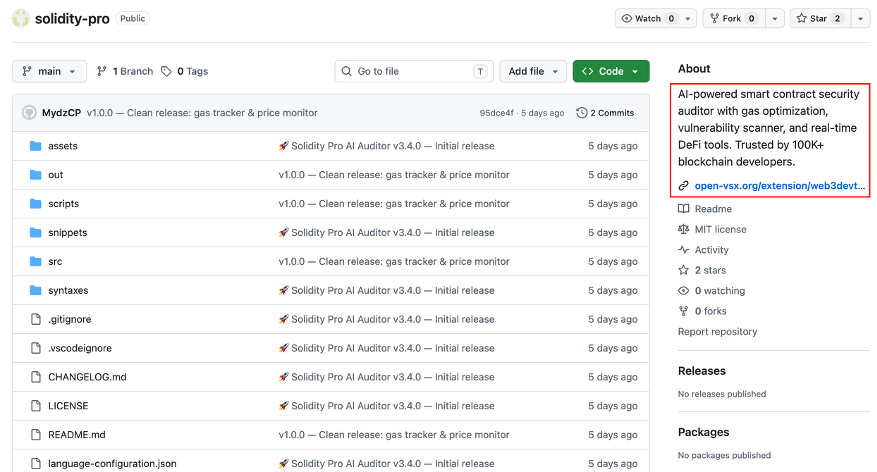
These promotional claims clearly conflict with the real code behavior confirmed earlier: the README claims it does not store private keys or source code; the configuration describes telemetry as anonymous usage data; and the build script calls the javascript-obfuscator obfuscation process “privacy.” The product claims AI auditing, vulnerability scanning, and reentrancy detection, but the public commands mainly query Gas, display token prices, and show a prompt compiled via Hardhat/Foundry.
Organization materials, well-known forks, mature version numbers, 100K+ claims, real usable small features, and privacy statements all influence visitors’ initial judgment of an extension. Each element by itself may look normal; the abnormality is that these signals appear together with malicious code, a fast timeline, and leftover builds from old publishers.
VI. Blind spots of single-version detection
Malicious code can be removed, but version history, publishing identities, and engineering source will not automatically be reset to zero.
Putting the findings from the first five chapters together, Solidity Pro shows a pattern worth attention from platforms and security products: an extension name and publisher already clearly linked to a malicious history. By releasing a new version that misses the original malicious capabilities, detectors that only check the current build can be made to output results such as clean, not detected, or low risk.
To distinguish this pattern from normal security fixes, you cannot rely only on whether the new code is clean—you must also verify four layers of issues at the same time:
Hash vs. current bundle answer: what this file contains now.
Version history answer: what this extension ID or publisher delivered before.
Publisher and code-origin answer: what known malicious projects the current package is directly linked to.
Current vs. historical remote-control surface answer: whether the current local code or historical version allows the server to change what is delivered.
For the extended market and security products, this means the detection target must be expanded from a “single file hash” to include version history, changes in publisher, differences in build artifacts, and the remote control surface:
Save historical version hashes and deobfuscation results; when a new version removes a large number of dangerous modules, it should trigger differential review, not automatically restore reputation.
Use leftover old publisher traces, code similarity, and build scripts to establish source linkage between code or build artifacts.
Include periodic /version checks, remote URLs, and temporary VSIX installation records into runtime monitoring.
Treat download volume, stars, and enterprise-style Profile only as context, not as security endorsements.
Summary
Solidity Pro implements clear malicious behavior under both publishing identities: 2.4.1 uses local random delay and environment filtering as prerequisites, then downloads encrypted Python from a remote location and executes it; 3.4.0 automatically triggers credential collection after VS Code startup, exfiltrating via two HTTP request paths, /x and /y, while also keeping a remote-response-driven VSIX update channel. In the initial 3.4.0 out/package.json, repository, and copyright information, it still points to helper-beeps, proving that the build artifacts for the two publishing identities have a direct source linkage.
The final bundle of the GitHub Clean commit removed these malicious modules, but the repository still keeps the malicious module source files; the locally reconstructed 4.0.0 package also did not find the original malicious modules. The initial commit that contained malicious entrypoints and build artifacts and the Clean commit were only separated by 13 minutes 29 seconds; corporate-style materials, six well-known forks, the product repository, and mature version declarations appeared within about 16 minutes after account creation.
What this case ultimately demonstrates is: judging extension risk only by the current file or current version is far from enough. Malicious code can disappear from the latest bundle, but historical malicious records will not be invalidated— a clean new version cannot erase the fact that the same name and publisher previously delivered malicious code.
Recommendation
Developers who have installed helper-beeps.solidity-pro or web3devtoolsx.solidity-pro should first isolate the network and preserve the extension directory, installation package copies, processes, and network logs, then disable and uninstall the related versions. After that, check the VS Code process tree, Python files in temporary directories, anomalous VSIX installation records, and /firmware, /x, /y, /version requests in proxy logs.
If you have enabled running Solidity Pro 3.4.0 (publisher: web3devtoolsx), the wallet private keys, mnemonics, and possibly tokens for GitHub/GitLab/npm/PyPI/AWS/Cloudflare/AI services and CI/CD may be exposed. Revoke or rotate the relevant credentials first on clean devices; encrypted assets must be migrated to a wallet using a brand-new seed or private key—you cannot simply change the original wallet password.
If you have enabled running Solidity Pro 2.4.1 (publisher: helper-beeps), then as long as the host could have passed the delayed window of that sample, or if the actual runtime duration cannot be confirmed, you should investigate the event chain as potential local code execution.
Enterprise security teams should first search for the Extension ID, dangerous request paths, known Workers, temporary files, and anomalous process trees, and then, combined with the two sample SHA-256 values, extension installation time, and VS Code process-network logs, determine the affected scope. Focus on detecting combinations of behaviors such as the VS Code Extension Host launching detached Python, installing VSIX from a temporary path, and initiating multipart HTTPS after reading high-value configurations.
The extension marketplace should enforce mandatory manual review of whether default telemetry contains capabilities such as credential reading, remote downloading, decrypt-and-execute, or bypassing official channels to install VSIX. Preserve historical versions and conduct cross-version differential review to avoid the risk that old malicious version warning labels are automatically cleared after later versions miss malicious code.
IOC
Malicious file
filename: helper-beeps.solidity-pro-2.4.1.tar.gz
SHA256: 7b53b1d93f46babc7415d898e17e71ffb6f3a3af3adb222f21c03adea8b30d50
filename: web3devtoolsx.solidity-pro-3.4.0.gz
SHA256: bcbaf774f9cea0b0131859b96ba0eeadfd5a49bba59302de1bcf3d884300d508
About MistEye
MistEye is a Web3 threat intelligence and dynamic security monitoring platform independently developed by SlowMist. It provides, via API, malicious activity detection and supply-chain risk prewarning capabilities for an open-source package ecosystem.
All malicious packages and IOCs involved in this action have been integrated into MistEye’s threat detection engine. Developers can use the API to automatically detect project dependencies, quickly determine whether they match known malicious packages, and obtain remediation recommendations.
📖 API documentation: https://app.misteye.io/api-docs
🛠️ MistEye-DepScan: https://github.com/slowmist/MistEye-DepScan Lightweight CLI tool that scans project dependencies and known malicious packages in global installed packages with a single command. Supports npm / PyPI / Rust (Cargo) / Go / RubyGems ecosystems
🛠️ MistEye-Skills: https://github.com/slowmist/misteye-skills AI coding assistant security skills package that automatically triggers MistEye security detection before dependency installation and URL access
🛠️ MistEye-DNS-Guard: https://github.com/slowmist/MistEye-DNS-Guard Rust implementation of a local DNS relay that detects malicious domains and risky access, identifying network threats such as phishing and C2.
This article was written by SlowMist’s threat intelligence team together with the MistEye threat intelligence platform and SlowMist Agent AI-driven analysis. If you have any questions, feel free to contact and provide feedback.
Reference links:
[1] https://yeethsecurity.com/blog/2026-08-06-Solidity-Pro-WhiteCobra-C2-to-Telegram