
IT Home, July 22: Dark mode is a long-standing inconsistency in the visual design of Windows 11. In theory, once you enable dark mode, the entire system interface should switch to dark, but some components still haven’t fully completed the adaptation.
The “Properties” panel is the most obvious example. Whether the system is using a light or dark theme, the window always stays white, standing out awkwardly from the surrounding interface. The issue seems trivial, but once you notice it, it’s hard to ignore—especially for users who care about visual consistency.
Things finally started to change. According to a report from the foreign media outlet Neowin today (the 22nd), in the Windows 11 experimental build 26300.8935, the modernized dark “Properties” interface has already been hidden. The new design is currently only applied to the interface for deleted files, and it hasn’t covered all “Properties” windows yet, but it’s enough to show that Microsoft has begun working to address the inconsistent interface styling.
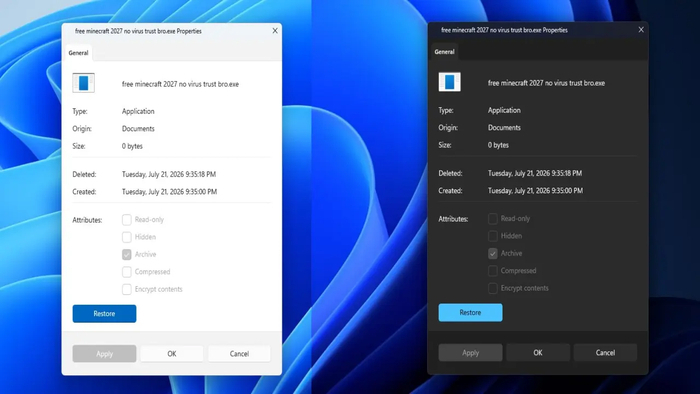
IT Home learned that Microsoft has not yet disclosed when the dark design will expand to more “attribute” dialog boxes, and it is also unclear whether it can be rolled out broadly in the end. However, Windows 11 has finally taken the first step toward fixing the long-standing visual fragmentation.
It may still take some time for this feature to officially roll out. The report also noted that Microsoft has not even fully enabled the new interface in Insider preview builds, meaning the public release has to come later. Therefore, even if it’s just a small change, there is still a long way to go before all users can truly use it.