


Trading badges are a new identification feature on Binance Square. Traders with the best performance in the rankings automatically earn badges based on real trading metrics — these are displayed in profiles, posts, and comments.
Trading volume, profits, actual futures trading results, and the scale of copy trading — everything is visible and backed by data.
Update the app to the latest version (V3.16.0 or higher) to enjoy new features.
One badge, double value: proof of skill for traders and a quick way for readers to find professionals.
What do badges provide?
For traders and authors
Instant visibility—your badge immediately displays your trading track record as soon as a reader sees your name.
Context for your viewpoints—are you sharing market analysis or trade reviews? Badges let readers see your profile data alongside your opinion.
For readers
Fast filtering—easily identify authors with an open trading track record as you scroll the feed.
A well-considered decision—click any badge to see its source and parameters. Review the data behind the profile and form your own opinion.
Badge categories
Badges are formed based on multiple trading performance metrics:
Top by trading volume (7 days / 30 days)—updates daily
Best by profit performance (7 days / 30 days)—updates daily
Top by real-time futures trading—updates every 30 minutes
Top by copy-trading scale—updates every 30 minutes
Best profit in copy-trading (30 days)—updates every 30 minutes
More categories will be available soon. Is there a metric you’d like to see? Leave a comment.
Note: To protect user privacy and data security, the specific threshold values required to earn each badge are not published. Badges are only granted to users with the best results in each category—having a badge confirms your leadership in that direction.
How do I get and set up my badge?
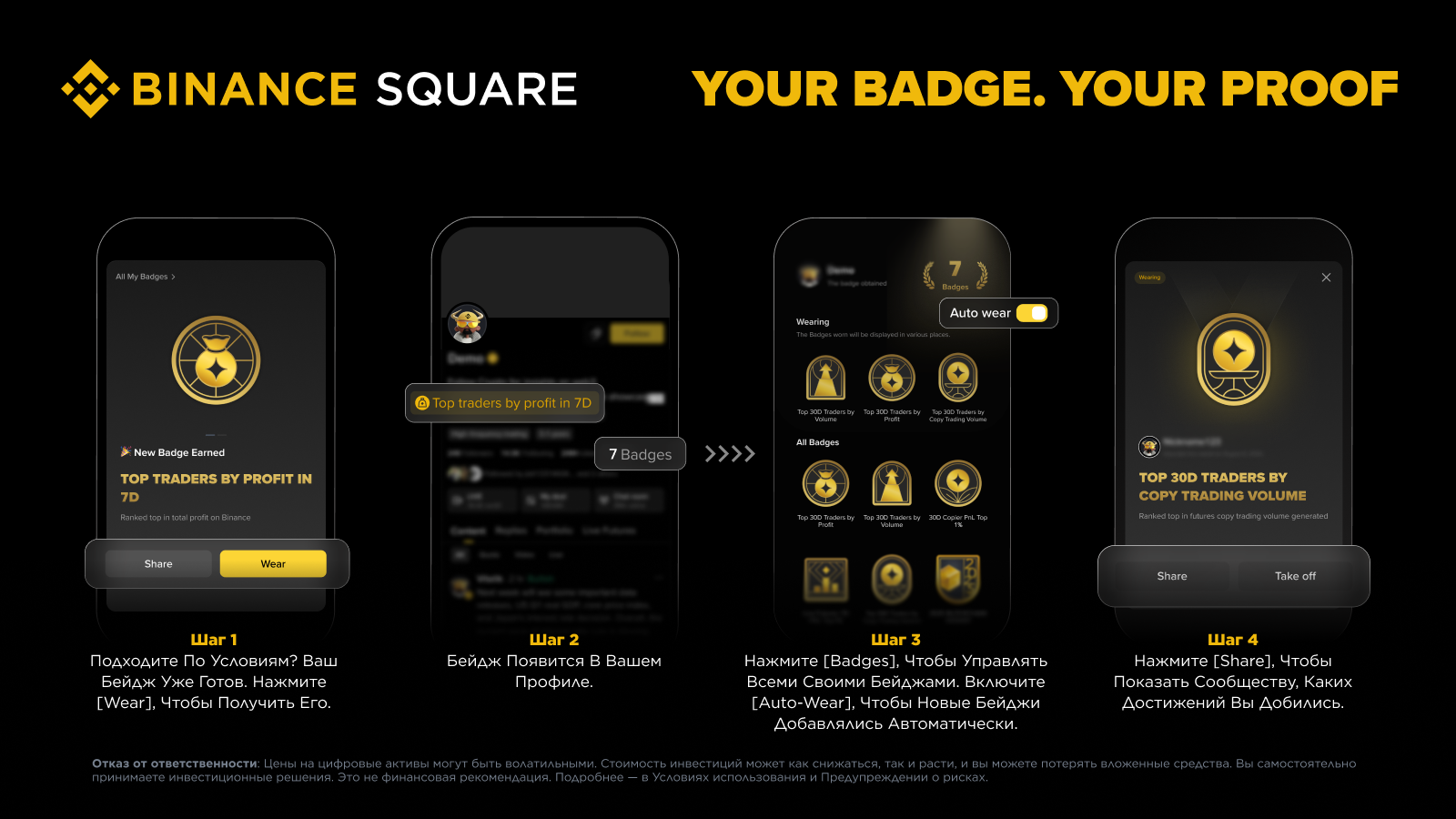
Step 1: Meet the ranking requirements—the badge is issued automatically. Tap [Wear] to get it, or [Share] to show it off.
Step 2: Worn badges are displayed on your profile.
Step 3: Tap [Badges] to view all your badges and enable [Auto-Wear].
Step 4: Tap [Share] to show your achievements to the community.
Share your badges
Got a badge? Show off your achievement. Tap [Share] in the new badge notification or on the badge details page—create an achievement card and post it in Chat, X, Telegram, and other platforms, or share the link.
Frequently Asked Questions
Q1: Do I need to apply for a badge?
No. The badge is issued automatically after you meet the required conditions.
Q2: Where and how are badges displayed?
Badges are displayed on profiles, posts, comments, and on the Badge Wall in Binance Square. You can put them on manually or enable Auto-Wear so that new badges are shown automatically. Click any badge to see which trading metric it relates to.
Q3: How do I manage my badges?
Go to the “My Badges” section to wear, remove, or view any badge. You can also enable Auto-Wear so that new badges are displayed automatically.
Q4: What should I do if I have multiple badges from the same category?
The most representative badge will be shown. The display updates as your trading results change.
Q5: Are badges issued forever?
Badges are tied to your real trading performance and update dynamically. If your rank drops below the set threshold, the badge will be automatically removed. Once you meet the conditions again, the system will issue it again—so long as you maintain a strong performance, your badge remains active.
Q6: Are badges an investment recommendation?
No. Badges only show that a user meets certain criteria based on data within a specific trading category. They do not guarantee future profits, do not confirm the quality of any content or opinion, and are not an investment recommendation. Always do your own analysis and manage risks.