
Forgotten wallet password? You might not lose your coins; but if your seed phrase leaks, that's where the real danger lies.
Written by: Tyler
I often help newcomers to Web3 with their queries and have encountered all sorts of questions.
Like someone asking, 'Can I recover my wallet if I accidentally delete it or forget my password?'; or people saving their seed phrases as screenshots in their photo albums, thinking it's fine as long as they don’t share them; and some still can’t distinguish between the accounts on trading platforms and the wallets they've downloaded, not knowing the difference.
These questions may seem basic, but in reality, many folks who've been using wallets for years still don't fully grasp them.
So I’m going to start a new “Web3 Survival Handbook” series. I’ll try not to use jargon, focusing specifically on those issues that look small but are genuinely important, helping everyone understand and use Web3 step by step.
This article is Web3 Survival Handbook, Episode 1. We’ll start with the most important thing: the difference between the private key, the mnemonic phrase, and the wallet password.
First, remember this one sentence: there aren’t actually any coins in the wallet
Many people think that their BTC, USDT, ETH, or other tokens are “stored in the wallet.”
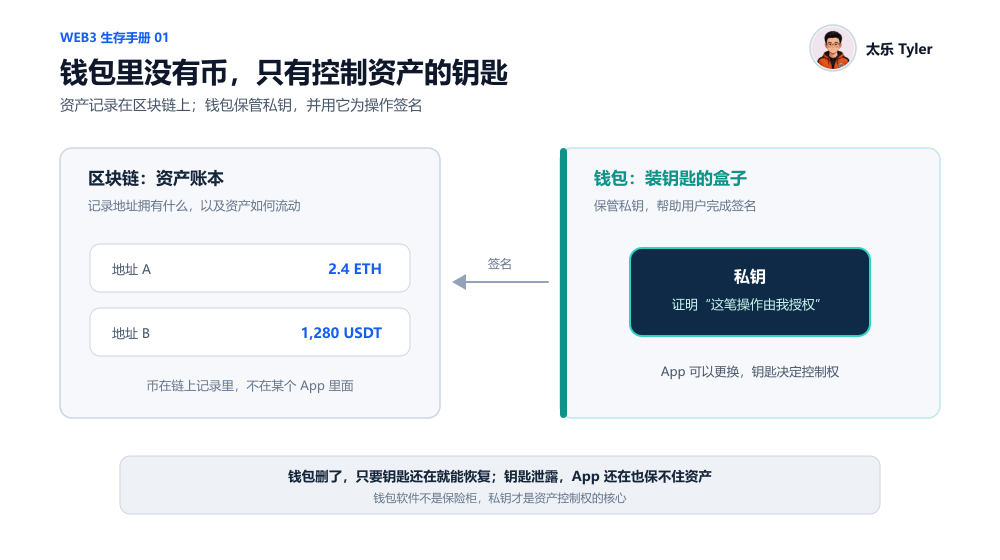
But strictly speaking, the assets are not inside the wallet app—they’re recorded on the blockchain. In other words, the wallet you use—whether it’s MetaMask, OKX, SafePal, TP, or imToken—is more like a tool that helps you manage keys, not a vault that stores assets:
The blockchain records how much asset a particular address has, where those assets came from, and where they were sent;
The wallet is responsible for helping you manage the “key” to that address, and for enabling deposits and withdrawals of assets for that address;
For example, when you make a transfer, swap tokens, or authorize an on-chain application, the wallet calls the private key stored internally to sign that operation—essentially proving to the blockchain that the person controlling this address has agreed to execute the operation.
So the wallet app isn’t a vault for holding coins—instead, it’s more like a box for holding keys. The truly valuable part is the keys inside (the private key), not the box itself.
This also explains two things that many people have trouble understanding:
Even if the original wallet app shuts down, gets delisted, or you accidentally delete it, as long as you still have backed up the correct private key, you can download another wallet, import the private key again, and recover it. Because the industry is currently based on the same set of technical standards, the import logic across different wallets is interoperable. Put the same key into a different box—the lock can still be opened.
If someone gets hold of your private key, even if your phone is still in your possession and you haven’t deleted the wallet app, they can still transfer your assets—because they can import this key into their own wallet. The blockchain only recognizes the key, not who is holding the key;
Second, what’s the difference between the private key, the mnemonic phrase, and the wallet password?
Since the private key is so important, what exactly is the mnemonic phrase?
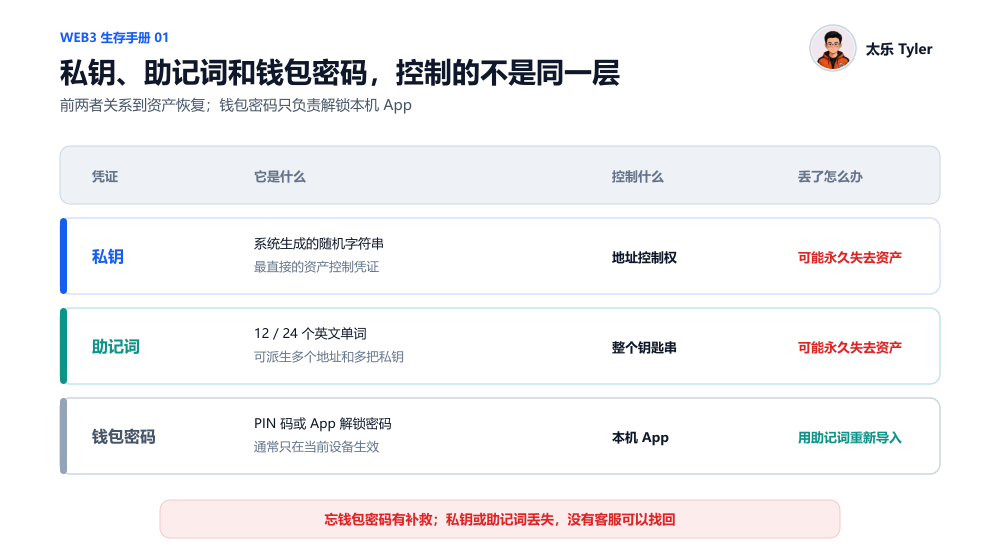
Actually, mnemonic phrases are mainly there to make it easier for ordinary people to back up their wallets. Since the private key is a string of characters randomly generated by the system—long and messy—people are likely to make mistakes when backing it up manually, and ordinary users can almost never memorize it directly.
So the industry adopted a common standard and “converted” the private key into a mnemonic phrase made of 12 or 24 English words.
That is to say, the private key and mnemonic phrase are essentially the same key—just in a different format. Extending that a bit further: in theory, one set of mnemonic phrases can be used to derive multiple private keys. To make it easier to understand, you can think of a private key as a specific key, while the mnemonic phrase is like a total backup of a keychain. (I also discussed in (starting from (chasing wind in a pursuit of shadows): deciding the 2048 words that determine trillions of crypto assets) why mnemonic phrases are usually generated from a fixed word list, and the basic logic behind it. If you’re interested, you can take another look).
When most mainstream wallets are created, they ask users to back up the mnemonic phrase, and it’s very rare to directly require regular users to copy down a long string of private keys.
However, whether it’s a private key or a mnemonic phrase, you must never tell anyone. Under normal circumstances, whether it’s wallet customer support, a project team, or staff at a trading platform, they won’t ask you to send them your private key/mnemonic phrase. If someone asks you to provide your private key for reasons like “verifying your wallet,” “removing risk control,” “claiming anirdrops,” or “helping you recover assets,” you can basically treat it as a scam right away.
So what is the wallet password?
The wallet password—meaning the PIN code or unlock password you set when opening the app—is only used to unlock the app itself, similar to a phone screen lock. It’s completely different from the private key and mnemonic phrase.
Everyone can remember a simple principle:
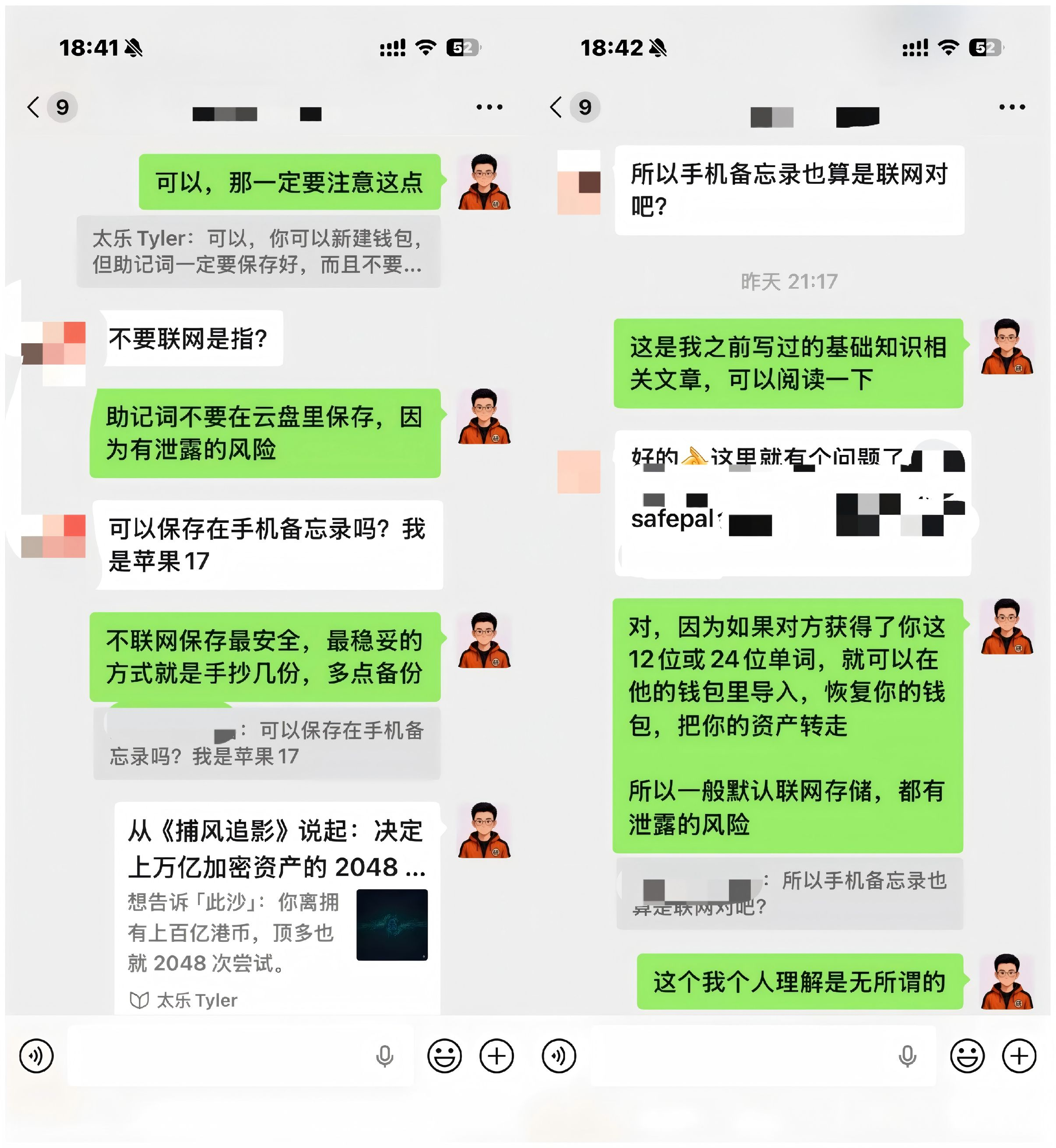
If you forget your wallet password, that’s fine—you can import your private key/mnemonic phrase again, then set a new password;
If you lose the mnemonic phrase and the original wallet can still be opened, you still have a chance to back it up again or transfer your assets;
If you lose the mnemonic phrase and the original wallet can’t be opened either, then you might truly be unable to recover anything;
Once a mnemonic phrase leaks, you should immediately transfer your assets to a brand-new wallet;
Third, why doesn’t the account on a trading platform have a mnemonic phrase?
Many people first come into contact with cryptocurrency through trading platforms like BN, OK, or BG. At that point, you might wonder: “I have BTC, ETH, USDT, and USDC in the trading platform—why didn’t it give me a mnemonic phrase?”
Because assets kept on centralized exchanges are usually not directly managed by you in terms of private keys/mnemonic phrases—the exchange manages them for you.
When we log in to a trading platform, we rely on things like a phone number/email + login password, plus second-factor verification tools such as an SMS code or Google Authenticator. The balance shown in the account is also mainly a record kept by the trading platform’s internal system for you, not an independent on-chain address that you directly control.
The advantage of this approach is that it’s simple: even if we forget the password, we can contact customer support and recover the account after completing face recognition or identity verification. But the trade-off is that we need to trust the trading platform to store your assets securely and handle everyone’s deposits and withdrawals normally.
A wallet is different: you personally keep the private key, and you mainly control the assets. When you want to transfer or who you want to send to, it usually doesn’t need to go through a trading platform’s approval—but at the same time, you also have the responsibility to store the mnemonic phrase securely, identify phishing websites, and avoid incorrect actions.
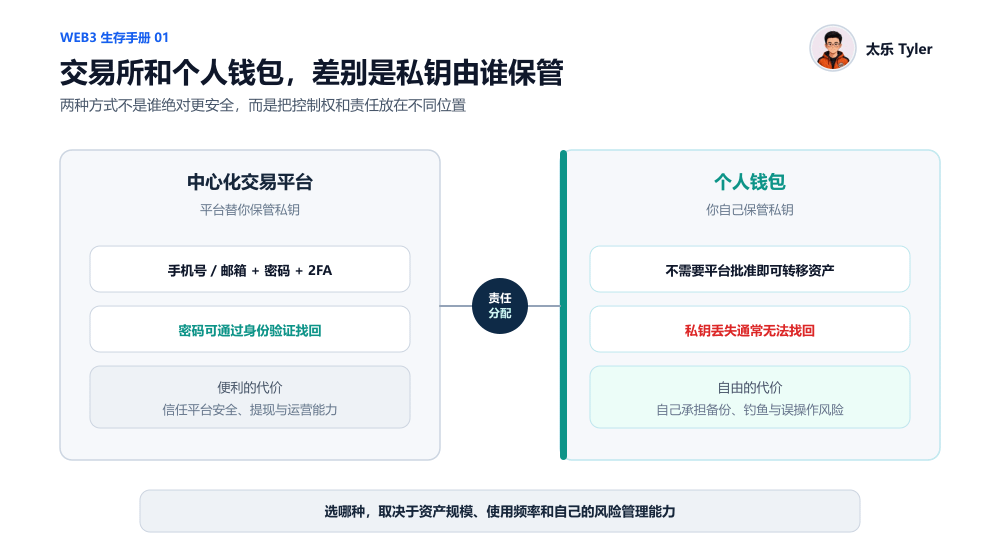
So I’ve always told everyone: trading platforms and personal wallets aren’t necessarily “more secure” in absolute terms. It’s just two different ways of assigning responsibilities. Using a trading platform means you hand part of the security and custody responsibility to the platform; using a wallet means you take back both control of your assets and the corresponding responsibilities.
Which one to choose depends on your asset size, how frequently you use it, and your own risk-management ability.
But there’s also an easy-to-confuse point: today’s mainstream trading platforms usually provide both a “trading platform account” and a “Web3 wallet.” For example, in the same BN or OK app, you can log in to the trading platform account and also create a self-custody wallet that requires backing up a mnemonic phrase.
Even though the entry points are together, they are not the same account. The way you control assets is completely different. The test is simple: if a wallet asks you to back up the mnemonic phrase independently and explicitly states that the platform cannot recover it for you, then it’s a self-custody wallet.
Fourth, the difference between hot wallets and cold wallets is also in the private key.
Once you understand the private key/mnemonic phrase, it becomes easy to distinguish hot wallets from cold wallets:
Hot wallet: the private key is stored on a connected device, and signatures are completed via a phone or computer. Wallet apps from brands like MetaMask, OKX, SafePal, and TP usually fall into the hot wallet category;
Cold wallet: the hardware wallet we often hear about is a common implementation of a cold wallet. Its private key is generated and stored in a dedicated offline hardware device. During signing, the private key never leaves the device—for example, hardware devices from Ledger, Trezor, and OneKey;
Of course, most projects that build hardware wallets also have their own compatible software apps—like SafePal and OneKey.
It needs to be clarified that a cold wallet doesn’t mean the whole device will never touch the internet. More precisely, it means the private key itself won’t leave the hardware device, and it won’t be directly exposed to connected phones or computers. The real process is roughly:
A transaction that waits for a signature generated by your phone or computer;
The hardware wallet’s secure chip inside the device completes the signature;
The hardware wallet sends the signature result back to your phone or computer;
The phone or computer broadcasts the transaction to the blockchain;
Throughout the entire process, the private key always remains inside the secure chip of the hardware device.
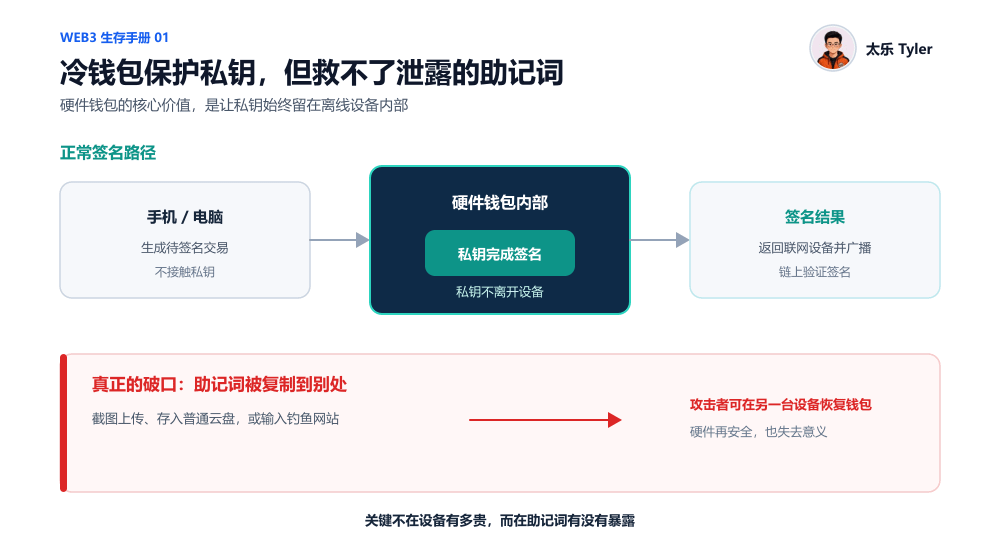
However, a cold wallet—meaning a hardware wallet—is not absolutely secure. If you take a photo of the hardware wallet’s mnemonic phrase and upload it, or you enter it into a phishing website, or you give an incorrect authorization to a malicious contract, then even if the hardware device itself is secure, it won’t matter.
In short, a hardware wallet protects the storage and signing environment of the private key, but it can’t protect you from actively leaking the mnemonic phrase.
For the specific selection between hot wallets and cold wallets/hardware wallets, we’ll discuss that in detail in the next article.
Fifth, can’t mnemonic phrases really be stored in a cloud drive?
Also, some friends keep asking me: “If I store the mnemonic phrase in my phone’s notes app and don’t send it to anyone, is that okay?” “If I store it in an Alipay iron box or an encrypted cloud drive, is it safe?”
Objectively speaking, security issues are rarely as simple as “it will definitely be stolen” or “it will definitely not.” Instead, different storage methods correspond to different probabilities of risk.
If you store the mnemonic phrase in a plain notes app, WeChat favorites, chat history, email, or a photo album, the biggest risk is that your phone might get infected or remotely controlled, or your cloud account might be hacked and photos/notes might sync automatically. This could allow certain apps to read your clipboard or local content. Even when you sell or repair an old phone, the data might not be fully erased.
Of course, tools with independent passwords and encryption features may indeed be safer than ordinary photo albums and notes, but you still need to trust the corresponding app on your phone, the cloud account, and the strength of the password. If any link fails, it can lead to a leak.
So for assets with larger amounts or that you plan to hold long-term, it’s still recommended to write the mnemonic phrase by hand on paper, or record it on a dedicated metal mnemonic phrase plate (most mainstream hardware wallet providers also offer similar mnemonic metal plates; we’ll explain that in the next post). Store them separately in two relatively secure and mutually independent places.
Of course, offline storage also has its own risks—for example, paper damage, losing it during a move, or being exposed to fire or water. So the truly reasonable security approach is to back up multiple times.
As for tips on storing crypto assets, the specific use cases and selection of hot wallets/cold wallets (hardware wallets), we’ll discuss those in the next article in more detail.