#opg $OPG To whip up some concept visuals for next week's quarterly report PPT, I tried out several image models on the OpenGradient Chat at @OpenGradient .
In the past, to create a slick presentation, I had to fire up a text AI tool to polish the prompts, then jump to another image platform and queue up for the output. If the generated style didn't match, I had to hustle over to a third tool and cross my fingers. The whole process felt like I was shuttling between apps, leaving my mark on every platform.
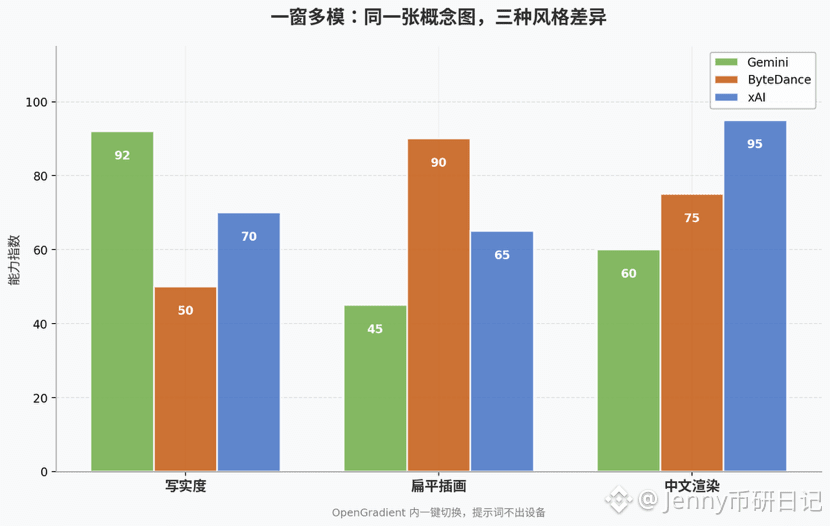
OpenGradient Chat merges all these tasks into one window. I can switch between different image models in the same conversation; the visual styles of Gemini, ByteDance, and xAI are noticeably different—one leans towards realism, another favors flat illustration, and the last one nails the rendering of Chinese text. I tried three or four prompts, compared the output quality, and ended up downloading the image that best fit the report scenario.
I think safety is even more crucial than efficiency. The prompts on chat.opengradient.ai are locked down before I even step away from my phone. The backend can't see what themes I'm working on, nor will it store my prompts. This physical isolation saves me from self-censorship. It replaces specific business terms with more general descriptions, allowing me to clearly state the desired style and color scheme, resulting in images that better fit the report context.
As a finance person, quarterly materials often need concept images to aid explanation, so I care more about whether the images accurately express the business logic and whether my prompts will be archived by the platform. Now, I can knock out both of these tasks in one window.
Have you ever found yourself hopping between several tools just to find the right image to match your needs?
In the past, to create a slick presentation, I had to fire up a text AI tool to polish the prompts, then jump to another image platform and queue up for the output. If the generated style didn't match, I had to hustle over to a third tool and cross my fingers. The whole process felt like I was shuttling between apps, leaving my mark on every platform.
OpenGradient Chat merges all these tasks into one window. I can switch between different image models in the same conversation; the visual styles of Gemini, ByteDance, and xAI are noticeably different—one leans towards realism, another favors flat illustration, and the last one nails the rendering of Chinese text. I tried three or four prompts, compared the output quality, and ended up downloading the image that best fit the report scenario.
I think safety is even more crucial than efficiency. The prompts on chat.opengradient.ai are locked down before I even step away from my phone. The backend can't see what themes I'm working on, nor will it store my prompts. This physical isolation saves me from self-censorship. It replaces specific business terms with more general descriptions, allowing me to clearly state the desired style and color scheme, resulting in images that better fit the report context.
As a finance person, quarterly materials often need concept images to aid explanation, so I care more about whether the images accurately express the business logic and whether my prompts will be archived by the platform. Now, I can knock out both of these tasks in one window.
Have you ever found yourself hopping between several tools just to find the right image to match your needs?