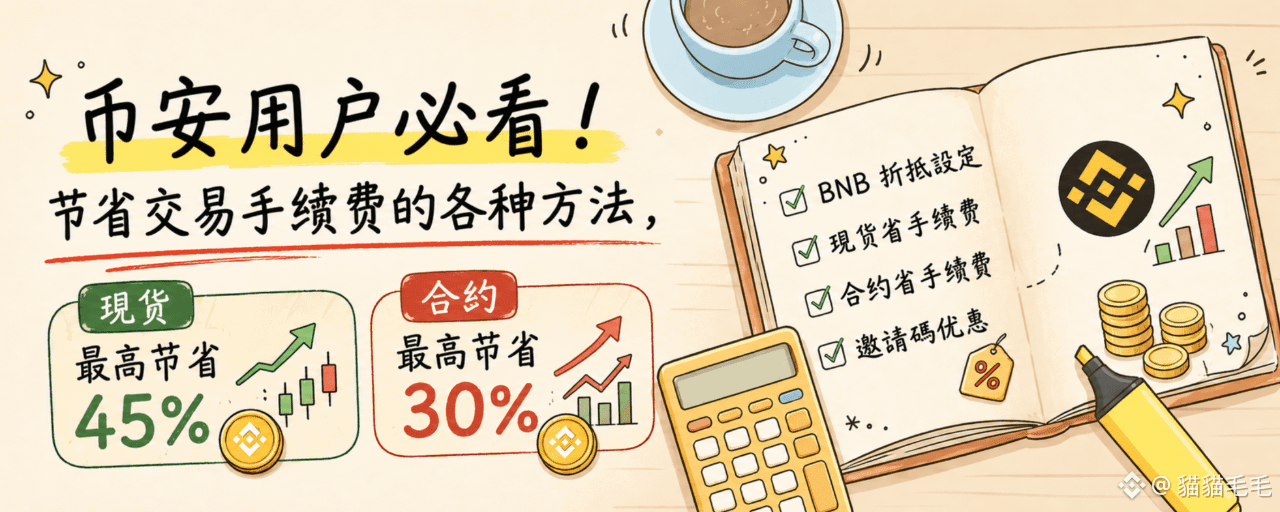

This article mainly introduces various methods and settings for fee discounts on Binance, divided into the following sections.
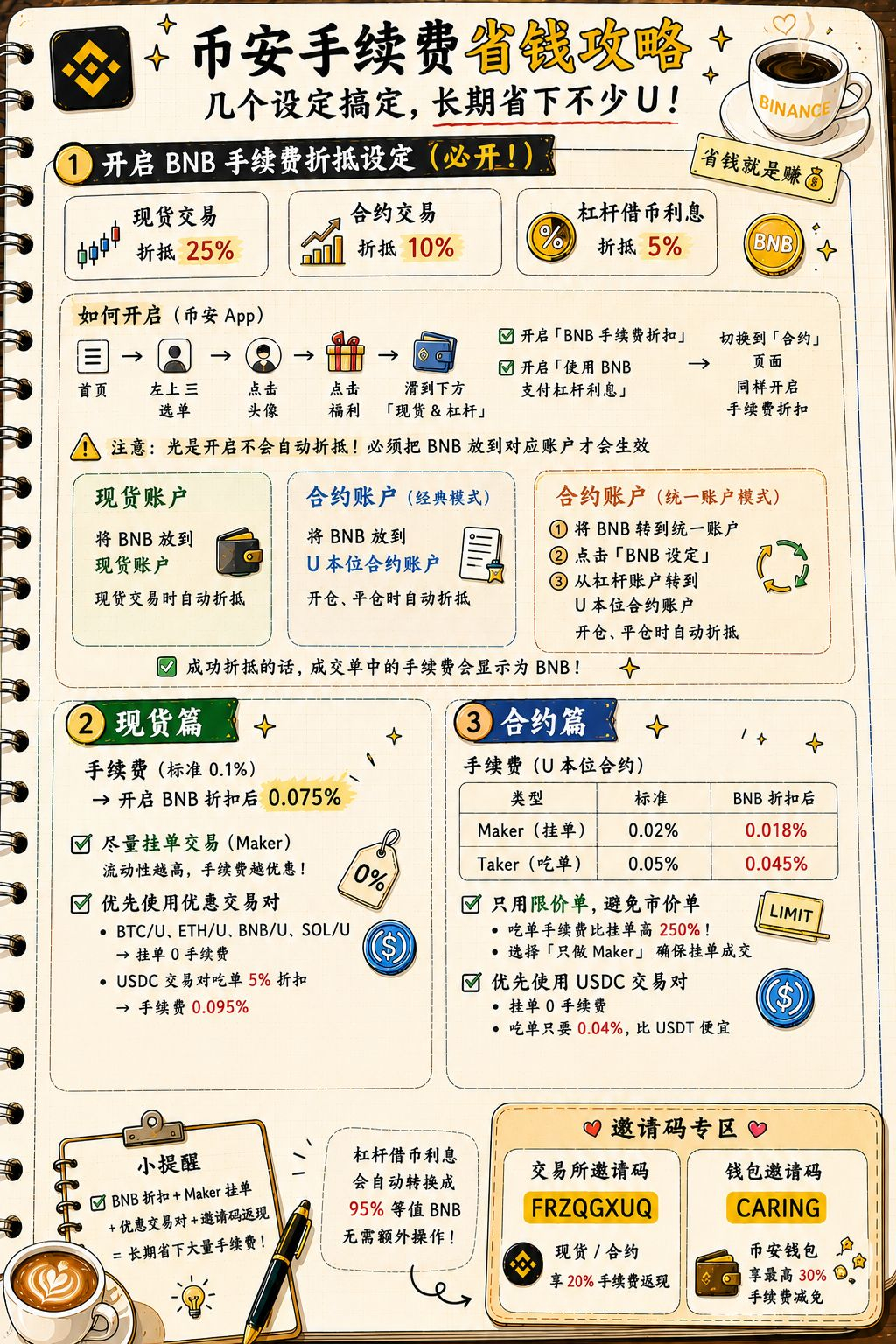
BNB fee discount settings (mandatory, spot discount 25%, contract discount 10%, leverage borrowing saves 5% interest).
Spot trading section.
Contract trading section.
Lower the cost of participating in trading competitions.
Special section.
BNB fee discounts.
As the name suggests, using BNB for fees gives you a certain discount on Binance. Specifically, there are mainly three types.
Spot trading fee discount of 25%.
Contract trading fee discount of 10%.
Leverage account borrowing fee discount of 5% interest.
Whether you often trade spot or futures, or currently hold USD1 in a margin account to participate in wealth management activities, and also borrow coins to increase annualized returns—everyone is advised to enable the BNB fee discount. In the long run, you can save a lot of fees.
How to enable: Binance App home page → the “☰” menu at the top-left → click your avatar → click “Rewards/Benefits (福利)” → scroll down to “Spot & Margin” → enable “BNB Fee Discount” and “Use BNB to pay margin interest” → switch to the “Futures” page and enable the fee discount there as well
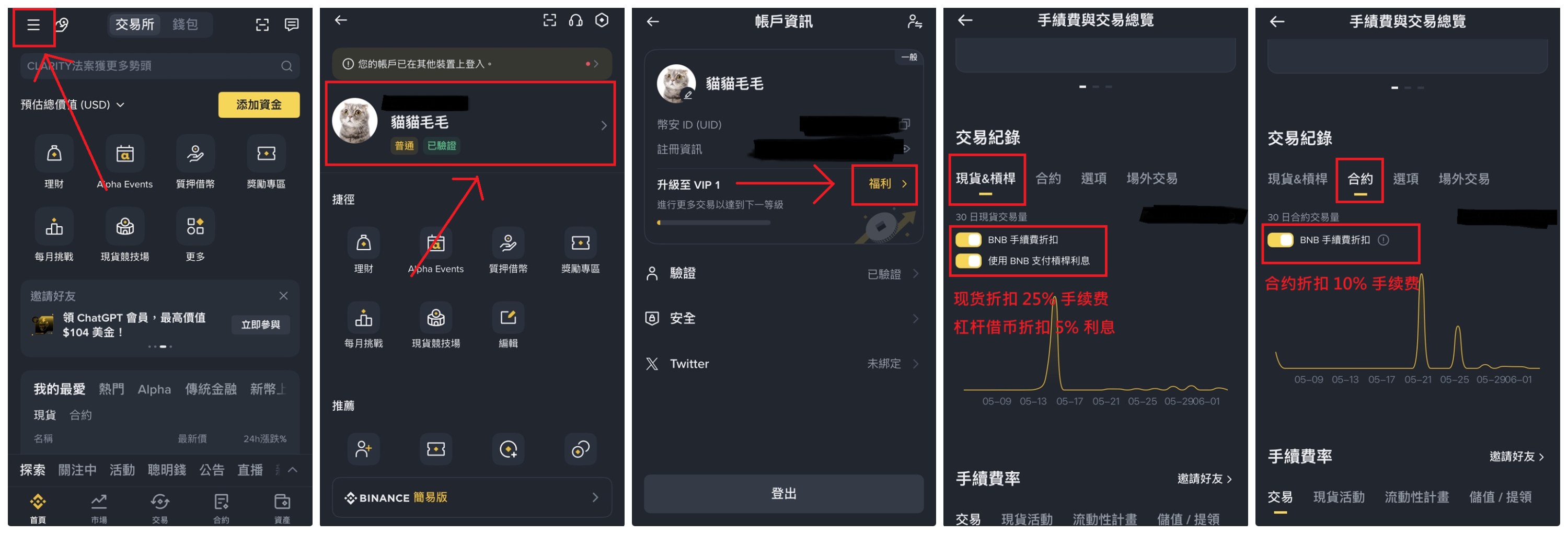
⚠️But note that simply enabling it will not automatically use BNB to offset. You must place BNB in the correct place for it to offset automatically. Below I’ll introduce how to offset for spot and futures. For margin borrowing, it will automatically convert the interest into BNB with a 95% equivalent value—no special operation needed.
Spot: you must put BNB into your spot account; only when trading spot will it automatically offset
Futures (classic account mode): you must put BNB into your U-margined futures account; it will automatically offset when opening and closing positions
Futures (unified account mode): first transfer BNB into the unified account → click “BNB Settings” → transfer from the margin account to the U-margined futures account; it will automatically offset when opening and closing positions
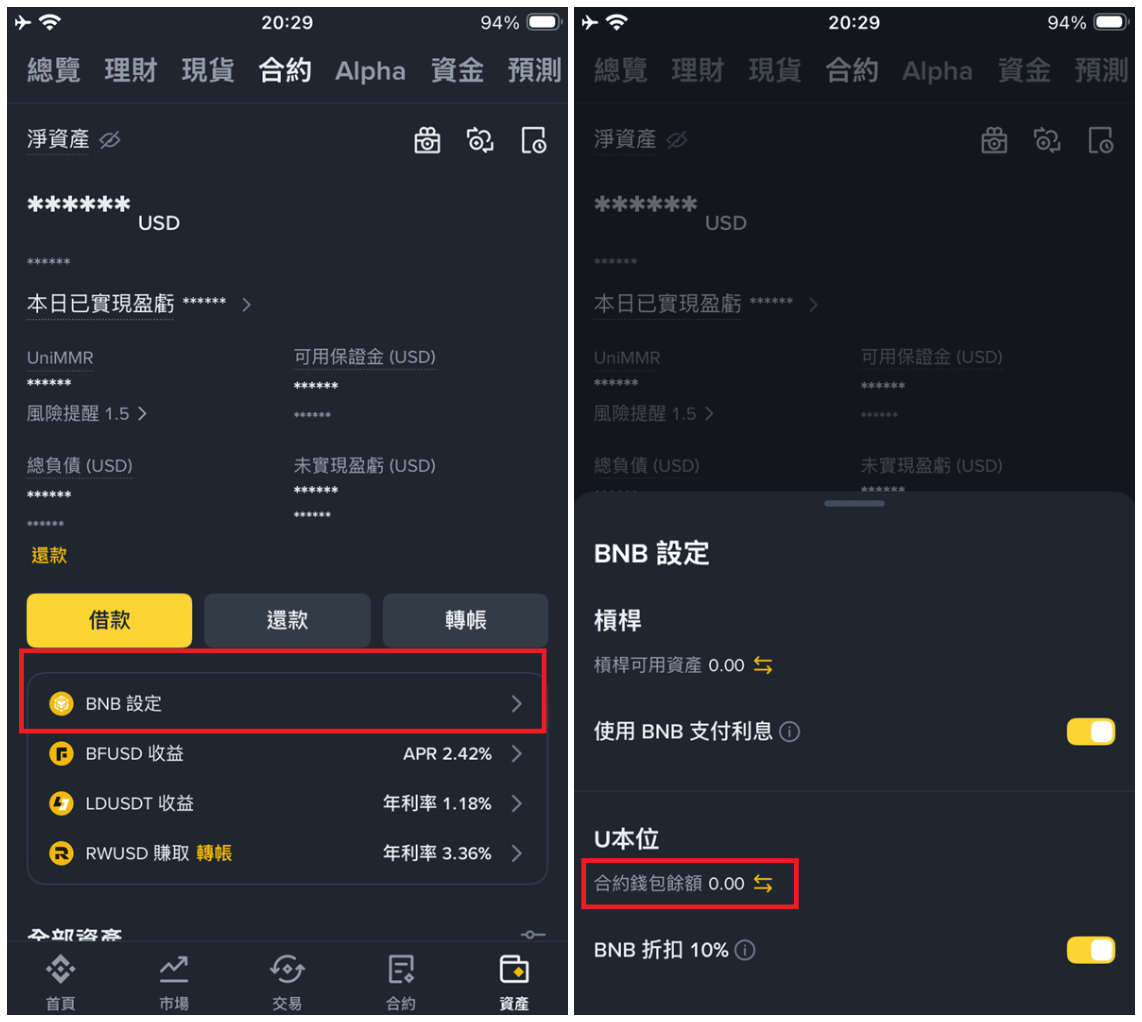
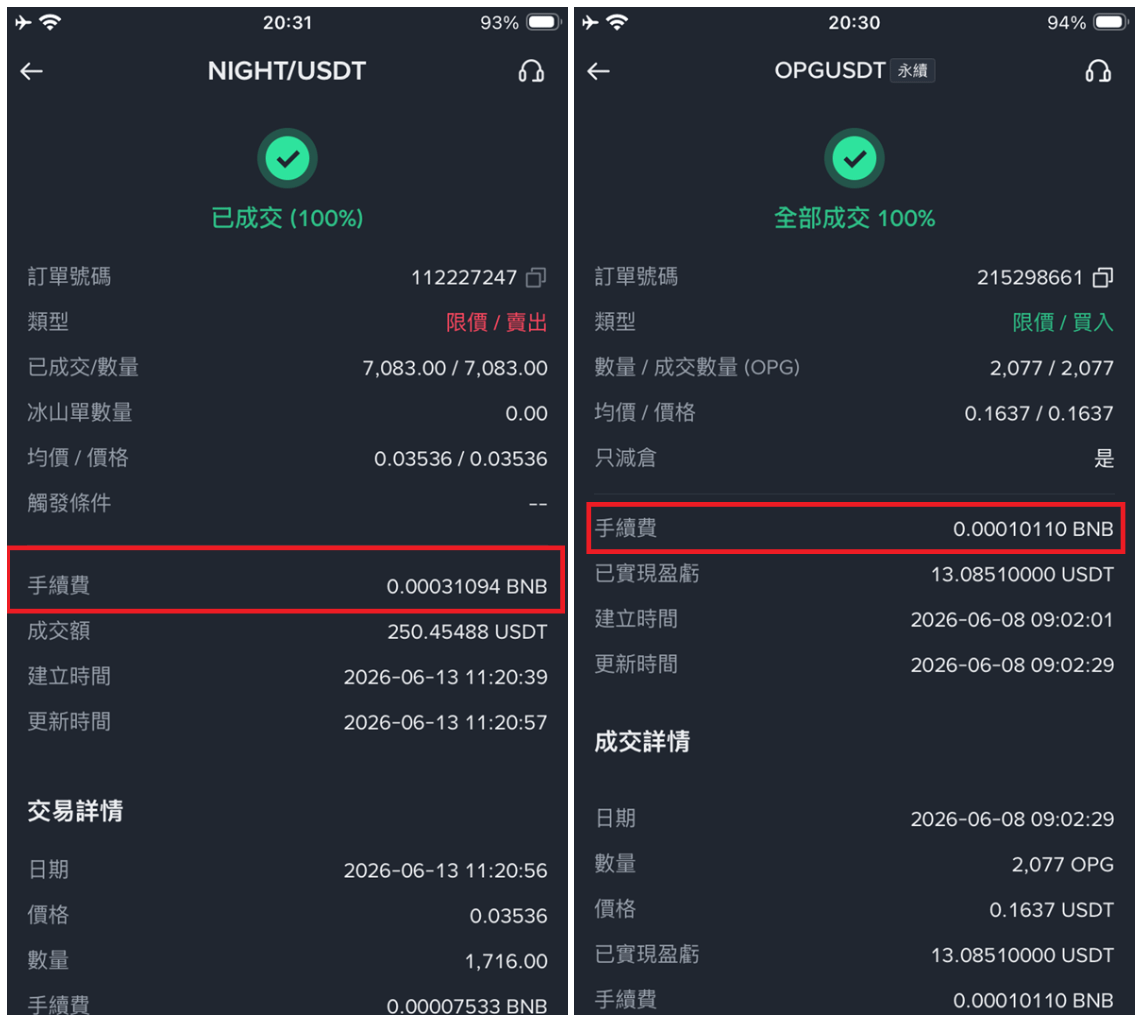
If you successfully used BNB to automatically offset the trading fees, then in the completed orders the fee will show as BNB
Spot section
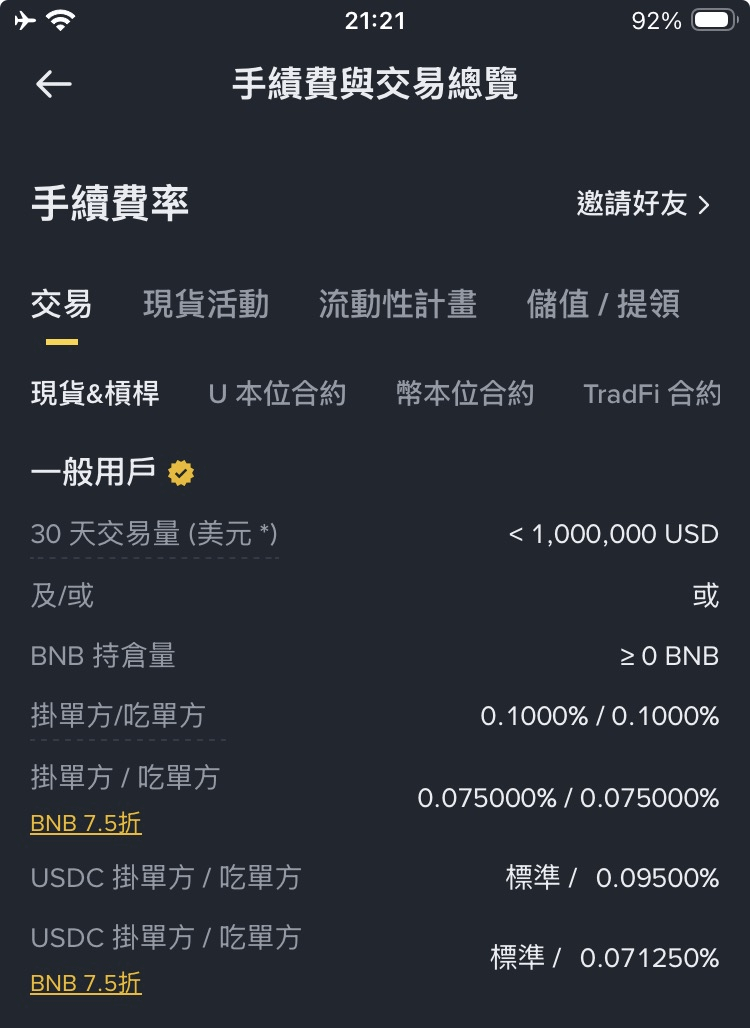
When trading spot, besides the 25% fee offset with BNB above, there are also a few other ways to reduce trading fees. Normally, the standard spot trading fee is 0.1%; after enabling BNB fee offset, it becomes 0.075%.
Bind my invitation code when registering (FRZQGXUQ). You can enjoy a permanent 20% fee discount.
The cashback will automatically be issued into your spot account after a few days of trading. But if you didn’t bind when registering, there is currently no way to re-bind—you can only wait for Binance to periodically hold an invitation-code re-binding promotion.
Try to place Maker orders
Exchanges use fee discounts to encourage users to place more orders, usually to increase liquidity.
For new users, here’s a simple explanation of the difference between Maker orders and Taker orders.
Maker order: an order whose price cannot be filled immediately, mostly limit orders, which increase liquidity
Taker: orders that can be matched immediately. Mostly market orders, or limit orders that can be filled right away—this reduces liquidity.
For example, if the current BTC price is 63,000, then setting the price to 62,000 for a buy, or 64,000 for a sell limit order counts as a Maker order. Market orders, a limit to sell 62,000, a limit to buy 64,000—anything that can be filled immediately—counts as a Taker order.
When liquidity and the bid-ask spread are normal, try to use trading pairs that offer fee discounts. For example, U, USDC, FSUSD, etc.
For example, the BTC/U trading pair enjoys a 0 fee discount. For popular tokens like ETH, BNB, and SOL, using U as the trading asset also gives you a Maker order fee discount of 0%.
Or USDC also has a Taker fee discount campaign. For USDC trading pairs on Taker orders, there’s a 5% discount, and the fee is 0.095%.
Futures section
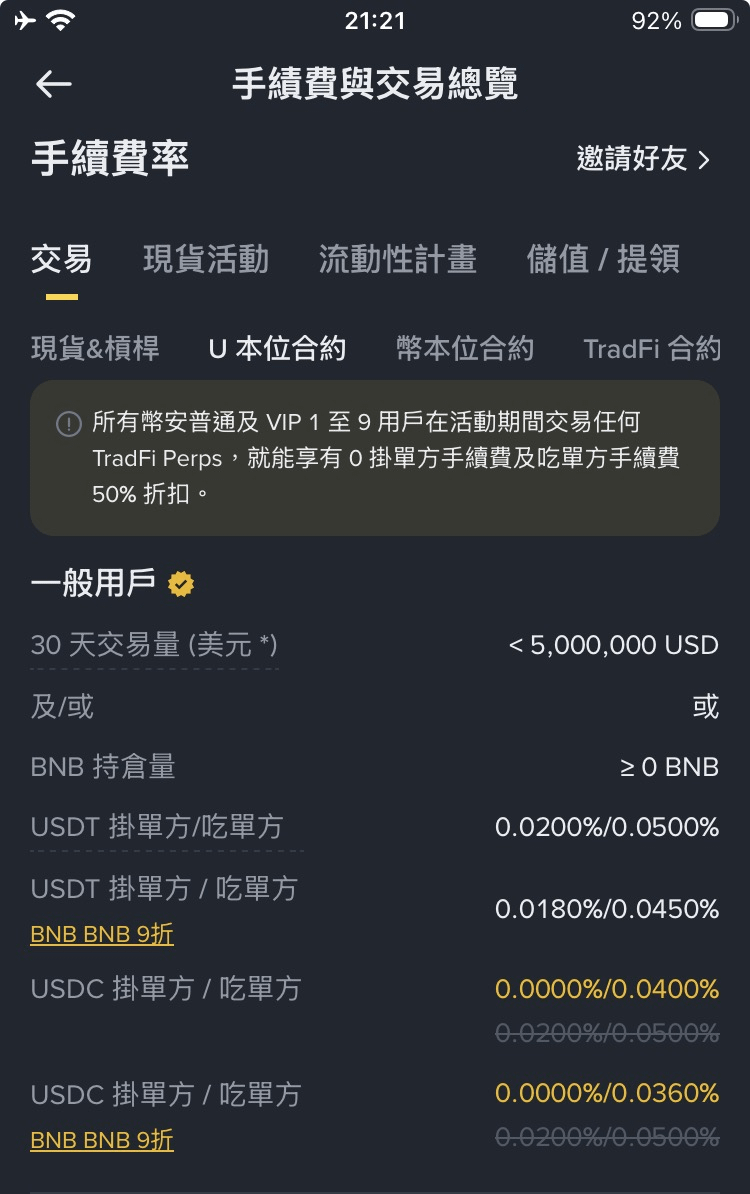
Futures and spot are basically very similar. The standard trading fee for futures is 0.02% for Maker orders. After enabling BNB fee offset, it becomes 0.018%. For Taker orders it’s 0.05%, and after enabling offset it becomes 0.045%.
Bind my invitation code when registering (FRZQGXUQ). You can enjoy a permanent 20% fee discount.
If you didn’t bind the invitation code when registering, there is currently no way to re-bind. So remember to bind when creating a new account, or wait for Binance to hold a re-binding promotion and grab the opportunity.
Don’t place market orders—only trade with limit orders
From the fees above, you can see that futures Maker order fees only require 0.02%, but Taker orders are 0.05%—that’s 250% higher fees. Unless it’s absolutely necessary, you should always prioritize using limit orders for Maker orders. A handy tip: as long as when placing an order you choose “Only do Maker”, it will definitely be a Maker order. If it’s a Taker price that would match immediately, the system will automatically cancel it for you.
Under the prerequisite of high trading volume, try to use USDC trading pairs
Compared with spot, futures offers greater concessions on USDC trading pairs. In futures, USDC trading pairs enjoy a 0-fee discount for Maker orders; even Taker orders are cheaper than USDT trading pairs, as long as it’s only 0.04%. So for large-volume tokens like BTC, ETH, and BNB, using USDC trading pairs is a better choice.
Reduce the cost of participating in trading contests
Binding an invitation code and enabling BNB discounts are the most basic steps. Then, whether it’s a spot trading contest or a futures task, using trading pairs that offer fee discounts will normally be counted toward your trading volume. So for contests like these, it’s more worthwhile to use trading pairs with fee discounts.
Spot Trading Contest: Binance spot trading contest activity is currently underway
Contract task: no-cost to earn 50 U rewards: https://x.com/caringtank/status/2046786909993841143
Extra section
If you usually use the Binance Wallet, the wallet can also be bound with an invitation code. The wallet’s invitation code is separate from the exchange. You can re-bind, but once you bind it, you can’t change to someone else.
I’ve directly set the fee discount to the maximum 30%. Once bound, you can enjoy permanent fee reductions. If you need it, you can use it—thanks to everyone for your support 🥰
Binance Wallet invitation code: CARING, or click here to bind in one step
Summary
This time I shared several methods I personally use to save trading fees. In my opinion, the must-do items are binding an invitation code + enabling BNB fee offset. If you do these two, spot can save 45%, and futures can save 30%. Small discounts add up to a not-insignificant amount.
If you brothers have other ways to save on fees, feel free to add them in the comments below 👍