


How to unlock exclusive chats with authors on Binance Square
What is Tip to Chat?
Tip to Chat is now live on Binance Square! It's a fresh feature that allows you to send private one-on-one messages to your favorite authors. This is a new revenue stream for authors and direct access for fans.
Tip to Chat is a feature that allows users to unlock 1-on-1 personal chats with their favorite authors by sending tips above the threshold set by the author. This creates a new income stream for authors and gives fans direct access to them.
Why is this important?
For authors
Monetization beyond content
Earn directly from your profile, not just from individual posts. This is a separate income stream, independent of content performance.Flexible pricing setup
Set your own tip threshold in chat settings. Market analytics, trading ideas, Q&A — you decide what to offer and how much it costs.Less noise — more value
Only users who have met the set threshold can write. No spam — only messages from those who truly value your time.
For readers
Support authors, not just posts
Leave tips directly on any author's profile to show support — without tying it to specific content.
Tips first — then chat
One donation opens a direct dialogue. Market forecasts, strategy breakdowns, timely comments — the shortest path from question to answer.
How it works
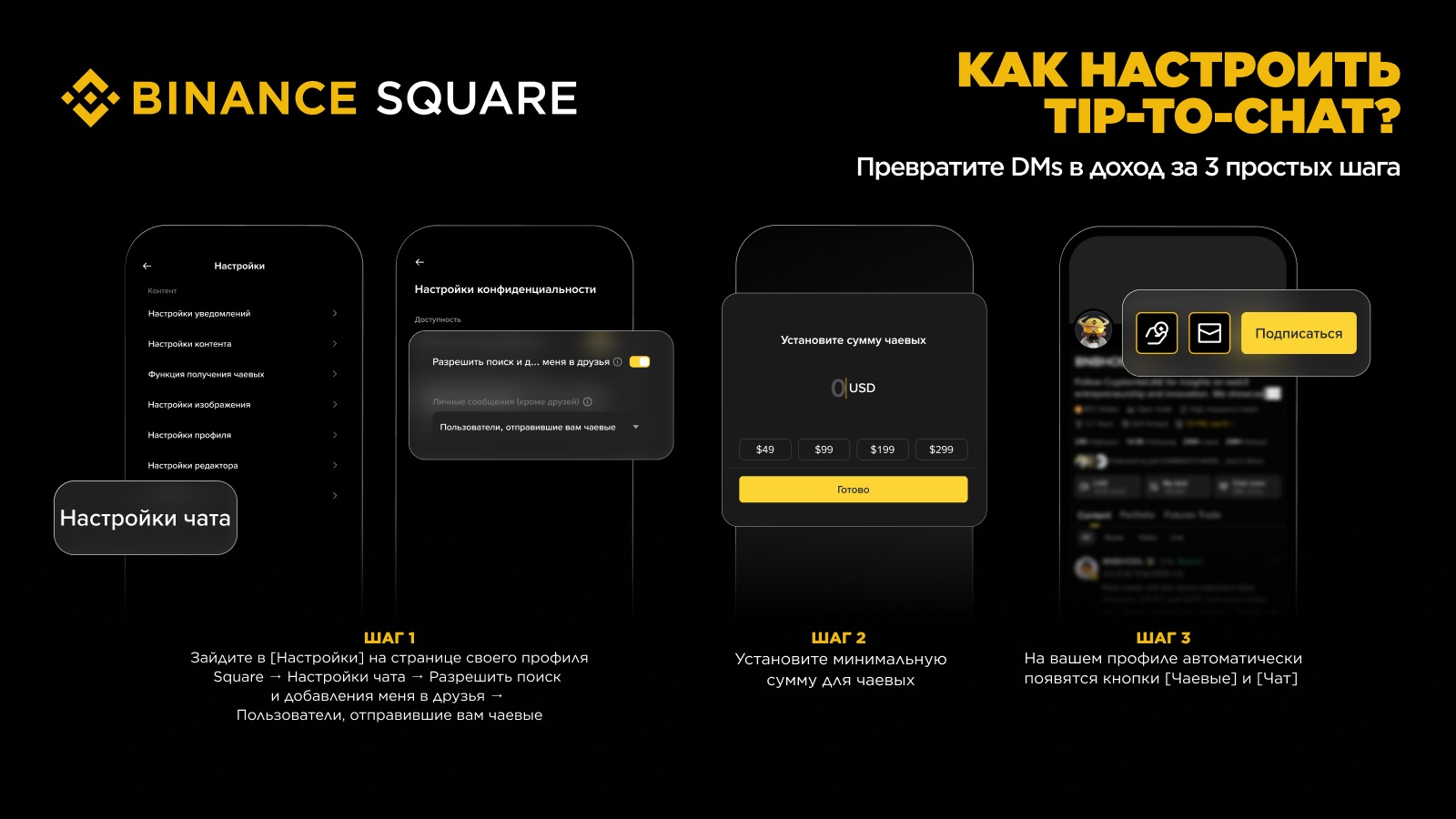
For authors: setup in 3 steps
Step 1: Go to [Settings] on your profile page in Square → Chat Settings → enable the option 'Allow searching and adding me as a friend — Users who send you tips'
Step 2: Set the minimum tip amount (chat unlock threshold)
Step 3: After setup, the [Tip] and [Chat] buttons will appear on your Square profile.
For readers
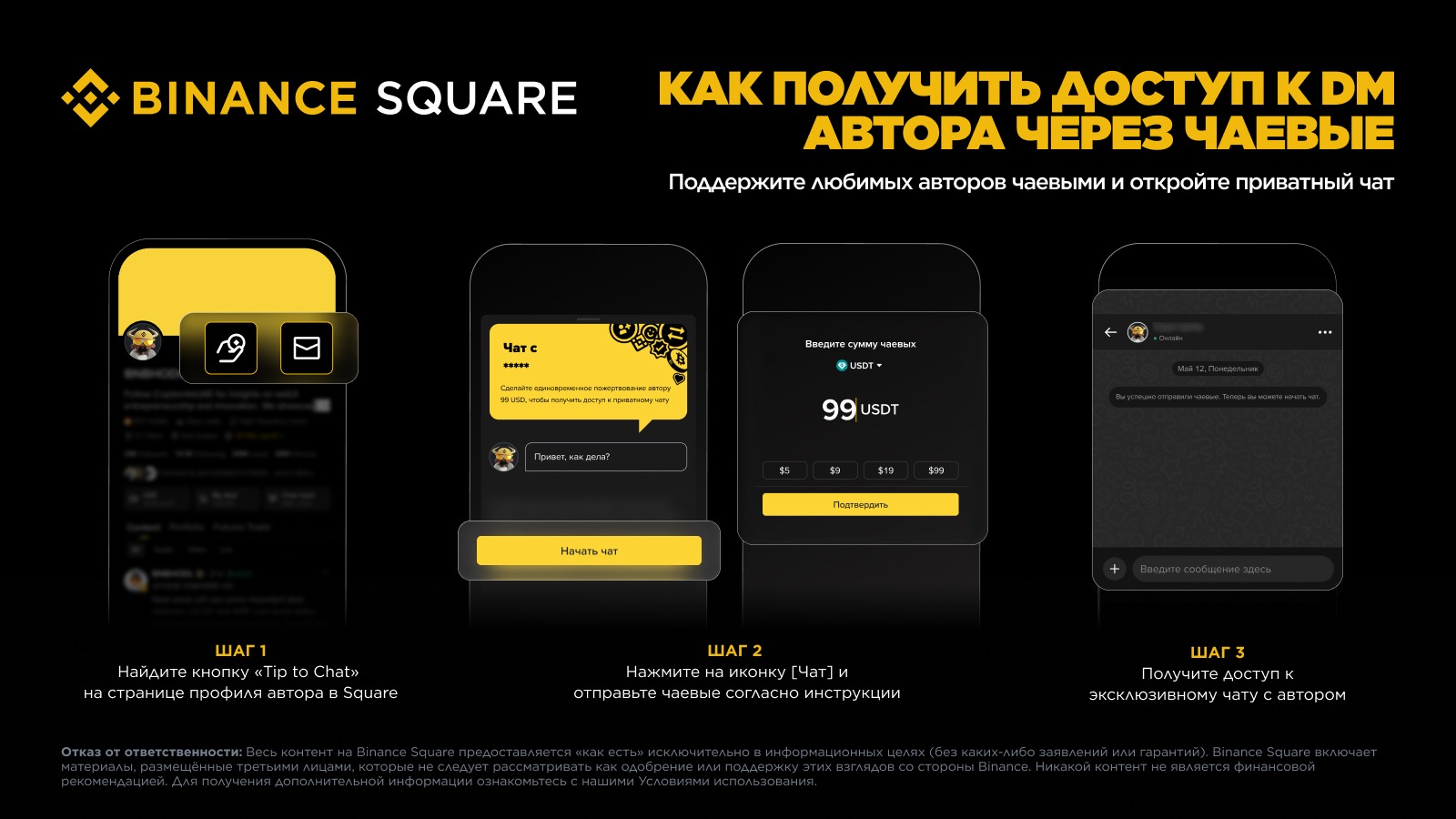
Step 1: Find the Tip to Chat button on the author's profile page in Binance Square.
Step 2: Two ways:
Hit [Tip] to support the author. Once the target amount is reached, the 'Chat' button will be available.
Or just hit [Chat] right away — the system will show the required amount. Drop tips as per the prompt.
Step 3: Unlock exclusive messaging with the author and get access to personal chat.
Access the chat through the User Center
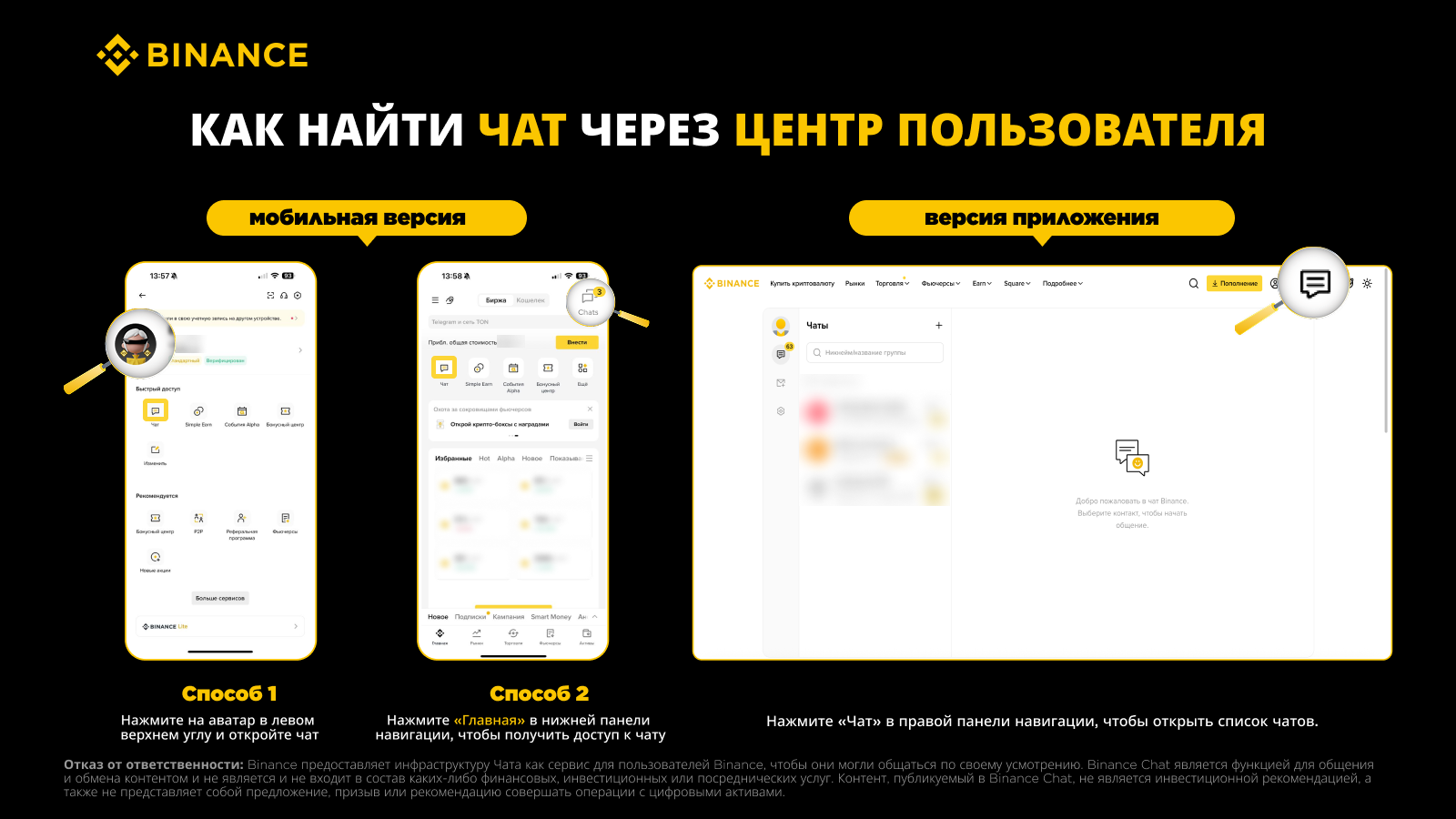
Once the chat starts, you can quickly find your messages through the following methods.
App
Method 1: Click on your avatar in the top left corner of the homepage to go to the User Center. Then click on the chat icon to open conversations.
Method 2: Click 'Home' in the bottom menu. After that, two icons will appear in the top left corner or on the homepage — click on them to open the conversations list.
Web
Click [Chat] in the top right of the navigation menu to open the list of chats.
FAQ
1. Is Tip to Chat enabled by default? No. Authors must manually enable it in chat settings and set a threshold. Without this, the [Tip] or [Chat] buttons won't appear on the profile.* This feature may not be available in your region.
2. What is the minimum threshold? 1 USD - Authors set their own price.
3. What tokens can be used for tips? Tips on Binance Square support various cryptocurrencies available in the Funding, Spot, and Earn wallets. After entering the amount, you can manually select the desired wallet and token.
4. How much does the author get from tips? Authors receive 100% of the tips. Binance Square does not take a cut.
5. Can tips be refunded? Tips are considered a final transaction; refunds are not possible. Make sure you want to proceed before confirming the operation.
6. If the author raises the threshold, will access remain? Yes. Users who have already met the conditions retain access to the personal chat, even if the threshold is changed later.
7. Is the author required to respond? Tip to Chat provides a direct communication channel, but the author decides whether to respond and can block users. All interactions are governed by the chat management rules of Binance Square.
8. Is my privacy protected? Yes. Tip to Chat operates under the rules of Binance Square, including blocking and reporting features. Both authors and users can manage privacy and message settings.
9. Where can I see the tip history? Both senders and receivers can view history through: [Assets] → [Deposit] → [History] → [Payment] → [Paid/Received]. Authors can also see the total amount of tips, tips by content, and by each user in the tips section of the Authors Center.
10. What if the tip payment fails? If the payment fails, tokens will be returned to your wallet. Check your wallet history and notifications, then try again later.